pengenalan
The BYTECH 3-in-1 Charging Cable (Model BYOPCA103BK) is a versatile USB cable designed for charging and syncing a wide range of electronic devices. It features a standard USB Type-A connector on one end and a multi-connector head on the other, providing Lightning, USB Type-C, and Micro USB compatibility. This cable offers a convenient solution for users with multiple device types, ensuring high-speed charging and data transfer.
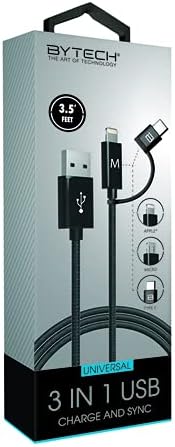
Image: The BYTECH 3-in-1 Charging Cable, showcasing its universal compatibility with various device types.
Persediaan dan Sambungan
Using the BYTECH 3-in-1 Charging Cable is straightforward. Follow these steps to connect your devices:
- Identify the USB-A End: Locate the standard USB Type-A connector. This end typically connects to a power adapter (wall charger), a computer's USB port, or a power bank.
- Sambungkan ke Sumber Kuasa/Komputer: Insert the USB Type-A end firmly into a compatible USB port on your charging device or computer.
- Select the Appropriate Device Connector: The other end of the cable features three integrated connectors:
- kilat: Untuk peranti Apple iPhone, iPad dan iPod.
- USB Jenis-C: For newer Android smartphones, tablets, laptops, and other USB-C enabled devices.
- USB mikro: For older Android smartphones, tablets, power banks, and various other electronic gadgets.
- Sambung ke Peranti Anda: Carefully insert the chosen connector into the charging/data port of your electronic device. Ensure it is inserted correctly to avoid damage.
- Sahkan Sambungan: Peranti anda harus menunjukkan bahawa ia sedang dicas atau disambungkan untuk pemindahan data.
Arahan Operasi
This cable supports both charging and data synchronization, depending on the connected device and power source.
Mengecas
- Connect the USB-A end to a compatible USB wall adapter, car charger, or power bank.
- Connect the appropriate device connector (Lightning, USB-C, or Micro USB) to your smartphone, tablet, or other compatible device.
- The cable is designed for high-speed charging, ensuring efficient power delivery to your device.
Penyegerakan Data
- Connect the USB-A end to a USB port on your computer (PC or Mac).
- Connect the appropriate device connector to your smartphone or tablet.
- Your computer should recognize the connected device, allowing you to transfer files, photos, videos, and other data. Follow your device's specific instructions for data transfer.
Penyelenggaraan dan Penjagaan
To ensure the longevity and optimal performance of your BYTECH 3-in-1 Charging Cable, please follow these maintenance guidelines:
- Elakkan Bengkok: Do not excessively bend or crimp the cable, especially near the connectors, as this can damage internal wires.
- Pemutusan sambungan yang betul: Always pull from the connector head, not the cable itself, when unplugging from a device or power source.
- Keringkan: Protect the cable from moisture and liquids. Do not use it in wet environments.
- Bersihkan Perlahan-lahan: If necessary, wipe the cable and connectors with a soft, dry cloth. Avoid using harsh chemicals or abrasive materials.
- Storan: Store the cable in a cool, dry place, away from direct sunlight and extreme temperatures. Coiling it loosely can prevent tangles and damage.
- Periksa dengan kerap: Periodically check the cable and connectors for any signs of wear, fraying, or damage. Discontinue use if damage is observed.
Menyelesaikan masalah
If you encounter issues with your BYTECH 3-in-1 Charging Cable, try the following solutions:
- Peranti Tidak Mengecas:
- Pastikan kedua-dua hujung kabel disambungkan dengan selamat.
- Cuba penyesuai kuasa atau port USB yang lain.
- Uji kabel dengan peranti lain untuk menolak isu khusus peranti.
- Check if the correct connector (Lightning, USB-C, Micro USB) is being used for your device.
- Pengecasan perlahan:
- Ensure your power adapter provides sufficient output (e.g., 5V/2A or higher for faster charging).
- Elakkan menggunakan peranti ini secara berlebihan semasa mengecas.
- Close background applications on your device.
- Isu Pemindahan Data:
- Ensure the USB-A end is connected to a computer's data-enabled USB port, not just a charging port.
- Check your device's settings to ensure it's set to "File Transfer" or "MTP" mode, not just "Charging."
- Try restarting both your device and computer.
- Kerosakan Kabel: If the cable appears frayed, bent, or damaged, discontinue use immediately and replace it.
Spesifikasi
| Ciri | Perincian |
|---|---|
| Jenama | Bytech |
| Nama Model | 3 dalam 1 |
| Nombor Model Item | BYOPCA103BK |
| Jenis Penyambung | USB Type-A, USB Type-C, Lightning |
| Jenis Kabel | USB |
| Peranti Serasi | Komputer riba, Komputer Peribadi, Tablet, Telefon Pintar |
| Ciri Khas | Kelajuan Tinggi |
| Penggunaan yang Disyorkan | Mengecas peranti elektronik |
| warna | Hitam |
| Jantina Penyambung | Lelaki kepada Lelaki |
| bentuk | rata |
| Bilangan Pin | 8 |
| Penggunaan Dalaman/Luar | Dalaman |
| Bilangan Item | 1 |
| Jenis Pakej Pelanggan | coiled in protective tubing |
| Vol Maksimumtage | 5 Volt |
| Bahan Luar | Plastic/Rubber |
| Pengeluar | BYTECH |
| UPC | 805112034765 |
| Dimensi Pakej | 7 x 5 x 3 inci |
| Berat Barang | 1 paun |
| ASIN | B09BBK4X64 |
| Tarikh Mula-mula Tersedia | 27 Julai 2021 |
Waranti dan Sokongan
For warranty information or technical support regarding your BYTECH 3-in-1 Charging Cable, please refer to the manufacturer's official webtapak atau hubungi bahagian perkhidmatan pelanggan mereka. Simpan resit pembelian anda sebagai bukti pembelian untuk sebarang tuntutan waranti.
Manufacturer: BYTECH
Untuk bantuan lanjut, lawati www.bytechintl.com (cthample link, actual link not provided in input).


