Produk Selesaiview
The Phomemo PM-246S is a compact and efficient thermal label printer designed for small businesses and home use. It offers high-speed printing without the need for ink or toner, making it a cost-effective solution for various labeling needs, including shipping labels, product labels, and more. Its distinctive pink design adds a touch of style to any workspace.

Image: The Phomemo PM-246S pink label printer, a compact device designed for efficient label printing.
Persediaan dan Pemasangan
Setting up your Phomemo PM-246S printer is a straightforward process. Ensure you have the necessary drivers installed for your operating system.
Keserasian Sistem
The Phomemo PM-246S thermal label printer is compatible with a range of operating systems:
- Windows (7 and later)
- Mac OS (10.11 and later)
- Chromebook
- Linux Centos 7.0

Image: Visual representation of the printer's compatibility with Chrome OS, Windows, macOS, and Linux operating systems, indicating USB-only connection.
Pemasangan Pemandu
- Connect the printer to your computer via the provided USB cable.
- Hidupkan pencetak.
- Download the latest drivers from the official Phomemo webtapak: phomemo.com/pages/drivers.
- Ikut arahan pada skrin untuk melengkapkan pemasangan pemacu.
- For Chrome OS and Mac OS users, the "labelife" extension is available on the Chrome Web Store to facilitate printing.
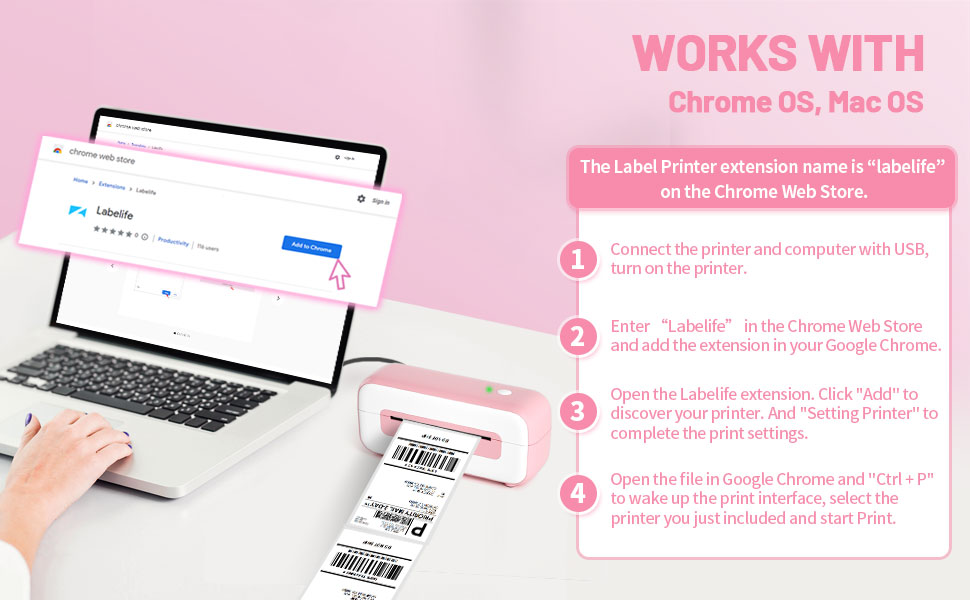
Image: Step-by-step guide illustrating how to connect the printer and use the "labelife" extension for Chrome OS and Mac OS.
Arahan Operasi
The Phomemo PM-246S printer utilizes advanced thermal printing technology, eliminating the need for ink or toner. This section details how to load labels and print effectively.
Memuatkan Label
The printer supports thermal labels with a paper feed width ranging from 1 inch to 4.6 inches. Ensure the labels are properly aligned before printing.

Image: The Phomemo PM-246S printer demonstrating its capability to print various label sizes, including 4"x6", 3"x2", and 3"x1".
Mencetak Label
This printer is designed for high-speed, efficient label printing, capable of producing up to 72 labels per minute at 203 dpi resolution.

Image: The Phomemo PM-246S printer in action, illustrating its high-speed printing capabilities with a shipping label being fed out.
Keserasian Platform
The Phomemo PM-246S is compatible with a wide range of major shipping and e-commerce platforms, including but not limited to:
- Amazon
- Etsy
- Shopify
- eBay
- FedEx
- USPS
- UPS
- PayPal
- Stesen Kapal
- Shipwire
- Kerja Kapal
- Shopee
- Stamps.com
- XPS Ship
- DHL
- Easyship
- Endicia
- Kapal Lanun
- ORDORO

Image: A visual display of the Phomemo PM-246S printer's extensive compatibility with numerous shipping and e-commerce platforms.
Penyelenggaraan
Maintaining your Phomemo PM-246S printer is simple due to its thermal printing technology, which requires no ink or toner. The primary maintenance involves ensuring the use of appropriate thermal labels and keeping the printer clean.
- Penggunaan Label: Only use thermal labels with this printer. While specialized labels are not required, using official Phomemo thermal label paper may yield optimal performance.
- Pembersihan: Regularly wipe the exterior of the printer with a soft, dry cloth to prevent dust accumulation.
- Storan: Store the printer in a clean, dry environment away from direct sunlight and extreme temperatures.

Image: An illustration emphasizing that the Phomemo PM-246S printer operates without ink or toner, reducing printing costs.
Menyelesaikan masalah
Should you encounter any issues with your Phomemo PM-246S printer, refer to the following common troubleshooting tips. For more detailed guidance, consult the official Troubleshooting Guide.
Isu dan Penyelesaian Biasa
- Pencetak Tidak Memberi Respons:
- Ensure the printer is properly connected to your computer via USB.
- Verify the power adapter is securely plugged into both the printer and a working power outlet.
- Mulakan semula pencetak dan komputer anda.
- Printing Blank Labels:
- Check that you are using thermal labels and that they are loaded correctly with the printable side facing up.
- Ensure the print head is clean and free of debris.
- Kualiti Cetakan Lemah:
- Confirm that the thermal labels are of good quality.
- Clean the print head if smudges or faded lines appear.
- Adjust print density settings in your printer driver if available.
- Isu Pemasangan Pemacu:
- Ensure you have downloaded the correct driver for your operating system from the official Phomemo webtapak.
- Lumpuhkan perisian antivirus buat sementara waktu semasa pemasangan jika ia mengganggu.
For comprehensive troubleshooting steps, please refer to the official Phomemo PM-246S Troubleshooting Guide (PDF).

Image: An icon representing frequently asked questions or support, indicating resources for troubleshooting.
Spesifikasi
Key technical specifications for the Phomemo PM-246S USB Pink Label Printer:
| Ciri | Perincian |
|---|---|
| Dimensi Produk | 3.86"D x 8.43"W x 3.31"H |
| Berat Barang | 2.2 paun (1 Kilogram) |
| Teknologi Ketersambungan | USB |
| Teknologi Percetakan | terma |
| Saiz Media Maksimum | 4.6 inci |
| Resolusi Cetakan Hitam dan Putih Maksimum | 200-300 dpi |
| Kelajuan Cetakan Maks (Monokrom) | 60 ppm |
| Komponen yang Disertakan | Labels, USB thumb driver, User manual |
| Nama Model | Phomemo PM246S Label Printer Pink |
| Kegunaan Khusus Untuk Produk | Home business, Handmade business, Start-up Company |
Waranti dan Sokongan
Maklumat Waranti
The Phomemo PM-246S printer comes with a Waranti Terhad. For specific terms and conditions of the warranty, please refer to the documentation included with your product or contact Phomemo customer support.
Sokongan Teknikal
Phomemo offers professional technical support to assist with any product-related inquiries or issues. Support is available via:
- Skype
- E-mel
- Panggilan telefon
For contact details and further assistance, please visit the official Phomemo webtapak atau rujuk maklumat hubungan yang diberikan dalam pembungkusan produk anda.


