pengenalan
The Amazon Fire HD 8 Plus is a versatile tablet designed for media consumption, light productivity, and seamless integration with the Amazon ecosystem. Featuring an 8-inch HD display, a hexa-core processor, 3GB RAM, and wireless charging capabilities, it offers an enhanced user experience for reading, browsing, watching videos, and more.
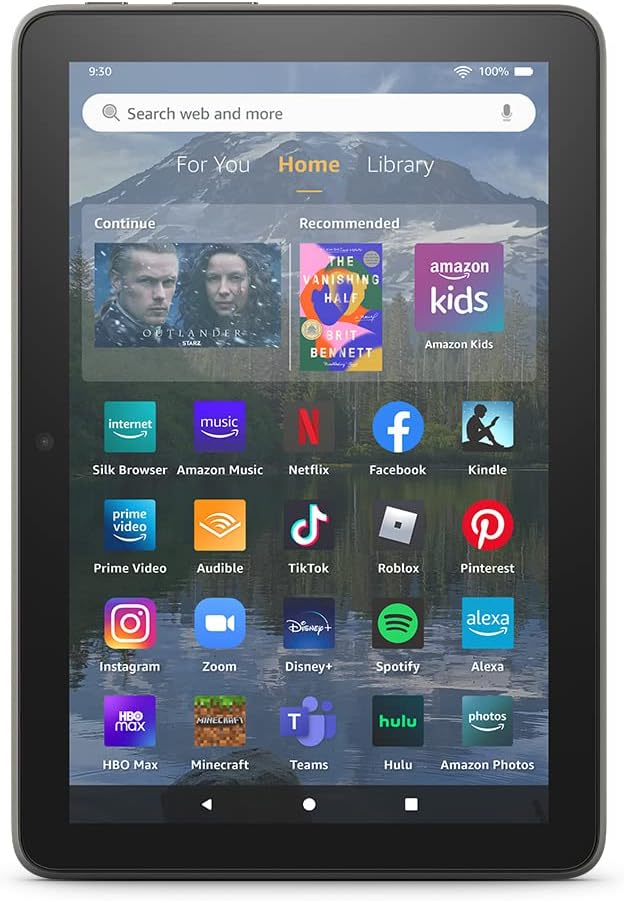
Image: The Fire HD 8 Plus tablet displaying its home screen with a variety of applications, including streaming services, social media, and Amazon's own apps.
Persediaan
1. Membuka Kotak dan Caj Permulaan
Upon unboxing your Fire HD 8 Plus tablet, locate the included USB-C (2.0) cable and 9W power adapter. Connect the cable to the tablet's USB-C port and the adapter to a power outlet. Allow the device to fully charge before first use. A full charge typically takes approximately 3 hours.
- Termasuk dalam kotak: Fire HD 8 Plus tablet, USB-C (2.0) cable, 9W power adapter, and Quick Start Guide.
2. Powering On and First-Time Setup
Press and hold the power button located on the side of the tablet until the Amazon logo appears. Follow the on-screen prompts to select your language, connect to a Wi-Fi network, and register your device with your Amazon account. This process will personalize your tablet and enable access to Amazon services.
3. Pengecasan Tanpa Wayar (Pilihan)
The Fire HD 8 Plus supports Qi-certified wireless charging. If you have a compatible wireless charging dock (sold separately), simply place the tablet on the dock to begin charging. Ensure the tablet is properly aligned for optimal charging efficiency.
Operating Your Fire HD 8 Plus
1. Navigasi dan Antara Muka Pengguna
The Fire HD 8 Plus runs on Fire OS, a customized version of Android. Navigate by swiping across the screen, tapping icons to open apps, and using the back, home, and recent apps buttons at the bottom of the screen. Swipe down from the top for quick settings and notifications.
2. Accessing Content and Apps
Content is organized into "For You," "Home," and "Library" tabs. The Amazon Appstore provides access to thousands of apps, games, and streaming services. Note that Google Play Store is not natively supported.

Imej: Tamatview graphic for the Fire HD 8 Plus, emphasizing its storage options (32/64 GB), 13-hour battery life, 30% faster processor, wireless charging, and 3GB RAM.
3. Menggunakan Alexa
Your Fire HD 8 Plus has built-in Alexa. Simply say "Alexa" followed by your command, or tap the Alexa icon. You can ask Alexa to play music, check the weather, make video calls, set alarms, and control smart home devices.

Image: A person relaxing and listening to a podcast on their Fire HD 8 Plus tablet, with the caption "Alexa, play Life is Short podcast".
4. Kefungsian Kamera
The tablet features a 2 MP front-facing camera for video calls and a 5 MP rear-facing camera for photos and 1080p HD video recording. Open the Camera app to capture images or videos.
5. Parental Controls with Amazon Kids
Amazon Kids offers robust parental controls, allowing you to manage content, set time limits, and create profiles for children. Subscribe to Amazon Kids+ for access to a curated library of kid-friendly content.

Image: A father and daughter sitting on the floor, smiling and looking at a pink Fire tablet together, illustrating its suitability for family use.
Penyelenggaraan
1. Membersihkan Tablet Anda
Untuk membersihkan skrin, gunakan kain lembut dan tidak berbulu. Untuk calitan degil, sedikit dampen the cloth with water. Avoid using abrasive cleaners or solvents. For the tablet body, a dry or slightly damp kain sudah memadai.
2. Kemas Kini Perisian
Your Fire HD 8 Plus will receive automatic software security updates. Ensure your device is connected to Wi-Fi to receive these updates, which improve performance and security.
3. Pengurusan Storan
The tablet comes with 32 GB or 64 GB of internal storage. You can expand storage up to 1 TB using a microSD card. Regularly manage your storage by deleting unused apps or files untuk mengekalkan prestasi optimum.
Menyelesaikan masalah
| Masalah | Penyelesaian |
|---|---|
| Tablet tidak dihidupkan | Ensure the tablet is fully charged. Press and hold the power button for at least 20 seconds to perform a hard reset. |
| Isu sambungan Wi-Fi | Restart your Wi-Fi router and the tablet. Go to Settings > Wi-Fi and try reconnecting. Ensure you are within range of the network. |
| Apl ranap atau beku | Close and reopen the app. Clear the app's cache (Settings > Apps & Games > Manage All Applications > [App Name] > Clear Cache). If the problem persists, uninstall and reinstall the app. |
| Prestasi perlahan | Tutup apl yang tidak digunakan. Kosongkan cache dan sementara files. Consider adding a microSD card if internal storage is nearly full. Restart the tablet regularly. |
| Bateri cepat habis | Reduce screen brightness. Turn off Wi-Fi or Bluetooth when not in use. Close background apps. Limit video streaming or gaming sessions. |
Spesifikasi
| Ciri | Perincian |
|---|---|
| Paparan | 8” high-definition touchscreen; 1280 x 800 resolution at 189 ppi, HD video playback, with IPS (in-plane switching) technology |
| Saiz | 7.94” x 5.40” x 0.37” (201.90mm x 137.34 mm x 9.60 mm) |
| Berat badan | 12.06 ounces (342 grams). Actual size and weight may vary by configuration and manufacturing process |
| CPU & RAM | Hexa-core 2.0 GHz with 3 GB of RAM |
| Penyimpanan | 32 GB (25.2 GB available to user) or 64 GB (54.5 GB available to user) of internal storage. Add microSD slot for up to 1 TB of additional storage. |
| Hayat Bateri | Sehingga 13 jam membaca, menyemak imbas web, watching videos, and listening to music. |
| Masa Mengecas | Approx. 3 hours with 9W power adapter (included). Approx. 3 hours with 10W ANGREAT wireless charging dock (sold separately). |
| Pengecasan Tanpa Wayar | Serasi dengan pengecas wayarles yang diperakui Qi. |
| Kesambungan Wi-Fi | Dual-band 802.11a/b/g/n/ac. Wi-Fi 6 (802.11 ax) not supported. |
| Pelabuhan | Penyambung USB-C (2.0) untuk mengecas; slot microSD untuk storan luaran. |
| Audio | 3.5 mm stereo jack and integrated speakers; external volume controls. |
| Penderia | Pecutan, sensor cahaya ambien. |
| Spesifikasi Kamera | 2 MP front-facing (720p HD video); 5 MP rear-facing (1080p HD video). |
| Bluetooth | Built-in Bluetooth 5.2 with A2DP support. |
| Generasi | Generasi ke-12 - keluaran 2022. |
Waranti dan Sokongan
The Fire HD 8 Plus tablet comes with a Waranti dan servis terhad 90 hari included. Optional 1-year, 2-year, and 3-year extended warranties are available for U.S. customers, sold separately.
Untuk bantuan lanjut, lawati sokongan Amazon website or contact customer service. Software security updates are guaranteed for at least four years after the device is last available for purchase as a new unit on Amazon webtapak.
Use of the Fire HD 8 tablet is subject to Amazon's Conditions of Use and relevant terms.


