1. Pengenalan
Thank you for choosing the OMTech 70W CO2 Laser Engraver and Cutter. This manual provides essential information for the safe and efficient operation, setup, and maintenance of your new laser machine. Please read this manual thoroughly before operating the device to ensure proper usage and to prevent damage or injury.
This laser engraver is designed for precision engraving and cutting of various materials, featuring a 400x750 mm (16x30 inch) workbed, autofocus capability, and Ruida controls. It is compatible with LightBurn software and supports Windows, Mac OSX, and Linux operating systems, making it suitable for a wide range of home DIY and professional applications.

Figure 1.1: The OMTech 70W CO2 Laser Engraver and Cutter, showcasing its design and the LightBurn software logo.
2. Maklumat Keselamatan
Operating a laser engraver involves inherent risks. Adhere to all safety guidelines to prevent injury or damage to the equipment. This device is a Laser Class 2 product with 0.827 mW output power.
2.1 Langkah Keselamatan Am
- Always wear appropriate laser safety glasses when the laser is in operation.
- Ensure proper ventilation to remove fumes and smoke generated during engraving/cutting.
- Jangan biarkan mesin tanpa pengawasan semasa beroperasi.
- Keep a fire extinguisher nearby and know how to use it.
- Jangan mengukir atau memotong bahan yang menghasilkan asap toksik atau sangat mudah terbakar.
- Pastikan mesin dibumikan dengan betul.
- Jauhkan tangan dan pakaian longgar daripada bahagian yang bergerak.
- Putuskan sambungan kuasa sebelum melakukan sebarang penyelenggaraan atau pembersihan.
2.2 Hentian Kecemasan
Locate the emergency stop button on the control panel. In case of any emergency, press this button immediately to halt all machine operations.
3. Produk Lebihview & Komponen
The OMTech 70W CO2 Laser Engraver is equipped with several key features for optimal performance and user convenience.

Figure 3.1: Key features of the OMTech 70W CO2 Laser Engraver, including engraving area, laser tube power, autofocus, and auto-lift platform.
3.1 Komponen Utama
- 70W CO2 Laser Tube: The core component for engraving and cutting.
- Sistem autofokus: Automatically adjusts the laser focus for different material thicknesses.
- Electric Lift Workbed: Allows for easy adjustment of the working distance.
- Ruida Control Panel: Intuitive interface for machine operation and settings.
- 16" x 30" (400x750 mm) Engraving Area: Menyediakan ampruang untuk pelbagai projek.
- Debris Collection System: Helps manage waste materials.
- 4-Way Pass-Through Doors: Enables processing of larger materials.
- Transparent Acrylic Glass Cover: Untuk selamat viewing of the engraving process.

Figure 3.2: Visual breakdown of the OMTech laser engraver's key components, including the work bed, debris collection, laser tube, control panel, autofocus, and pass-through.
4. Panduan Persediaan
Follow these steps for the initial setup of your OMTech laser engraver.
4.1 Membongkar dan Meletakkan
- Carefully remove the machine from its packaging. It is recommended to have at least two people for this process due to the machine's weight (approximately 114 kg).
- Place the engraver on a stable, level surface in a well-ventilated area, away from flammable materials.
- Ensure there is sufficient space around the machine for operation and maintenance, especially for the 4-way pass-through doors.
4.2 Menyambung Peranti
- Connect the exhaust fan system to the machine and vent it outdoors or to a suitable filtration system.
- Connect the water chiller (not included, but essential for laser tube cooling) to the laser tube's inlet and outlet ports. Ensure the chiller is filled with distilled water.
- Sambungkan kabel kuasa ke soket elektrik yang dibumikan.
- Connect the machine to your computer via USB or Ethernet cable.
5. Arahan Operasi
This section details the basic operation of your laser engraver.
5.1 Menghidupkan dan Pemeriksaan Awal
- Ensure the water chiller is running and circulating water through the laser tube.
- Turn on the main power switch on the machine.
- The Ruida control panel will power on.
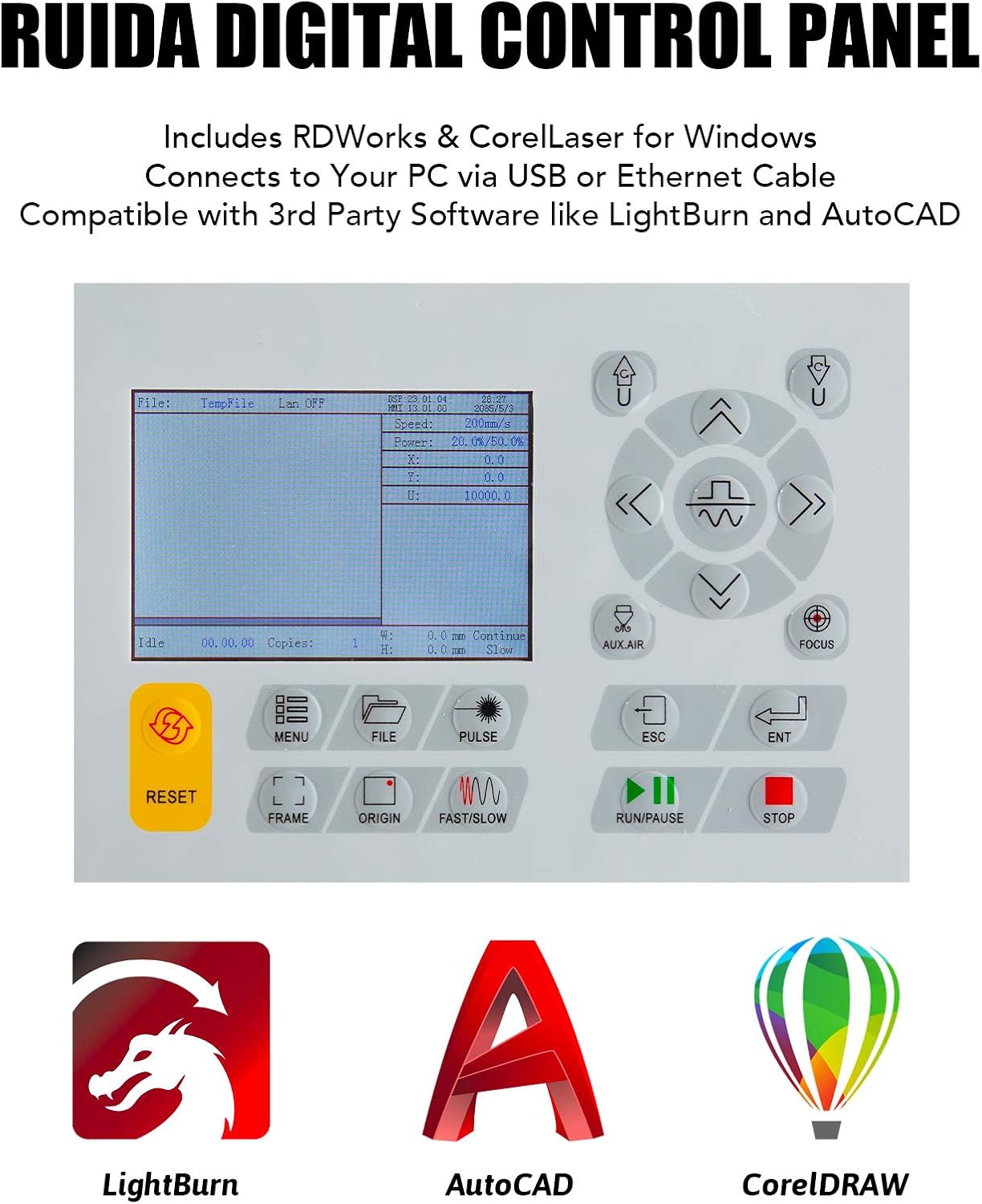
Figure 5.1: The Ruida Digital Control Panel, showing its display and various function buttons.
5.2 Loading Material and Focusing
- Place your material onto the workbed.
- Use the electric lift workbed controls on the Ruida panel to adjust the bed height.
- Utilize the autofocus function by pressing the dedicated button on the control panel. The machine will automatically adjust the laser head to the correct focal distance for your material.

Rajah 5.2: Jarak dekat view of the autofocus mechanism, which automatically corrects focus at the touch of a button.
5.3 Starting a Job
- Prepare your design in LightBurn or other compatible software (see Section 6).
- Send the job to the laser engraver.
- On the Ruida panel, select the job and press "Start" or "Run/Pause".
- Monitor the engraving/cutting process closely.
6. Software & Connectivity
Your OMTech laser engraver is designed for seamless integration with various software platforms.
6.1 Sistem yang Serasi
The machine is compatible with:
- Sistem pengendalian Windows
- Mac OSX operating systems
- Linux operating systems

Figure 6.1: Visual representation of the laser engraver's compatibility with Windows, Linux, and Mac OS.
6.2 Perisian yang Disyorkan
- LightBurn: Highly recommended software for laser engraving and cutting, offering powerful design and control features.
- RDWorks: Included software for Windows users.
- CorelLaser: Included software for Windows users, compatible with CorelDRAW.
- Perisian Pihak Ketiga: Compatible with other software like AutoCAD.
For detailed instructions on software installation and usage, please refer to the respective software manuals or online resources.
7. Penyelenggaraan & Penjagaan
Penyelenggaraan berkala memastikan jangka hayat dan prestasi optimum pengukir laser anda.
7.1 Penyelenggaraan Harian
- Clean the workbed and debris collection system after each use.
- Inspect the laser lens and mirrors for dust or debris. Clean gently with a lens cleaning solution and cotton swab if necessary.
- Check the water level and temperature in the chiller.
7.2 Penyelenggaraan Mingguan/Bulanan
- Clean and lubricate the guide rails and bearings to ensure smooth movement of the laser head.
- Inspect the laser tube for any signs of damage or degradation.
- Replace the water in the chiller with fresh distilled water.

Figure 7.1: Close-up of the 70W CO2 laser tube, which produces stable beams over its long service life.
8. Penyelesaian masalah
Bahagian ini menangani isu biasa yang mungkin anda hadapi dan kemungkinan penyelesaiannya.
| Masalah | Kemungkinan Punca | Penyelesaian |
|---|---|---|
| Laser tidak menembak | No water flow from chiller, chiller error, laser tube issue, power supply issue. | Check chiller connection and water level. Verify laser power supply. Contact support if tube is faulty. |
| Kualiti ukiran/pemotongan yang buruk | Incorrect focus, dirty lens/mirrors, wrong power/speed settings, material issues. | Perform autofocus. Clean optics. Adjust power/speed settings in software. Ensure material is suitable. |
| Mesin tidak bersambung ke komputer | Loose USB/Ethernet cable, driver issues, software settings. | Check cable connections. Reinstall drivers. Verify software communication settings. |
| Workbed not moving | Motor issue, control panel issue, obstruction. | Check for obstructions. Restart machine. If problem persists, contact support. |
9. Spesifikasi Teknikal
| Spesifikasi | Perincian |
|---|---|
| Nombor Model | USB7B47 OMTCA |
| Jenis Laser | Laser CO2 |
| Kuasa Laser | 70W |
| Kelas Laser | Class 2 (0.827 mW output power) |
| Kawasan Ukiran | 400 x 750 mm (16 x 30 inci) |
| Workbed Type | Electric Lift Workbed (Dual Honeycomb & Knife Blade Platforms) |
| Sistem Kawalan | Ruida Controls |
| Perisian yang Serasi | LightBurn, RDWorks, CorelLaser, AutoCAD |
| OS yang serasi | Windows, Mac OSX, Linux |
| Dimensi Produk | 125.98 x 91.95 x 87.12 cm (49.6 x 36.2 x 34.3 inci) |
| Berat Barang | 113.99 kg (251.3 lbs) |
| bahan | LCD (likely referring to the control panel display) |

Figure 9.1: The spacious 16" x 30" engraving area, providing over 3.3 square feet for projects.
10. Waranti & Sokongan
For warranty information and technical support, please refer to the official OMTech website or contact their customer service directly. Keep your purchase receipt and model number (USB7B47 OMTCA) handy for any inquiries.
You can visit the OMTech Store for more information: OMTech Official Store


