pengenalan
This manual provides comprehensive instructions for the FANTECH GP12 Revolver USB Gaming Controller. Please read this manual carefully before using the product to ensure proper operation and to maximize your gaming experience.
Produk Selesaiview
The FANTECH GP12 Revolver is a wired gaming controller designed for an immersive gaming experience on PC and PS3. It features a familiar console-like layout and dual vibration feedback motors.
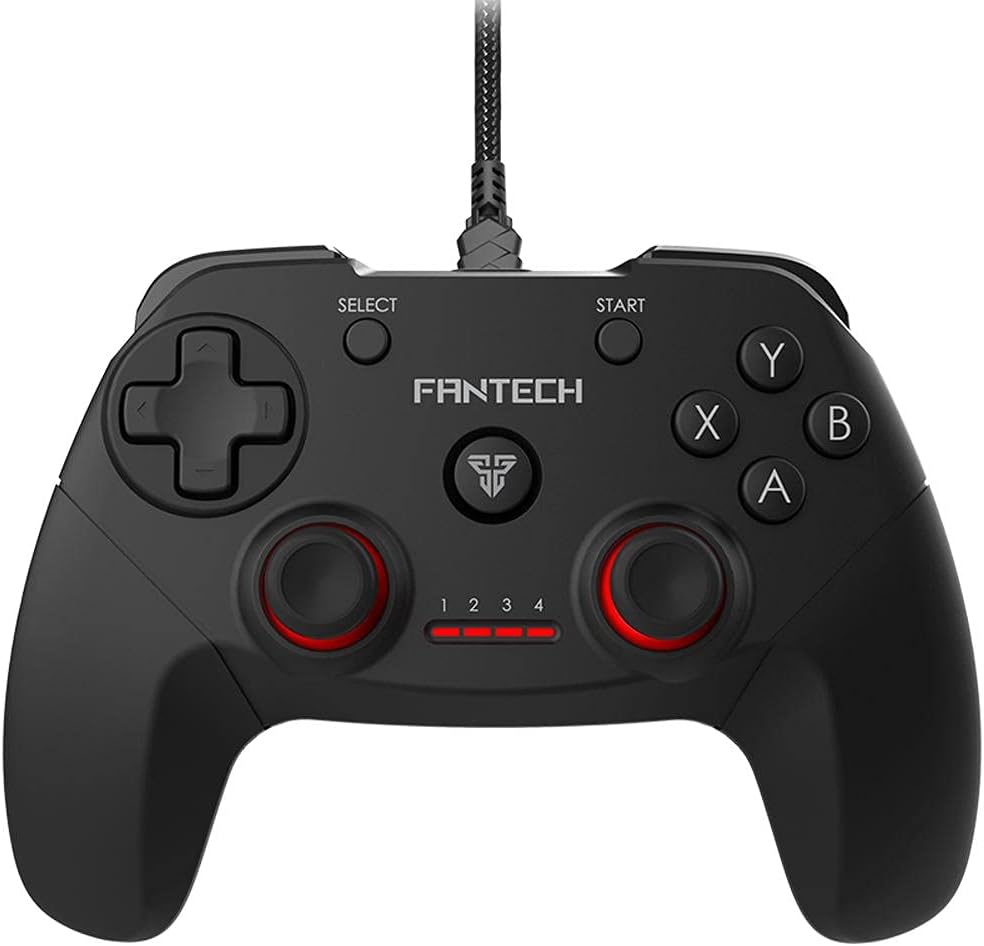
Imej: Depan view of the FANTECH GP12 Revolver USB Gaming Controller, showcasing reka bentuk ergonomik dan susun atur butangnya.
Ciri-ciri Utama:
- Familiar Console-Like Layout: Designed for intuitive control, allowing users to pick up and play without a steep learning curve. The controller's shape and button placement mimic traditional console gamepads.
- Dual Vibration Feedback Motors: Provides tactile feedback for in-game actions, enhancing immersion with every hit, crash, and explosion. The motors are strategically placed to deliver realistic sensations.
- Wide Game Compatibility: Compatible with thousands of games on PC and PS3, offering full control across various genres. Simply plug and play to enjoy your favorite titles.
- Cengkaman Ergonomik: Crafted for comfortable long-term gaming sessions, reducing hand fatigue.
- 17 Butang: Comprehensive button layout for versatile control, including action buttons, directional pad, analog sticks, and shoulder buttons.
- Kesambungan Berwayar: Reliable USB connection with a 1.8-meter cable, ensuring stable and lag-free gameplay.

Image: A user's hands comfortably gripping the FANTECH GP12 Revolver controller, demonstrating its ergonomic design for extended gameplay.

Image: The FANTECH GP12 Revolver controller with visual representations of vibration waves emanating from its sides, illustrating the dual vibration feedback feature.

Image: A person using the FANTECH GP12 Revolver controller while gaming on a PC setup, highlighting its compatibility with various gaming platforms.
Persediaan
Menyambungkan Pengawal:
- Locate an available USB port on your PC or PlayStation 3 console.
- Insert the USB connector of the FANTECH GP12 Revolver controller firmly into the USB port.
- Sistem akan mengesan dan memasang pemacu yang diperlukan secara automatik. Proses ini mungkin mengambil masa beberapa saat.
- Once installed, the controller's indicator lights will illuminate, signifying it is ready for use.
Note: For optimal performance, ensure your operating system (Windows 7, Windows 10, or PS3) is up to date.
Arahan Operasi
Kawalan Asas:
The GP12 Revolver features a standard gamepad layout. Familiarize yourself with the button assignments for your specific game.
- Pad Arah (D-Pad): Used for precise directional input, typically for movement or menu navigation.
- Kayu Analog: Provide 360-degree movement and camera control. Pressing them down often activates additional functions (L3/R3).
- Butang Tindakan (A, B, X, Y): Primary interaction buttons for in-game actions such as jumping, attacking, or confirming selections.
- Shoulder Buttons (L1, R1) and Triggers (L2, R2): Located on the top of the controller, used for various actions like aiming, firing, or special abilities.
- Butang MULA: Typically used to pause games or access in-game menus.
- Butang PILIH: Often used for map access, inventory, or other secondary functions.
Maklum Balas Getaran:
The dual vibration motors provide immersive feedback during gameplay. This feature is automatically activated in games that support vibration. You will feel vibrations during impacts, explosions, and other significant in-game events.
Penyelenggaraan
- Pastikan pengawal bersih dengan mengelapnya dengan kain lembut dan kering.
- Elakkan mendedahkan pengawal kepada suhu, kelembapan atau cahaya matahari langsung yang melampau.
- Do not use abrasive cleaners or solvents on the controller.
- Simpan alat kawalan di tempat yang selamat apabila tidak digunakan untuk mengelakkan kerosakan pada kabel atau butang.
Menyelesaikan masalah
Pengawal Tidak Menjawab:
- Ensure the USB cable is securely connected to both the controller and the device (PC/PS3).
- Cuba sambungkan pengawal ke port USB yang berbeza.
- Restart your PC or PS3.
- Verify that the game you are playing supports gamepad input.
Getaran Tidak Berfungsi:
- Sahkan bahawa permainan yang anda mainkan menyokong maklum balas getaran.
- Semak tetapan dalam permainan untuk memastikan getaran didayakan.
- Pastikan pengawal disambungkan dengan betul.
Butang Tidak Berfungsi Dengan Betul:
- Pastikan tiada serpihan bersarang di bawah butang.
- Test the controller with another game or on a different device to isolate the issue.
Spesifikasi
Detailed technical specifications for the FANTECH GP12 Revolver USB Gaming Controller:

Image: Diagram showing the dimensions (154mm x 113mm x 58mm) and key technical specifications of the FANTECH GP12 Revolver controller.
| Ciri | Perincian |
|---|---|
| Jenama | Fantech |
| Model | GP12 Revolver |
| taip | Gamepad berwayar |
| Ketersambungan | USB |
| Butang | 17 pcs |
| Maklum balas Getaran | Yes (Dual Motors) |
| Panjang Kabel | 1.8 meter |
| Dimensi (L x W x H) | 154 x 113 x 58 mm (lebih kurang) |
| Berat badan | 170 gram (lebih kurang) |
| warna | Hitam / Grey |
| Platform yang Serasi | PC, PlayStation 3 (PS3) |
| Sistem Operasi | Windows 7, Windows 10, PS3 |
Waranti & Sokongan
For warranty information and technical support, please refer to the warranty card included with your product or visit the official Fantech webtapak. Simpan bukti pembelian anda untuk tuntutan waranti.
If you encounter any issues not covered in this manual, please contact Fantech customer support for assistance.


