1. Pengenalan
This manual provides detailed instructions for the installation, operation, and maintenance of your ZEROXCLUB BCT01 Wireless Side View Camera. This camera is specifically designed for use with AHD* (Analog High Definition) systems. Please read this manual thoroughly before using the product to ensure proper function and safety.
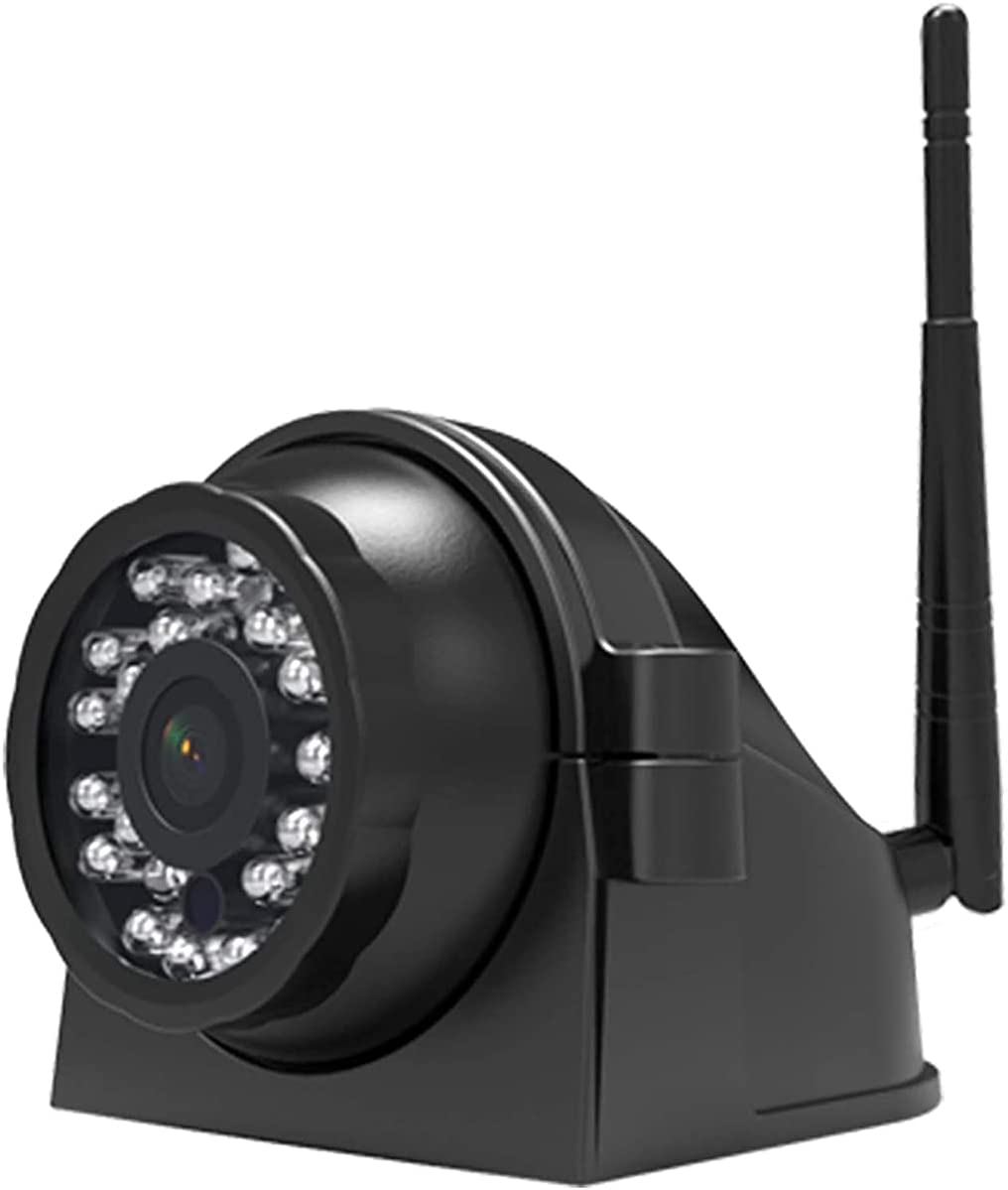
Image 1.1: ZEROXCLUB BCT01 Wireless Side View Camera. This image shows the compact black camera unit with an antenna, designed for vehicle side mounting.
2. Produk Lebihview
2.1 Ciri-ciri Utama
- Wireless connectivity for simplified installation.
- Designed for AHD* systems, ensuring compatibility with specific monitors.
- IP69 International Protection Rating for durability against water and dust.
- Compact design suitable for side view applications on various vehicles.
2.2 Komponen
The package typically includes the BCT01 wireless side view camera unit with an integrated antenna and mounting bracket.
Image 2.1: A single wireless side camera unit. This image highlights the camera's design, including its lens, infrared LEDs, and wireless antenna.
3. Persediaan dan Pemasangan
3.1 Memasang Kamera
Select a suitable location on the side of your vehicle for optimal viewing. Ensure the mounting surface is clean and secure. Use the provided bracket and hardware to firmly attach the camera. Consider the camera's field of view and potential obstructions before final installation.

Image 3.1: Wireless camera with its mounting bracket. This image illustrates how the camera can be positioned and secured to a vehicle surface.
3.2 Sambungan Kuasa
Connect the camera to a stable 12V DC power source. It is recommended to connect the camera's power to a circuit that is activated when the vehicle's ignition is on, or to a specific signal (e.g., turn signal for side cameras) if desired for automatic activation.
3.3 Arahan Berpasangan
Follow these steps to pair the BCT01 camera with your compatible AHD* monitor:
- Disconnect the camera from its power source.
- Power on the monitor unit.
- Press the "CH/AV" button on the monitor to select the channel intended for pairing.
- Press the menu button to enter the monitor's menu interface. Select the first option, which is typically the 'pairing' icon.
- Press the "SEL/MODE" button to confirm the pairing selection. The monitor will initiate a 20-second countdown for pairing.
- Reconnect the camera to its power source within the 20-second pairing window.

Image 3.2: Visual representation of a camera unit, often associated with pairing processes.
4. Arahan Operasi
Once successfully paired and powered, the camera will transmit video wirelessly to your AHD* monitor. The monitor will display the side view, assisting with lane changes, parking, and maneuvering. Refer to your monitor's instruction manual for specific display settings and channel switching.
5. Penyelenggaraan
- Pembersihan: Bersihkan lensa kamera dengan kerap dengan lembut, damp kain untuk memastikan imej yang jelas. Elakkan pembersih yang kasar.
- Semakan Sambungan: Periodically inspect all power connections and mounting hardware for security and corrosion. Ensure the antenna is free from damage.
- Perlindungan Alam Sekitar: While the camera has an IP69 rating, prolonged exposure to harsh elements can affect its lifespan. Consider applying a protective spray to metal components, such as the antenna bracket, to prevent rust, especially in corrosive environments.
6. Penyelesaian masalah
6.1 Isu Berpasangan
- No Picture After Pairing: If no image is displayed after attempting to pair, retry the pairing steps carefully.
- Tamat masa berpasangan: The pairing process must be completed within 20 seconds. If the countdown expires, you will need to re-initiate the pairing process.
- Power During Pairing: Do not plug in the camera's power until the pairing countdown has already started on the monitor.
6.2 Isu Umum
- No Signal/Intermittent Signal: Ensure the camera and monitor are within effective wireless range. Check for obstructions that might interfere with the wireless signal. Verify all power connections are secure.
- Kualiti Imej Lemah: Clean the camera lens. Check for any physical damage to the camera or antenna. Ensure the monitor is set to the correct input.
7. Spesifikasi
| Ciri | Spesifikasi |
|---|---|
| Model | BCT01 (AHD* ver.) |
| Teknologi Komunikasi Tanpa Wayar | Wi-Fi |
| Penilaian Perlindungan Antarabangsa | IP69 |
| Dimensi Produk (L x W x H) | 2.76 x 3 x 2.76 inci |
| Berat Barang | 13.2 auns |
| Peranti Serasi | AHD* Monitors |
| Pengeluar | ZEROXCLUB |
8. Waranti dan Sokongan
For any questions, technical assistance, or post-sales inquiries regarding your ZEROXCLUB BCT01 camera, please contact our support team. While specific warranty details are not provided in this manual, our commitment is to provide reliable products and service.
Anda boleh menghubungi kami melalui emel di: sales@uszeroxclub.com
Please include your product model (BCT01) and a detailed description of your inquiry for prompt assistance.

Image 8.1: ZEROXCLUB brand logo, representing customer support and service.


