1. Pengenalan
The D-Link DGS-105GL is a 5-Port Gigabit Unmanaged Desktop Switch designed to provide a simple and efficient solution for expanding network connectivity in small office/home office (SOHO) and small to medium-sized business (SMB) environments. This device offers plug-and-play functionality, requiring no complex configuration. Its fanless design ensures silent operation, and the metal housing provides durability. The DGS-105GL incorporates energy-efficient features, including IEEE 802.3az Energy-Efficient Ethernet, to reduce power consumption without compromising performance.
2. Kandungan Pakej
Sahkan bahawa pakej anda mengandungi item berikut:
- D-Link DGS-105GL 5-Port Gigabit Unmanaged Desktop Switch
- Penyesuai Kuasa
Jika terdapat sebarang barang yang hilang atau rosak, sila hubungi penjual semula D-Link tempatan anda.
3. Produk Lebihview
The DGS-105GL switch features a compact, low-profile design with a durable metal housing. It is equipped with five Gigabit Ethernet ports for high-speed network connections.
3.1 Panel Depan

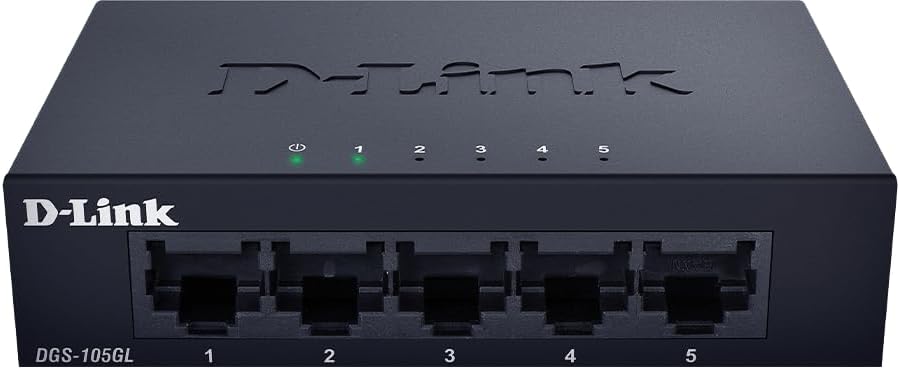
Imej: Depan view of the D-Link DGS-105GL switch, showing the D-Link logo, model number DGS-105GL, a power LED, five port status LEDs (1-5), and five RJ45 Gigabit Ethernet ports (1-5).
The front panel includes the following indicators and ports:
- LED kuasa: Menunjukkan status kuasa suis.
- LED Port (1-5): Each port has an LED that indicates link status and activity. A solid light indicates a successful connection, and a blinking light indicates data transmission.
- RJ45 Gigabit Ethernet Ports (1-5): These ports are used to connect network devices such as computers, servers, and other switches.
3.2 Panel Belakang

Imej: Belakang view of the D-Link DGS-105GL switch, showing the power input port labeled '5V --- 1A'.
The rear panel contains the power input port, where the included power adapter is connected.
4. Persediaan
The DGS-105GL is a plug-and-play device, making installation straightforward. Follow these steps to set up your switch:
- Sambungkan Penyesuai Kuasa: Plug the included power adapter into the power input port on the rear panel of the DGS-105GL switch. Then, plug the other end of the adapter into a standard electrical outlet. The Power LED on the front panel should illuminate.
- Sambungkan Peranti Rangkaian: Connect your network devices (e.g., computers, network-attached storage, routers) to any of the five RJ45 Gigabit Ethernet ports on the front panel using standard Ethernet cables.
- Sahkan Sambungan: Once a device is connected and powered on, the corresponding Port LED on the switch's front panel should light up, indicating a successful link. If there is network activity, the LED will blink.

Image: The D-Link DGS-105GL switch placed on a desk in an office setting, connected to a laptop and other peripherals, demonstrating a typical setup.
5. Mengendalikan Suis
The DGS-105GL operates automatically once connected. It supports auto-negotiation for speed and duplex mode, and auto-MDI/MDIX, eliminating the need for crossover cables. The switch automatically detects the speed of the connected device (10/100/1000 Mbps) and adjusts accordingly.
5.1 Penunjuk LED
The LEDs provide visual feedback on the switch's status:
Imej: Depan view of the D-Link DGS-105GL switch with the green power LED and green port LEDs 1-5 illuminated, indicating active connections.
| LED | Status | Penerangan |
|---|---|---|
| kuasa | Hijau Pejal | Suis dihidupkan. |
| kuasa | Mati | Suis tidak menerima kuasa. |
| Pelabuhan (1-5) | Hijau Pejal | Peranti berjaya disambungkan ke port. |
| Pelabuhan (1-5) | Hijau Berkelip | Data sedang dihantar atau diterima melalui port. |
| Pelabuhan (1-5) | Mati | Tiada peranti yang disambungkan ke port, atau peranti yang disambungkan dimatikan. |
6. Penyelenggaraan
To ensure optimal performance and longevity of your DGS-105GL switch, consider the following maintenance guidelines:
- Pembersihan: Periodically clean the exterior of the switch with a soft, dry cloth. Avoid using liquid or aerosol cleaners directly on the device.
- Keadaan Persekitaran: Ensure the switch is placed in a well-ventilated area, away from direct sunlight, heat sources, and excessive moisture. Maintain operating temperatures within the specified range (refer to specifications).
- Pengurusan Kabel: Keep network cables neatly organized to prevent strain on ports and improve airflow around the device.
- Berbasikal Kuasa: If you experience network issues, a simple power cycle (unplugging the power adapter, waiting 10 seconds, and plugging it back in) can often resolve minor problems.
7. Penyelesaian masalah
If you encounter issues with your DGS-105GL switch, refer to the following common troubleshooting steps:
- Tiada LED Kuasa:
- Pastikan penyesuai kuasa disambungkan dengan selamat pada suis dan soket elektrik yang berfungsi.
- Sahkan bahawa soket elektrik berfungsi dengan memasang peranti lain.
- No Link LED for a Connected Device:
- Pastikan kabel Ethernet dipasang dengan kukuh pada kedua-dua port suis dan peranti rangkaian.
- Pastikan peranti rangkaian yang disambungkan dihidupkan dan berfungsi dengan betul.
- Cuba kabel Ethernet yang lain untuk menolak kabel yang rosak.
- Cuba sambungkan peranti ke port lain pada suis.
- Kelajuan Rangkaian Perlahan:
- Pastikan semua peranti dan kabel yang disambungkan menyokong Gigabit Ethernet (Cat5e atau lebih tinggi).
- Periksa trafik rangkaian yang berlebihan atau aplikasi intensif lebar jalur yang berjalan pada peranti yang bersambung.
- Perform a power cycle on the switch and connected devices.
8. Spesifikasi
Key technical specifications for the D-Link DGS-105GL switch:
| Ciri | Spesifikasi |
|---|---|
| Nombor Model | DGS-105GL |
| Bilangan Pelabuhan | 5 x Gigabit Ethernet (RJ45) |
| Kadar Pemindahan Data | 1 Gbps per port |
| Jenis Antaramuka | RJ45 |
| Bahan Kes | logam |
| Reka bentuk tanpa pengsan | ya |
| Kecekapan Tenaga | IEEE 802.3az Ethernet Cekap Tenaga (EEE) |
| Input Kuasa | 5 Volts (DC), 1 Amps |
| Berat Barang | 160 Gram (5.6 auns) |
| Dimensi Produk | 39.37"L x 25.2"W x 0.94"H (Anggaran) |
| UPC | 790069458606 |
9. Waranti dan Sokongan Teknikal
D-Link products are backed by a limited warranty. For specific warranty terms and conditions, please refer to the warranty information included with your product or visit the official D-Link webtapak.
For technical assistance, product documentation, or to download the latest software and firmware updates, please visit the D-Link support portal or contact D-Link technical support directly. Contact information can typically be found on the D-Link webtapak untuk wilayah anda.