1. Pengenalan
Terima kasih kerana membeliasing the Asimom X1 Wireless Bluetooth Speaker. This X-shaped speaker combines high-fidelity audio with dynamic multi-color LED lighting and a unique fan feature designed to enhance your audio experience. This manual provides essential information for setup, operation, maintenance, and troubleshooting to ensure optimal performance of your device.
2. Kandungan Pakej
Sila sahkan bahawa semua item terdapat dalam pakej anda:
- Asimom X1 Wireless Bluetooth Speaker
- Kabel Pengecas USB
- Kabel Audio AUX
- Manual Pengguna

Image: The Asimom X1 speaker shown alongside its included USB charging cable and AUX audio cable.
3. Persediaan
3.1 Mengecas Speaker
Before first use, fully charge the speaker. Connect the provided USB charging cable to the speaker's charging port and the other end to a USB power adapter (not included) or a computer's USB port. The LED indicator will show charging status.
3.2 Menghidupkan/Mematikan
- Untuk Menghidupkan: Tekan dan tahan butang Kuasa selama 3 saat.
- Untuk Mematikan: Tekan dan tahan butang Kuasa selama 3 saat.
4. Arahan Operasi
4.1 Berpasangan Bluetooth
- Ensure the speaker is powered on and in Bluetooth pairing mode (usually indicated by a blinking LED).
- Pada peranti anda (telefon pintar, tablet, komputer riba), dayakan Bluetooth dan cari peranti yang tersedia.
- Select "Asimom X1" from the list of devices.
- Once connected, the speaker will emit an audible confirmation, and the LED indicator will become solid.
4.2 Sambungan Berwayar (AUX)
For devices without Bluetooth, use the provided AUX audio cable. Connect one end to the speaker's AUX input port and the other end to your audio source's headphone jack.
4.3 Kawalan Lampu LED
The Asimom X1 features 48 multi-color RGB lighting systems and 5 levels of intensity control. Use the dedicated lighting control buttons on the speaker to cycle through modes and adjust brightness.

Image: The Asimom X1 speaker illuminated with a vibrant rainbow LED display.

Image: The Asimom X1 speaker illuminated with a striking red LED display.

Image: The Asimom X1 speaker illuminated with a dynamic purple and blue LED display.
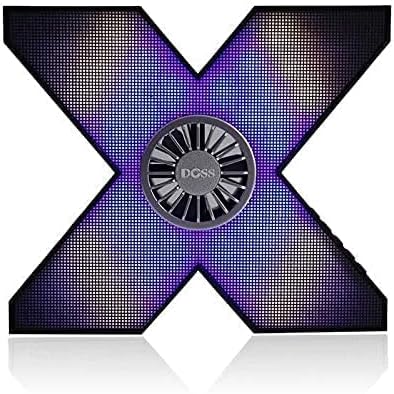
Image: The Asimom X1 speaker illuminated with a nuanced purple and blue LED display.
4.4 Fan Feature for Sound Simulation
The integrated fan in the center of the speaker is designed to create a vibration effect, simulating enhanced audio presence and bass. This feature operates automatically with audio playback.
4.5 Main Balik Audio
The Asimom X1 delivers very loud and professional pure stereo sound. Adjust volume using your connected device or the speaker's volume controls.
5. Penyelenggaraan
- Bersihkan pembesar suara dengan kain lembut dan kering. Jangan gunakan pembersih atau pelarut yang melelas.
- Avoid exposing the speaker to extreme temperatures, direct sunlight, or moisture.
- Simpan pembesar suara di tempat yang sejuk dan kering apabila tidak digunakan untuk tempoh yang lama.
- The speaker features a full metal body and a metal base with rubber supports for durability and stability.
6. Penyelesaian masalah
| Masalah | Kemungkinan Punca | Penyelesaian |
|---|---|---|
| Speaker tidak dihidupkan. | Bateri lemah. | Cas pembesar suara sepenuhnya. |
| Tiada bunyi. | Volume too low; not paired correctly; AUX cable loose. | Increase volume; re-pair Bluetooth; check AUX cable connection. |
| Gandingan Bluetooth gagal. | Speaker too far from device; speaker not in pairing mode; interference. | Move speaker closer; ensure speaker is in pairing mode; turn off other Bluetooth devices. |
7. Spesifikasi
| Ciri | Perincian |
|---|---|
| Nombor Model | X1 |
| Nama Jenama | Gedung orang miskin |
| Teknologi Ketersambungan | Wired/Wireless (Bluetooth) |
| Jenis Pembesar Suara | Pembesar Suara Bluetooth |
| Peranti Serasi | All devices (iPhone, iPad, Laptops, Smartphones, TVs) |
| Jenis Input | AUX |
| Bilangan Kepingan | 1 |
| External Product ID Type | EAN-13 |
| External Product ID | 6938546511985 |
| Kuasa Keluaran | 10 - 20 Watt |
| Berat Barang | 1 Kilogram |
| bentuk | X-shaped |
| Mod Keluaran Audio | Stereo |
| Jenis Pemasangan | Atas meja |
| Ciri Khas | Wireless, Bluetooth, Multi-color RGB LED Lighting (48 systems, 5 intensity levels), Fan for sound simulation, Full metal body, Metal base with rubber supports |
| Tarikh Mula-mula Tersedia | 7 Julai 2021 |
8. Waranti dan Sokongan
For warranty information and technical support, please refer to the documentation provided with your purchase or contact the manufacturer, Doss, directly. Keep your proof of purchase for any warranty claims.


