pengenalan
The Altec Lansing HydraBlast is a robust and versatile wireless portable Bluetooth speaker designed for various environments, from outdoor parties to everyday use. It features IP67 Everything Proof protection, ensuring it is waterproof, shockproof, snowproof, and dustproof. With a long-lasting battery, built-in phone charging capabilities, and dynamic LED lights, the HydraBlast delivers powerful audio and convenience wherever you go.

Rajah 1: Depan view of the Altec Lansing HydraBlast speaker in Royal Blue.
Apa yang ada dalam Kotak
- Altec Lansing HydraBlast Bluetooth Speaker
- Kabel Pengecas USB-C
- Klip Carabiner
- Manual Pengguna (dokumen ini)
Ciri-ciri Produk
- Bold Bass and Clear Audio: Experience HD audio with immersive bass for a rich listening experience.
- IP67 Everything Proof: Designed to be waterproof, shockproof, snowproof, and dustproof, making it suitable for any environment.

Figure 2: The HydraBlast speaker demonstrating its water resistance.
- 20 Jam Masa Main: Enjoy extended music playback on a single charge.
- Built-in Phone Charger: Features both wireless (Qi) charging and wired USB-C output to charge your devices.

Figure 3: Wireless charging a smartphone on the speaker's top surface.
- Mod Lampu LED: Multiple LED light modes to enhance your listening experience and create a party atmosphere.

Figure 4: The speaker features 11 distinct LED light modes, including strobe effects.
- Reka Bentuk Mudah Alih: Lightweight and includes a built-in carabiner hook for easy transport and attachment.

Figure 5: The included carabiner clip allows for easy portability, attaching to bags or gear.
- Bluetooth 5.0: Menyediakan sambungan tanpa wayar yang stabil sehingga 100 kaki.
- Gandingan Wayarles Benar: Connect two HydraBlast speakers for a stereo sound experience.
Kawal Selesaiview

Figure 6: Top panel controls of the HydraBlast speaker.
- Butang Hidup / Mati: Tekan dan tahan untuk menghidupkan atau mematikan pembesar suara.
- Butang Pautan: Used for True Wireless Pairing with another HydraBlast speaker.
- Butang Tukar Warna: Cycles through different LED light modes.
- Wireless Qi Charger: Integrated charging pad for compatible devices.
- Butang Kelantangan Kurang / Trek Sebelumnya (-): Tekan pendek untuk kelantangan turun, tekan lama untuk trek sebelumnya.
- Voice Assistant / Answer Calls Button: Activates voice assistant or answers/ends calls.
- Butang Naikkan Kelantangan / Trek Seterusnya (+): Tekan pendek untuk kelantangan, tekan lama untuk trek seterusnya.
Persediaan
1. Pengecasan Awal
Before first use, fully charge your HydraBlast speaker. Locate the USB-C charging port on the side of the speaker (protected by a waterproof flap). Connect the provided USB-C cable to the speaker and the other end to a USB power adapter (not included) or a computer's USB port. The charging indicator light will show charging status.
2. Berpasangan Bluetooth
- Pastikan pembesar suara dimatikan.
- Tekan dan tahan butang Hidupkan/Mati Kuasa button until you hear an audible prompt and the Bluetooth indicator light begins to flash, indicating pairing mode.
- Pada telefon pintar atau peranti yang didayakan Bluetooth anda, navigasi ke tetapan Bluetooth.
- Select "Altec Lansing HydraBlast" from the list of available devices.
- Once connected, you will hear a confirmation tone, and the Bluetooth indicator light will become solid.
3. True Wireless Pairing (Pairing Two Speakers)
To achieve a stereo sound experience, you can pair two HydraBlast speakers together:
- Ensure both HydraBlast speakers are powered on and not connected to any other Bluetooth devices.
- On one speaker (this will be your primary speaker), press the Pautan button. The speaker will enter True Wireless Pairing mode.
- Pada pembesar suara kedua, tekan juga Pautan butang.
- The two speakers will automatically connect to each other. You will hear a confirmation tone once connected.
- Now, connect your Bluetooth device to the primary speaker as described in the "Bluetooth Pairing" section above. Audio will play through both speakers in stereo.
Arahan Operasi
Memainkan Audio
- After successful Bluetooth pairing, open your preferred music application on your device and begin playback.
- Gunakan Kelantangan Naik (+) dan Perlahankan suara (-) buttons on the speaker to adjust the volume.
- Tekan lama Kelantangan Naik (+) button for the next track, and long press the Perlahankan suara (-) butang untuk trek sebelumnya.
Managing Calls
- Apabila panggilan masuk, tekan butang Voice Assistant / Answer Calls butang untuk menjawab.
- Untuk menamatkan panggilan, tekan butang yang sama sekali lagi.
- Untuk menolak panggilan masuk, tekan dan tahan Voice Assistant / Answer Calls butang.
Using LED Light Modes
Tekan ke Perubahan Warna button to cycle through the available LED light modes. Continue pressing until you find your desired light pattern or turn the lights off.
Mengecas Peranti Luaran
- Pengecasan Tanpa Wayar: Place your Qi-compatible smartphone or device on the designated wireless charging area on top of the speaker. Ensure proper alignment for charging to begin.
- Pengecasan Berwayar: Open the waterproof flap on the side of the speaker to access the USB-A output port. Connect your device's charging cable to this port to charge it.
Penyelenggaraan
- Pembersihan: Gunakan yang lembut, damp kain untuk membersihkan bahagian luar pembesar suara. Elakkan menggunakan bahan kimia yang keras atau pembersih yang kasar.
- Tahan Air: While the speaker is IP67 rated, ensure the charging port flap is securely closed before exposing it to water or dust. Do not submerge the speaker for extended periods or at depths greater than 1 meter.
- Storan: Simpan pembesar suara di tempat yang sejuk dan kering apabila tidak digunakan. Elakkan suhu yang melampau.
- Penjagaan Bateri: For optimal battery life, avoid fully discharging the speaker frequently. Charge it regularly, even if not in constant use.
Menyelesaikan masalah
| Masalah | Kemungkinan Punca / Penyelesaian |
|---|---|
| Pembesar suara tidak akan dihidupkan. | Battery may be depleted. Connect to a power source using the USB-C cable and charge for at least 30 minutes before attempting to power on again. |
| Tidak boleh berpasangan melalui Bluetooth. |
|
| Tiada bunyi atau kelantangan rendah. |
|
| Pengecasan tanpa wayar tidak berfungsi. |
|
| Penyelewengan bunyi. |
|
Spesifikasi
| Ciri | Perincian |
|---|---|
| Jenama | Altec Lansing |
| Nama Model | HydraBlast (IMW1300-RYB-STK-2) |
| Teknologi Ketersambungan | Bluetooth, USB |
| Teknologi Komunikasi Tanpa Wayar | Bluetooth 5.0 |
| Julat Bluetooth | 100 Kaki |
| Jenis Pembesar Suara | Luar |
| Ciri Khas | Portable, Waterproof, Built-in Phone Charger, LED Lights |
| Tahap Ketahanan Air | IP67 (Waterproof, Shockproof, Snowproof, Dustproof) |
| Hayat Bateri | Sehingga 20 Jam |
| Sumber Kuasa | Dikuasakan Bateri |
| Port Pengecasan | USB-C |
| Mod Keluaran Audio | Stereo |
| Kuasa Output Maksimum Pembesar Suara | 6 Watt |
| Dimensi Produk | 8.7"D x 4.4"W x 5.5"H |
| Berat Barang | 1.9 paun |
| bahan | Durable Plastic / Rubberized Plastic |
| Komponen yang Disertakan | Pembesar Suara Bluetooth |
| UPC | 021331023704 |
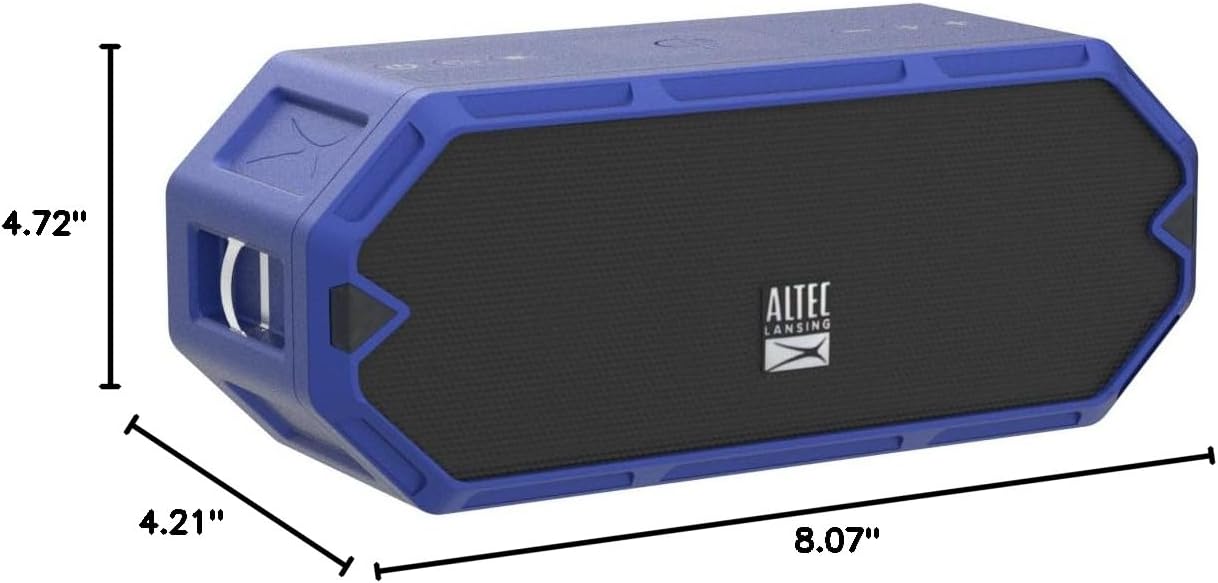
Figure 7: Dimensions of the HydraBlast speaker.
Waranti dan Sokongan
The Altec Lansing HydraBlast speaker comes with a Limited Warranty. For specific warranty terms, conditions, and duration, please refer to the warranty card included with your product or visit the official Altec Lansing webtapak.
For technical support, troubleshooting assistance, or warranty claims, please contact Altec Lansing Customer Service:
- Webtapak: alteclansing.com/support
- telefon: Rujuk pembungkusan produk atau webtapak untuk nombor hubungan serantau.
Please have your product model number (IMW1300-RYB-STK-2) and proof of purchase ready when contacting support.


