1. Pengenalan
Thank you for choosing the BenQ DVD-2019 DVD Player. This manual provides essential information for the safe and efficient use of your new device. Please read it thoroughly before operating the player and retain it for future reference.
Maklumat Keselamatan Penting:
- Jangan dedahkan unit kepada hujan atau lembapan.
- Jangan buka casing; merujuk semua perkhidmatan kepada kakitangan yang berkelayakan.
- Pastikan pengudaraan yang betul di sekeliling unit.
- Gunakan hanya bekalan kuasa yang ditentukan untuk peranti ini.
2. Kandungan Pakej
Sila pastikan semua item ada dalam pakej:
- BenQ DVD-2019 DVD Player
- Alat Kawalan Jauh
- Kabel AV (RCA)
- Kabel Kuasa
- Manual Arahan (dokumen ini)
3. Produk Lebihview
3.1 Panel Depan

Figure 1: Front Panel of the DVD-2019 Player
The front panel features the disc tray, power button, play/pause, stop, and skip buttons. It also includes a USB port and an SD card slot for playing media from external storage devices.
3.2 Panel Belakang

Figure 2: Rear Panel of the DVD-2019 Player
The rear panel provides various connection ports for audio and video output, including HDMI, RCA (composite video and stereo audio), and component video outputs. The power input is also located here.
3.3 Alat Kawalan Jauh
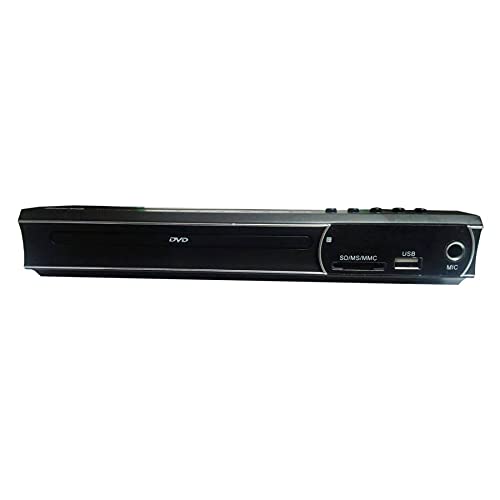
Figure 3: Remote Control for the DVD-2019 Player
The remote control allows you to operate all functions of the DVD player from a distance. It requires two AAA batteries (not included).
4. Persediaan
4.1 Menyambung ke Televisyen
Pilih salah satu daripada kaedah sambungan berikut:
- HDMI Connection (Recommended for best quality):
Connect one end of an HDMI cable (not included) to the HDMI OUT port on the DVD player and the other end to an HDMI IN port on your television. Select the corresponding HDMI input on your TV. - Sambungan RCA:
Connect the yellow video cable to the VIDEO OUT port on the DVD player and the yellow video input on your TV. Connect the red and white audio cables to the AUDIO OUT (R/L) ports on the DVD player and the corresponding red and white audio input ports on your TV. Select the AV input on your TV.
4.2 Sambungan Kuasa
After connecting the video and audio cables, plug the power cable into the AC IN port on the rear of the DVD player and then into a wall outlet.
5. Arahan Operasi
5.1 Main Semula DVD Asas
- Turn on your TV and the DVD player.
- Select the correct input source on your TV (e.g., HDMI 1, AV).
- Press the OPEN/CLOSE button on the front panel or remote to open the disc tray.
- Place a DVD disc gently into the tray with the label side facing up.
- Press the OPEN/CLOSE button again to close the tray. The disc will load automatically.
- Playback should begin automatically. If a menu appears, use the arrow keys and OK button on the remote to navigate.
5.2 Main Semula USB/Kad SD
- Insert a USB flash drive into the USB port or an SD card into the SD card slot on the front panel.
- The player should automatically detect the device and display a media browser. If not, press the SOURCE or USB/CARD button on the remote.
- Use the arrow keys and OK button to navigate through your files (videos, music, photos).
- Pilih a file dan tekan OK untuk memulakan main semula.
5.3 Tetapan Audio dan Video
Access the player's setup menu by pressing the SETUP button on the remote control. Here you can adjust settings such as:
- Tetapan Video: Aspect ratio (4:3, 16:9), video output resolution.
- Tetapan Audio: Audio output mode (Stereo, Dolby Digital, DTS), dynamic range control.
- Tetapan Bahasa: Bahasa OSD, bahasa audio, bahasa sari kata.
6. Penyelenggaraan
6.1 Membersihkan Unit
- Lap bahagian luar pemain dengan kain lembut dan kering.
- Jangan gunakan pembersih cecair atau semburan aerosol.
- For the disc tray, use a soft, lint-free cloth to gently remove dust.
6.2 Pengendalian Cakera
- Always hold discs by their edges.
- Keep discs clean and free from scratches. Use a soft cloth to wipe from the center outwards.
- Simpan cakera dalam bekasnya apabila tidak digunakan.
7. Penyelesaian masalah
| Masalah | Kemungkinan Punca | Penyelesaian |
|---|---|---|
| Tiada kuasa | Kabel kuasa tidak disambungkan; salur keluar kuasa rosak. | Pastikan kabel kuasa disambungkan dengan kukuh. Cuba soket lain. |
| Tiada gambar | Incorrect TV input selected; video cable loose or faulty. | Pilih input HDMI/AV yang betul pada TV anda. Periksa sambungan kabel video. |
| Tiada bunyi | Audio cables loose or faulty; TV volume muted. | Check audio cable connections. Increase TV volume and ensure it's not muted. |
| Cakera tidak dimainkan | Cakera adalah format kotor, tercalar atau tidak serasi. | Clean the disc. Try a different disc. Ensure the disc format is supported (DVD). |
| Alat kawalan jauh tidak berfungsi | Bateri mati atau tidak dimasukkan dengan betul; halangan antara alat kawalan jauh dan pemain. | Gantikan bateri. Pastikan polariti yang betul. Keluarkan sebarang halangan. |
8. Spesifikasi
| Ciri | Perincian |
|---|---|
| Nombor Model | DVD-2019 |
| Jenama | BenQ |
| Jenis Media | DVD |
| Jenis Penyambung | HDMI, RCA |
| Teknologi Ketersambungan | HDMI, RCA, USB |
| Format Audio yang Disokong | Dolby Digital, DTS, PCM |
| Peranti Serasi | Televisyen |
9. Waranti dan Sokongan
This BenQ DVD-2019 DVD Player comes with a standard manufacturer's warranty. Please refer to the warranty card included in your package for specific terms and conditions, including the warranty period and coverage details.
For technical support, service inquiries, or to obtain replacement parts, please contact BenQ customer service through their official website or the contact information provided on your warranty documentation. Keep your purchase receipt as proof of purchase for warranty claims.


