pengenalan
Thank you for choosing the Lepro 5m RGB LED Strip Light. This product is designed to provide versatile and vibrant lighting for various indoor applications. Featuring high-brightness SMD5050 LEDs, a wide range of colors, and easy installation, it enhances the ambiance of any space. Please read this manual carefully before installation and use to ensure proper operation and safety.
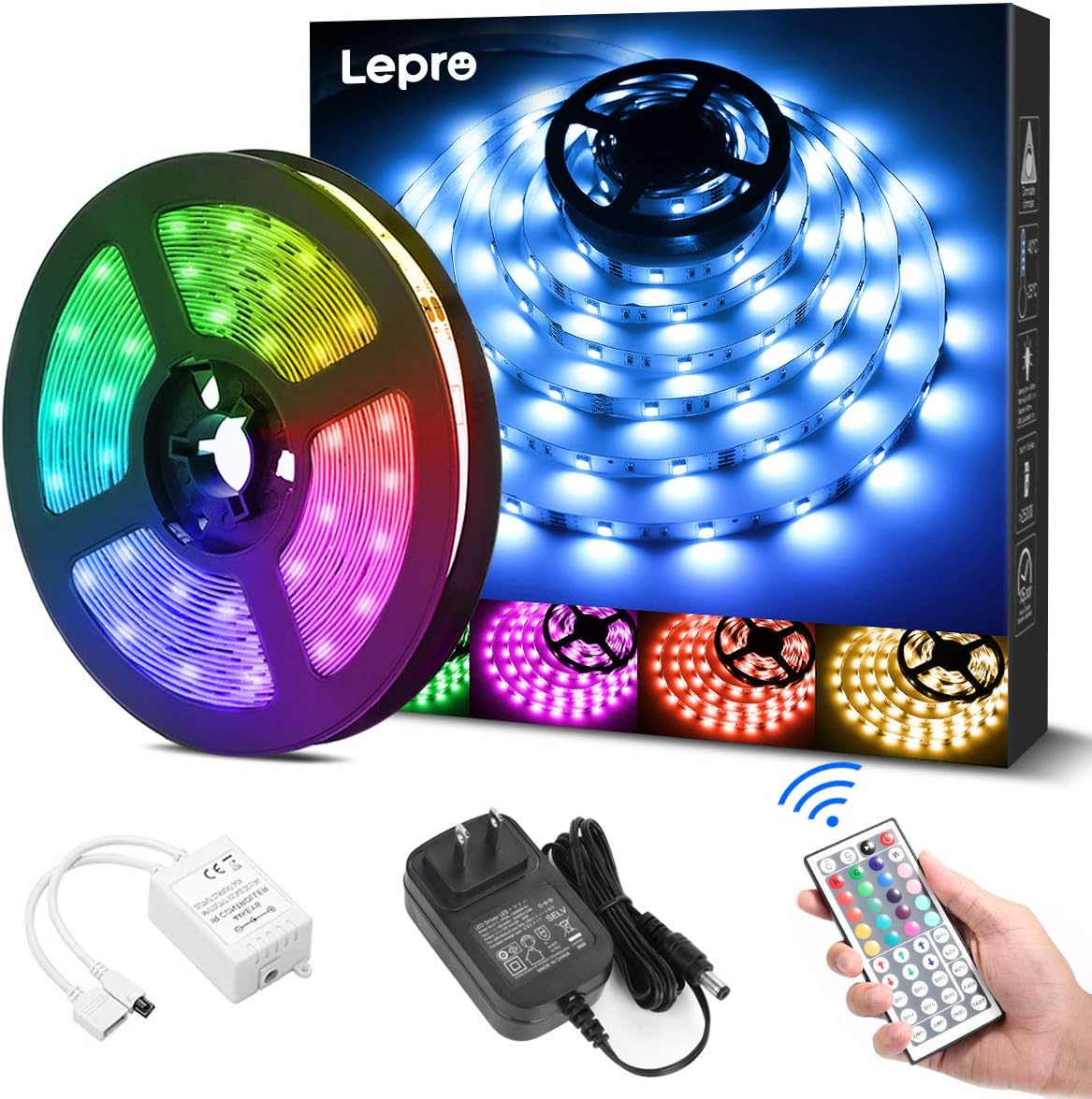
Apa yang ada dalam Kotak
Sahkan bahawa semua komponen hadir sebelum memulakan pemasangan:
- LED Strip Light (5 meters) x 1
- DC12V Power Adapter x 1
- Connection Receiver x 1
- Alat kawalan jauh x 1
- Instruction Manual (Japanese) x 1
Maklumat Keselamatan
- Produk ini direka untuk kegunaan dalaman sahajaJangan dedahkan kepada air atau kelembapan yang tinggi.
- Pastikan bekalan kuasa diputuskan sebelum pemasangan atau penyelenggaraan.
- Use only the provided DC12V power adapter. Using an incompatible power supply may damage the product or pose a fire hazard.
- Do not bend the LED strip sharply or apply excessive force, as this may damage the circuit.
- Jauhkan daripada kanak-kanak.
- If any part of the product is damaged, discontinue use immediately and contact support.
Persediaan
Ikuti langkah-langkah berikut untuk pemasangan lampu jalur LED anda dengan betul:
- Sediakan Permukaan: Clean the desired installation surface thoroughly. Ensure it is dry, smooth, and free of dust or oil for optimal adhesive performance.
- Ukur dan Potong (Pilihan): If a shorter length is required, cut the LED strip along the designated cut marks (indicated by a scissor icon) using scissors. Nota: Only cut at these specific marks. Cutting elsewhere will damage the strip. Cut sections cannot be reconnected without additional connectors (sold separately).
- Sapukan Jalur: Peel off the backing from the 3M adhesive tape on the back of the LED strip. Carefully press the strip onto the cleaned surface, ensuring firm contact along its entire length.
- Sambungkan Komponen: Connect the LED strip to the connection receiver, ensuring the arrows on both components align. Then, connect the DC12V power adapter to the receiver.
- Hidupkan kuasa: Plug the power adapter into a suitable power outlet. Remove the insulation sheet from the remote control before first use. Point the remote control towards the receiver and press the power button to turn on the lights.


Arahan Operasi
The LED strip light is controlled using the included 44-key remote control. Ensure the remote is pointed towards the receiver for effective operation.
Fungsi Kawalan Jauh:
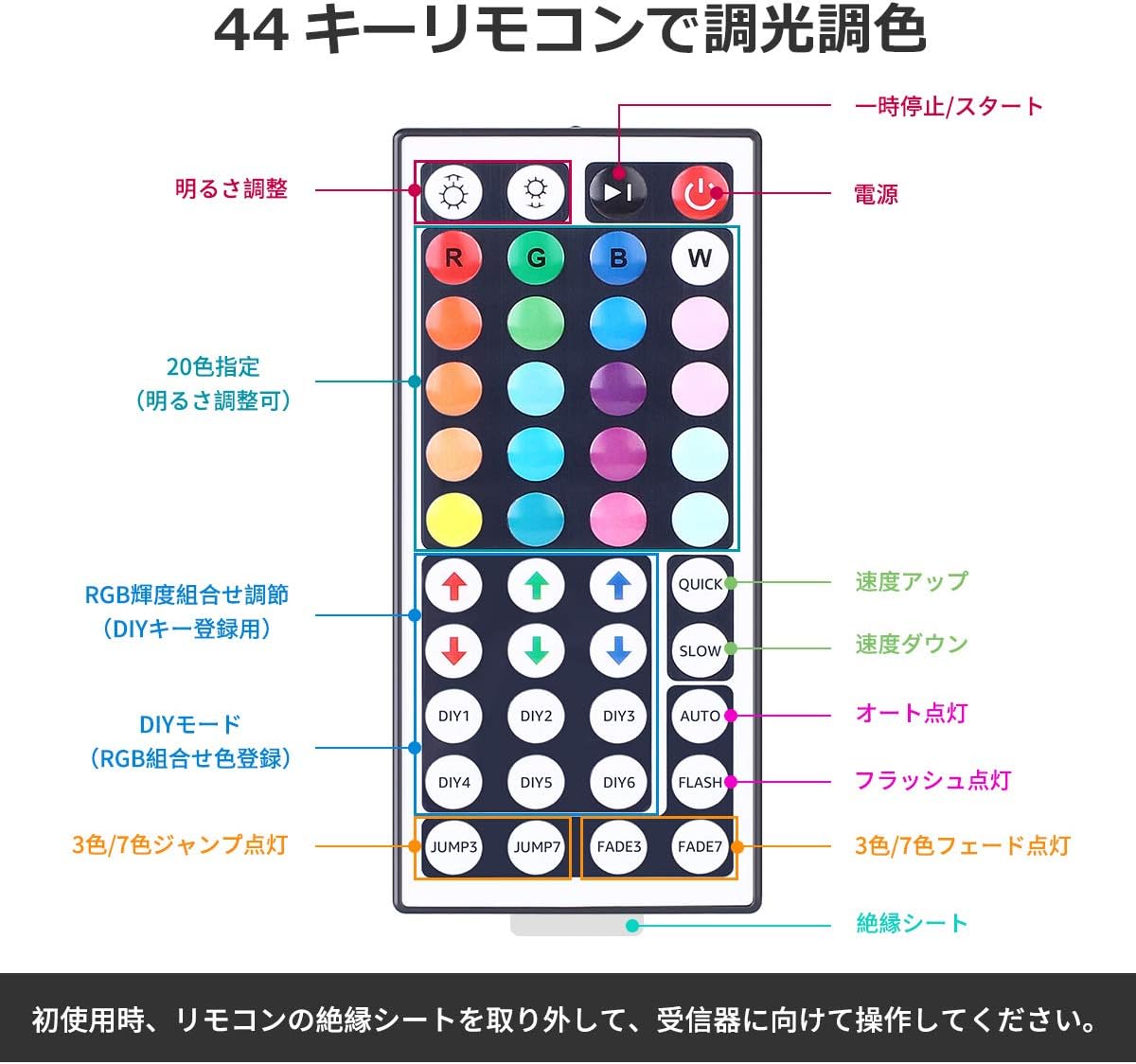
- Hidupkan/Mati Kuasa: Tekan ke red power button to turn the lights on or off.
- Pelarasan Kecerahan: Gunakan butang anak panah atas dan bawah (labeled 'Brightness Adjust') to increase or decrease the light intensity.
- Pilihan Warna: Pilih daripada 20 warna pratetap by pressing the corresponding color buttons.
- Mod DIY: The DIY1-DIY6 buttons allow you to create and save custom colors by adjusting the Red, Green, and Blue intensity using the RGB arrow buttons.
- Mod Dinamik:
- CEPAT/PERLAHAN: Laraskan kelajuan mod dinamik.
- AUTO: Cycles through all dynamic modes automatically.
- KILAT: Flashes through colors.
- LOMPAT3/LOMPAT7: Jumps between 3 or 7 colors.
- FADE3/FADE7: Pudar antara 3 atau 7 warna.
Penyelenggaraan
- Pembersihan: Ensure the power is off and unplugged before cleaning. Gently wipe the LED strip with a dry, soft cloth. Do not use harsh chemicals or abrasive cleaners.
- Storan: If storing the strip for an extended period, ensure it is clean and dry. Roll it loosely to prevent damage to the LEDs or circuit. Store in a cool, dry place away from direct sunlight.
- Penjagaan Pelekat: The 3M adhesive is strong, but repeated removal and reapplication may reduce its effectiveness.
Menyelesaikan masalah
| Masalah | Kemungkinan Punca | Penyelesaian |
|---|---|---|
| Jalur LED tidak menyala. | 1. Power adapter not plugged in. 2. Remote control insulation sheet not removed. 3. Connections are loose or incorrect. 4. Remote control battery is dead. | 1. Ensure power adapter is securely plugged into an outlet. 2. Remove the clear plastic insulation sheet from the remote control battery compartment. 3. Check all connections, ensuring arrows align between the strip and receiver. 4. Replace the remote control battery (CR2025 or equivalent). |
| Alat kawalan jauh tidak bertindak balas. | 1. Remote not pointed at receiver. 2. Obstruction between remote and receiver. 3. Remote control battery is dead. | 1. Point the remote directly at the receiver. 2. Remove any objects blocking the line of sight. 3. Gantikan bateri alat kawalan jauh. |
| Some sections of the strip are not lighting up. | 1. Damage to the LED strip. 2. Incorrect cutting. | 1. Inspect the strip for physical damage. If damaged, contact support. 2. Ensure cuts were made only at designated marks. |
Spesifikasi
- Nombor Model: PR410082-RGB-JP
- Jenama: Kusta
- Jenis Sumber Cahaya: LED (SMD5050)
- Kuantiti LED: 150 LEDs (30 LEDs per meter)
- Panjang Jalur: 5 meter
- Penggunaan Kuasa: 18W
- Input Voltage: DC12V 1.5A
- Pilihan Warna: RGB (20 preset colors + DIY modes)
- Kaedah Kawalan: 44-key IR Remote Control
- Penggunaan Dalaman/Luar: Dalaman
- Ciri Khas: Dimmable, Cuttable, 3M Adhesive, PSE Certified
- Saiz Pakej: 13.1 x 10.7 x 6.7cm; 230g

Waranti dan Sokongan
This Lepro LED Strip Light comes with a Waranti 2 tahun. If you encounter any issues or have questions regarding the product, please contact Lepro JP customer support through the retailer's platform. Provide your order details and a description of the issue for prompt assistance.
For further assistance, you can visit the official Lepro store on Amazon: Lepro Amazon Store


