pengenalan
This manual provides comprehensive instructions for the setup, operation, and maintenance of your Browning BTC-5HD-MXP Strike Force HD MAX Plus Outdoor Trail Camera. Designed for robust outdoor use, this camera captures high-quality photos and videos, making it ideal for wildlife monitoring and surveillance. Please read this manual thoroughly before using the device to ensure proper function and longevity.
Maklumat Keselamatan
- Jangan dedahkan kamera kepada suhu yang melampau atau cahaya matahari langsung untuk tempoh yang lama.
- Ensure all battery compartments and covers are securely closed to prevent water ingress.
- Use only recommended battery types (AA batteries). Do not mix old and new batteries or different battery types.
- Jauhkan kamera daripada medan magnet yang kuat.
- Jangan cuba membuka atau mengubah suai kamera. Ini akan membatalkan jaminan.
- Buang bateri secara bertanggungjawab mengikut peraturan tempatan.
Kandungan Pakej
Sahkan bahawa semua item yang disenaraikan di bawah disertakan dalam pakej anda:
- Browning BTC-5HD-MXP Strike Force HD MAX Plus Trail Camera
- 6-Foot Tree Mount Strap
- Blucoil 32GB Class 10 SDHC SD Card
- Blucoil 6.5-Foot Multi-Functional Combination Cable Lock with 4-Digit Password Code
- 4-Pack of Blucoil AA Batteries
- 5-Pack of Blucoil Reusable Velcro Cable Ties
- VidPro USB 2.0 Card Reader

Image: The complete Browning BTC-5HD-MXP Strike Force HD MAX Plus bundle, including the trail camera, SD card, cable lock, batteries, cable ties, and USB card reader.
Persediaan
1. Pemasangan Bateri
The camera requires 6 AA batteries for operation. Ensure correct polarity when inserting the batteries.
- Open the camera's main compartment latch.
- Cari petak bateri.
- Masukkan 6 bateri AA, padankan terminal positif (+) dan negatif (-) seperti yang ditunjukkan.
- Tutup petak bateri dengan selamat.
2. Pemasangan Kad SD
A Blucoil 32GB Class 10 SDHC SD Card is included. The camera supports SDXC memory cards up to 512GB.
- With the camera open, locate the SD card slot, typically near the control panel.
- Masukkan kad SD dengan label menghadap bahagian hadapan kamera sehingga ia klik pada tempatnya.
- To remove, press the SD card gently to eject it.

Image: The Browning trail camera with its front panel open, revealing the control screen, navigation buttons, and the SD card slot. The "SD CARD" and "Eject" labels are visible.
3. Memasang Kamera
Use the included 6-foot tree mount strap to secure the camera to a tree or post.
- Thread the tree mount strap through the slots on the back of the camera.
- Wrap the strap around the desired mounting surface (e.g., tree trunk).
- Pull the strap tight and secure it to ensure the camera is stable and does not move.
- Position the camera to capture the desired area, ensuring no obstructions are in the field of view.
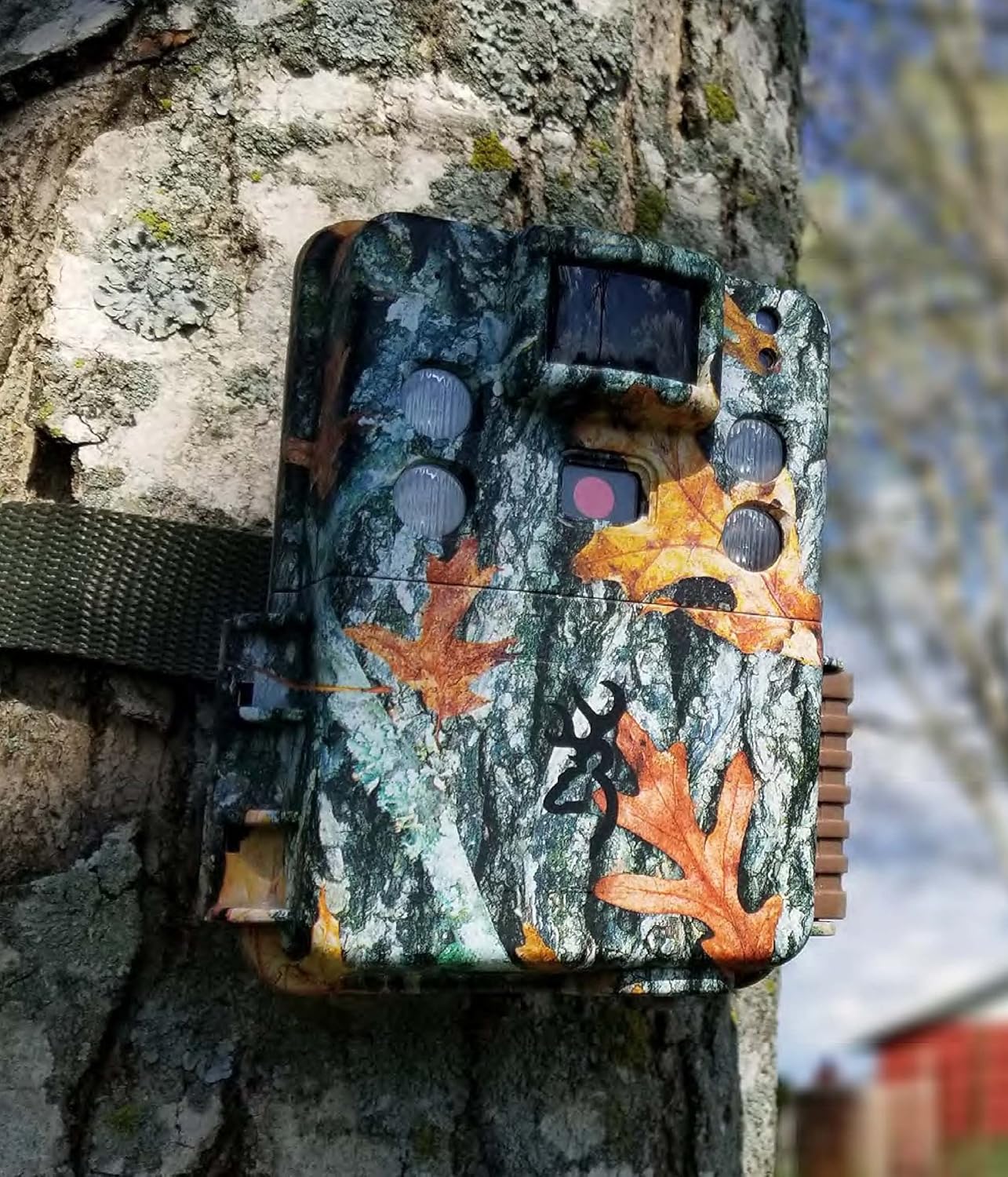
Image: The Browning trail camera securely mounted on a tree trunk using its strap, blending into the natural environment with its camouflage pattern.
4. Mengamankan dengan Kunci Kabel
The Blucoil 6.5-Foot Multi-Functional Combination Cable Lock provides additional security for your camera.
- Locate the security cable slots on the camera body.
- Thread the cable lock through these slots and around the mounting surface.
- Set your desired 4-digit combination (initial password is 0000) and secure the lock. Refer to the cable lock's instructions for changing the combination.

Image: A Browning trail camera secured to a tree with a Blucoil 6.5-foot combination cable lock, demonstrating its anti-theft feature.
Mengendalikan Kamera
Menghidupkan/Mematikan
Untuk menghidupkan kamera, luncurkan suis kuasa ke kedudukan "HIDUP". Untuk mematikan kuasa, luncurkannya ke "MATI".
Mod Asas
The Strike Force HD MAX Plus offers various capture modes:
- Mod Foto: Menangkap imej pegun.
- Mod Video: Records video clips with sound.
- Mod Selang Masa Plus: Captures images at pre-set intervals over a period. These can be compiled into a video using the Buck Watch Timelapse Viewer perisian.
Use the "MODE" button on the control panel to cycle through these options and the navigation buttons to select settings.
Melaraskan Tetapan
The camera allows for customization of several parameters:
- Kelajuan Pencetus: Adjustable from 0.135s to 0.7s for faster or slower detection response.
- Masa Pemulihan: A shorter 0.5s recovery time between images allows for more frequent captures.
- Capture Timer: This function allows you to specify the operational hours of the camera.
- Resolusi: Set desired photo (up to 20MP) and video (up to 1600 x 900p HD+) resolution.
Operasi waktu malam
The camera features Illuma-Smart technology that automatically adjusts the 90-FT IR flash power for clear nighttime photos. The infrared illumination range extends up to 100-FT.
Viewrakaman
Kepada view gambar dan video yang dirakam:
- Keluarkan kad SD daripada kamera.
- Insert the SD card into the VidPro USB 2.0 Card Reader.
- Connect the card reader to your computer (Mac or Windows).
- Akses ke files pada kad SD melalui komputer anda file penjelajah.
- For Timelapse videos, download the Buck Watch Timelapse Viewer Software from Browning's official webmuka surat. Nota: This software is not compatible with Mac. Mac users can view timelapse images by changing the file extension from .TLS to .AVI format.

Image: The VidPro USB 2.0 Card Reader, a compact device for transferring data from various memory card types to a computer.
Penyelenggaraan
Pembersihan
- Lap bahagian luar kamera dengan kain lembutamp kain. Elakkan pembersih yang kasar.
- Gently clean the lens and IR sensors with a lens cleaning cloth or brush to ensure clear images.
- Ensure no debris is obstructing the motion sensor.
Penggantian Bateri
Replace all 6 AA batteries when the low battery indicator appears on the camera's screen or when performance degrades. Always replace all batteries at once with new ones of the same type.
Pengurusan Kad SD
Regularly format your SD card using the camera's internal formatting function or a computer to maintain optimal performance and prevent data corruption. Back up important files sebelum memformat.
Penyimpanan
Apabila tidak digunakan untuk tempoh yang lama, keluarkan bateri daripada kamera dan simpan di tempat yang sejuk dan kering jauh daripada cahaya matahari langsung.
Menyelesaikan masalah
| Masalah | Kemungkinan Punca | Penyelesaian |
|---|---|---|
| Kamera tidak dihidupkan. | Bateri mati atau salah dimasukkan. | Gantikan bateri dengan yang baharu, memastikan kekutuban yang betul. |
| Tiada imej/video yang ditangkap. | SD card full, not inserted correctly, or corrupted; motion sensor obstructed; camera in wrong mode. | Check SD card, format if necessary. Clear sensor. Ensure camera is in active capture mode. |
| Poor quality nighttime images. | IR flash obstructed; object too far; low batteries. | Clear obstructions. Ensure target is within 100-FT IR range. Replace batteries. |
| Timelapse videos not playing on Mac. | Buck Watch Timelapse Viewer not Mac compatible. | Berubah file extension from .TLS to .AVI. |
Spesifikasi
| Ciri | Perincian |
|---|---|
| Model | BTC-5HD-MXP |
| Resolusi Pegun Berkesan | 20 MP |
| Resolusi Tangkapan Video | 1920 x 1080 FHD (with Sound) / 1600 x 900p HD+ |
| Kecepatan Pencetus | 0.135 - 0.7 seconds (adjustable) |
| Masa Pemulihan | 0.5 saat |
| Julat Pengesanan | 80-FT |
| Julat Denyar IR | 100-FT (Illuma-Smart) |
| Sumber Kuasa | 6 Bateri AA |
| Sokongan Kad Memori | Up to 512GB SDXC (32GB SDHC included) |
| Teknologi Ketersambungan | Wayarles (Wi-Fi) |
| Penggunaan Dalaman/Luar | Luar |
| bahan | Zink |
| Dimensi (L x W x H) | 1 x 1 x 1 inci |
| Berat Barang | 1 paun |
| Penilaian Perlindungan Antarabangsa | IP54 |
Waranti dan Sokongan
Untuk maklumat jaminan dan sokongan teknikal, sila rujuk Kamera Laluan Browning rasmi. webtapak atau hubungi perkhidmatan pelanggan mereka. Simpan resit pembelian anda sebagai bukti pembelian untuk sebarang tuntutan waranti.
For additional support regarding Blucoil accessories (SD card, cable lock, batteries, cable ties), please visit the Blucoil official webtapak atau hubungi sokongan pelanggan mereka.