1. Pengenalan dan Lebihview
This user manual provides comprehensive instructions for the safe and efficient operation, installation, and maintenance of your Concept OPP1250SS Under-Cabinet Range Hood. Please read this manual thoroughly before using the appliance and retain it for future reference.
The Concept OPP1250SS is an ultra-slim 50cm under-cabinet range hood designed to effectively remove cooking odors and steam from your kitchen. It features LED lighting for improved visibility and push-button controls for ease of use.

Rajah 1: Depan view of the Concept OPP1250SS Under-Cabinet Range Hood.
2. Maklumat Keselamatan
Keselamatan Umum:
- Pastikan perkakas dipasang dengan betul oleh orang yang berkelayakan.
- Do not operate the range hood if it is damaged.
- Jauhkan kanak-kanak daripada perkakas semasa operasi.
- Bersihkan penapis secara berkala untuk mengelakkan pengumpulan gris, yang boleh menyebabkan bahaya kebakaran.
- Pastikan pengudaraan yang mencukupi di dalam bilik apabila hud dapur digunakan serentak dengan gas atau peralatan pembakar bahan api yang lain.
Keselamatan Elektrik:
- Sebelum membersihkan atau menyelenggara, sentiasa putuskan sambungan perkakas daripada bekalan kuasa.
- Jangan tarik kord kuasa untuk mencabut palam perkakas.
- Jika kord kuasa rosak, ia mesti diganti oleh pengilang, ejen servisnya, atau orang yang berkelayakan yang serupa untuk mengelakkan bahaya.
3. Apa yang ada di dalam Kotak
Setelah membuka bungkusan, sila sahkan bahawa semua komponen ada dan tidak rosak:
- 1x Concept OPP1250SS Under-Cabinet Range Hood
- 1x LED light bulb (6500 K) (pre-installed or separate)
- 2x Metallic anti-particulate filters (pre-installed)
- Manual Pengguna (dokumen ini)
- Mounting hardware (screws, wall plugs, etc. - check packaging for specifics)
4. Persediaan dan Pemasangan
Keperluan penempatan:
- The minimum distance above an electric hob is 65 cm.
- The minimum distance above a gas hob is 70 cm.
- Ensure the installation area allows for proper air circulation, especially if using the recirculation option.
Langkah Pemasangan:
- Carefully unpack the range hood and check for any damage.
- Determine the desired mounting location under the cabinet, adhering to the minimum distance requirements from the hob.
- Mark the drilling points for mounting the hood. Refer to the included mounting template (if provided) for precise measurements.
- Drill the necessary holes and insert wall plugs.
- Secure the range hood to the cabinet using the provided screws.
- Connect the power supply. Ensure the power is off at the main circuit breaker before making any electrical connections.
- If using the ducted extraction option, connect the 120mm diameter extraction duct to the outlet.
- If using the recirculation option, ensure the carbon filters are installed (sold separately for some models) and the air outlet is clear for filtered air to return to the kitchen.

Figure 2: Dimensions of the Concept OPP1250SS Under-Cabinet Range Hood (Height: 82mm).
5. Arahan Operasi
The Concept OPP1250SS features intuitive push-button controls located on the front panel.

Figure 3: Control panel of the range hood.
Hidupkan/Mati Kuasa:
- Press the power button (usually marked with a circle and a vertical line) to turn the hood on or off.
Pemilihan Kelajuan Kipas:
- The hood offers 3 power levels. Press the corresponding fan speed buttons (often marked with I, II, III or fan symbols) to adjust the extraction power according to your cooking needs.
- Use lower speeds for light cooking and higher speeds for heavy frying or grilling.
Pencahayaan LED:
- Press the light button (usually marked with a light bulb symbol) to turn the LED illumination on or off. The LED light provides bright, energy-efficient lighting for your cooking surface.
6. Penyelenggaraan
Penyelenggaraan tetap memastikan prestasi optimum dan jangka hayat tudung julat anda.
Cleaning the Metallic Anti-Particulate Filters:
- The metallic filters capture grease and should be cleaned regularly (approximately every 2-4 weeks, depending on usage).
- To remove the filters, locate the release latches or handles and gently pull them down or slide them out.
- Clean the filters by hand using warm soapy water or in a dishwasher. Ensure they are completely dry before re-installing.
- Do not bend the filters during cleaning or re-installation.
Menggantikan Penapis Karbon (untuk Mod Edaran Semula):
- If your hood is operating in recirculation mode, carbon filters (not included with all models) are used to remove odors. These filters cannot be washed and must be replaced every 3-6 months, depending on usage.
- Rujuk kepada arahan khusus yang disediakan bersama penapis karbon anda untuk prosedur penggantian.
Membersihkan Bahagian Luar Hud:
- Lap permukaan luar tudung dengan kain lembut dampdisalut dengan detergen ringan.
- Do not use abrasive cleaners, corrosive detergents, or harsh brushes, as these can damage the finish.
Replacing the LED Bulb:
- Ensure the appliance is disconnected from the power supply before attempting to replace the bulb.
- Carefully remove the old LED bulb.
- Install a new LED bulb of the same type and wattage (1x LED lamp, 6500 K).
7. Penyelesaian masalah
Jika anda menghadapi masalah dengan hud jarak jauh anda, rujuk petua penyelesaian masalah biasa berikut:
- Hud tidak menyala: Periksa sama ada kord kuasa dipasang dengan kukuh ke soket dan jika pemutus litar telah terpelantik.
- Kuasa sedutan rendah: Ensure the metallic filters are clean and not clogged. If using recirculation, check if the carbon filters need replacement. Verify that the ducting (if applicable) is not obstructed.
- Bunyi yang berlebihan: Check for loose components or obstructions in the fan. Ensure the hood is securely mounted.
- Lampu tidak berfungsi: Check if the LED bulb needs replacement. Ensure the light button is pressed.
Jika masalah berterusan selepas mencuba penyelesaian ini, sila hubungi sokongan pelanggan.
8. Spesifikasi
| Ciri | Spesifikasi |
|---|---|
| Jenama | Konsep |
| Nombor Model | OPP1250BC |
| warna | Hitam |
| bahan | Keluli Tahan Karat |
| Dimensi (D x W x H) | 8.2P x 50p x 8.2T cm |
| Kelas Kecekapan Tenaga | D |
| Jenis Kawalan | Butang Tekan |
| Kelajuan Kipas | 3 Peringkat |
| Kapasiti Aliran Udara Maksimum | 136 m³/j |
| Tahap Kebisingan Maksimum | 60 dB |
| Pencahayaan | 1x LED bulb (6500 K) |
| Diameter Saluran | 120mm |
| Jenis Penapis | Metallic Anti-Particulate Filters |
| Jenis Pengudaraan | Recirculation option |
| Kuasa dalam Watts | 67 watt |
| Voltage | 240 Volt |
| Berat badan | 4.6 Kilogram |
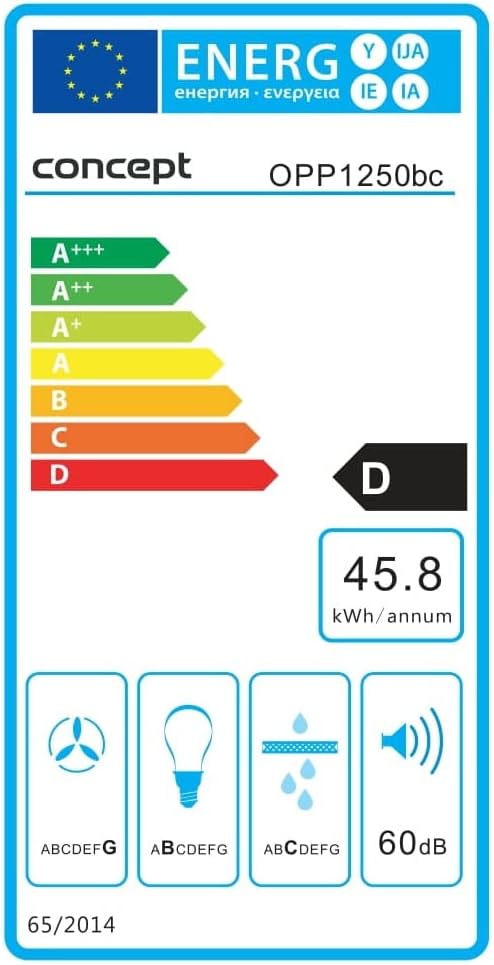
Figure 4: Energy Efficiency Label for the Concept OPP1250BC.
9. Waranti dan Sokongan
Your Concept OPP1250SS Under-Cabinet Range Hood comes with a standard manufacturer's warranty. Please refer to the warranty card included in your product packaging for specific terms and conditions, including warranty duration and coverage details.
For technical support, spare parts, or warranty claims, please contact the Concept customer service department. Contact information can typically be found on the manufacturer's webtapak atau dalam pembungkusan produk.


