1. Pengenalan
Thank you for choosing the VITCOCO Wireless Ear Cleaner. This device is designed to provide a safe and effective way to inspect and clean your ear canal, featuring a high-definition camera and integrated LED lights for clear visualization. It offers a convenient solution for personal ear care and can also be used for inspecting other areas like the nose and skin.

Figure 1: VITCOCO Wireless Ear Cleaner and accessories.
2. Maklumat Keselamatan
- Rujuk Profesional: If you experience ear pain, discharge, hearing loss, or suspect an ear infection, consult a medical professional before using this device.
- Penggunaan Lembut: Always use the device gently. Avoid inserting it too deeply into the ear canal to prevent injury to the eardrum or ear canal.
- Pengawasan Kanak-kanak: Do not allow children under 10 years old to use this product unsupervised. Adult supervision is required for children and individuals who may not be able to use the device safely.
- Kebersihan: Ensure the ear picks and the camera lens are clean before each use to prevent the introduction of bacteria.
- Suhu: The device is designed to maintain a constant temperature to prevent discomfort. However, if you feel any excessive heat, discontinue use immediately.
- Pendedahan Air: While the ear pick tip is waterproof, the main body of the device is not. Avoid submerging the main body in water.
3. Kandungan Pakej
The VITCOCO Wireless Ear Cleaner package includes the following items:
- Otoscope product (main unit)
- Kotak pembungkusan produk
- Connection line (USB charging cable)
- Replaceable ear picks (various types, typically silicone)
- Manual Arahan

Figure 2: Included components of the VITCOCO Ear Cleaner kit.
4. Panduan Persediaan
4.1 Mengecas Peranti
The ear wax removal tool comes with a built-in high-quality rechargeable battery. Before first use, ensure the device is fully charged. A single charge can provide up to 30 days of use.
- Sambungkan kabel pengecas USB yang disediakan ke port pengecasan pada peranti.
- Pasangkan hujung kabel USB yang satu lagi ke dalam penyesuai kuasa USB yang serasi (tidak disertakan) atau port USB komputer.
- The indicator light on the device will show charging status (refer to manual for specific light indications).
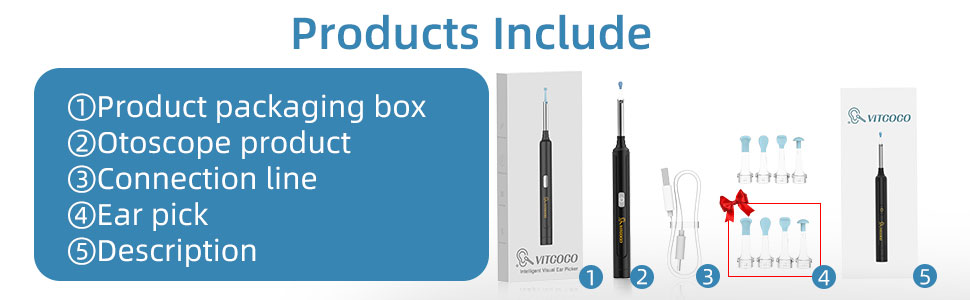
Figure 3: Charging the VITCOCO Wireless Ear Cleaner.
4.2 Muat Turun Apl dan Sambungan
This ear wax remover works well with all iPhone, iPad, and Android phones. The product requires a WiFi connection to use.
- Langkah 1: Muat turun Apl. Scan the QR code provided in the manual or on the product packaging to download the "EndscopeTool" software from your device's app store (Google Play for Android, App Store for iPhone). You can also visit http://download.wuyihang.com/app/download/#/.
- Langkah 2: Hidupkan. Click the power button on the product. The LED light will turn on, indicating the device is ready for connection.
- Step 3: Connect to WiFi. Go to your phone's WiFi settings and connect to the WiFi network named "softish-xxxx" (where xxxx is a unique identifier). This is a direct connection to the device, not your home WiFi.
- Step 4: Open App and Start. Open the "EndscopeTool" app. It should automatically detect the connected device. Click the "Start" button to begin using the product and view suapan langsung daripada kamera.

Figure 4: App connection steps for the VITCOCO Wireless Ear Cleaner.
4.3 Attaching Ear Picks
The device comes with replaceable ear picks made of soft silicone material. These are designed to be gentle and will not hurt your ear canal when used correctly.
- Select the desired ear pick from the provided accessories.
- Gently push the ear pick onto the tip of the device until it clicks securely into place. Ensure it is firmly attached to prevent it from detaching during use.
- The rotating-mounted ear spoon design ensures stability and safety during use.

Figure 5: Attaching a silicone ear pick to the device.
5. Arahan Operasi
5.1 Using the Ear Camera and Light
The device features a 360° wide-angle professional-grade lens and a 1296P FHD Camera, along with 6 built-in LED lights, to provide a clear and illuminated view inside your ear canal.
- Once connected to the app, the live feed from the camera will appear on your phone screen.
- Gently insert the ear pick tip into your ear canal. Observe the image on your phone to guide the device.
- The 6 LED lights will illuminate the canal, allowing you to see clearly even in dark areas.
- You can take pictures or record videos of the ear canal through the app interface.

Figure 6: High-definition camera and LED lighting for optimal viewing.
5.2 Ear Wax Removal
The device is designed to help you remove earwax more easily and safely. The slim stick and soft ear spoon are suitable for both adults and children.
- With the live view on your phone, carefully maneuver the ear pick to gently scoop out visible earwax.
- Avoid pushing earwax deeper into the canal. Use a gentle, sweeping motion to bring wax outwards.
- The built-in system controls the device at a constant temperature (20-25°C at the tip, 30-34°C at the handle) to prevent discomfort.

Figure 7: Safe and effective earwax removal.
Video 1: Demonstration of ear wax removal using the VITCOCO device.
Video 2: Selesaiview of the VITCOCO Ear Wax Removal Y8 model.
5.3 Aplikasi Lain
Beyond ear cleaning, this endoscope is convenient for daily inspection of the nose, mouth, throat, and other health conditions. It allows you to monitor the health of your family or even pets.

Figure 8: Versatile use for nose and skin inspection.
6. Penyelenggaraan
6.1 Membersihkan Peranti
The ear pick tip is IP67 waterproof, making it easy to clean. However, the main body of the device is not waterproof.
- After each use, remove the ear pick and rinse it under running water.
- Wipe the camera lens gently with a soft, dry cloth. Ensure the lens is facing down when cleaning to prevent water from entering the main body.
- Do not submerge the main body of the device in water or use harsh chemicals for cleaning.
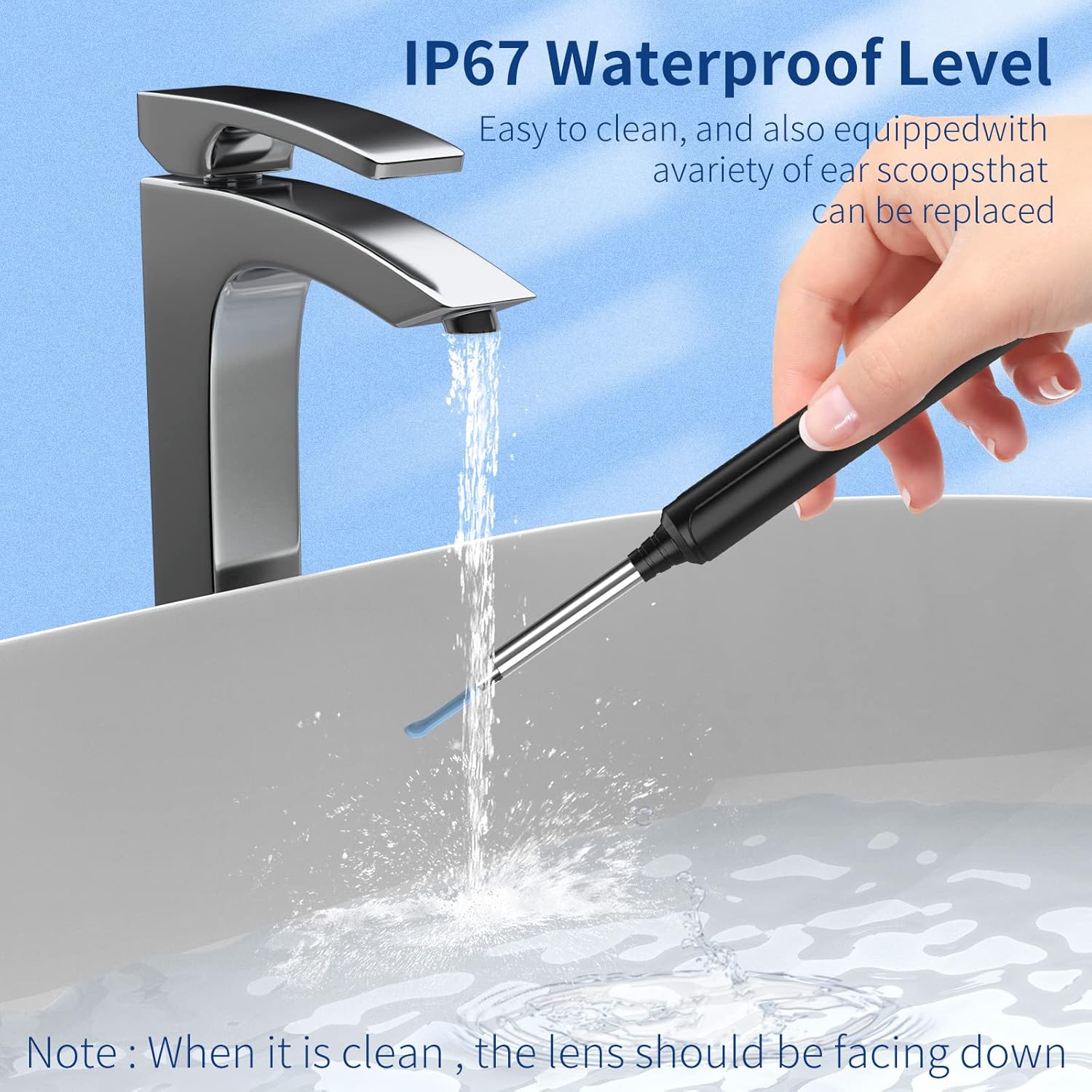
Figure 9: Cleaning the waterproof ear pick tip.
6.2 Replacing Ear Picks
Replace ear picks as needed to maintain hygiene and effectiveness. Extra ear picks are provided in the package.
- Gently pull the used ear pick off the device.
- Attach a new, clean ear pick as described in Section 4.3.
7. Penyelesaian masalah
| Masalah | Kemungkinan Punca | Penyelesaian |
|---|---|---|
| Peranti tidak dihidupkan. | Bateri lemah. | Cas peranti sepenuhnya. |
| Tidak dapat menyambung ke WiFi. | Incorrect WiFi network selected; WiFi on device not activated. | Ensure you are connecting to the "softish-xxxx" network. Press the power button on the device to activate its WiFi. |
| Unclear image on app. | Dirty camera lens; insufficient lighting. | Clean the camera lens gently. Ensure the LED lights are on and providing adequate illumination. |
| Ear pick detaches during use. | Ear pick not securely attached. | Ensure the ear pick clicks firmly into place when attaching. |
| Device feels too warm. | Prolonged use; internal malfunction. | Discontinue use immediately. Allow the device to cool down. If problem persists, contact customer support. |
8. Spesifikasi
- Nombor Model: Y8
- Resolusi Kamera: 1296P FHD
- Diameter kanta: 3.5mm
- Bidang View (FOV): 70°-80°
- Depth of Field (DOF): 15-30mm
- Pencahayaan: 6 Lampu LED
- Waterproof Rating (Tip): IP67
- Hayat Bateri: Sehingga 30 hari dengan sekali cas
- Ketersambungan: High-speed 2.4GHz WiFi
- Kadar Pemindahan Imej: 20fps
- Keserasian: iPhone, iPad, Android Phones
- Dimensi: 6.57 x 3.74 x 0.75 inci
- Berat: 0.71 auns
- Pengeluar: VITCOCO

Rajah 10: Terperinci view of the 1296P FHD Camera components.

Figure 11: High-speed WiFi chip for clear and stable image transmission.
9. Waranti & Sokongan
VITCOCO is committed to providing high-quality products. For any issues or inquiries regarding your Wireless Ear Cleaner, please contact our customer support team. Please refer to the product packaging or the official VITCOCO store for specific warranty details and contact information.
Penafian Undang-undang: Statements regarding dietary supplements have not been evaluated by the FDA and are not intended to diagnose, treat, cure, or prevent any disease or health condition. This product is intended for personal hygiene and inspection purposes only.
Visit the official VITCOCO Store: VITCOCO Store on Amazon


