pengenalan
This manual provides comprehensive instructions for the safe and efficient use of your Tronsmart Apollo Air TWS Bluetooth Earphones. Please read this manual thoroughly before using the product and retain it for future reference.
Maklumat Keselamatan:
- Do not expose the earphones or charging case to extreme temperatures, humidity, or corrosive environments.
- Elakkan daripada menjatuhkan, menjejaskan atau membuka peranti.
- Jauhkan daripada kanak-kanak dan haiwan peliharaan.
- Gunakan hanya kabel pengecasan yang disediakan atau diperakui.
- Prolonged exposure to high volume levels may cause hearing damage.
Produk Selesaiview
Kandungan Pakej
- Tronsmart Apollo Air TWS Bluetooth Earphones (Left and Right)
- Kes Pengecasan
- Kabel Pengecas USB
- Petua Telinga (pelbagai saiz)
- Manual Pengguna (dokumen ini)
Pengenalan Komponen
Familiarize yourself with the main components of your Tronsmart Apollo Air earphones and charging case.
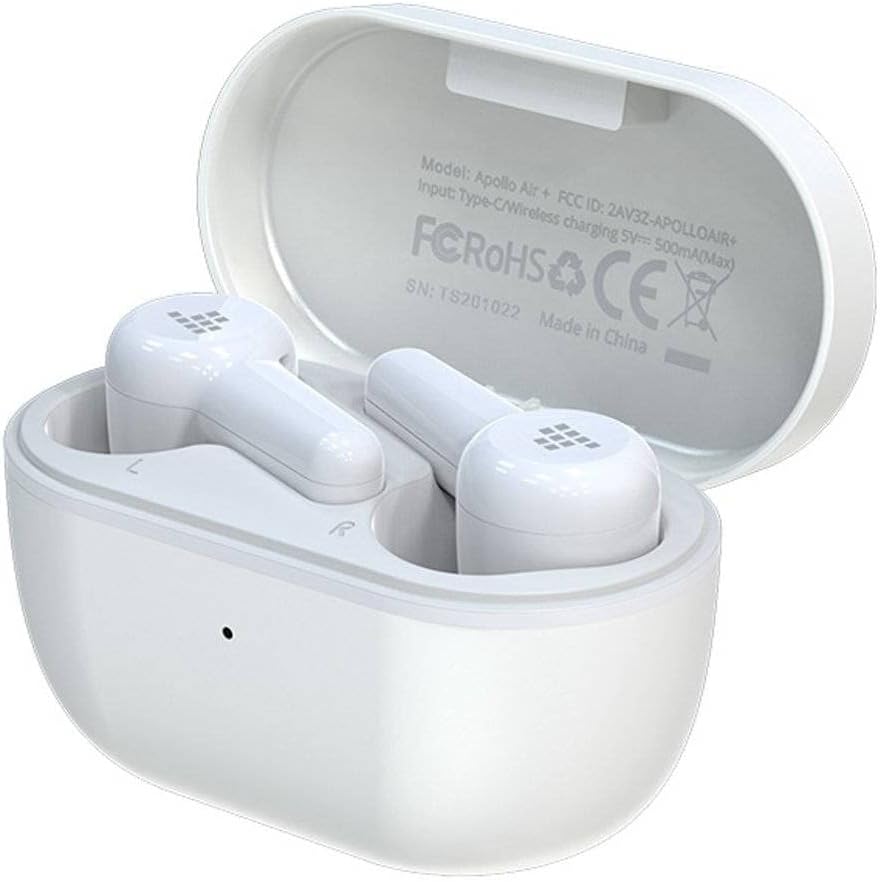
Image: Tronsmart Apollo Air TWS Earphones placed inside their open charging case. The case lid displays model information and certifications.

Image: Tronsmart Apollo Air TWS Earphones. One earbud is shown outside the charging case, highlighting its design and the charging contacts within the case.

Imej: Dari dekat view of the two Tronsmart Apollo Air TWS Earbuds, showcasing their ergonomic shape, ear tips, and touch control areas.
Persediaan
Mengecas Fon Telinga dan Sarung
- Mengecas Kes: Connect the provided USB charging cable to the charging port on the case and to a USB power adapter (not included) or a computer's USB port. The indicator light on the case will show charging status.
- Mengecas Fon Telinga: Place the earphones into the charging case. Ensure they are correctly seated in their respective slots (L for left, R for right). The earphones will automatically begin charging. The indicator lights on the earphones will show charging status.
- Fully charge the earphones and case before first use.
Berpasangan Bluetooth
- Gandingan Awal: Open the charging case. The earphones will automatically enter pairing mode, indicated by flashing lights (refer to product for specific light patterns).
- Pada peranti anda (telefon pintar, tablet, dll.), dayakan Bluetooth dan cari peranti yang tersedia.
- Select "Tronsmart Apollo Air" from the list of found devices.
- Sebaik sahaja disambungkan, gesaan suara atau lampu penunjuk akan mengesahkan pasangan yang berjaya.
- Berpasangan semula: If the earphones do not connect automatically, ensure Bluetooth is enabled on your device and the earphones are charged. You may need to manually select "Tronsmart Apollo Air" from your device's Bluetooth menu.
Operating the Earphones
Hidupkan/Mati Kuasa
- Hidupkan kuasa: Buka sarung pengecas atau keluarkan fon telinga daripada sarung. Mereka akan dihidupkan secara automatik.
- Matikan: Letakkan fon telinga kembali ke dalam bekas pengecasan dan tutup penutupnya. Mereka akan dimatikan secara automatik.
- Matikan Manual: (If supported) Long press the touch control area on both earbuds for approximately 5 seconds until the indicator light turns off.
Touch Controls (General)
The Tronsmart Apollo Air earphones feature touch-sensitive controls. Specific functions may vary slightly, but common operations include:
- Main/Jeda: Ketik sekali pada salah satu fon telinga.
- Lagu Seterusnya: Ketik dua kali pada fon telinga kanan.
- Trek Sebelumnya: Ketik dua kali pada fon telinga kiri.
- Jawab/Tamatkan Panggilan: Ketik sekali pada salah satu fon telinga.
- Tolak Panggilan: Tekan lama pada salah satu fon telinga selama 2 saat.
- Aktifkan Pembantu Suara: Ketik tiga kali pada salah satu fon telinga.
- Kawalan Kelantangan: (If supported) Long press on the right earbud to increase volume, long press on the left earbud to decrease volume.
Note: Refer to the quick start guide included in your package for precise touch control mappings if different from above.

Image: A smartphone screen showing an equalizer application with various sound presets (e.g., Default, Deep Bass, Hi-Fi, Rock, Vocal). The Tronsmart Apollo Air earphones and charging case are visible in the background, suggesting compatibility with audio customization apps.
Penyelenggaraan
Pembersihan
- Lap fon telinga dan bekas pengecas dengan lembut menggunakan kain lembut, kering dan tidak berbulu.
- Jangan gunakan pembersih yang melelas, alkohol atau pelarut kimia.
- Tanggalkan hujung telinga dan bersihkannya secara berasingan dengan sabun lembut dan air jika perlu, pastikan ia kering sepenuhnya sebelum dipasang semula.
- Ensure charging contacts on both the earphones and case are clean and free of debris.
Penyimpanan
- Apabila tidak digunakan, sentiasa simpan fon telinga dalam bekas pengecasnya untuk melindunginya dan memastikan ia dicas.
- Simpan peranti di tempat yang sejuk dan kering, jauh dari cahaya matahari langsung dan suhu yang melampau.
Menyelesaikan masalah
If you encounter issues with your Tronsmart Apollo Air earphones, please refer to the following common solutions:
Earphones not pairing or connecting
- Ensure both earphones are charged and taken out of the charging case.
- Matikan dan hidupkan Bluetooth pada peranti anda.
- Delete "Tronsmart Apollo Air" from your device's Bluetooth list and attempt to re-pair.
- Try resetting the earphones (refer to product-specific reset instructions if available, otherwise, place them back in the case, close, then reopen).
Tiada suara atau kelantangan rendah
- Periksa tahap kelantangan pada kedua-dua peranti anda yang disambungkan dan fon telinga.
- Pastikan fon telinga dipasang dengan betul di telinga anda.
- Confirm the earphones are connected to the correct audio output on your device.
- Clean any debris from the earphone speaker grilles.
Isu pengecasan
- Pastikan kabel pengecasan disambungkan dengan selamat pada kedua-dua bekas dan sumber kuasa.
- Sahkan sumber kuasa berfungsi.
- Clean the charging contacts on the earphones and inside the case.
- Cuba kabel pengecas USB atau penyesuai kuasa yang berbeza.
Spesifikasi
| Ciri | Perincian |
|---|---|
| Jenama | Tronsmart |
| Nama Model | Apollo Air |
| Nombor Model Item | 372452 |
| Ketersambungan | Bluetooth, Wayarles |
| warna | putih |
| Faktor Bentuk | In-Ear, Basic Case |
| bahan | Getah |
| Berat Barang | 100 g |
| Dimensi Produk | 10 x 5 x 3 cm |
| Tahap Ketahanan Air | Bukan Tahan Air |
| Model Telefon yang Serasi | Please check description (Generally compatible with most Bluetooth-enabled devices) |

Image: Technical diagram illustrating the precise dimensions of the Tronsmart Apollo Air charging case and individual earbuds in millimeters and inches.
Waranti dan Sokongan
Tronsmart products are designed and manufactured to the highest quality standards. For detailed warranty information, please refer to the warranty card included with your purchase or visit the official Tronsmart webtapak.
For technical support, troubleshooting assistance, or to inquire about replacement parts, please contact Tronsmart customer service through their official channels. Contact information can typically be found on the product packaging or the official Tronsmart webtapak.


