1. Pengenalan
Thank you for choosing the Qoltec 51556 65W Power Adapter. This manual provides essential information for the safe and efficient use of your new power adapter. Please read this manual thoroughly before using the product and keep it for future reference.
This AC adapter is designed to provide reliable power for compatible Lenovo laptop models featuring a square tip plug. It can serve as a primary or backup power supply for your device, offering 65W of usable power.
2. Maklumat Keselamatan
Untuk memastikan operasi yang selamat dan mengelakkan kerosakan, sila patuhi langkah berjaga-jaga keselamatan berikut:
- Jangan dedahkan penyesuai kepada air, lembapan atau suhu yang melampau.
- Elakkan daripada menjatuhkan atau meletakkan penyesuai kepada kesan yang kuat.
- Do not disassemble or attempt to repair the adapter yourself. Refer to qualified service personnel.
- Pastikan voltan salur keluar kuasatage matches the adapter's input requirements.
- Cabut plag penyesuai daripada salur keluar kuasa apabila tidak digunakan untuk tempoh yang lama.
- Keep the adapter away from heat sources and ensure proper ventilation during use.
- This adapter is equipped with advanced protections against overvoltage, short-circuit, overload, and thermal issues to enhance safety.
3. Produk Lebihview
The Qoltec 51556 Power Adapter is a compact and efficient power solution. It includes the main adapter unit, a power cable, and a Velcro strap for cable management.
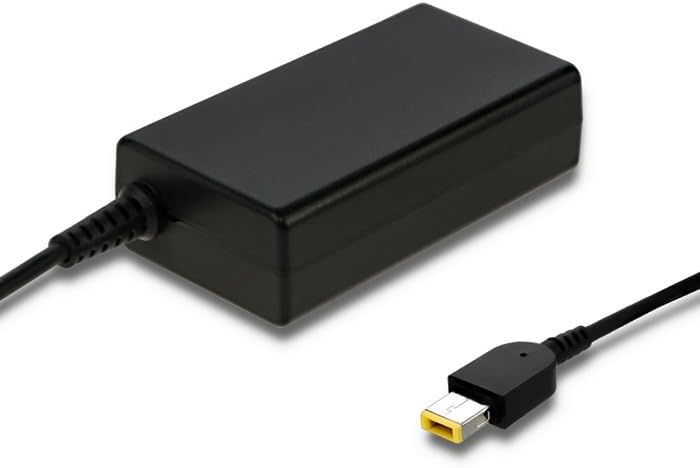
Figure 3.1: Qoltec 65W Power Adapter. This image shows the main adapter unit, a black rectangular block, with its integrated output cable ending in a yellow-tipped square connector, designed for compatible Lenovo laptops.
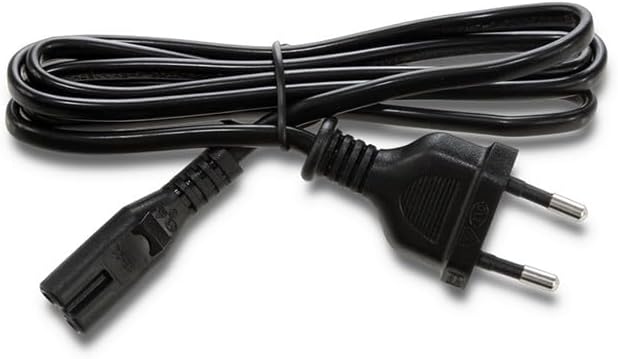
Figure 3.2: Detachable Power Cable. This image displays the black power cable, which connects the adapter to the wall outlet. It features a standard two-prong European plug on one end and a C5 (cloverleaf) connector on the other, which plugs into the adapter.
The adapter is designed for high energy efficiency and performance, ensuring fast and reliable charging for your laptop.
4. Persediaan
- Sambungkan Kabel Kuasa: Insert the C5 (cloverleaf) connector of the detachable power cable firmly into the corresponding port on the Qoltec 51556 power adapter.
- Sambung ke Laptop: Plug the square tip connector of the adapter's output cable into the power input port of your compatible Lenovo laptop. Ensure it is fully inserted.
- Sambung ke Alur Kuasa: Insert the two-prong plug of the power cable into a standard, grounded wall power outlet.
- Sahkan Sambungan: Once connected, your laptop should indicate that it is receiving power or charging.
5. Beroperasi
Once properly set up, the Qoltec 51556 Power Adapter will automatically begin supplying power to your laptop and charging its battery. No additional user interaction is typically required for basic operation.
- The adapter is designed for continuous use as a primary or backup power source.
- Monitor your laptop's charging indicator to confirm proper power delivery.
- For optimal battery health, avoid frequently draining your laptop battery completely before recharging.
6. Penyelenggaraan
- Pembersihan: Disconnect the adapter from all power sources before cleaning. Use a soft, dry cloth to wipe the surface. Do not use liquid cleaners or aerosols.
- Storan: When not in use, store the adapter in a cool, dry place. Use the included Velcro strap to neatly manage the cables.
- Pengendalian: Avoid bending or crimping the cables excessively, as this can damage the internal wires. Always grasp the plug when disconnecting from an outlet, rather than pulling the cable.
7. Penyelesaian masalah
| Masalah | Kemungkinan Punca | Penyelesaian |
|---|---|---|
| Laptop tidak dicas. | Adapter not properly connected to power outlet or laptop. | Ensure all connections are secure and fully inserted. Try a different power outlet. |
| Penyesuai terasa panas. | Normal operation under load; poor ventilation. | Ensure the adapter is in a well-ventilated area and not covered. If excessively hot or emitting smoke/smell, disconnect immediately. |
| Laptop not recognizing adapter. | Incompatible laptop model; damaged adapter/cable. | Verify your laptop model requires a 65W adapter with a square tip. Inspect cables for damage. |
8. Spesifikasi
| Ciri | Perincian |
|---|---|
| Jenama | Qoltec |
| Nombor Model | 51556 |
| Output Kuasa | 65 Watt |
| warna | Hitam |
| Keserasian | Individual Lenovo laptop models with square tip plug |
| Input Voltage | Standard AC (details not specified, typical for region) |
| Perlindungan | Overvoltage, Short-circuit, Overload, Thermal Protection |
9. Waranti dan Sokongan
Warranty information for the Qoltec 51556 Power Adapter is typically provided at the point of purchase or can be found on the official Qoltec webtapak. Sila simpan bukti pembelian anda untuk tuntutan waranti.
For technical support, troubleshooting assistance beyond this manual, or warranty inquiries, please contact Qoltec customer service or the retailer from whom you purchased the product. Contact details are usually available on the manufacturer's official webtapak atau pembungkusan produk.


