1. Pengenalan
This manual provides comprehensive instructions for the assembly, operation, and maintenance of your FLEXISPOT EN2 Electric Height Adjustable Standing Desk. Please read this manual thoroughly before assembly and use to ensure safe and efficient operation.
The FLEXISPOT EN2 desk features a spacious one-piece desktop, an electric height adjustment system with memory presets, and a removable clamp power strip for convenient device charging and cable management. It is designed to support a dynamic work environment, allowing seamless transitions between sitting and standing positions.
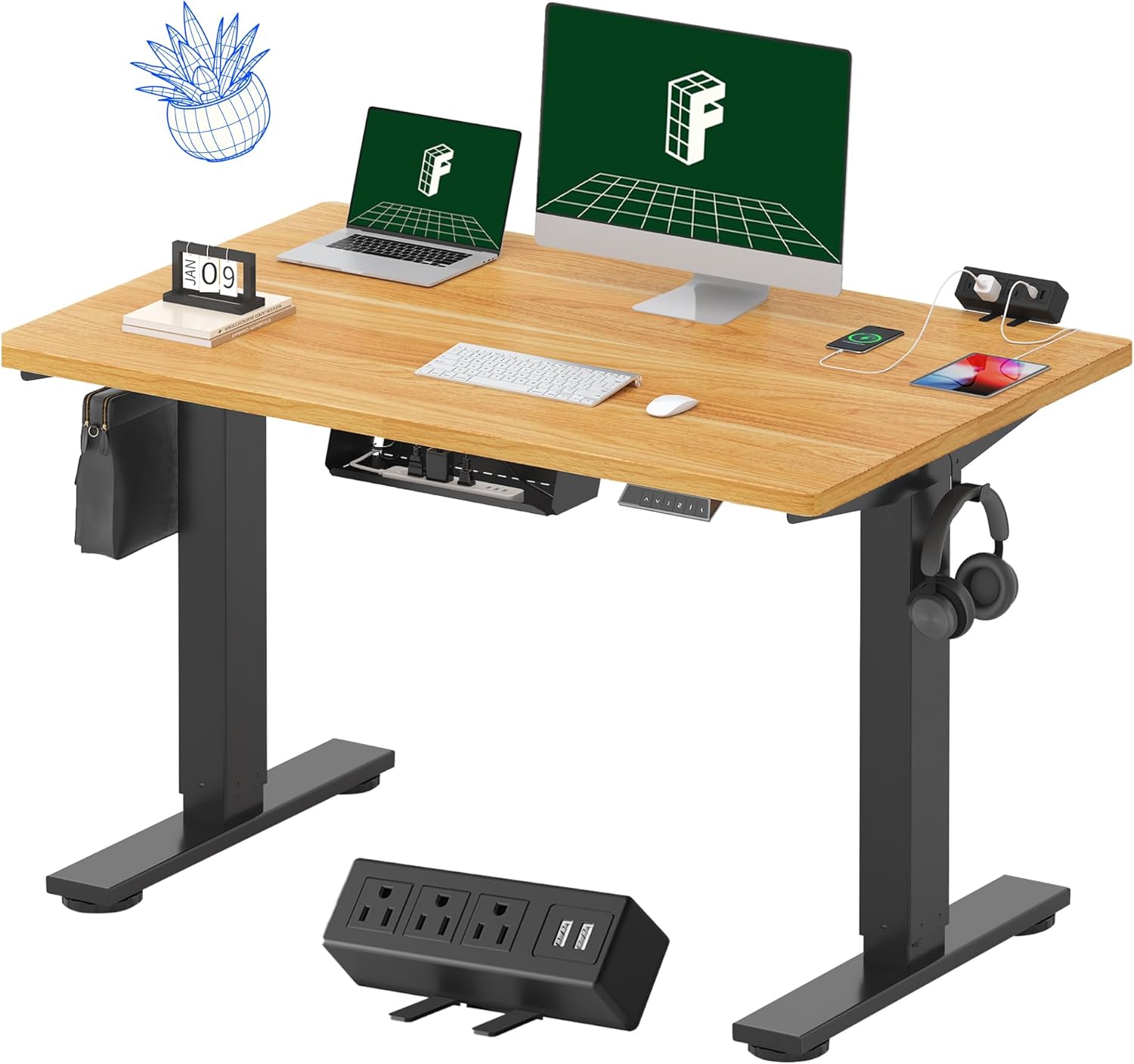
Image 1.1: FLEXISPOT EN2 Standing Desk with Maple Top and Black Frame, showcasing a typical setup with monitors, a laptop, and a clamp jalur kuasa.
2. Maklumat Keselamatan
AMARAN: Kegagalan mematuhi arahan keselamatan ini boleh mengakibatkan kecederaan atau kerosakan pada produk.
- Sentiasa ikut arahan pemasangan dengan teliti.
- An electric drill (not included) may be required for assembly.
- Ensure the desk is properly anchored to prevent tipping.
- Jangan melebihi berat maksimum yang disyorkan iaitu 176 paun (80 kg).
- Keep the work surface clear of items that could fall and cause injury during height adjustments.
- Always unplug the desk before performing any maintenance or making adjustments to the frame or electrical components.
- Jauhkan kanak-kanak dan haiwan peliharaan dari meja semasa operasi.
3. Kandungan Pakej
Your FLEXISPOT EN2 Standing Desk will arrive in two separate packages, which may be shipped separately. Please ensure you have received both packages and all components before beginning assembly.

Image 3.1: Illustration showing the desk components arriving in two separate packages: one for the desktop and one for the desk frame.
Komponen yang Disertakan:
- One-piece desktop (48" x 30" Maple Top)
- Electric height-adjustable frame (Black)
- 6-button digital controller with 4 memory presets
- Removable clamp power strip (3 AC outlets, 2 USB charging ports)
- Cable management device
- Assembly hardware and tools (excluding electric drill)
4. Persediaan dan Pemasangan
Assembly typically requires two people and an electric drill (not included). Follow the detailed instructions provided in the separate assembly guide included with your product. The process involves attaching the legs to the desktop and connecting the control panel and motor.
Petua Perhimpunan:
- Letakkan semua komponen pada permukaan yang lembut dan bersih untuk mengelakkan calar.
- Pastikan semua skru diketatkan dengan kukuh, tetapi jangan terlalu ketat.
- Properly route all cables using the provided cable management solutions to avoid interference with desk movement.
Video 4.1: Official FLEXISPOT Standing Desk Frame Installation Guide. This video demonstrates the step-by-step process of assembling the desk frame and attaching it to the desktop.
5. Arahan Operasi
5.1 Panel Kawalan Digital
The desk is operated using a 6-button digital controller, typically mounted on the underside of the desktop. It features up/down arrows, an LED display for height, and four programmable memory presets.

Image 5.1: Digital control panel with LED display showing current height, up/down arrows, and four numbered memory preset buttons.
5.2 Pelarasan Ketinggian
- Tekan dan tahan butang Up Arrow (^) butang untuk menaikkan meja.
- Tekan dan tahan butang Down Arrow (v) butang untuk menurunkan meja.
- The desk adjusts smoothly from 28.1 inches (71.4 cm) to 45.7 inches (116.1 cm).
- The motor operates quietly at less than 50 dB.
5.3 Menetapkan Pratetap Memori
The controller allows you to save up to four preferred height settings for quick adjustments.
- Laraskan meja mengikut ketinggian yang diingini menggunakan anak panah atas/bawah.
- Tekan ke Ingatan (M) butang. Paparan LED akan berkelip.
- Dalam masa 3 saat, tekan salah satu butang pratetap bernombor (1, 2, 3, atau 4) untuk menyimpan ketinggian semasa pada pratetap tersebut.
- Untuk mengingat semula ketinggian yang disimpan, hanya tekan butang pratetap bernombor yang sepadan. Meja akan bergerak secara automatik ke kedudukan yang disimpan.
Video 5.2: FlexiSpot Brand Store video demonstrating the desk's height adjustment and memory preset functions.
6. Ciri-ciri
6.1 One-Piece Desktop
The desk features a spacious, single-piece desktop made of FSC-Certified wood. This design provides a smooth, seamless work surface, enhancing stability and aesthetics compared to multi-piece desktops.

Image 6.1: Visual comparison highlighting the smooth surface of a single-piece desktop against the visible seams of a two-piece desktop.
6.2 Removable Clamp Strip Kuasa
A desktop-mounted power strip is included, featuring 3 AC outlets (125V/12A) and 2 USB charging ports (5V/2A). This allows for convenient charging of electronic devices directly from your desk. The power strip can be clipped to the back or side of your desk.

Image 6.2: Close-up of the removable clamp power strip, detailing its 3 AC outlets and 2 USB-A ports, and how it attaches to the desk edge.
6.3 Pengurusan Kabel
The desk includes a cable management device to help organize and tidy up your workspace, preventing cables from dangling and interfering with desk movement.

Image 6.3: Illustration demonstrating effective cable management with an under-desk tray, showing a tidy setup compared to unmanaged cables.
7. Penyelenggaraan
- Regularly inspect all screws and connections to ensure they are tight.
- Bersihkan permukaan desktop dengan kain lembut,amp kain. Elakkan pembersih yang melelas yang boleh merosakkan kemasan.
- Pastikan motor dan komponen elektrik bebas daripada habuk dan kelembapan.
- Do not place hot items directly on the desktop without protective coasters.
8. Penyelesaian masalah
8.1 Desk Not Moving or Displaying Error Code (e.g., "r5t")
If your desk is not responding or the LED display shows an error code like "r5t", a system reset may be required.
- Unplug the desk from the power outlet.
- Tunggu sekurang-kurangnya 10-15 saat.
- Plug the desk back into the power outlet.
- Press and hold the "Down Arrow (v)" button until the desk reaches its lowest position and then slightly rises. This indicates a successful reset.
- Jika masalah berterusan, hubungi sokongan pelanggan.
8.2 Desk Wobbling at Higher Heights
While the desk is designed for stability, minor wobbling can occur at maximum heights. Ensure the adjustable feet on the leg bases are properly leveled to compensate for uneven flooring.
9. Spesifikasi
| Ciri | Spesifikasi |
|---|---|
| Jenama | FLEXISPOT |
| Model | EN2 |
| Bahan Desktop | FSC-Certified Maple Wood |
| Dimensi Desktop | 48" (W) x 30" (D) |
| Ketebalan Desktop | 1 inci |
| Bahan Bingkai | Industrial-grade Alloy Steel (Black) |
| Julat Pelarasan Tinggi | 28.1" hingga 45.7" (71.4 sm hingga 116.1 sm) |
| Tahap Kebisingan Motor | < 50 dB |
| Kapasiti Berat | 176 paun (80 kg) |
| Panel Kawalan | 6-button digital controller with 4 memory presets |
| Outlet Kuasa | 3 AC outlets (125V/12A), 2 USB charging ports (5V/2A) |
| Perhimpunan Diperlukan | Yes (electric drill recommended) |
10. Waranti dan Sokongan
10.1 Maklumat Waranti
- Waranti 5 Tahun: Covers frames, motors, and other mechanical devices.
- Waranti 2 Tahun: Covers controllers, switches, and electronics.
Sila simpan bukti pembelian anda untuk tuntutan jaminan. Jaminan ini meliputi kecacatan bahan dan mutu kerja di bawah penggunaan biasa.
10.2 Sokongan Pelanggan
For any questions, troubleshooting assistance, or warranty claims, please contact FLEXISPOT customer support through their official webtapak atau peruncit tempat anda membeli produk tersebut.