1. Pengenalan
Terima kasih kerana membeliasing the iOCHOW SZJ4 Micro-Cut Shredder. This manual provides essential information for the safe and efficient operation, maintenance, and troubleshooting of your new shredder. Please read this manual thoroughly before use and retain it for future reference.
2. Arahan Keselamatan
Untuk memastikan operasi yang selamat dan mengelakkan kerosakan, sila patuhi langkah berjaga-jaga keselamatan berikut:
- Keep fingers, loose clothing, hair, and ties away from the paper entry slot.
- Jangan carik objek logam, label pelekat atau kertas basah.
- Sentiasa cabut plag mesin pencincang sebelum mengalihkan, membersihkan atau mengosongkan tong sampah.
- Jangan biarkan kanak-kanak atau haiwan peliharaan berhampiran mesin pencincang.
- Operate the shredder on a flat, stable surface.
- Do not place the shredder near heat sources or in direct sunlight.
- Avoid overloading the shredder beyond its specified sheet capacity.
- The shredder is equipped with overheat protection. If the motor becomes too hot, it will automatically stop. Allow it to cool down before resuming operation.
- The shredder will not operate if the dust box is removed, ensuring safety during waste disposal.
3. Produk Lebihview
3.1 Ciri-ciri Utama
- Micro-Cut Technology: Shreds documents into small 4x10mm particles for enhanced security.
- Kapasiti Tinggi: Shreds up to 12 sheets of A4 paper per pass.
- Operasi Berterusan: Designed for approximately 20 minutes of continuous shredding.
- Versatile Shredding: Capable of shredding paper and plastic cards.
- Persembahan Senyap: Operates at a low noise level of ≤60dB.
- Mekanisme Keselamatan: Includes overheat protection and automatic shut-off when the dust box is removed.
- Convenient Waste Management: Features an 18L large capacity dust box with a transparent window for easy monitoring.
- Pencegahan Kesesakan: Equipped with a reverse function to clear paper jams.
3.2 Spesifikasi
| Ciri | Spesifikasi |
|---|---|
| Jenis Keratan | Potongan mikro |
| Jenama | iOCHOW |
| Kapasiti | 18 Liter |
| warna | putih |
| Standard Sheets (A4) | 12 helai |
| Saiz Potong | 4x10mm |
| Jenis Kuasa | AC100V 50 / 60Hz |
| Penggunaan Kuasa Ternilai | 140W |
| Masa Penggunaan Berterusan | 20 minit |
| Mod Operasi | Automatik |
| Dimensi Item (D x W x H) | 22.5 x 33 x 49 cm |
| Berat Barang | 8.17 kg (Product), 9.33 kg (Shipping) |
| Nombor Model Pengeluar | SZJ4 |
4. Persediaan
- Bongkar: Tanggalkan mesin pencincang dari pembungkusannya dengan berhati-hati.
- jawatan: Place the shredder on a flat, stable surface. Ensure there is adequate space around the unit for ventilation.
- Sambungkan Kuasa: Plug the power cord into a standard AC100V 50/60Hz electrical outlet.
- Check Dust Box: Ensure the dust box is correctly inserted into the shredder. The shredder will not operate if the dust box is not fully in place.

5. Arahan Operasi
5.1 Kuasa Hidup/Mati dan Pemilihan Mod
- Locate the power switch/mode selector on the top of the shredder.
- Mod AUTO: Set the switch to 'AUTO'. The shredder will automatically start when paper is inserted and stop when shredding is complete.
- Mod MATI: Set the switch to 'OFF' to turn off the shredder.
- REV (Reverse) Mode: Set the switch to 'REV' to reverse the shredding blades. This is used to clear paper jams.
5.2 Kertas Penghancur
- Ensure the shredder is in 'AUTO' mode.
- Insert up to 12 sheets of A4 paper straight into the paper entry slot. Do not force paper into the slot.
- The shredder will automatically begin shredding.
- After shredding, the machine will stop automatically.
- Allow the shredder to cool down for at least 40 minutes after 20 minutes of continuous use to prevent overheating.

5.3 Shredding Plastic Cards
- Ensure the shredder is in 'AUTO' mode.
- Insert one plastic card at a time into the dedicated card entry slot (if available, or the main paper slot if not separate).
- The shredder will process the card and stop automatically.
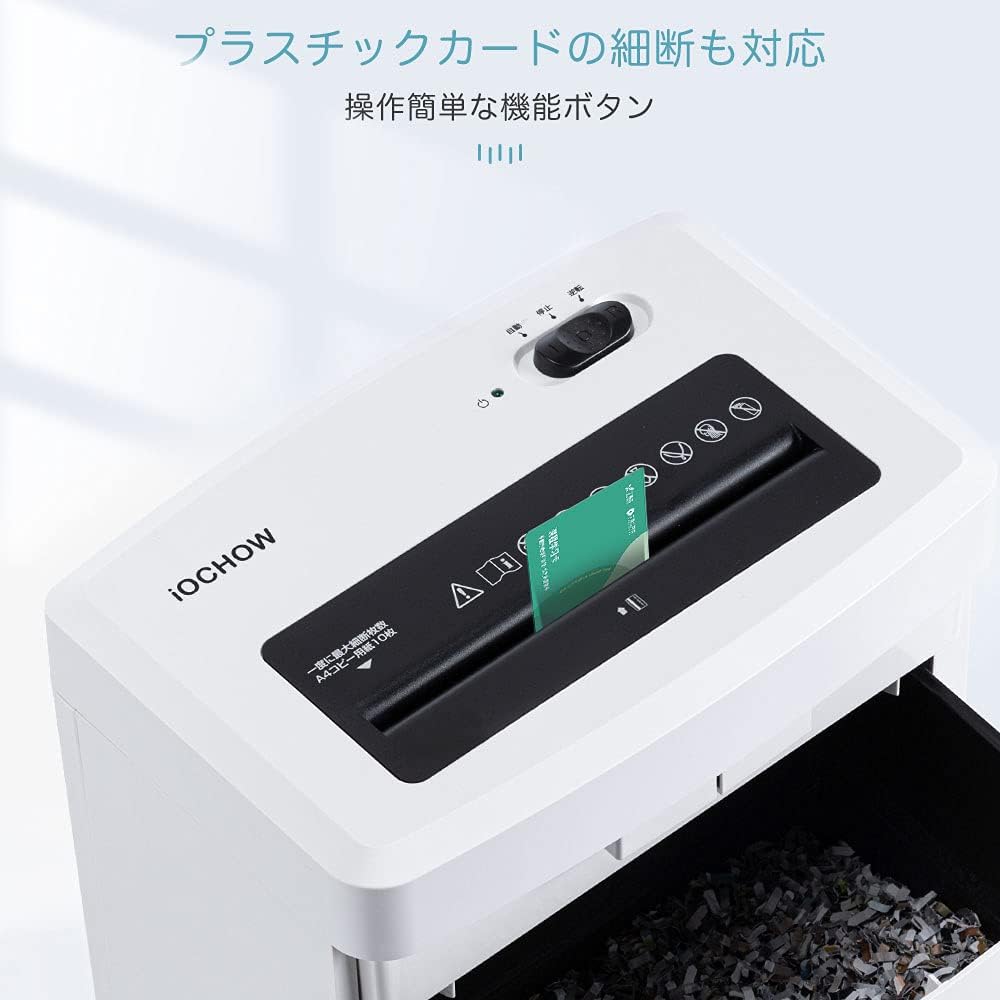
5.4 Demonstrasi Video
6. Penyelenggaraan
6.1 Emptying the Dust Box
- Always turn off and unplug the shredder before emptying the dust box.
- Pull out the dust box from the front of the shredder. The shredder will automatically stop if the box is removed during operation.
- Dispose of the shredded waste.
- Slide the dust box back into the shredder until it clicks securely into place.

6.2 Cleaning the Shredder
- Ensure the shredder is unplugged.
- Lap bahagian luar mesin pencincang dengan kain lembut dan kering. Jangan gunakan pembersih atau pelarut yang kasar.
- Do not spray any liquids directly onto the shredder.
6.3 Oiling the Blades (Recommended)
Regularly oiling the shredder blades helps maintain performance and prolong the life of the unit. Use shredder oil sheets or liquid shredder oil (sold separately).
- Apply shredder oil across a sheet of paper or use an oil sheet.
- Feed the oiled paper into the shredder in 'AUTO' mode.
- After shredding, switch to 'REV' mode for a few seconds to distribute the oil.
- Switch back to 'OFF' mode.
7. Penyelesaian masalah
| Masalah | Kemungkinan Punca | Penyelesaian |
|---|---|---|
| Shredder tidak boleh dihidupkan. | Not plugged in; Power switch is off; Dust box not properly inserted. | Ensure power cord is securely plugged in. Set power switch to 'AUTO'. Reinsert dust box correctly. |
| Kertas jem. | Too much paper inserted; Paper inserted incorrectly. | Switch to 'REV' mode to clear the jam. If necessary, unplug, remove paper manually, then plug in and try 'REV' again. Reduce paper quantity for next shredding. |
| Mesin penghancur berhenti semasa operasi. | Overheat protection activated; Dust box is full or removed. | Allow the shredder to cool down for 40 minutes. Empty the dust box and ensure it is properly inserted. |
| Shredded paper is not fine enough. | Not applicable for micro-cut shredders (always fine). | Ensure the shredder is functioning correctly. The iOCHOW SZJ4 is a micro-cut shredder, producing 4x10mm particles. |
8. Waranti dan Sokongan
The iOCHOW SZJ4 Micro-Cut Shredder comes with a Waranti 1 tahun dari tarikh pembelian. Waranti ini melindungi kecacatan pada bahan dan mutu kerja di bawah penggunaan biasa.
For warranty claims, technical support, or any questions regarding your product, please contact iOCHOW customer service through the retailer where you purchased the product or visit the official iOCHOW webtapak untuk maklumat hubungan.
Please have your model number (SZJ4) and proof of purchase ready when contacting support.

