pengenalan
This manual provides detailed instructions for the Google Pixel Buds A-Series wireless earbuds. These earbuds are designed to deliver high-quality audio and feature a comfortable, secure fit with multiple eartip sizes and a stabilizer arc. They are compatible with Android, iOS, and other Bluetooth 4.0+ devices.
Apa yang ada dalam Kotak
- Google Pixel Buds A-Series Earbuds
- Kes Pengecasan
- Kabel Pengecas USB-C
- Hujung Telinga (Kecil, Sederhana, Besar)
- Panduan Mula Pantas (tidak termasuk dalam manual digital ini)

Image: Google Pixel Buds A-Series earbuds securely placed within their white charging case, which is open to reveal the earbuds.
Persediaan
1. Gandingan Awal
For Android Devices (One-Tap Pairing):
- Ensure your Android device is unlocked and has Bluetooth enabled.
- Open the charging case of your Pixel Buds A-Series next to your Android device.
- A pairing notification will appear on your device's screen. Tap to connect.
- Follow any on-screen prompts to complete the setup, including installing the Pixel Buds app for additional features.
For iOS and Other Bluetooth 4.0+ Devices:
- With the earbuds in the charging case, open the lid.
- Press and hold the pairing button on the back of the charging case until the status light begins to pulse white.
- On your device, navigate to Bluetooth settings and select "Pixel Buds A-Series" from the list of available devices.
- Confirm the pairing on your device.
2. Mencapai Kesesuaian yang Selamat
The Pixel Buds A-Series come with three sizes of eartips (small, medium, large) and a flexible stabilizer arc to ensure a comfortable and secure fit.
- Experiment with different eartip sizes to find the best seal for your ears. A good seal is crucial for optimal sound quality and bass response.
- Gently insert each earbud into your ear, rotating slightly until the stabilizer arc tucks comfortably into your ear's concha.

Imej: Dari dekat view of a single Google Pixel Bud A-Series earbud, highlighting its ergonomic design, eartip, and stabilizer arc.
Arahan Operasi
1. Kawalan Sentuh
The Pixel Buds A-Series feature touch controls on the outer surface of each earbud.
- Ketuk tunggal: Main/Jeda audio, Jawab/Tamatkan panggilan.
- Tekan dua kali: Skip forward a track, Decline call.
- Ketuk Tiga Kali: Skip backward a track.
- Tekan dan Tahan: Activate Google Assistant (Android only), or hear notifications.
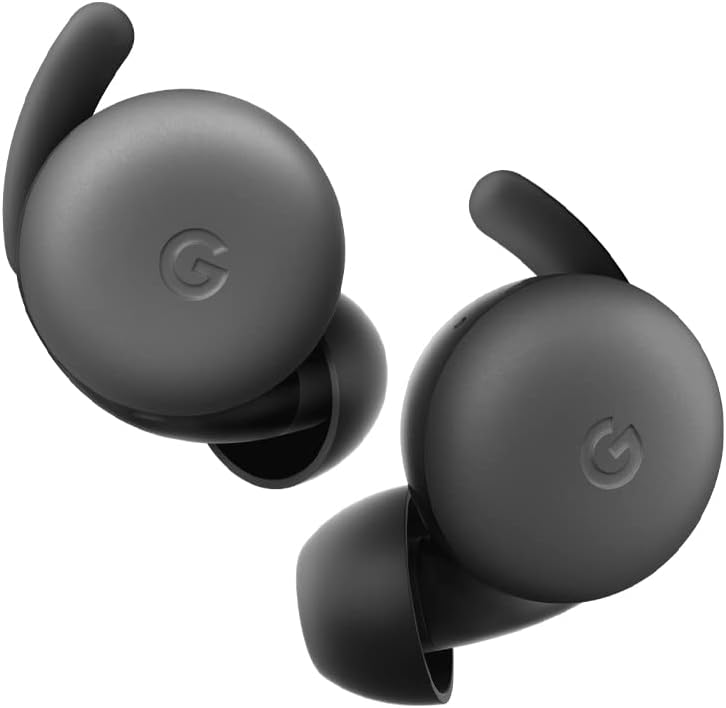
Image: A pair of Google Pixel Buds A-Series earbuds, showcasing their compact design and the 'G' logo on the touch-sensitive surface.
2. Google Assistant Integration
With a compatible Android device, you can access Google Assistant directly from your Pixel Buds A-Series.
- Say "Hey Google" or "Ok Google" to activate the Assistant hands-free.
- Alternatively, press and hold either earbud to speak to Google Assistant.
- You can ask for directions, check weather, control music, or have notifications read aloud.
3. Mengecas
The Pixel Buds A-Series provide up to 5 hours of listening time or 2.5 hours of talk time on a single charge. The charging case extends this to up to 24 hours of total listening time.
- To charge the earbuds, place them inside the charging case. The indicator light on the case will show their charging status.
- To charge the case, connect it to a USB-C power source using the provided cable. The case's indicator light will show its charging status.
Penyelenggaraan
1. Pembersihan
- Bersihkan fon telinga dan bekas pengecas anda dengan kerap untuk mengekalkan prestasi dan kebersihan.
- Use a soft, dry, lint-free cloth to wipe the exterior of the earbuds and case.
- For eartips, gently remove them and clean with a mild soap solution and water, then rinse and dry thoroughly before reattaching.
- Elakkan menggunakan bahan yang melelas atau bahan kimia yang keras.
2. Penyimpanan
- Always store the Pixel Buds A-Series in their charging case when not in use to protect them and keep them charged.
- Simpan di tempat yang sejuk dan kering, jauh daripada suhu ekstrem dan cahaya matahari langsung.
Menyelesaikan masalah
If you encounter issues with your Pixel Buds A-Series, try the following steps:
- Tiada Bunyi atau Sambungan Terputus-putus:
- Pastikan kedua-dua fon telinga dicas.
- Check that Bluetooth is enabled on your device and the earbuds are connected.
- Try placing the earbuds back in the case, closing the lid for a few seconds, then reopening to reset the connection.
- Lupakan peranti dalam tetapan Bluetooth telefon anda dan pasangkan semula.
- Pastikan peranti anda berada dalam julat Bluetooth (sehingga 10 meter).
- Fon telinga Tidak Mengecas:
- Pastikan kes pengecas itu sendiri dicas.
- Verify that the earbuds are correctly seated in the charging case.
- Bersihkan sesentuh pengecasan pada kedua-dua fon telinga dan di dalam bekas dengan kapas kering.
- Cuba kabel USB-C dan penyesuai kuasa yang berbeza.
- Kualiti Bunyi Lemah:
- Ensure you have a secure fit with the correct eartip size.
- Clean the earbud mesh and eartips.
- Check your device's audio settings and equalizer.
Spesifikasi
| Nama Model | Pixel Buds A-Series |
| Teknologi Ketersambungan | Wayarles (Bluetooth 5.0) |
| Peranti Serasi | Android, iOS, and Bluetooth 4.0+ devices |
| Hayat Bateri (Earbud) | Sehingga 5 jam mendengar, 2.5 jam masa bercakap |
| Hayat Bateri (dengan Sarung Pengecasan) | Up to 24 hours listening |
| Tahap Ketahanan Air | Water Resistant (IPx4 rating for earbuds) |
| Jenis Kawalan | Touch (Media Control, Google Assistant) |
| Berat Barang | 1.9 auns (jumlah) |
| Dimensi (Fon Telinga) | 0.81 x 1.15 x 0.69 inci |
| Julat Kekerapan | 20 Hz - 20,000 Hz |
| Julat Bluetooth | 10 Meter |
Waranti dan Sokongan
For detailed warranty information and customer support, please refer to the official Google Pixel Buds support website. You can typically find support resources, FAQs, and contact options at g.co/pixelbuds/help.
The Pixel Buds A-Series are designed to be repairable, but any repair, disassembly, or damage may affect the water resistance rating.


