pengenalan
The OCOOPA HotPal Rechargeable Hand Warmer is a portable and versatile device designed to provide warmth and serve as a power bank for your electronic devices. Constructed from durable aircraft-grade aluminum and ABS material, it features double-sided fast heating with three adjustable temperature levels, making it suitable for various outdoor activities and cold conditions. This manual provides essential information for the safe and effective use of your HotPal hand warmer.

Figure 1: OCOOPA HotPal Rechargeable Hand Warmer (Blue Two-Pack)
Ciri-ciri Produk
- Double-sided Fast Heating: Provides rapid warmth on both sides of the device.
- Three Temperature Levels: Adjustable heat settings ranging from 95°F to 131°F (35°C to 55°C) to suit individual preferences.
- Bateri Boleh Dicas Semula 5200mAh: Offers extended operating time and doubles as a portable power bank.
- Port Pengecasan USB-C: Convenient and fast charging for the hand warmer and external devices.
- Pembinaan Tahan Lama: Made from aircraft-grade aluminum and ABS material for durability and a comfortable, anti-skid grip.
- Reka Bentuk Mudah Alih: Compact and lightweight, designed to fit comfortably in your pocket or hand.

Figure 2: Double-sided Heating Feature

Figure 3: Three Temperature Settings
Persediaan
Membuka Kotak dan Caj Permulaan
Upon receiving your OCOOPA HotPal hand warmer, carefully unbox all components. The package typically includes two HotPal rechargeable hand warmers, a carrying pouch, charging cables, and a USB converter. It is recommended to fully charge the device before its first use.

Rajah 4: Kandungan Pakej
- Connect the provided USB-C charging cable to the hand warmer's charging port.
- Sambungkan hujung kabel yang satu lagi ke penyesuai kuasa USB (tidak disertakan) atau port USB komputer.
- The indicator lights will illuminate to show the charging status. A full charge typically takes approximately 3 hours.
Arahan Operasi
Power On/Off and Heat Adjustment
The OCOOPA HotPal features a single button for easy operation.
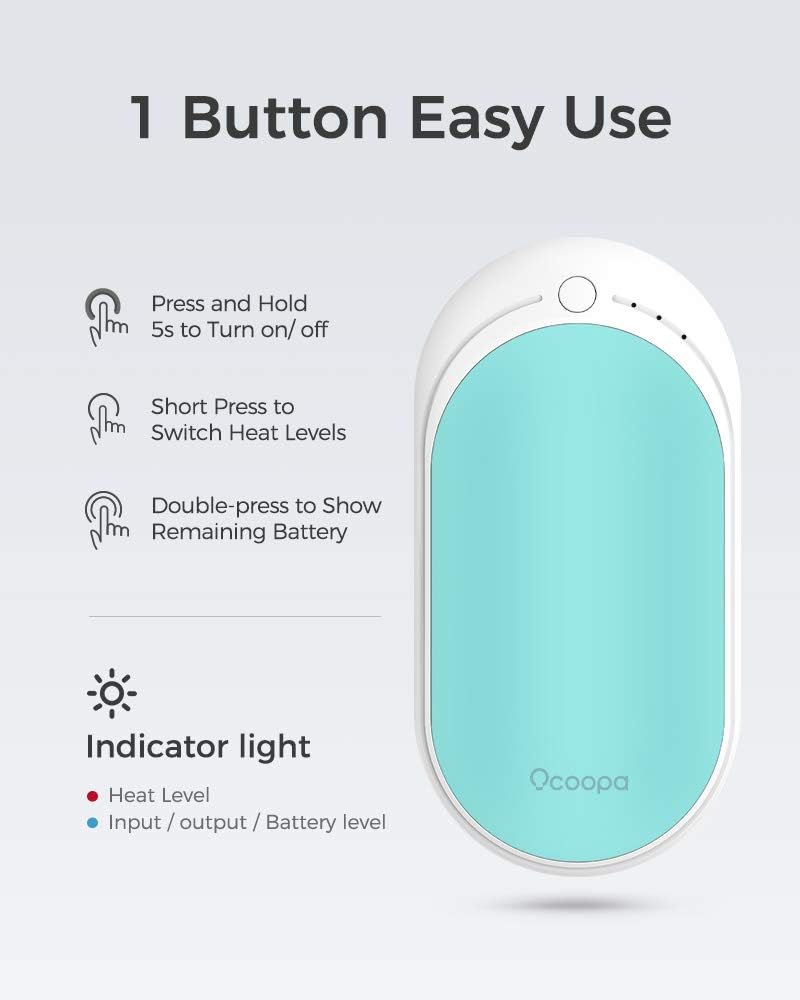
Figure 5: One Button Easy Use
- Untuk Menghidupkan/Mematikan: Press and hold the power button for approximately 5 seconds. The indicator lights will show the current heat level or turn off.
- To Adjust Heat Levels: Once powered on, short press the power button to cycle through the three heat settings:
- 1 Red Light: Low (95-107.6°F / 35-42°C)
- 2 Red Lights: Medium (104-118.4°F / 40-48°C)
- 3 Red Lights: High (118.4-131°F / 48-55°C)
- To Check Remaining Battery: Double-press the power button. The indicator lights will briefly show the battery level.
Menggunakan sebagai Power Bank
The OCOOPA HotPal can also charge your mobile devices.

Rajah 6: Kefungsian Power Bank
- Connect your device's charging cable to the USB-C port on the hand warmer.
- The hand warmer will automatically begin charging your device.
- Note that using the hand warming function simultaneously with the power bank function may reduce the overall battery life.
Penyelenggaraan
Pembersihan dan Penyimpanan
- Ensure the device is turned off and cool before cleaning.
- Wipe the surface with a soft, dry cloth. Do not use abrasive cleaners or immerse the device in water.
- Store the hand warmer in a cool, dry place away from direct sunlight and extreme temperatures.
- For long-term storage, charge the device to approximately 50% every three months to maintain battery health.
Menyelesaikan masalah
| Masalah | Kemungkinan Punca | Penyelesaian |
|---|---|---|
| Peranti tidak dihidupkan. | Low battery or incorrect power-on procedure. | Charge the device fully. Ensure you press and hold the power button for 5 seconds. |
| Peranti tidak memanaskan. | Not in heating mode or low battery. | Short press the power button to select a heat level. Charge the device if battery is low. |
| Device not charging external device. | Cable issue, external device issue, or low hand warmer battery. | Ensure the cable is securely connected. Try a different cable or external device. Charge the hand warmer. |
| Hayat bateri pendek. | High heat setting usage, frequent power bank use, or aging battery. | Use lower heat settings when possible. Avoid simultaneous heating and charging. Battery capacity naturally decreases over time. |
Spesifikasi
| Spesifikasi | Perincian |
|---|---|
| Jenama | OCOOPA |
| Nombor Model | ZLS-118S |
| warna | Blue Two-Pack |
| bahan | Aircraft-grade Aluminum, ABS |
| Kapasiti Bateri | 5200mAh Litium-Ion |
| Masa Mengecas | Lebih kurang 3 Jam |
| Penarafan Suhu Lebih Rendah | 95 Darjah Fahrenheit (35°C) |
| Penarafan Suhu Atas | 131 Darjah Fahrenheit (55°C) |
| Berat Barang | 250 Gram |
| Dimensi Item (LxWxH) | 2.09 x 1.07 x 4.23 inci |
| Komponen yang Disertakan | 2*Hotpal rechargeable hand warmer, carrying pouch, charging cables, USB convertor |
Maklumat Keselamatan
Sila baca dan patuhi garis panduan keselamatan ini untuk mengelakkan kecederaan atau kerosakan pada peranti:
- Do not expose the device to extreme temperatures (above 140°F/60°C or below 0°F/-18°C) or direct sunlight for prolonged periods.
- Jangan tebuk, buka atau ubah suai peranti.
- Keep away from water and other liquids. Do not operate with wet hands.
- Do not use if the device appears damaged or swollen.
- Jauhkan daripada kanak-kanak dan haiwan peliharaan.
- Gunakan hanya kabel pengecasan yang disediakan atau diperakui.
- Jika peranti menjadi terlalu panas, hentikan penggunaan dengan segera.
- Lupuskan peranti ini secara bertanggungjawab mengikut peraturan tempatan untuk sisa elektronik.

Rajah 7: Ciri Keselamatan Dalaman
Video Produk Rasmi
Video 1: Giving the gift of warmth and comfort. This video demonstrates the OCOOPA HotPal hand warmer's features, including its quick heating, portability, and use as a power bank, showcasing its versatility for various situations and as a thoughtful gift.
Waranti dan Sokongan
For warranty information, technical support, or any inquiries regarding your OCOOPA HotPal hand warmer, please refer to the warranty card included in your product packaging or visit the official OCOOPA store online:
Please have your model number (ZLS-118S) and purchase details ready when contacting support.


