1. Pengenalan
Thank you for choosing the LDNIO 10W Max Wireless Charger Pad. This device provides convenient and efficient wireless charging for your Qi-enabled devices. Please read this manual carefully before use to ensure proper operation and to maximize the product's lifespan.
Key features include 10W fast charging capability, compatibility with phone cases up to 5mm thick, Qi certification, and integrated safety mechanisms such as overcharge protection and heat dissipation.

LDNIO 10W Max Wireless Charger Pad, top view, showing the white charging surface with a red center and a power button on the side.
2. Kandungan Pakej
Sila semak pakej untuk item berikut:
- 1 x LDNIO 10W Max Wireless Charger Pad (Model AW001)
- 1 x Kabel Pengecas USB
- 1 x Manual Pengguna (dokumen ini)
3. Arahan Persediaan
- Connect the provided USB charging cable to the USB-C port on the LDNIO Wireless Charger Pad.
- Plug the other end of the USB cable into a compatible power adapter (not included). For optimal fast charging, use a Quick Charge 2.0/3.0 or Power Delivery (PD) compatible adapter.
- Letakkan pad pengecasan pada permukaan yang rata dan stabil jauh dari cahaya matahari langsung atau sumber haba.
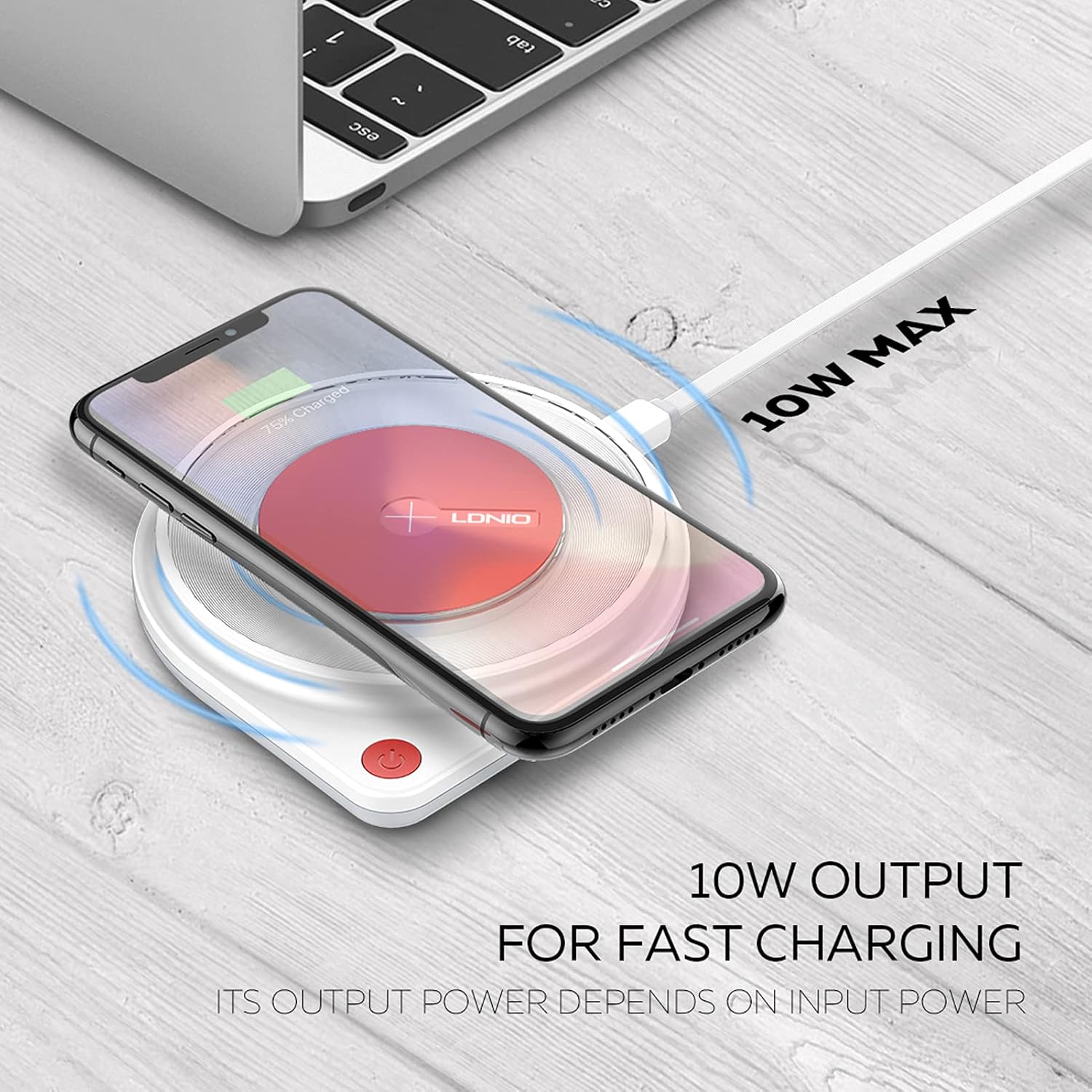
A smartphone charging wirelessly on the LDNIO 10W Max Wireless Charger Pad, illustrating the 10W output for fast charging.
4. Arahan Operasi
4.1 Charging a Device
- Ensure the LDNIO Wireless Charger Pad is connected to a power source.
- Place your Qi-enabled smartphone or AirPods (with wireless charging case) directly onto the center of the charging pad.
- The charging indicator light on the pad will activate, and your device should display a charging icon or notification.
- For optimal charging, ensure your device is centered on the pad.
4.2 Keserasian Kes
The charger supports charging through phone cases up to 5mm thick. Please remove any cases made of metal, or cases with external attachments such as magnets, credit cards, grips, or stands, as these can interfere with wireless charging.
4.3 Integrated Lamp Ciri
This model includes an integrated LED lamp that provides warm and soft light. The brightness of the lamp is adjustable. Refer to the power button or touch controls on the device for lamp operasi.

The LDNIO Wireless Charger Pad featuring an integrated LED lamp, providing warm and soft light, with adjustable brightness.
5. Penyelenggaraan
- Keep the charging pad clean and dry. Use a soft, dry cloth to wipe the surface.
- Avoid exposing the device to extreme temperatures, humidity, or corrosive environments.
- Do not disassemble, modify, or attempt to repair the charger yourself. This may void the warranty and pose safety risks.
- Simpan pengecas di tempat yang sejuk dan kering apabila tidak digunakan.
6. Penyelesaian masalah
6.1 Peranti Tidak Mengecas
- Semak Sambungan Kuasa: Ensure the charging pad is securely connected to a working power outlet and a compatible power adapter.
- Keserasian Peranti: Verify that your device supports Qi wireless charging.
- Penempatan yang betul: Reposition your device to ensure it is centered on the charging pad.
- Halangan: Remove any foreign objects, thick cases (over 5mm), or metallic attachments (magnets, credit cards, grips) between your device and the charging pad.
- Power Adapter/Cable: Try using a different USB cable and power adapter to rule out issues with accessories.
6.2 Pengecasan Lambat
- Penyesuai Kuasa: Ensure you are using a Quick Charge 2.0/3.0 or Power Delivery (PD) compatible power adapter for 10W fast charging. Standard 5V/1A adapters will result in slower charging speeds.
- Apl Latar Belakang: Tutup sebarang aplikasi intensif kuasa yang berjalan di latar belakang pada peranti anda.
- Suhu: High ambient temperatures or excessive device usage during charging can slow down the charging process.
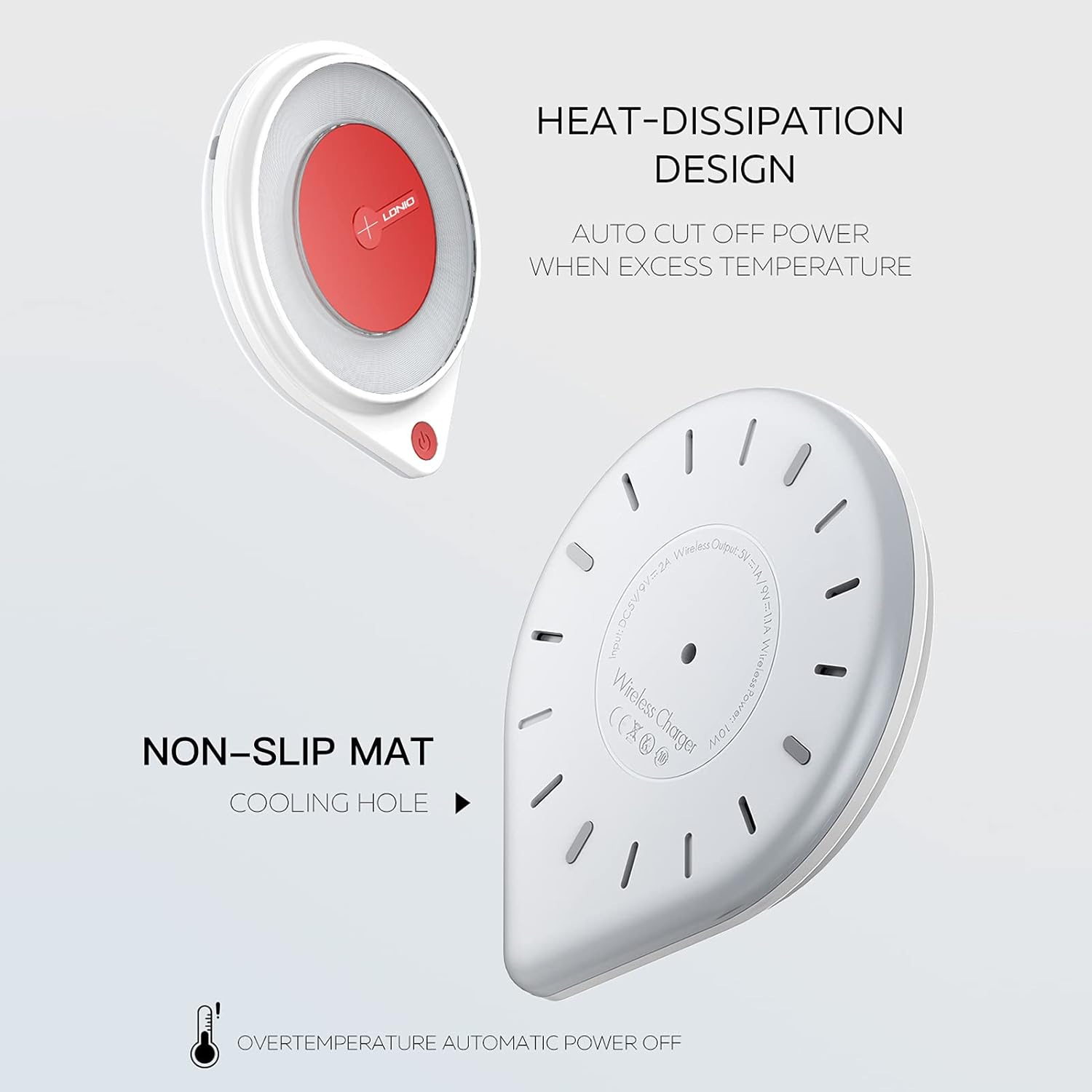
Diagram showing the heat-dissipation design and non-slip mat on the underside of the LDNIO Wireless Charger Pad, highlighting safety features like automatic power off for overtemperature.
7. Spesifikasi
| Ciri | Spesifikasi |
|---|---|
| Model | AW001 |
| Input | DC 5V/2A, 9V/2A |
| Output Tanpa Wayar | 5V/1A, 9V/1.1A |
| Kuasa Tanpa Wayar | Maksimum 10W |
| Dimensi | 11 cm (Diameter) x 1.85 cm (Thickness) |
| Berat Barang | 6.7 auns |
| Jenis Penyambung | USB Jenis-C |
| warna | Merah dan Putih |
| Ciri Khas | Fast Charging, Wireless Charging, Overcharge Protection, Heat Dissipation, Non-slip Mat, Integrated Lamp |
| Peranti Serasi | Qi-enabled smartphones (e.g., iPhone 8/X/XS/XR/11/12/13 series, Samsung Galaxy S8/S9/S10/S20/S21, Note 8/9/10 series), AirPods with wireless charging case. |

Technical parameters and dimensions of the LDNIO Wireless Charger Pad, including input/output specifications, power, and physical measurements.

Sebuah meletup view diagram of the LDNIO Wireless Charger Pad, revealing the internal components including a larger charging coil for efficient power transfer.
8. Waranti dan Sokongan
For warranty information, product registration, or technical support, please refer to the official LDNIO webtapak atau hubungi perkhidmatan pelanggan mereka secara langsung. Simpan resit pembelian anda sebagai bukti pembelian.
LDNIO is committed to providing quality products and support. If you encounter any issues, please reach out to their customer service team for assistance.


