1. Pengenalan
The Aprvtio WJL-6000PRO is an upgraded halogen refrigerant leak detector designed for precise detection of various halogenated gases. This device features a high-sensitivity sensor, a clear LCD screen for leakage level visualization, and multi-alarm functions to assist in locating leaks efficiently. It also includes a two-color LED light (UV and white flashlight) for enhanced visibility in diverse working conditions. This manual provides essential information for the safe and effective operation and maintenance of your WJL-6000PRO leak detector.
2. Maklumat Keselamatan
Sila baca dan fahami semua arahan keselamatan sebelum mengendalikan peranti. Kegagalan mematuhi arahan ini boleh mengakibatkan renjatan elektrik, kebakaran atau kecederaan serius.
- Sentiasa kendalikan peranti ini di kawasan yang mempunyai pengudaraan yang baik.
- Jangan dedahkan peranti kepada suhu atau kelembapan yang melampau.
- Jauhkan peranti daripada bahan mudah terbakar.
- Pastikan bateri dimasukkan dengan betul mengikut tanda kekutuban.
- Do not attempt to repair or modify the device yourself. Refer to qualified personnel for service.
- Avoid direct exposure to the UV light.
- When using fluorescent agents, follow the manufacturer's safety guidelines for the agent.
3. Ciri-ciri Produk
- Upgraded WJL-6000Pro Version: Enhanced sensitivity sensor and multiple alarm functions.
- Higher Sensitivity: Detects leaks up to 0.14oz/yr with a 7.9-inch flexible sensing tip.
- Leakage Level Visualization: LCD screen displays the refrigerant gas leakage level and sensitivity level.
- Two-Color LED Light: Includes a UV lamp for use with fluorescent agents and a white flashlight for illuminating dark areas.
- Multi-Alarms: Equipped with audible and visual alarms for easy leak localization.
- Hayat Bateri yang Panjang: Can continuously work for up to 50 hours with 4 AAA batteries.
- Detects All Halogenated Gases: Compatible with R22, R410A, R134A, R1234YF, CFCs, HCFCs, HFCs, and other halogenated gases.
4. Kandungan Pakej
Sahkan bahawa semua item ada semasa membongkar:
- Aprvtio WJL-6000PRO Halogen Leak Detector
- LED Light (integrated with UV and white light)
- Manual Pengguna
- Beg Bawa

Image: The Aprvtio WJL-6000PRO Halogen Leak Detector, showing its flexible probe, LED display, and control buttons.
5. Persediaan
5.1 Pemasangan Bateri
The WJL-6000PRO requires four AAA batteries (not included). Ensure correct polarity during installation.
- Open the battery compartment cover located at the bottom of the detector.
- Insert four AAA batteries, matching the positive (+) and negative (-) terminals correctly.
- Tutup penutup petak bateri dengan selamat.
Video: Demonstrates how to install batteries and addresses the "6" error code, indicating low battery voltage.
5.2 Initial Power On and Warm-up
After battery installation, press the power button. The device will emit a discontinuous buzzer sound and display "8" on the LCD screen, indicating it is warming up. This warm-up period typically lasts 6 seconds. Once complete, the device is ready for use.

Image: Close-up of the detector's instructions, detailing battery installation, warm-up time, sensitivity adjustment, and reset function.
6. Arahan Operasi
6.1 Power On and Sensitivity Adjustment
- Tekan ke O/R button to turn on the detector. A discontinuous buzzer will be heard.
- Wait for the 6-second warm-up period.
- Adjust the sensitivity using the + dan - buttons. The LCD screen will display the current sensitivity level (e.g., 1-5). Higher numbers indicate higher sensitivity.
Video: A demonstration on how to power on the WJL-6000PRO and adjust its sensitivity settings.
6.2 Leak Detection Procedure
- Move the sensing tip slowly (approximately 1/4 inch per second) around the suspected leak area.
- Keep the probe about 1/4 inch away from any hard surface when checking for leaks.
- When a leak is detected, the device will emit a siren sound, and the LCD screen will display the corresponding leakage level. The alarm rate will increase with higher concentrations of refrigerant.
- To pinpoint the exact leak location, move the probe away from the leak source, press the O/R (reset) button, and then slowly approach the suspected area again. This resets the baseline and helps narrow down the leak.

Image: The flexible probe of the WJL-6000PRO, emphasizing its high sensitivity and quick response for leak detection.

Image: The WJL-6000PRO's LCD screen showing a detected leakage level of '5', accompanied by visual and audible alarms.
6.3 Using the Two-Color LED Light
The integrated LED light provides both UV and white light functions.
- UV Lamp: Use the UV lamp in conjunction with a fluorescent agent (not included) to visually identify leak points, especially in systems where a fluorescent dye has been added.
- White Flashlight: The bright white light is suitable for illuminating dark and confined spaces, aiding in general inspection and visibility.
Video: Demonstrates the functionality of the two-color LED light, showing both white light for illumination and UV light for fluorescent leak detection.
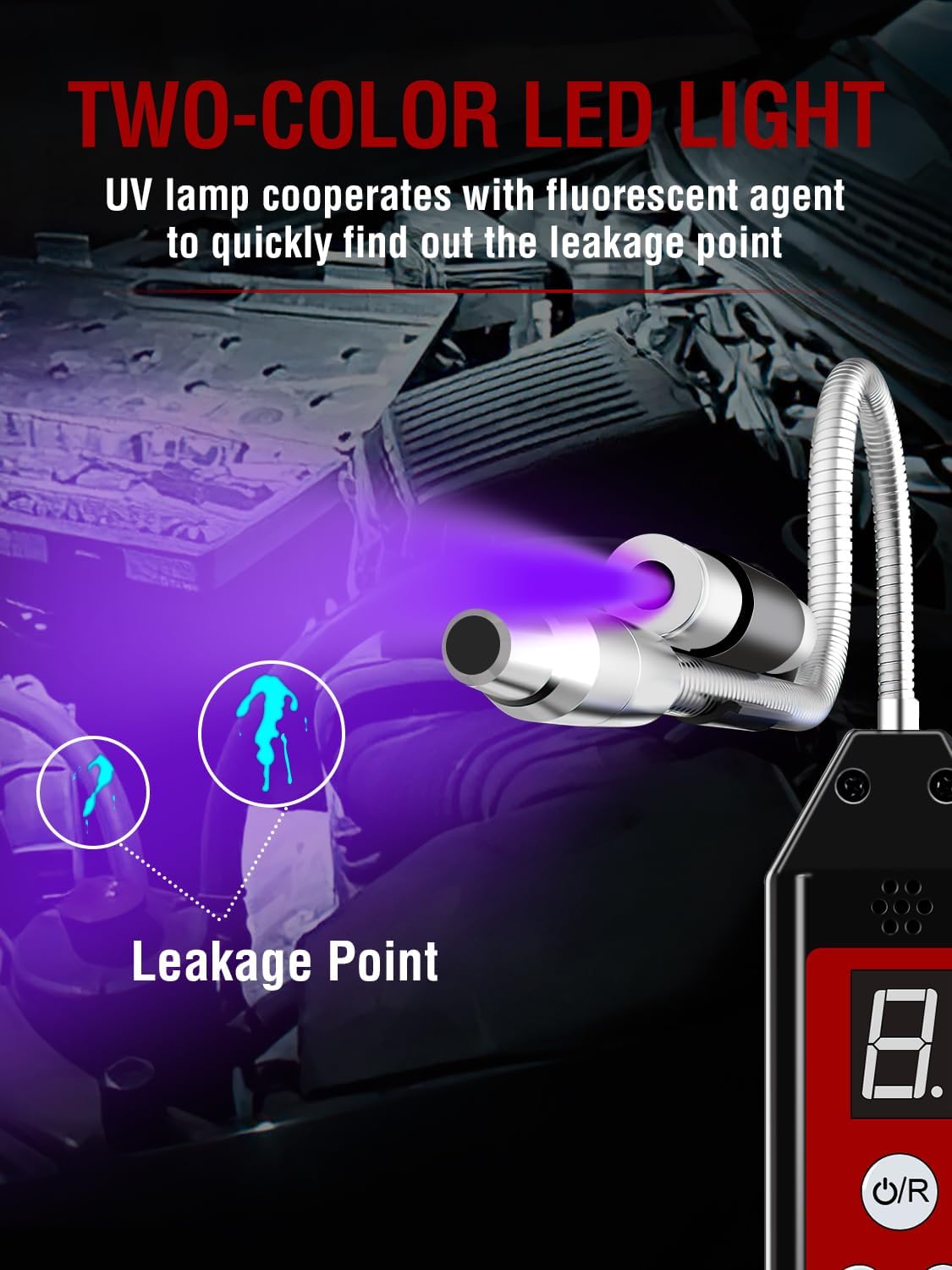
Image: The UV lamp of the WJL-6000PRO illuminating a leak point, made visible by a fluorescent agent.

Image: The white flashlight function of the WJL-6000PRO providing illumination in a dark engine compartment.
7. Penyelenggaraan
7.1 Pembersihan
Wipe the device with a soft, dry cloth. Do not use abrasive cleaners or solvents. Ensure the sensing tip is clean and free of debris for accurate readings.
7.2 Penggantian Bateri
If the screen flashes "6" or the device behaves erratically, it indicates low battery voltage. Replace all four AAA batteries with new ones to ensure normal operation.
7.3 Penyimpanan
Store the detector in its carrying pouch in a cool, dry place when not in use. Remove batteries if storing for extended periods to prevent leakage.
8. Penyelesaian masalah
| Masalah | Kemungkinan Punca | Penyelesaian |
|---|---|---|
| Detector continuously beeps after turning on. | Normal operation, indicating the device is working. | This sound cannot be turned off. It will change to a siren tone when a leak is detected. |
| Detector keeps a siren tone after turning it on. | High humidity in the environment. | Press and hold the power button for three seconds to reset, then use it normally. |
| False alarms or inconsistent readings. | Sudden changes in halogen gas concentration in the environment. | Move to fresh air and switch on, adjust to maximum sensitivity. Any concentration above zero will be detected. The automatic circuit function helps avoid false alarms. |
| Screen displays "E". | Sensor is too wet. | Remove the sensor, blow it dry, and reinstall it. |
| Screen flashes "6". | Bateri voltage is below acceptable operating level. | Tukar bateri kepada yang baru. |
Video: Explains what to do when the screen flashes "6", indicating a low battery condition.
9. Spesifikasi
- Jenama: Aprvtio
- model: WJL-6000PRO (CLD-100)
- Sumber Kuasa: Dikuasakan oleh Bateri (4 x bateri AAA, tidak termasuk)
- Sensitiviti: 0.14 oz/yr
- Masa Respons: 0.5 saat
- Panjang Probe: 7.9 inches (flexible)
- penggera: Audible, Visual (LCD display)
- Kelembapan Operasi: 95% (tidak pemeluwapan)
- Penyejuk Serasi: R22, R410A, R134A, R1234YF, CFCs, HCFCs, HFCs, HFOs, and other halogenated gases (including Chlorine, Fluorine, Bromine). Also detects SF-6 in high voltage circuit breakers and cleaning agents like perchloroethylene.
- Berat Barang: 7.8 auns (0.22 Kilogram)
- Dimensi Pakej: 9.25 x 3.39 x 2.01 inci
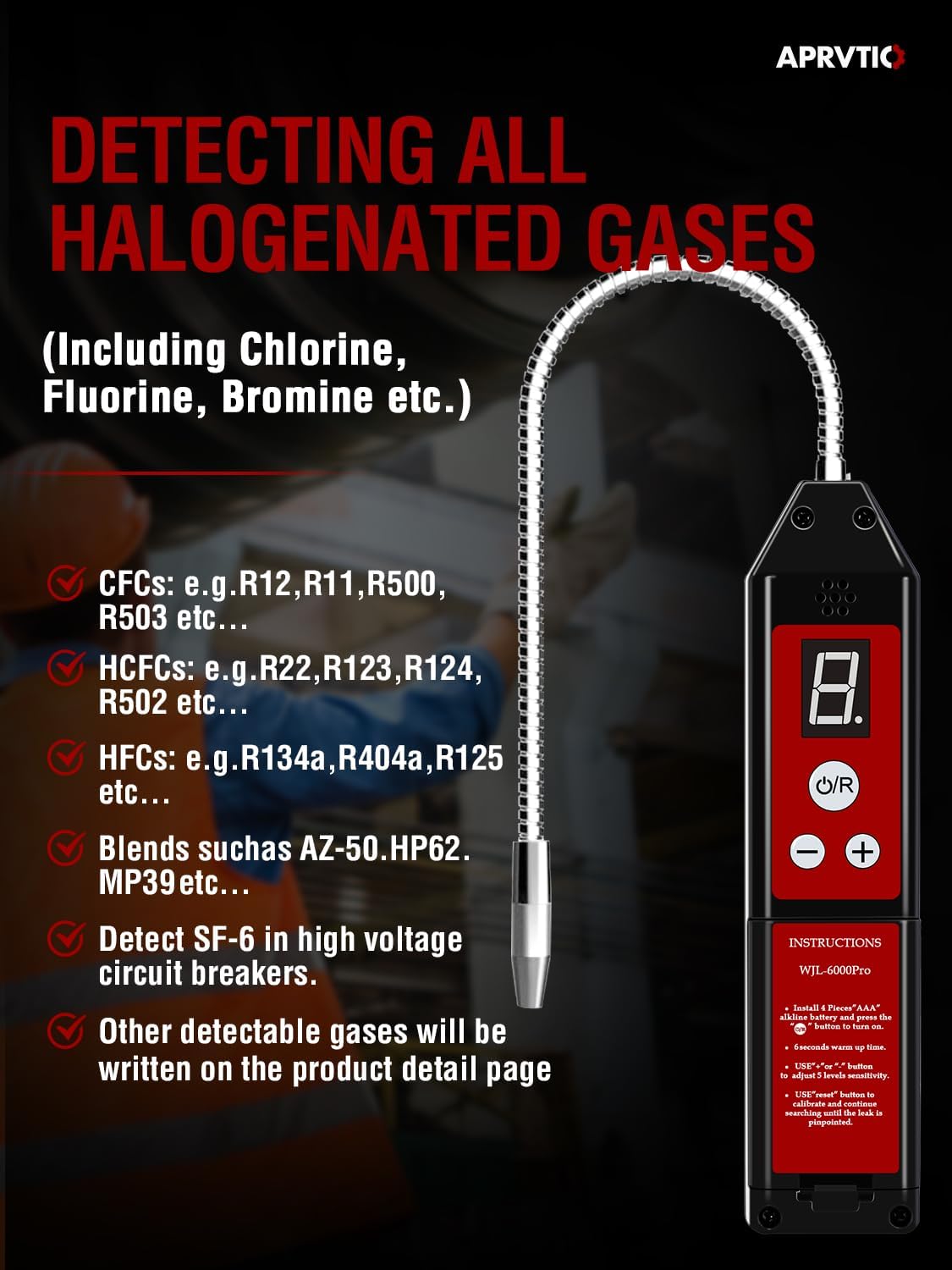
Image: Illustrates the wide range of halogenated gases detectable by the WJL-6000PRO, including CFCs, HCFCs, and HFCs.
10. Waranti dan Sokongan
For warranty information, technical support, or service inquiries, please refer to the contact information provided with your product packaging or visit the official Aprvtio webtapak. Simpan resit pembelian anda sebagai bukti pembelian untuk tuntutan waranti.


