1. Pengenalan
Terima kasih kerana membeliasing the ANESOK 3-Speed Bluetooth Turntable. This manual provides essential information for the safe and correct use of your new record player. Please read it thoroughly before use and retain it for future reference.
This turntable features a 3-speed belt drive system, built-in stereo speakers, Bluetooth connectivity for wireless audio streaming, and multiple output options including Aux-in, Headphone Jack, and RCA output. Enjoy your vinyl collection and digital music with this versatile device.
2. Arahan Keselamatan Penting
- Baca Arahan: Baca semua arahan keselamatan dan pengendalian sebelum menggunakan produk ini.
- Kekalkan Arahan: Simpan arahan keselamatan dan pengendalian untuk rujukan masa hadapan.
- Perhatikan Amaran: Patuhi semua amaran pada produk dan dalam arahan pengendalian.
- Ikuti Arahan: Ikut semua arahan pengendalian dan penggunaan.
- Air dan Kelembapan: Do not use this apparatus near water (e.g., bathtub, washbowl, kitchen sink, laundry tub, wet basement, or swimming pool).
- Pembersihan: Bersihkan hanya dengan kain kering.
- Pengudaraan: Jangan sekat sebarang bukaan pengudaraan. Pasang mengikut arahan pengilang.
- haba: Jangan pasang berhampiran mana-mana sumber haba seperti radiator, daftar haba, dapur, atau radas lain (termasuk amppenghidup) yang menghasilkan haba.
- Perlindungan Kord Kuasa: Lindungi kord kuasa daripada berjalan atau tersepit, terutamanya pada palam, bekas kemudahan dan tempat keluar dari radas.
- Lampiran/Aksesori: Gunakan hanya lampiran/aksesori yang ditentukan oleh pengilang.
- kilat: Cabut plag radas ini semasa ribut petir atau apabila tidak digunakan untuk tempoh yang lama.
- Servis: Rujuk semua servis kepada kakitangan perkhidmatan yang berkelayakan. Servis diperlukan apabila radas telah rosak dalam apa jua cara, seperti kord bekalan kuasa atau palam rosak, cecair telah tertumpah atau objek jatuh ke dalam radas, radas telah terdedah kepada hujan atau lembapan, tidak beroperasi seperti biasa. , atau telah digugurkan.
3. Komponen dan Kawalan Produk
Familiarize yourself with the various parts of your ANESOK turntable.

Image: Detailed diagram of the ANESOK turntable highlighting the RCA Output, AUX IN Jack, DC IN, Headphone Jack, Power Button, Volume Control, 45RPM Fixtor, Tone Arm, Tone Arm Lifter, Auto Stop Switch, LP Speed Control Switch, Tone Arm Rest And Lock, and Cartridge.
- Penutup habuk: Protects the turntable from dust.
- Pinggan: Di mana rekod itu terletak.
- gelendong: Memegang rekod di tempatnya.
- Lengan Nada: Memegang kartrij dan stilus.
- Tone Arm Lifter: Raises and lowers the tone arm gently.
- Kartrij dengan Stilus: Reads the grooves on the record.
- Penyesuai 45 RPM: Digunakan untuk memainkan rekod 7 inci dengan lubang tengah yang besar.
- Suis Pemilih Kelajuan: Allows selection of 33, 45, or 78 RPM.
- Suis Berhenti Automatik: Enables or disables the auto-stop function.
- Tombol Kuasa/Kelantangan: Turns the unit on/off and adjusts the volume.
- Lampu Penunjuk Mod: Shows current operating mode (e.g., Bluetooth, Phono).
- Jack fon kepala: Untuk mendengar peribadi dengan fon kepala.
- AUX IN Jack: Sambungkan peranti audio luaran.
- Keluaran RCA: Sambungkan ke luaran amppengangkat atau pembesar suara berkuasa.
- DC IN Jack: Sambungkan penyesuai kuasa.
- Pembesar Suara Stereo Terbina dalam: For direct audio playback.

Imej: Jarak dekat views highlighting the well-designed cartridge, the pure hand-made PVC/leather finishing, and the high-quality metal tone-arm, contributing to sound quality and product aesthetics.
4. Panduan Persediaan
4.1 Membongkar
- Keluarkan meja putar dari bungkusannya dengan berhati-hati.
- Remove all protective materials and packaging.
- Pastikan semua komponen yang disenaraikan dalam Bahagian 3 hadir.
4.2 Penempatan
- Place the turntable on a flat, stable surface away from direct sunlight, heat sources, and excessive vibration.
- Pastikan pengudaraan yang mencukupi di sekeliling unit.
4.3 Sambungan Kuasa
- Connect the DC power adapter to the DC IN jack on the back of the turntable.
- Pasangkan penyesuai ke soket dinding yang sesuai.
5. Arahan Operasi
5.1 Memainkan Rekod Vinil
- Hidupkan kuasa: Turn the Power/Volume knob clockwise to turn on the turntable. The mode indicator light will illuminate.
- Pilih Kelajuan: Set the speed selector switch to the appropriate speed (33, 45, or 78 RPM) for your record. Use the 45 RPM adapter if necessary for 7-inch records.
- Rekod Tempat: Letakkan rekod vinil di atas pinggan.
- Tanggalkan Pelindung Stilus: Gently remove the stylus protector from the cartridge.
- Buka Kunci Lengan Nada: Lepaskan kunci lengan nada.
- Kedudukan Nada Lengan: Use the tone arm lifter to raise the tone arm. Manually move the tone arm over the desired track on the record.
- Lengan Nada Bawah: Gently lower the tone arm onto the record using the tone arm lifter. The record will begin to play.
- Laraskan Kelantangan: Laraskan kelantangan menggunakan tombol Kuasa/Kelantangan.
- Fungsi Auto Stop: If the Auto Stop switch is ON, the platter will stop spinning automatically when the record finishes. If OFF, the platter will continue to spin.
- After Playback: When the record finishes, use the tone arm lifter to raise the tone arm, return it to the tone arm rest, and secure it with the lock. Turn off the unit by rotating the Power/Volume knob counter-clockwise.

Image: The ANESOK turntable playing a record, highlighting the dual built-in stereo speakers for full-range sound reproduction.
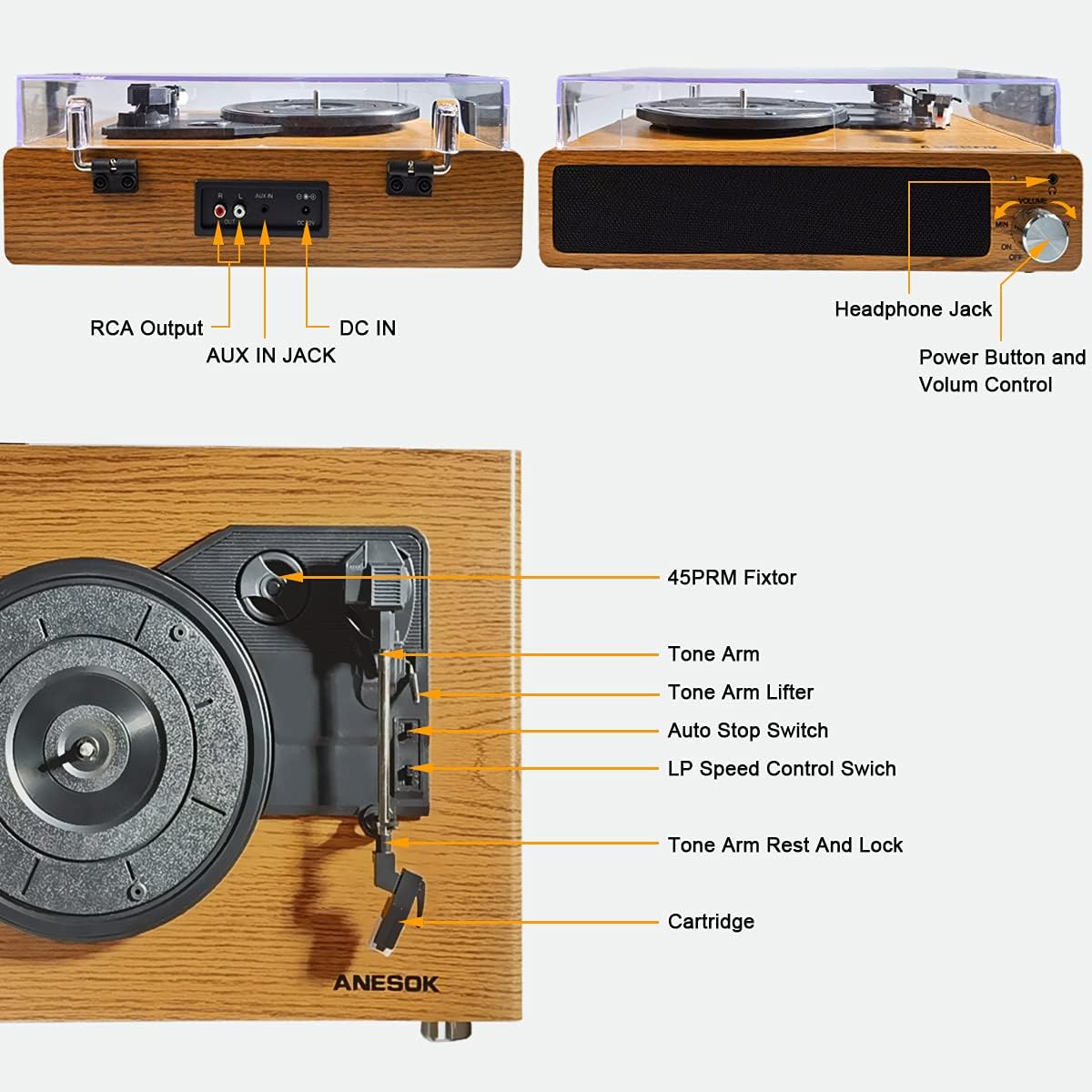
Image: Visual guide for selecting the correct playback speed (33, 45, or 78 RPM) for 7, 10, and 12-inch records.
5.2 Operasi Bluetooth
Meja putar boleh menerima audio secara wayarles daripada peranti yang didayakan Bluetooth.
- Hidupkan kuasa: Turn the Power/Volume knob clockwise to turn on the turntable.
- Mod Bluetooth: The turntable will automatically enter Bluetooth pairing mode. The mode indicator light will flash blue.
- Pasangkan Peranti: On your Bluetooth-enabled device (smartphone, tablet, etc.), enable Bluetooth and search for "ANESOK" in the list of available devices.
- Sambung: Select "ANESOK" to pair. Once connected, the mode indicator light will stop flashing and remain solid blue.
- Mainkan Audio: You can now play music from your device through the turntable's speakers. Adjust volume on both your device and the turntable.

Image: Illustration of the wireless connection feature, demonstrating how to pair a smartphone or other digital audio player with the turntable via Bluetooth.
5.3 AUX IN Connection
Connect external audio sources using the AUX IN jack.
- Sambungkan Kabel: Plug a 3.5mm audio cable (not included) into the AUX IN jack on the back of the turntable.
- Sambungkan Peranti: Connect the other end of the cable to the headphone output or line-out jack of your external audio device (e.g., MP3 player, CD player).
- Hidupkan kuasa: Turn on the turntable and your external audio device.
- Mainkan Audio: Play audio from your external device. The sound will be routed through the turntable's speakers. Adjust volume on both devices.
5.4 Output Fon Kepala
For private listening, connect headphones to the dedicated jack.
- Plug your headphones into the Headphone Jack on the front of the turntable.
- Pembesar suara terbina dalam akan membisukan secara automatik apabila fon kepala disambungkan.
- Laraskan kelantangan menggunakan tombol Kuasa/Kelantangan.
5.5 Keluaran RCA
Sambungkan meja putar ke sumber luaran amplifier or powered speakers for enhanced sound.
- Connect an RCA cable (not included) to the RCA Output jacks (Red for Right, White for Left) on the back of the turntable.
- Connect the other end of the RCA cable to the corresponding input jacks on your amppembesar atau pembesar suara berkuasa.
- Pastikan sistem audio luaran anda ditetapkan kepada input yang betul.
- Adjust the volume using your external audio system's controls.
6. Penyelenggaraan dan Penjagaan
6.1 Membersihkan Meja Putar
- Lap bahagian luar unit dengan kain lembut dan kering.
- Jangan gunakan bahan kimia yang keras, pelarut pembersih atau detergen yang kuat.
- Pastikan penutup habuk ditutup apabila tidak digunakan untuk mengelakkan pengumpulan habuk.
6.2 Penjagaan Stilus
- The stylus is delicate. Handle it with care.
- Bersihkan stylus secara berkala menggunakan berus lembut, berus perlahan-lahan dari belakang ke hadapan.
- Replace the stylus when you notice a degradation in sound quality or visible wear.


Imej: Jarak dekat views of the cartridge and tone arm, illustrating the delicate components that require careful handling and maintenance.
7. Penyelesaian masalah
| Masalah | Kemungkinan Punca | Penyelesaian |
|---|---|---|
| Tiada kuasa | Penyesuai kuasa tidak disambungkan atau alur keluar tidak berfungsi. | Ensure the power adapter is securely connected to the turntable and a live power outlet. |
| Tiada suara dari pembesar suara | Volume too low; headphones connected; external amplifier not connected or set incorrectly. | Increase volume. Disconnect headphones. Check RCA connections and external amptetapan penguat. |
| Langkauan rekod | Record is dirty or scratched; stylus is worn or dirty; turntable not on a stable surface. | Clean the record. Clean or replace the stylus. Place the turntable on a stable, level surface. |
| Bluetooth tidak bersambung | Turntable not in Bluetooth mode; device too far; device already connected to another Bluetooth device. | Ensure the turntable is in Bluetooth pairing mode (flashing blue light). Move device closer. Disconnect from other Bluetooth devices. |
| Record plays too fast/slow | Incorrect speed selected. | Adjust the speed selector switch to 33, 45, or 78 RPM as appropriate for the record. |
8. Spesifikasi Teknikal
- model: LPTurntableYUANMU2
- Jenama: ANESOK
- Kelajuan: 33 1/3, 45, 78 RPM
- Jenis Drive: Pemacu Belt
- Jenis Motor: Motor AC
- Ketersambungan: Bluetooth, AUX-in, RCA Output, Headphone Jack
- Penceramah: Pembesar suara Stereo terbina dalam
- Bahan: Plastik, Kayu
- warna: coklat
- Ciri Khas: Mudah alih
- Dimensi Pakej: 16.61 x 13.54 x 7.64 inci
- Berat Barang: 6.67 paun
- Format Isyarat: peringkat garisan
- Tarikh Mula-mula Tersedia: 16 Ogos 2021
9. Waranti dan Sokongan
This ANESOK product is covered by a manufacturer's warranty. Please refer to the warranty card included in your packaging for specific terms and conditions, including warranty duration and coverage details.
For technical support, troubleshooting assistance, or warranty claims, please contact ANESOK customer service. Contact information can typically be found on the product packaging, the official ANESOK webtapak, atau resit pembelian anda.
Please note: Keep your proof of purchase for warranty validation.