1. Pengenalan
Terima kasih kerana membeliasing the ANESOK 3-Speed Bluetooth Turntable. This manual provides essential information for the proper setup, operation, and maintenance of your new record player. Please read these instructions thoroughly before use to ensure optimal performance and longevity of the device. Keep this manual for future reference.
2. Arahan Keselamatan
- Sumber Kuasa: Gunakan hanya penyesuai kuasa yang disediakan. Pastikan volumtage sepadan dengan bekalan kuasa tempatan anda.
- Air dan Kelembapan: Jangan dedahkan unit ini kepada hujan, kelembapan atau cecair. Elakkan meletakkan objek yang berisi cecair, seperti pasu, di atas unit ini.
- haba: Jauhkan unit daripada sumber haba seperti radiator, daftar haba, dapur, atau radas lain (termasuk amppenghidup) yang menghasilkan haba.
- Pengudaraan: Pastikan pengudaraan yang betul. Jangan sekat sebarang bukaan pengudaraan.
- Pembersihan: Cabut palam unit dari salur keluar dinding sebelum membersihkan. Gunakan kain lembut dan kering. Jangan gunakan pembersih cecair atau pembersih aerosol.
- Servis: Jangan cuba servis produk ini sendiri. Rujuk semua perkhidmatan kepada pegawai perkhidmatan yang berkelayakan.
- penempatan: Letakkan unit di atas permukaan yang stabil dan rata untuk mengelakkan kerosakan daripada jatuh.
3. Kandungan Pakej
Sila pastikan semua item yang disenaraikan di bawah disertakan dalam pakej anda:
- ANESOK 3-Speed Bluetooth Turntable
- Penyesuai Kuasa
- Penyesuai 45 RPM
- Manual Arahan
- Penutup Habuk
4. Produk Lebihview
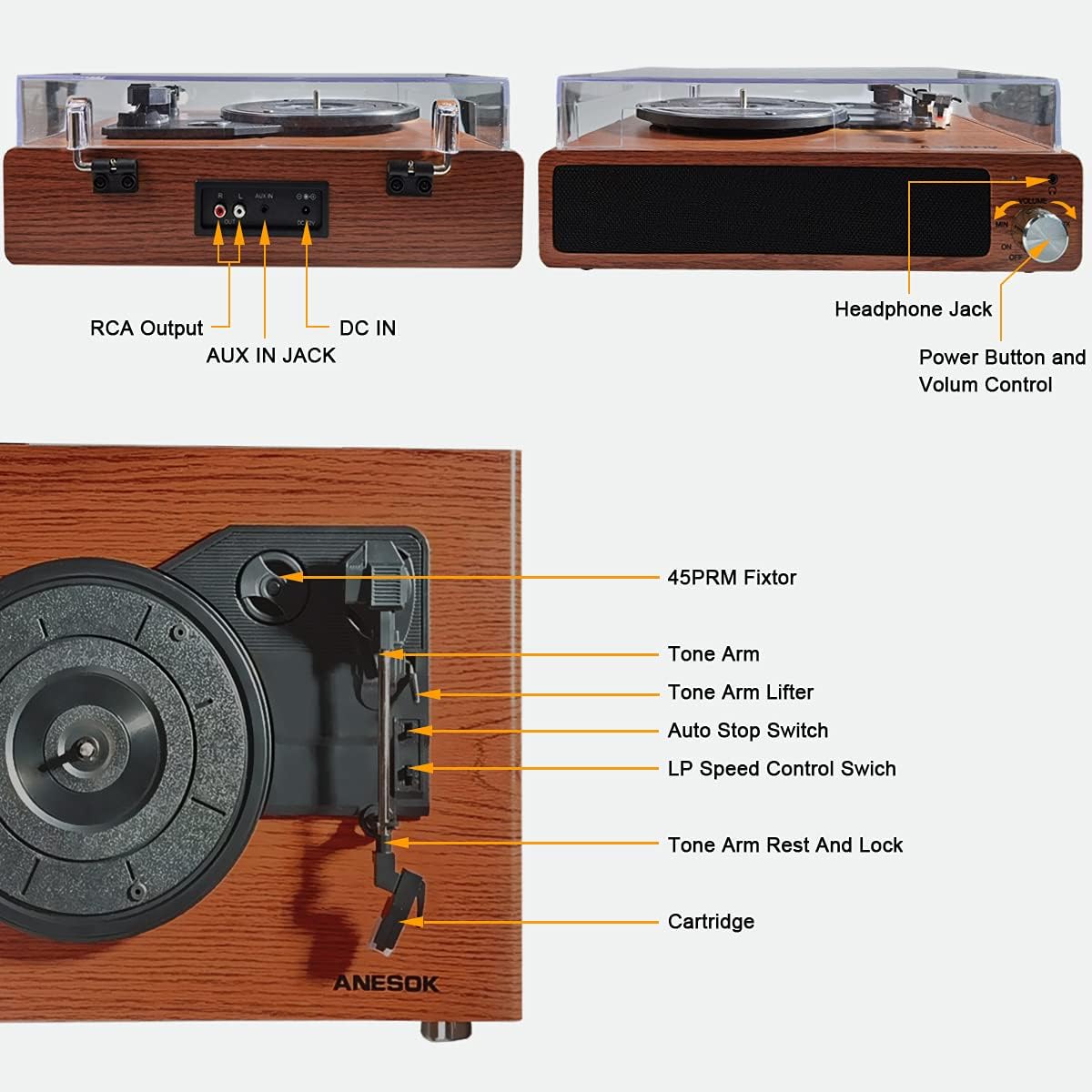
Rajah 1: A comprehensive diagram pointing out all the essential parts and connection ports of the ANESOK record player, including inputs, outputs, and operational controls.
- 45 RPM Fixtor: Used for playing 7-inch records with a large center hole.
- Lengan Nada: Memegang kartrij dan stilus.
- Tone Arm Lifter: Raises and lowers the tone arm gently.
- Suis Berhenti Automatik: Toggles the automatic stop function for vinyl playback.
- LP Speed Control Switch: Selects playback speeds (33, 45, 78 RPM).
- Tone Arm Rest and Lock: Mengekalkan lengan nada apabila tidak digunakan.
- Kartrij: Contains the stylus that reads the record grooves.
- Jack fon kepala: Untuk mendengar peribadi dengan fon kepala.
- Power Button and Volume Control: Turns the unit on/off and adjusts speaker volume.
- Keluaran RCA: Bersambung ke luaran amppengangkat atau pembesar suara berkuasa.
- AUX IN Jack: Connects external audio devices via a 3.5mm cable.
- DC DALAM: Input kuasa untuk penyesuai.
5. Persediaan
5.1 Membongkar dan Meletakkan
- Keluarkan meja putar dari bungkusannya dengan berhati-hati.
- Place the unit on a flat, stable, and level surface to prevent vibrations and ensure proper playback.
- Avoid placing the unit near strong magnetic fields or direct sunlight.
5.2 Pemasangan Penutup Habuk
- Align the hinges of the dust cover with the corresponding slots on the back of the turntable.
- Gently push down to secure the dust cover. Ensure it opens and closes smoothly.
5.3 Sambungan Kuasa
- Connect the DC plug of the power adapter to the DC IN jack on the back of the turntable.
- Palamkan penyesuai AC ke salur keluar dinding.
6. Arahan Operasi
6.1 Memainkan Rekod Vinyl

Rajah 2: Depan view of the ANESOK record player, showcasing its walnut wood finish, built-in speakers, and control knob. A vinyl record is currently playing on the platter.
- Hidupkan kuasa: Turn the Power Button/Volume Control knob clockwise to power on the unit. The indicator light will illuminate.
- Pilih Kelajuan: Set the LP Speed Control Switch to the appropriate speed (33, 45, or 78 RPM) for your record. Use the 45 RPM adapter for 7-inch singles with large center holes.
- Rekod Tempat: Carefully place your vinyl record on the turntable platter.
- Buka Kunci Lengan Nada: Release the Tone Arm Rest and Lock.
- Angkat Lengan Nada: Use the Tone Arm Lifter to gently raise the tone arm.
- Kedudukan Nada Lengan: Move the tone arm over the desired starting track of the record.
- Lengan Nada Bawah: Gently lower the tone arm onto the record using the Tone Arm Lifter. The record will begin to play.
- Laraskan Kelantangan: Rotate the Power Button/Volume Control knob to adjust the sound level from the built-in speakers.
- Auto Stop: If the Auto Stop Switch is set to ON, the turntable will automatically stop spinning when the record finishes playing. If set to OFF, the platter will continue to spin.
- Tamat Main Semula: When finished, use the Tone Arm Lifter to raise the tone arm, return it to the Tone Arm Rest, and secure it with the lock. Turn the Power Button/Volume Control knob counter-clockwise to power off the unit.

Rajah 3: An illustration detailing the turntable's versatility, supporting three common record sizes (7", 10", 12") and three playback speeds (33, 45, 78 RPM).
6.2 Sambungan Bluetooth

Rajah 4: The record player is shown connected to a smartphone, demonstrating its Bluetooth capability for streaming music from external devices through the turntable's speakers.
- Turn on the turntable. The Bluetooth indicator light will flash, indicating it is in pairing mode.
- Dayakan Bluetooth pada telefon pintar, tablet anda atau peranti lain yang didayakan Bluetooth.
- Cari untuk "ANESOK" in your device's Bluetooth settings and select it to pair.
- Once paired, the Bluetooth indicator light on the turntable will stop flashing and remain solid.
- You can now play audio from your device through the turntable's built-in speakers. Adjust volume using the turntable's volume knob or your connected device.
6.3 Sambungan Aux-in
- Connect one end of a 3.5mm audio cable (not included) to the AUX IN jack on the back of the turntable.
- Connect the other end of the cable to the audio output of your external device (e.g., MP3 player, CD player).
- Turn on the turntable and your external device. The audio from your external device will play through the turntable's speakers.
- Adjust volume using the turntable's volume knob or your connected device.
6.4 Bicu Fon Kepala
- Plug your headphones into the Headphone Jack on the front of the turntable for private listening.
- Pembesar suara terbina dalam akan membisukan secara automatik apabila fon kepala disambungkan.
6.5 Keluaran RCA
- Connect an RCA cable (not included) to the RCA Output jacks on the back of the turntable.
- Connect the other end of the RCA cable to the audio input of an external amppembesar atau pembesar suara berkuasa.
- Ensure the external audio system is set to the correct input.
- Adjust volume through your external audio system.
7. Penyelenggaraan
7.1 Membersihkan Unit
- Sentiasa cabut plag meja putar dari salur keluar kuasa sebelum membersihkan.
- Gunakan kain lembut, kering dan tidak berbulu untuk mengelap permukaan luar.
- Jangan gunakan pembersih, lilin atau pelarut yang melelas kerana ia boleh merosakkan kemasan.
7.2 Penjagaan Stilus
- The stylus is delicate. Handle it with care.
- Clean the stylus periodically using a soft brush (not included) in a back-to-front motion.
- A worn stylus can damage records and degrade sound quality. Replace the stylus when signs of wear appear (typically after 300-500 hours of play).
7.3 Dust Cover Care
- Wipe the dust cover with a soft, damp kain. Elakkan bahan kimia yang keras.
- The dust cover protects your records and turntable from dust when not in use.
8. Penyelesaian masalah
| Masalah | Kemungkinan Punca | Penyelesaian |
|---|---|---|
| Tiada kuasa | Penyesuai kuasa tidak disambungkan atau rosak. | Ensure the power adapter is securely connected to the unit and a working wall outlet. Try a different outlet. |
| Tiada suara dari pembesar suara | Volume too low; headphones connected; external speakers not connected/powered. | Increase volume. Disconnect headphones. If using RCA output, ensure external speakers are connected, powered, and selected as input. |
| Melangkau rekod | Record is dirty or scratched; stylus is dirty or worn; turntable not level. | Clean the record. Clean or replace the stylus. Ensure the turntable is on a stable, level surface. |
| Bluetooth tidak berpasangan | Turntable not in pairing mode; device too far; interference. | Ensure turntable is on and Bluetooth indicator is flashing. Move device closer. Turn off other Bluetooth devices. |
| Dust cover hinges stiff or broken | Over-tightened during assembly or manufacturing defect. | Apply gentle pressure when installing. If hinges are too stiff or broken, contact customer support for assistance. Do not force. |
9. Spesifikasi
- Jenama: ANESOK
- Nombor Model: LPTurntableHUTAO2
- Kelajuan Main Semula: 33 1/3, 45, 78 RPM
- Jenis Drive: Pemacu Belt
- Jenis Motor: Motor AC
- Ketersambungan: Bluetooth, 3.5mm Aux-in, RCA Output, Headphone Jack
- Penceramah: Dual Built-in Stereo Speakers
- Ciri Khas: Portable, Auto-stop function
- Bahan: Plastic, Wood (Walnut Wood finish)
- Berat Barang: 7.26 paun
- Dimensi Pakej: 16.69 x 13.74 x 7.6 inci
10. Waranti dan Sokongan
For warranty information or technical support, please refer to the documentation provided at the time of purchase or contact ANESOK customer service through the retailer where the product was acquired. Please have your model number (LPTurntableHUTAO2) and purchase date available when contacting support.


