pengenalan
This manual provides essential instructions for setting up, operating, maintaining, and troubleshooting your Blackview Tab 10 Android Tablet. The Blackview Tab 10 features a 10.1-inch FHD+ display, an MTK8768 Octa-Core processor, 4GB RAM, 64GB internal storage, and runs on Android 11 (Doke OS_P 1.0). It supports dual SIM cards for 4G phone calls and data, Wi-Fi, and Bluetooth 5.0 connectivity.
Please read this manual thoroughly to ensure proper use and to maximize your tablet's performance and longevity.

Imej: Si Hitamview Tab 10 tablet shown from the rear in three color options: gray, golden, and silvery, highlighting its sleek design.
Persediaan
Kandungan Pakej
Pastikan semua item ada dalam pakej:
- Hitamview Tab 10 Tablet PC
- Kabel USB (Jenis-C)
- Penyesuai Kuasa (9V 2A)
- Manual Pengguna
Mengecas Bateri
Before first use, fully charge the tablet. Connect the USB Type-C cable to the tablet's Type-C port and the other end to the provided power adapter. Plug the adapter into a power outlet. The charging indicator will show the charging status. The tablet supports 18W fast charging.
Inserting SIM and TF Cards
Si Hitamview Tab 10 supports dual Nano SIM cards or one Nano SIM card and one TF (microSD) card for expandable storage up to 128GB.
- Cari dulang kad SIM/TF di sisi tablet.
- Gunakan alat ejektor SIM yang disediakan untuk membuka dulang.
- Carefully place the Nano SIM card(s) and/or TF card into the designated slots on the tray. Ensure the cards are correctly oriented.
- Tolak dulang kembali ke dalam tablet dengan lembut sehingga ia terpasang dengan klik di tempatnya.
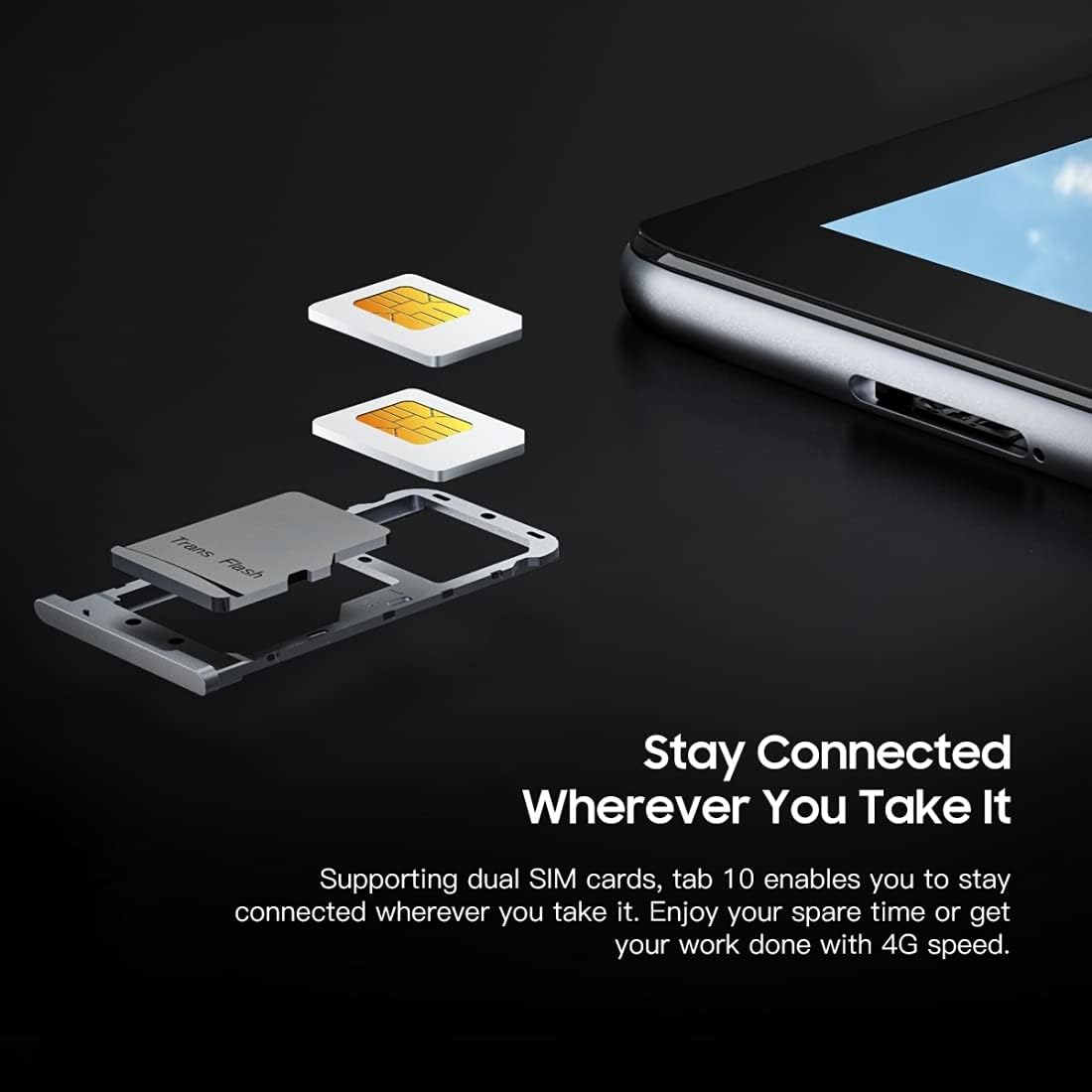
Imej: A terperinci view daripada Hitamview Tab 10's SIM card tray, showing how two Nano SIM cards are inserted, illustrating the dual SIM support.
Menghidupkan/Mematikan
- Untuk Menghidupkan: Tekan dan tahan butang Kuasa sehingga warna Hitamview logo muncul.
- Untuk Mematikan: Tekan dan tahan butang Kuasa sehingga menu pilihan kuasa muncul, kemudian pilih "Matikan".
- Untuk Mulakan Semula: Tekan dan tahan butang Kuasa sehingga menu pilihan kuasa muncul, kemudian pilih "Mulakan Semula".
Persediaan Awal
Setelah dihidupkan buat kali pertama, ikuti arahan pada skrin untuk menyelesaikan persediaan awal:
- Pilih bahasa anda.
- Sambung ke rangkaian Wi-Fi.
- Log masuk dengan akaun Google anda atau buat yang baharu.
- Sediakan kunci skrin (PIN, corak, kata laluan).
- Review dan menerima terma dan syarat.
Arahan Operasi
Navigasi Asas
- Ketik: Touch the screen once to open an app, select an item, or press a button.
- Sentuh dan Tahan: Tekan dan tahan item untuk mengakses lebih banyak pilihan atau mengalihkannya.
- Leret: Seret jari anda merentasi skrin untuk menatal halaman atau kandungan.
- Cubit: Gunakan dua jari untuk mengezum masuk atau keluar pada imej dan web muka surat.
Menyambung ke Rangkaian
- Wi-Fi: Pergi ke tetapan > Rangkaian & internet > Wi-Fi. Hidupkan Wi-Fi, pilih rangkaian yang anda inginkan, dan masukkan kata laluan jika perlu.
- Bluetooth: Pergi ke tetapan > Peranti yang disambungkan > Bluetooth. Turn Bluetooth on, then select a device from the list to pair.
- Data Mudah Alih (4G): If a SIM card is inserted, go to tetapan > Rangkaian & internet > Rangkaian mudah alih to enable mobile data and configure settings.
Menggunakan Kamera
Si Hitamview Tab 10 features a 13.0MP rear camera and a 5.0MP front camera.
- Buka Kamera apl.
- Ketik ikon kamera untuk bertukar antara kamera hadapan dan belakang.
- Ketik butang pengatup untuk mengambil foto atau memulakan/menghentikan rakaman video.
- Explore various camera modes and settings within the app.

Imej: Si Hitamview Tab 10 displaying its camera features, including an 8MP front camera and a 13MP rear camera, emphasizing its photographic capabilities.
Android 11 and Doke OS_P 1.0
Your tablet runs on Android 11 with Blackview's Doke OS_P 1.0 interface, offering enhanced privacy controls, improved notification management, and a more intuitive user experience. Explore the tetapan menu to customize your device, manage apps, and optimize performance.

Imej: Si Hitamview Tab 10 screen showing the Doke OS_P 1.0 interface based on Android 11, with various settings and app screens visible.
Penyelenggaraan
Membersihkan Peranti
- Gunakan kain lembut dan tidak berbulu untuk membersihkan skrin dan badan tablet.
- Untuk calitan degil, sedikit dampen kain dengan air atau pembersih skrin yang direka untuk elektronik.
- Elakkan menggunakan bahan kimia yang keras, bahan kasar atau semburan aerosol terus pada tablet.
Penjagaan Bateri
- Avoid exposing the tablet to extreme temperatures (hot or cold), as this can affect battery life.
- Jangan biarkan tablet mengecas untuk tempoh yang lama selepas ia dicas sepenuhnya.
- Gunakan hanya pengecas dan kabel asal yang disediakan bersama tablet.
Kemas Kini Perisian
Semak dan pasang kemas kini perisian secara kerap untuk memastikan tablet anda mempunyai ciri terkini, tampung keselamatan dan peningkatan prestasi. Pergi ke tetapan > Sistem > Kemas kini sistem.
Menyelesaikan masalah
Peranti Tidak Dihidupkan
- Ensure the battery is charged. Connect the tablet to the charger for at least 30 minutes.
- Tekan dan tahan butang Kuasa selama 10-15 saat untuk memaksa mula semula.
Isu Sambungan Wi-Fi
- Mulakan semula penghala Wi-Fi anda dan tablet.
- Lupakan rangkaian dalam tetapan Wi-Fi dan sambung semula.
- Pastikan anda berada dalam lingkungan isyarat Wi-Fi.
Prestasi Perlahan
- Tutup aplikasi yang tidak digunakan yang berjalan di latar belakang.
- Kosongkan data cache untuk aplikasi yang kerap digunakan.
- Ensure sufficient storage space is available. Delete unnecessary files atau aplikasi.
- Consider a factory reset as a last resort (back up your data first).
Apl Ranap atau Pegun
- Paksa tutup aplikasi: Pergi ke tetapan > Apl & pemberitahuan, select the app, then tap Hentikan paksa.
- Clear the app's cache and data (this will reset the app).
- Nyahpasang dan pasang semula apl.
Spesifikasi
| Model | Tab 10 |
| Saiz Skrin | 10.1 inci |
| Resolusi Paparan | 1920 x 1200 (FHD+) |
| Pemproses | MTK8768 Octa Core Cortex-A53 2.0GHz |
| RAM | 4GB |
| Storan Dalaman | 64GB |
| Storan Boleh Dikembangkan | TF card up to 128GB (not included) |
| Sistem Operasi | Android 11 (Doke OS_P 1.0) |
| Kamera Belakang | 13.0MP with AF, LED flash |
| Kamera Depan | 5.0MP |
| Kapasiti Bateri | 7480mAh |
| Mengecas | 9V 2A, 18W Fast Charging |
| Komunikasi Rangkaian | 4G LTE, Wi-Fi (802.11a/b/g/n/ac), Bluetooth V5.0 |
| Jenis SIM | Dual Nano SIM |
| Antara muka | 1 x 3.5mm Earphone Port, 1 x Type-C, 1 x Magnetic Port |
| Dimensi (L x W x H) | 243 x 162 x 8.4mm (9.57 x 6.38 x 0.33 inci) |
| Berat badan | 523g (1.15 paun) |

Imej: Satu rancangan infografikasing the Blackview Tab 10's main features, including its 13MP rear camera, Octa-core processor, 7480mAh battery, 10.1-inch FHD display, 8.8mm slim body, and support for dual SIM cards.
Waranti dan Sokongan
Si Hitamview Tab 10 comes with a standard manufacturer's warranty. Please refer to the warranty card included in your package for specific terms and conditions, including warranty period and coverage details.
For technical support, service inquiries, or additional product information, please visit the official Blackview webtapak atau hubungi bahagian perkhidmatan pelanggan mereka. Simpan resit pembelian dan nombor siri produk anda semasa mencari sokongan.
Official Blackview Kedai: Hitamview Kedai di Amazon