pengenalan
Thank you for choosing the WEKOME V25 TWS Wireless Bluetooth Earphones. This manual provides comprehensive instructions on how to set up, operate, and maintain your earphones to ensure optimal performance and longevity. Please read this manual carefully before using the product and retain it for future reference.
Kandungan Pakej
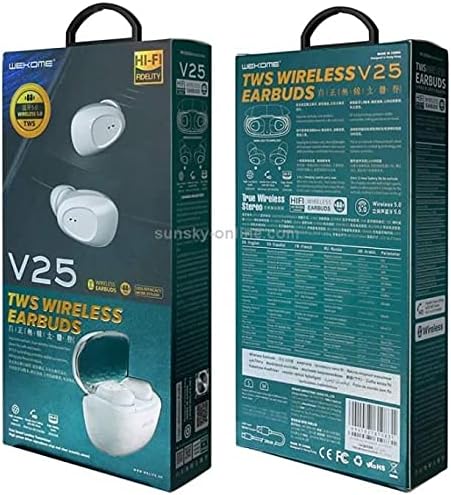
This image displays the front and back of the WEKOME V25 TWS Wireless Bluetooth Earphones retail packaging. The front shows the white earbuds and charging case, along with 'V25 TWS WIRELESS EARBUDS' branding. The back provides detailed specifications and features in multiple languages, including 'True Wireless Stereo' and 'Wireless 5.0' indicators.
Selepas membuka bungkusan, sila sahkan bahawa semua item ada dan dalam keadaan baik:
- WEKOME V25 TWS Wireless Bluetooth Earphones (Left and Right)
- Kes Pengecasan
- Kabel Pengecas USB
- Manual Pengguna
- Ear Cushions (various sizes, as per product specifications)
Panduan Persediaan
1. Mengecas Fon Telinga dan Sarung
Sebelum penggunaan pertama, disyorkan untuk mengecas sepenuhnya kedua-dua fon telinga dan bekas pengecas.
- Letakkan fon telinga ke dalam bekas pengecas, pastikan ia diletakkan dengan betul.
- Connect the USB charging cable to the charging port on the case and the other end to a 5V/1A USB power adapter (not included) or a computer's USB port.
- The indicator lights on the case and earphones will show charging status. Refer to the indicator light section for specific patterns.
- Once fully charged, disconnect the charging cable. A full charge typically takes 1-2 hours for the earphones and 2-3 hours for the case.
2. Berpasangan dengan Peranti Bluetooth
The earphones will automatically enter pairing mode when taken out of the charging case.
- Ensure the earphones are charged and remove them from the charging case. They will automatically power on and enter pairing mode (indicated by flashing lights).
- Pada peranti berdaya Bluetooth anda (telefon pintar, tablet, komputer riba), pergi ke tetapan Bluetooth.
- Hidupkan Bluetooth dan cari peranti yang tersedia.
- Select "WEKOME V25" from the list of found devices.
- Once connected, the earphone indicator lights will stop flashing, and you may hear a "Connected" prompt.
- Fon telinga akan disambungkan semula secara automatik ke peranti terakhir yang dipasangkan apabila dikeluarkan dari bekas, jika Bluetooth didayakan pada peranti.
Arahan Operasi
Kawalan Asas
The WEKOME V25 earphones feature touch controls for easy management of music and calls.
| Fungsi | Tindakan (Earbud Kiri/Kanan) |
|---|---|
| Hidupkan kuasa | Take out of charging case |
| Matikan Kuasa | Place back into charging case |
| Main/Jeda Muzik | Ketik sekali |
| Trek Seterusnya | Double tap Right earbud |
| Trek Sebelumnya | Double tap Left earbud |
| Jawab/Tamatkan Panggilan | Ketik sekali |
| Tolak Panggilan | Tekan dan tahan selama 2 saat |
| Aktifkan Pembantu Suara | Ketik tiga kali |
Memakai Earbud
Untuk kualiti dan keselesaan bunyi yang optimum, pastikan fon telinga dipakai dengan betul.
- Kenal pasti fon telinga Kiri (L) dan Kanan (R).
- Masukkan setiap fon telinga ke dalam saluran telinga yang sepadan dengan lembut.
- Rotate the earbud slightly until it fits snugly and comfortably.
- Experiment with different ear cushion sizes (if provided) to find the best fit for passive noise isolation and comfort.
Penyelenggaraan dan Penjagaan
Proper care will extend the life of your WEKOME V25 earphones.
- Pembersihan: Bersihkan fon telinga dan bekas pengecas dengan kerap menggunakan kain yang lembut, kering dan tidak berbulu. Jangan gunakan bahan kimia yang keras atau bahan yang melelas.
- Petua Telinga: Remove ear tips and clean them with a damp kain dan sabun lembut jika perlu. Pastikan ia kering sepenuhnya sebelum dipasang semula.
- Port Pengecasan: Keep the charging contacts on the earbuds and inside the case clean and free of debris. Use a dry cotton swab if needed.
- Storan: When not in use, always store the earphones in their charging case to protect them from dust, dirt, and damage.
- Suhu: Avoid exposing the earphones to extreme temperatures (hot or cold) or high humidity.
- Pendedahan Air: These earphones are not waterproof. Avoid contact with water or other liquids.
Menyelesaikan masalah
If you encounter issues with your earphones, refer to the following common problems and solutions.
| Masalah | Penyelesaian yang Mungkin |
|---|---|
| Fon telinga tidak dihidupkan | Ensure earphones are charged. Place them in the charging case for a few minutes, then remove. |
| Tidak boleh berpasangan dengan peranti |
|
| Hanya satu fon telinga berfungsi |
|
| Kelantangan rendah atau kualiti bunyi yang lemah |
|
| Kes pengecas tidak dicas |
|
Jika masalah berterusan selepas mencuba penyelesaian ini, sila hubungi sokongan pelanggan.
Spesifikasi
Key technical specifications for the WEKOME V25 TWS Wireless Bluetooth Earphones:
| Ciri | Perincian |
|---|---|
| Jenama | WEKOME |
| Nombor Model | V25 |
| Teknologi Ketersambungan | Wayarles (Bluetooth) |
| Faktor Bentuk Fon Kepala | Di Telinga |
| Kawalan Bunyi | Pembatalan Bunyi Aktif |
| Mikrofon | Termasuk |
| warna | putih |
| Komponen yang Disertakan | Kusyen Telinga |
| Ciri Kabel | Tanpa Kabel |
| Pengeluar | WEKOME |
| Tarikh Mula-mula Tersedia | 31 Mei 2021 |
Waranti dan Sokongan
WEKOME products are designed and manufactured to the highest quality standards. For information regarding warranty coverage, technical support, or service inquiries, please refer to the warranty card included with your product or visit the official WEKOME webtapak. Sila simpan bukti pembelian anda untuk tuntutan waranti.
For further assistance, you may contact WEKOME customer service through their official channels.


