pengenalan
This manual provides essential information for the safe and effective operation, maintenance, and troubleshooting of your Crown CT18024 BMC Rotary Demolition Hammer. Please read this manual thoroughly before using the tool to ensure proper handling and to prevent injury or damage.
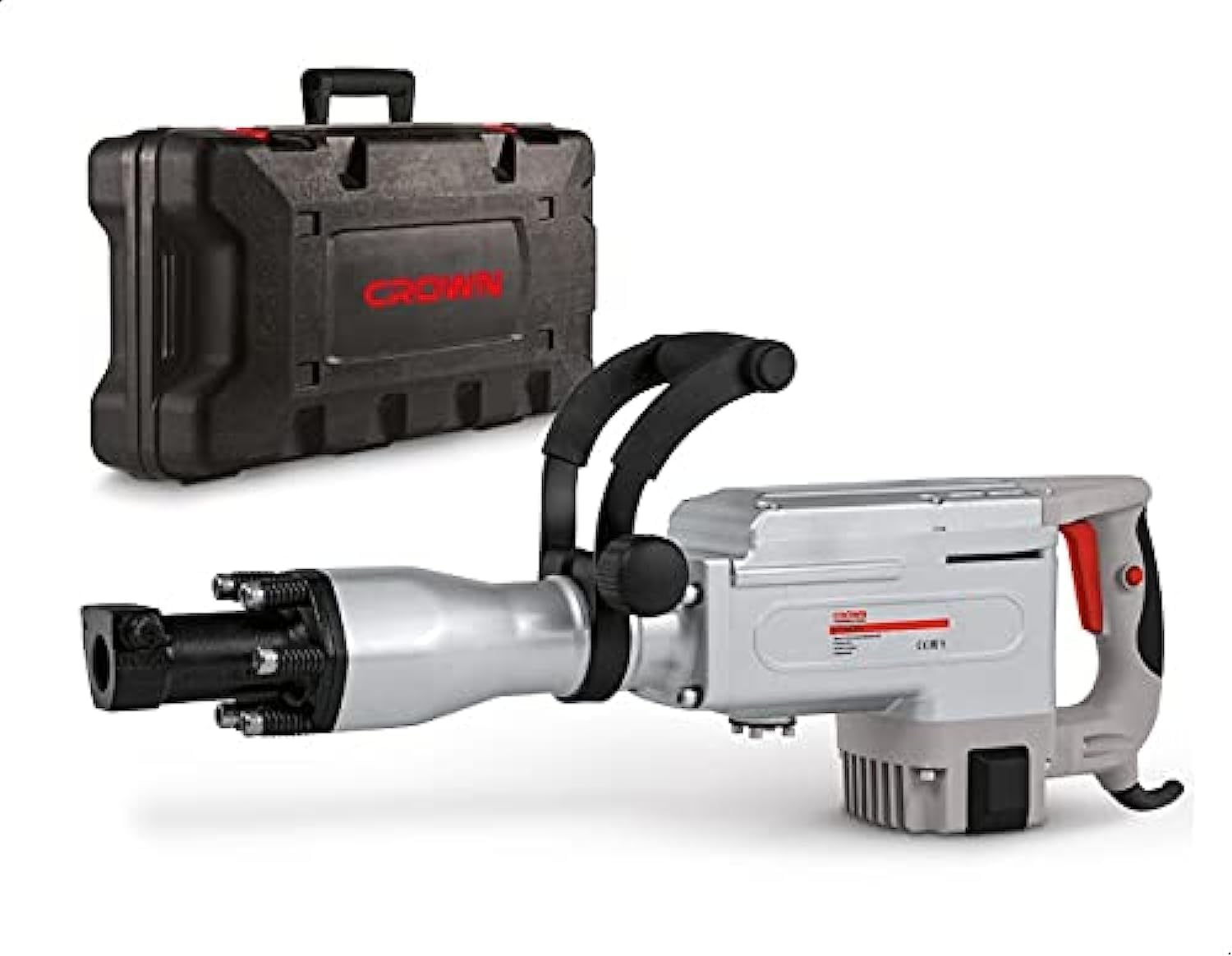
Image: The Crown CT18024 BMC Rotary Demolition Hammer, a powerful grey and red tool, is shown alongside its black, durable carrying case. The hammer features a robust body, a front chuck for bits, and an auxiliary handle for improved control.
Arahan Keselamatan Am
Sentiasa patuhi langkah berjaga-jaga keselamatan asas untuk mengurangkan risiko kebakaran, kejutan elektrik dan kecederaan diri.
- Keselamatan Kawasan Kerja: Pastikan kawasan kerja bersih dan terang. Kawasan bersepah atau gelap mengundang kemalangan. Jangan kendalikan alatan kuasa dalam atmosfera yang mudah meletup, seperti di hadapan cecair mudah terbakar, gas atau habuk.
- Keselamatan Elektrik: Palam alat kuasa mesti sepadan dengan alur keluar. Jangan sekali-kali mengubah suai palam dalam apa jua cara. Jangan menyalahgunakan kord. Jauhkan kord daripada haba, minyak, tepi tajam atau bahagian yang bergerak.
- Keselamatan Diri: Always wear eye protection. Use hearing protection when operating the tool. Dress properly; do not wear loose clothing or jewelry.
- Penggunaan dan Penjagaan Alat: Jangan paksa alat kuasa. Gunakan alat kuasa yang betul untuk aplikasi anda. Putuskan sambungan palam daripada sumber kuasa sebelum membuat sebarang pelarasan, menukar aksesori atau menyimpan alatan kuasa.
Persediaan
Membongkar
Carefully remove the demolition hammer and all accessories from the packaging. Inspect the tool for any signs of damage that may have occurred during transit. Retain packaging for future storage or transport.
Memasang Pemegang Bantu
- Longgarkan clamping mechanism on the auxiliary handle.
- Slide the auxiliary handle onto the front barrel of the demolition hammer.
- Adjust the handle to a comfortable and secure position for your grip.
- Ketatkan clamping mechanism firmly to secure the handle.
Installing the HEX-30 Bit
- Pastikan alat dicabut dari sumber kuasa.
- Clean the shank of the HEX-30 bit.
- Insert the bit into the chuck opening. Push and rotate the bit until it clicks into place.
- Pull on the bit to ensure it is securely locked. It should not come out easily.
Arahan Operasi
Sambungan Kuasa
Connect the power cord to a suitable 220-230V AC power outlet. Ensure the outlet is properly grounded and capable of supplying the required amperage (7.7 A) for the 1700 W motor.
Bermula dan Berhenti
- Untuk mula: Tekan suis ON/OFF.
- Untuk berhenti: Release the ON/OFF switch. For continuous operation, some models may have a lock-on button. If present, press the lock-on button after pressing the ON/OFF switch, then release the ON/OFF switch. To stop, press the ON/OFF switch again to release the lock.
Operasi Perobohan
- Hold the demolition hammer firmly with both hands, using the main handle and the auxiliary handle.
- Position the chisel or point of the bit against the material to be demolished.
- Start the tool and apply steady, firm pressure. Allow the tool to do the work; excessive force is not necessary and can lead to fatigue or damage.
- Maintain a stable stance and be aware of falling debris.
Nota: This tool is designed for heavy-duty demolition tasks. Always wear appropriate personal protective equipment (PPE) including safety glasses, hearing protection, gloves, and a dust mask.
Penyelenggaraan
Regular maintenance ensures optimal performance and extends the lifespan of your tool. Always disconnect the tool from the power supply before performing any maintenance.
Pembersihan
- After each use, clean the tool housing with a soft, damp kain. Jangan gunakan bahan kimia yang keras atau pembersih yang kasar.
- Buang sebarang habuk atau serpihan dari bukaan pengudaraan untuk mengelakkan terlalu panas.
- Bersihkan chuck dengan kerap untuk memastikan kemasukan dan penyingkiran bit lancar.
Pelinciran
The internal mechanisms of the demolition hammer require periodic lubrication. Refer to the service diagram (if provided with the physical manual) for specific lubrication points and recommended lubricants. Typically, the chuck mechanism benefits from light grease application.
Penggantian Berus Karbon
Carbon brushes are wear items and will need replacement over time. When the motor performance decreases significantly or sparks become excessive, the carbon brushes may need to be checked and replaced. This procedure should ideally be performed by a qualified service technician.
Penyimpanan
Store the demolition hammer in its original carrying case in a dry, secure location, out of reach of children. Ensure the tool is clean and free of debris before storage.
Menyelesaikan masalah
| Masalah | Kemungkinan Punca | Penyelesaian |
|---|---|---|
| Alat tidak bermula | Tiada bekalan kuasa; Suis rosak; Berus karbon usang. | Check power connection and outlet; Have switch inspected by technician; Replace carbon brushes. |
| Daya impak yang dikurangkan | Worn bit; Insufficient lubrication; Internal mechanism issue. | Replace bit; Apply appropriate lubricant to chuck; Consult service center. |
| Percikan api yang berlebihan dari motor | Berus karbon haus; Komutator kotor. | Replace carbon brushes; Have commutator cleaned by technician. |
| Alat terlalu panas | Slot pengudaraan tersumbat; Membebankan alat secara berlebihan. | Clean ventilation slots; Reduce load and allow tool to cool. |
For issues not listed or if solutions do not resolve the problem, contact an authorized service center.
Spesifikasi Teknikal
| Ciri | Perincian |
|---|---|
| Nombor Model | CT18024 / 1130263 |
| Jenama | Mahkota |
| Kuasa Dinilai | 1700 Watt |
| Voltage | 220-230 Voltan AC |
| Amppemadam | 7.7 Amps |
| Jenis Chuck | HEX-30 |
| Berat Barang | 23 Kilogram |
| Dimensi Produk (L x W x H) | 78.2 x 36.3 x 16.3 cm (lebih kurang) |
| Sumber Kuasa | Elektrik Bertali |
| warna | Kelabu/Merah |
Waranti dan Sokongan
Specific warranty terms and conditions for Crown products may vary by region and retailer. Please refer to the warranty card included with your purchase or visit the official Crown website for detailed information regarding warranty coverage and service procedures.
For technical support, spare parts, or service inquiries, please contact your authorized Crown dealer or service center. Keep your purchase receipt and model number handy when contacting support.


