1. Pengenalan
This manual provides detailed instructions for the Cellularline HUSH Bluetooth In-Ear Earbuds. These earbuds feature an interactive touch display, Active Noise Cancelling (ANC), Noise-Free Calls technology, and customizable sound with 5 EQ modes. Please read this manual carefully to ensure proper use and optimal performance of your device.
2. Apa yang ada di dalam Kotak
- Cellularline HUSH Earbuds
- Kes Pengecasan
- Manual Pengguna
3. Produk Lebihview
The Cellularline HUSH earbuds are designed for an advanced and personalized audio experience. The compact charging case features an interactive touch display for easy control.

Image 1: Cellularline HUSH Earbuds in their charging case, showcasing the sleek design and in-ear fit.
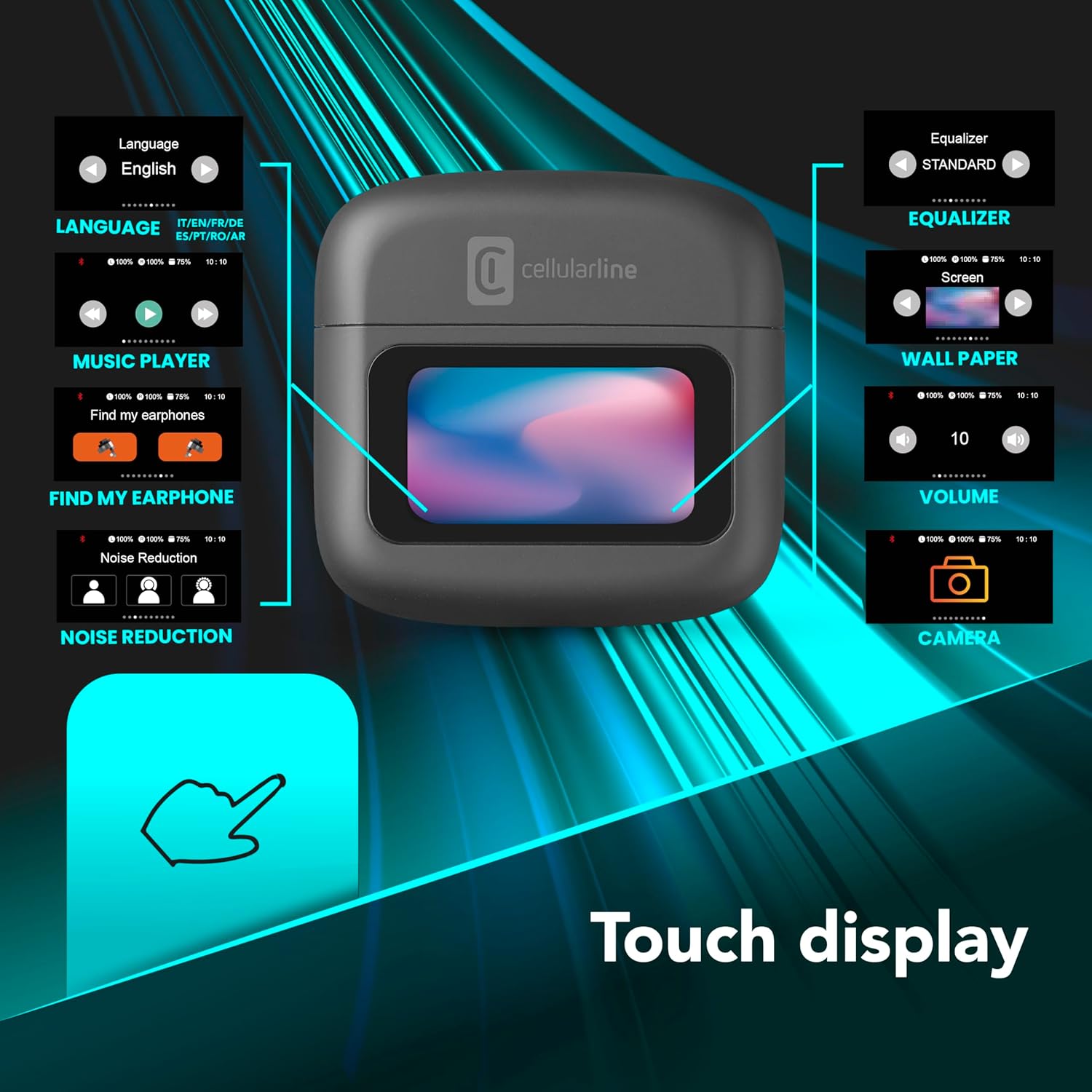
Image 2: An illustration highlighting the various functions accessible via the touch display on the charging case, including language, music player, 'Find My Earphone', noise reduction, equalizer, wallpaper, volume, and camera control.
4. Persediaan
4.1 Mengecas
Before first use, fully charge the earbuds and the charging case. Place the earbuds into the charging case. The magnetic closure ensures proper placement for charging. The case and earbuds offer up to 42 hours of total play time.

Image 3: Graphic indicating 42 hours of total play time and 6 hours of charger time for the Cellularline HUSH earbuds.
4.2 Berpasangan
The earbuds feature an Autopairing function. When removed from the charging case, they will automatically enter pairing mode or reconnect to the last paired device. To pair with a new device, ensure Bluetooth is enabled on your device and select 'Cellularline HUSH' from the list of available devices.
5. Arahan Operasi
5.1 Touch Display Controls
The interactive touch display on the charging case allows for easy management of various functions. You can control music playback, manage calls, adjust noise reduction modes, and select EQ settings directly from the display.
5.2 Active Noise Cancelling (ANC)
Activate Active Noise Cancelling to reduce ambient low-frequency noise, providing an immersive listening experience. This feature can be controlled via the touch display.
5.3 Noise-Free Calls
The integrated microphones utilize Noise-Free Calls technology to eliminate background noise, ensuring clear and crisp voice transmission during calls.

Image 4: The charging case display showing an incoming call with options to answer or decline, next to a smartphone displaying a similar call interface.
5.4 Mod Penyama (EQ)
Customize your audio experience by selecting one of the 5 available EQ modes through the touch display. This allows you to tailor the sound profile mengikut keutamaan anda.
5.5 Mod Pengurangan Bunyi
Switch between different noise reduction modes, including Active Noise Cancelling, Normal Mode, and Transparency Mode, to suit your environment. These modes are accessible via the touch display.

Image 5: The charging case display showing options for Noise Reduction, including Active Noise Cancelling, Normal Mode, and Transparency Mode.
6. Penyelenggaraan
To ensure the longevity and optimal performance of your Cellularline HUSH earbuds:
- Pastikan fon telinga dan bekas pengecas bersih dan kering.
- Elakkan daripada mendedahkan peranti kepada suhu atau kelembapan yang melampau.
- Clean the ear tips regularly with a soft, dry cloth.
- Store the earbuds in their charging case when not in use.
7. Penyelesaian masalah
If you encounter issues with your Cellularline HUSH earbuds, refer to the following common solutions:
- Tiada Bunyi:
- Pastikan fon telinga dicas.
- Periksa sambungan Bluetooth ke peranti anda.
- Laraskan kelantangan pada kedua-dua fon telinga dan peranti yang disambungkan.
- Tidak boleh berpasangan:
- Pastikan fon telinga berada dalam mod berpasangan (biasanya ditunjukkan oleh lampu berkelip).
- Matikan dan hidupkan Bluetooth pada peranti anda.
- Lupakan peranti daripada tetapan Bluetooth telefon anda dan cuba pasangkan semula.
- ANC Tidak Berfungsi:
- Ensure ANC is activated via the touch display.
- Check for proper fit of the earbuds in your ears.
- Isu Pengecasan:
- Pastikan kabel pengecasan disambungkan dengan selamat.
- Verify the charging case has power.
- Bersihkan kenalan pengecasan pada fon telinga dan sarung.
8. Spesifikasi
| Ciri | Perincian |
|---|---|
| Jenama | talian selular |
| Model | BTHUSHTWSK |
| Peranti Serasi | Peranti Bluetooth |
| Kaedah Kawalan | Sentuh |
| Ciri-ciri Tambahan | Active Noise Cancellation and Noise-Free Calls |
| Purata Hayat Bateri | 42 Jam |
| Berat Barang | 126 g |
| warna | Nero |
| Penempatan Telinga | Dalam telinga |
| Faktor Bentuk | Dalam telinga |
| Kawalan Bunyi | Pembatalan Bunyi Aktif |
| Bicu Fon Kepala | Jack-less |
| Teknologi Ketersambungan | Tanpa wayar |
| Teknologi Komunikasi Tanpa Wayar | Bluetooth |
9. Waranti dan Sokongan
For warranty information and customer support, please refer to the documentation included with your product or visit the official Cellularline webtapak. Simpan bukti pembelian anda untuk tuntutan waranti.


