pengenalan
Thank you for choosing the Cecotec BigDry 9000 Professional Dehumidifier. This manual provides essential information for the safe and efficient operation, maintenance, and troubleshooting of your new appliance. Please read this manual thoroughly before use and keep it for future reference.
This dehumidifier is designed to significantly reduce humidity levels in your environment, contributing to improved comfort and preventing issues caused by excessive moisture, such as mold growth or damage to furniture. With its advanced features, including Wi-Fi control and a large capacity tank, it offers a convenient and effective solution for humidity management.
Arahan Keselamatan
Sentiasa ikuti langkah berjaga-jaga keselamatan asas apabila menggunakan peralatan elektrik untuk mengurangkan risiko kebakaran, renjatan elektrik dan kecederaan.
- Pastikan perkakas diletakkan pada permukaan yang stabil dan rata.
- Do not operate the dehumidifier near water or in excessively wet environments.
- Jauhkan perkakas daripada sumber haba dan cahaya matahari langsung.
- Jangan halang saluran masuk atau keluar udara. Pastikan ruang yang mencukupi di sekeliling unit untuk aliran udara yang betul.
- Unplug the dehumidifier from the power outlet before cleaning, maintenance, or when not in use.
- Do not use if the power cord or plug is damaged. Contact qualified service personnel for repair.
- Perkakas ini adalah untuk kegunaan dalaman sahaja.
- Do not allow children to play with the dehumidifier.
- Penting: Selepas pengangkutan, biarkan unit berdiri tegak selama sekurang-kurangnya 24 jam sebelum memasangnya. Ini membolehkan bahan pendingin mendap.
Produk Selesaiview
Komponen
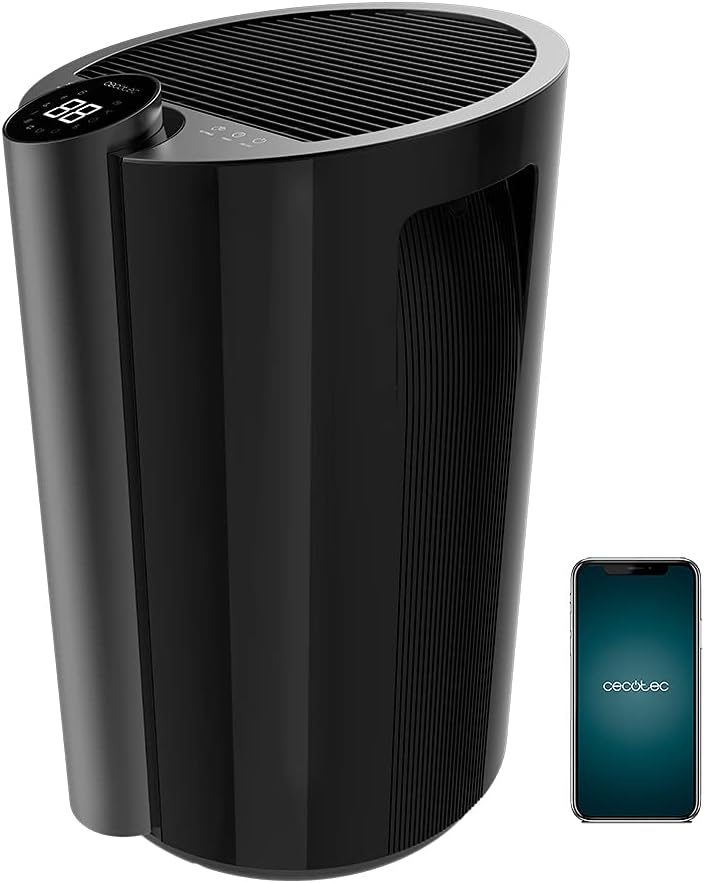
- Panel Kawalan dengan Paparan LED
- Gril Masuk Udara
- Gril Outlet Udara
- Water Tank (4.5 Liters)
- Roda untuk mudah alih
- Pemegang Bersepadu
- Kord Kuasa
- Penapis Udara
Ciri-ciri Utama
- Kapasiti Penyahlembapan Tinggi: Up to 20 liters per day.
- Tangki Air Besar: 4.5-liter removable tank minimizes emptying frequency.
- Kawalan Wi-Fi: Manage settings remotely via your smartphone.
- Liputan Luas: Effective for areas up to 90 m² (250 m³/h).
- Full Tank Warning: Prevents overflows and conserves energy.
- Adjustable Humidity: Set desired ambient humidity between 40% and 80%.
- Paparan led: Shows current ambient humidity, temperature, and selected settings.
- Kawalan Sentuh: Intuitive and easy-to-use interface.
- Pemasa Boleh Diprogram: Up to 12 hours with automatic shut-off.
- Dua Kelajuan: Low and High dehumidification speeds.
- Operasi senyap: Designed for minimal noise disruption.
- Penapis Udara: Improves air quality by preventing large particle entry.
- mudah alih: Dilengkapi dengan roda dan pemegang untuk pergerakan mudah.
Persediaan
- Membongkar: Keluarkan dehumidifier dengan berhati-hati daripada pembungkusnya. Simpan bahan pembungkusan untuk penyimpanan atau pengangkutan masa hadapan.
- penempatan: Place the dehumidifier on a firm, level surface in the desired room. Ensure there is at least 20 cm (8 inches) of space around all sides of the unit for proper air circulation. Avoid placing it against walls or furniture that could obstruct airflow.
- Siaga Awal: After transport, it is crucial to let the dehumidifier stand upright for a minimum of 24 hours before plugging it into a power outlet. This allows the refrigerant fluid to stabilize, preventing potential damage to the compressor.
- Sambungan Kuasa: Palamkan kord kuasa ke salur keluar elektrik yang dibumikan. Pastikan voltage sepadan dengan spesifikasi unit.
- Pemasangan Tangki Air: Ensure the water tank is correctly inserted into its compartment. The unit will not operate if the tank is not properly seated or is full.
- Persediaan Wi-Fi (Pilihan):
- Download the official Cecotec app on your smartphone.
- Buat akaun atau log masuk.
- Follow the in-app instructions to add your BigDry 9000 dehumidifier. This typically involves pressing the Wi-Fi button on the unit for 5 seconds to enter pairing mode. Note that the device requires a 2.4 GHz Wi-Fi network.

Arahan Operasi
Panel Kawalan Terlaluview

- Butang HIDUP/MATI: Tekan untuk menghidupkan atau mematikan unit.
- Butang MOD: Cycle through different operating modes (e.g., continuous dehumidification, auto mode).
- Butang KELAJUAN KIPAS: Adjust fan speed between Low and High.
- SETTINGS Button: Used to set the desired humidity level. Press repeatedly to cycle through humidity percentages (40% - 80%).
- Butang PEMASA: Set the automatic shut-off timer (up to 12 hours).
- Paparan led: Shows current ambient humidity, temperature, and selected settings.
Operasi Asas
- Hidupkan kuasa: Press the ON/OFF button to start the dehumidifier. The LED display will show the current ambient humidity.
- Tetapkan Kelembapan yang Diingini: Press the SETTINGS button to select your target humidity level. The unit will operate until the desired humidity is reached, then cycle on and off to maintain it.
- Laraskan Kelajuan Kipas: Press the FAN SPEED button to switch between low and high fan speeds. Lower speed provides quieter operation, while higher speed offers faster dehumidification.
- Tetapkan Pemasa: Press the TIMER button to set the desired operating duration (e.g., 1 hour, 2 hours, up to 12 hours). The unit will automatically turn off after the set time.
- Kawalan Wi-Fi: If connected to Wi-Fi, use the Cecotec app on your smartphone to control all functions remotely.
Penyelenggaraan
Penyelenggaraan tetap memastikan prestasi optimum dan memanjangkan jangka hayat penyahlembap anda.
Mengosongkan Tangki Air

- When the water tank is full, the unit will automatically stop operating and an indicator light (or message on the LED display) will alert you.
- Tarik keluar tangki air dari bahagian hadapan unit dengan berhati-hati.
- Kosongkan air yang terkumpul.
- Luncurkan tangki kosong kembali ke kedudukannya sehingga ia berbunyi klik dengan selamat. Unit ini akan menyambung semula operasi.
Membersihkan Penapis Udara
- Adalah disyorkan untuk membersihkan penapis udara setiap dua minggu atau lebih kerap bergantung pada penggunaan dan kualiti udara.
- Matikan penyahlembap dan cabut plagnya dari salur keluar kuasa.
- Locate and remove the air filter (refer to your specific model's diagram for exact location, usually at the back or side).
- Clean the filter using a vacuum cleaner to remove dust and debris. For heavier dirt, wash it gently with lukewarm water and a mild detergent.
- Biarkan penapis kering sepenuhnya sebelum memasukkannya semula ke dalam unit. Jangan gunakan pengering atau haba langsung.
- Reinsert the dry filter and plug the unit back in.
Pembersihan Am
- Lap bahagian luar dehumidifier dengan lembut, damp kain. Jangan gunakan pembersih atau pelarut yang melelas.
- Pastikan tiada air memasuki komponen elektrik.
Menyelesaikan masalah
Sebelum menghubungi sokongan pelanggan, sila rujuk panduan penyelesaian masalah berikut untuk isu biasa.
| Masalah | Kemungkinan Punca | Penyelesaian |
|---|---|---|
| Dehumidifier tidak dihidupkan. | Tiada kuasa; Tangki air penuh atau dimasukkan dengan salah. | Periksa sambungan kuasa; Kosongkan dan masukkan semula tangki air dengan betul. |
| Tiada air yang terkumpul atau penyahlembapan yang rendah. | Ambient humidity too low; Air filter clogged; Room temperature too low; Unit size too small for room. | Increase target humidity setting; Clean air filter; Ensure room temperature is above 5°C (41°F); Consider a larger unit for the space. |
| Unit bising. | Unit tidak berada di permukaan yang rata; Penapis udara tersumbat; Halangan pada kipas. | Letakkan di atas permukaan yang rata; Bersihkan penapis udara; Periksa dan tanggalkan sebarang halangan. |
| Isu sambungan Wi-Fi. | Incorrect Wi-Fi password; Router too far; Only supports 2.4 GHz network. | Verify password; Move unit closer to router; Ensure your Wi-Fi is 2.4 GHz. |
Spesifikasi
| Ciri | Spesifikasi |
|---|---|
| Jenama | Cecotec |
| Nombor Model | 05655 |
| warna | Black - Bigdry 9000 Professional Black Connected |
| Kapasiti Dehumidifikasi | 20 Liter/hari |
| Kapasiti Tangki Air | 4.5 Liter |
| kuasa | 320 Watt |
| Kawasan Liputan | Up to 90 m² (250 m³/h) |
| Pemasa | Up to 12 hours (automatic shut-off) |
| Bilangan Kelajuan | 2 (Rendah, Tinggi) |
| Dimensi (L x W x H) | 38.1 x 60.5 x 38.3 cm |
| Berat Barang | 14 Kilogram |
| Ciri Khas | Wi-Fi Control, Timer, High Dehumidification Capacity |
Waranti dan Sokongan
Cecotec products are manufactured to the highest quality standards. For warranty information and customer support, please refer to the official Cecotec webtapak atau hubungi perkhidmatan pelanggan mereka secara langsung.
- Ketersediaan Alat Ganti: 10 Tahun (mengikut spesifikasi produk).
- For technical assistance, troubleshooting beyond this manual, or warranty claims, please visit www.cecotec.com atau hubungi pengedar sah tempatan anda.


