pengenalan
Thank you for choosing the iHome AC Pro 2-Port USB Wall Charger. This manual provides essential information for the safe and efficient use of your new charger. Please read these instructions thoroughly before operation and retain them for future reference.
Maklumat Keselamatan
- Jangan dedahkan pengecas kepada cecair, lembapan atau suhu yang melampau.
- Do not disassemble or attempt to repair the charger. This may void the warranty and pose a safety risk.
- Ensure the wall outlet is easily accessible and not overloaded.
- Unplug the charger from the outlet when not in use or during electrical storms.
- Jauhkan daripada kanak-kanak.
Produk Selesaiview
The iHome AC Pro 2-Port USB Wall Charger is designed for convenient and efficient charging of your electronic devices. Its compact and flat design allows for easy access to outlets in tight spaces and portability for travel.
Ciri-ciri Utama
- Pelabuhan Dual USB: Charge up to two devices simultaneously.
- Ultra-Slim Profile: Designed to fit behind furniture and in narrow spaces without blocking other outlets.
- Rapid Charging Port: Includes a dedicated 2.4A port for faster charging of compatible devices.
- Cabang boleh dilipat: For enhanced portability and protection during travel.
- Keserasian Universal: Works with a wide range of USB-powered devices including smartphones, tablets, and other gadgets.

Image: The iHome 2-Port USB Wall Charger featuring its two USB ports, allowing simultaneous charging of two devices.
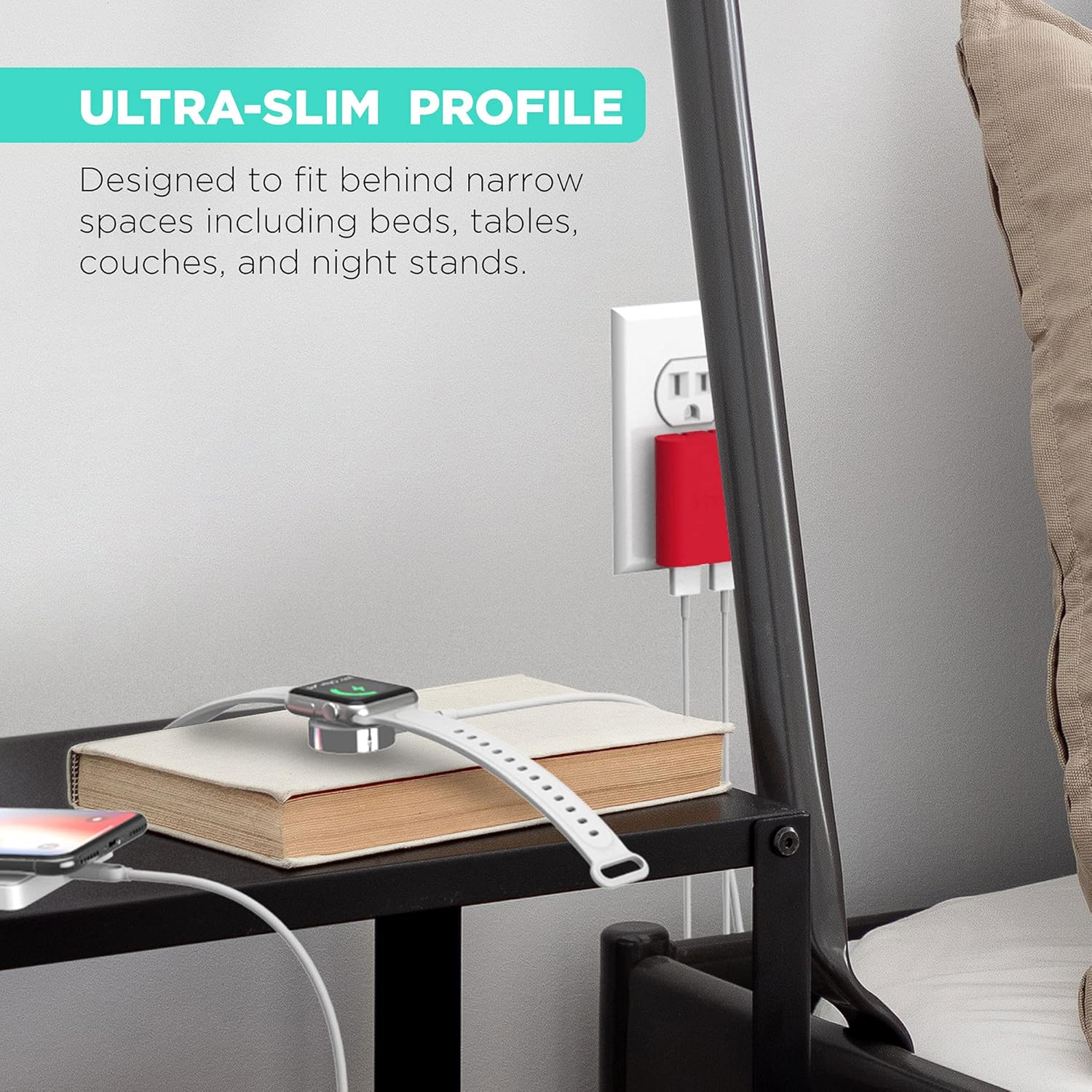
Image: The ultra-slim profile of the iHome charger, demonstrating its ability to fit discreetly behind furniture like a nightstand.

Imej: Dari dekat view of the iHome charger, pointing out the 3.4A USB port designed for rapid charging.

Image: The iHome charger with its foldable prongs, illustrating its compact design for convenient storage and travel.

Imej: Persembahan ilustrasicasing the universal compatibility of the iHome charger with a range of devices including smartphones, tablets, and wearables.
Persediaan
- Buka Prongs: Tarik keluar cabang yang boleh dilipat dari badan pengecas dengan lembut sehingga ia terkunci di tempatnya.
- Plug into an AC Outlet: Insert the charger into a standard 120V AC wall outlet. The flat design ensures it sits flush against the wall.
- Sambungkan Peranti: Plug your device's USB charging cable into one of the available USB ports on the charger.
Arahan Operasi
The iHome AC Pro 2-Port USB Wall Charger is designed for simple plug-and-play operation. Once plugged into a wall outlet, it is ready to charge your devices.
Mengecas Peranti Anda
- Identify the appropriate USB cable for your device.
- Connect one end of the USB cable to your device and the other end to an available USB port on the iHome charger.
- For faster charging, utilize the dedicated 2.4A USB port (often indicated by a blue interior or specific labeling) for compatible smartphones and tablets. The other port provides standard charging speed.
- Peranti anda harus menunjukkan bahawa ia sedang dicas.
Video: Demonstrates the iHome AC Pro 3.4 Amp 2-Port USB Wall Charger, highlighting its flat foldable plug and ease of use for charging various devices.
Penyelenggaraan
- Pembersihan: Putuskan sambungan pengecas daripada salur keluar kuasa sebelum membersihkan. Gunakan kain lembut dan kering untuk mengelap permukaan. Jangan gunakan pembersih cecair atau aerosol.
- Storan: When not in use, fold the prongs for compact storage. Store in a cool, dry place away from direct sunlight.
Menyelesaikan masalah
| Masalah | Kemungkinan Punca | Penyelesaian |
|---|---|---|
| Peranti tidak dicas. | Charger not properly plugged in; faulty cable; device issue. | Ensure charger is securely plugged into a live outlet. Try a different USB cable. Test the charger with another device. |
| Kelajuan pengecasan perlahan. | Using a standard port for a fast-charge compatible device; cable quality. | Ensure you are using the 2.4A rapid charging port for devices that support it. Use a high-quality USB cable. |
| Pengecas terasa hangat. | Operasi biasa semasa pengecasan. | A slight warmth is normal. If it becomes excessively hot, discontinue use and contact support. |
Spesifikasi
- Nombor Model: IH-CT539R
- Input Voltage: 120 Volt
- Jumlah Port USB: 2
- Amppemadaman: 3.4 Amps (Jumlah)
- Wattage: 10 watt
- Ciri Khas: Fast Charging (via dedicated 2.4A port)
- Dimensi: 8.07 x 4.41 x 0.91 inci (Pakej)
- Berat Barang: 2.89 auns
- Pengeluar: Lifeworks Technology, Inc.
Maklumat Waranti
This iHome product is covered by a limited manufacturer's warranty. For specific warranty terms and conditions, please refer to the documentation included with your purchase or visit the official iHome webtapak. Simpan bukti pembelian anda untuk tuntutan waranti.
Sokongan Pelanggan
For further assistance, technical support, or to inquire about replacement parts, please contact iHome customer service. Contact information can typically be found on the product packaging or the official iHome website. You may also visit the Kedai iHome di Amazon untuk maklumat produk tambahan dan sumber sokongan.


