pengenalan
The FLEXISPOT Pro 3 Stages Dual Motor Electric Standing Desk is designed to enhance your workspace by allowing seamless transitions between sitting and standing positions. This desk promotes better blood circulation, alleviates back and leg pain, and helps maintain proper muscle alignment, contributing to a healthier and more productive work style.
Key features include a seamless whole-piece desktop, a robust 3-stage lift system, quiet dual motors, and an intuitive one-touch LED control panel for personalized height adjustments.

Figure 1: The FLEXISPOT Pro 3 Stages Dual Motor Electric Standing Desk, showcasing its spacious whole-piece desktop and sturdy white frame.
Maklumat Keselamatan
Please read all safety instructions carefully before assembly and operation to prevent injury or damage to the product.
- Kapasiti Berat: Ensure the desk is not overloaded. The maximum weight capacity for this desk is 287 paun. Exceeding this limit can cause damage to the desk and potential injury.
- Perhimpunan: When assembling the desk, handle heavy parts with care. It is highly recommended to have the assistance of another person for safe assembly.
- Keselamatan Elektrik: Ensure the power cord is properly connected and not pinched or damaged. Do not operate the desk with a damaged cord or plug. Keep liquids away from electrical components.
- Mata Cubit: Keep hands and other objects clear of the moving parts of the desk frame during height adjustments to avoid pinching or crushing.
- Kanak-kanak dan Haiwan Kesayangan: Keep children and pets away from the desk during operation. Do not allow them to play on or under the desk.
- penempatan: Place the desk on a level surface. Ensure there is sufficient clearance around the desk for safe movement and adjustment.
Kandungan Pakej
Sebelum memulakan pemasangan, sila sahkan bahawa semua komponen ada dan tidak rosak. Jika mana-mana bahagian hilang atau rosak, sila hubungi khidmat pelanggan.
- Whole-Piece Desktop (Natural Desktop)
- Electric Desk Frame (White) with Dual Motors
- One-Touch LED Control Panel
- Penyesuai Kuasa dan Kord
- Perkakasan Pemasangan (skru, bolt, dsb.)
- Manual Arahan (dokumen ini)
Persediaan dan Perhimpunan
Assembly of the FLEXISPOT standing desk is designed to be straightforward, though it is recommended for two people. The desktop comes with pre-marked holes for easy alignment of the frame.
- Buka Pembungkusan Komponen: Keluarkan semua bahagian dari bungkusan dengan berhati-hati dan letakkannya di atas permukaan yang bersih dan lembut untuk mengelakkan calar.
- Pasangkan Kaki ke Desktop: Align the desk frame with the pre-drilled holes on the underside of the desktop. Secure the frame to the desktop using the provided screws. A drill may be helpful for this step.
- Pasang Panel Kawalan: Mount the one-touch LED control panel to the designated area on the underside of the desktop, typically on the front edge.
- Connect Motors and Control Panel: Connect the motor cables to the control box, and then connect the control panel cable to the control box. Ensure all connections are secure.
- Sambungkan Kuasa: Plug the power adapter into the control box, and then plug the power cord into a wall outlet.
- Pengurusan Kabel: Use the included cable ties or management clips to neatly organize and secure all cables to prevent tangling or damage during desk movement.

Figure 2: The seamless whole-piece desktop provides a superior and more durable surface compared to multi-piece alternatives.
Arahan Operasi
The FLEXISPOT standing desk features an intuitive control panel for easy height adjustment and memory functions.
Panel Kawalan Terlaluview
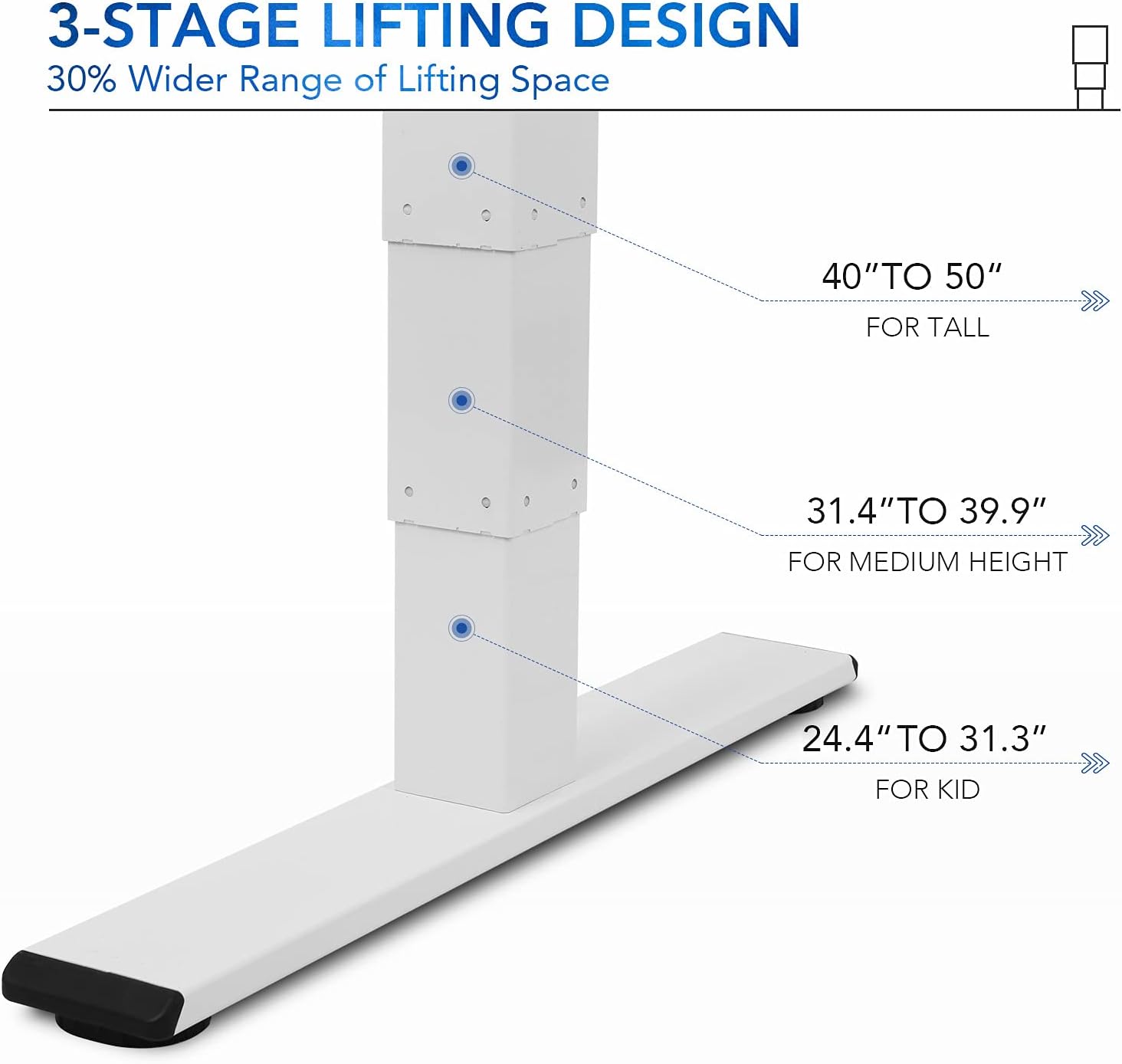
Figure 3: The one-touch LED control panel allows for precise height adjustments and memory programming.
- Anak panah atas/bawah: Tekan dan tahan untuk melaraskan ketinggian meja secara manual. Lepaskan untuk berhenti.
- Butang Memori (1, 2, 3): Program and recall your preferred sitting and standing heights.
- Butang "M": Used to save a height into a memory preset.
- "A" Button: (If applicable) May be used for advanced settings or a sit/stand reminder.
Pelarasan Ketinggian
3-stage lift system provides a wide height range from 24.4 inches (for children) to 50 inches (for tall adults), accommodating various user heights comfortably.

Rajah 4: 3-stage lifting design offers a 30% wider range of height adjustment compared to 2-stage sistem.
- Pelarasan Manual: Use the up and down arrows to find your desired height.
- Saving Memory Presets:
- Laraskan meja mengikut ketinggian yang anda inginkan.
- Tekan butang "M". Paparan akan berkelip.
- Press one of the numbered memory buttons (1, 2, or 3) before the display stops flashing. The height is now saved.
- Mengingat Semula Pratetap Memori: Simply press the corresponding numbered memory button (1, 2, or 3) to automatically move the desk to the saved height.
Quiet Dual Motors and Stability
The desk is equipped with whisper-quiet dual motors that generate less than 45 dB of sound during operation. These motors provide enhanced stability and can handle up to 287 lbs, ensuring smooth and reliable height adjustments even with heavy setups.
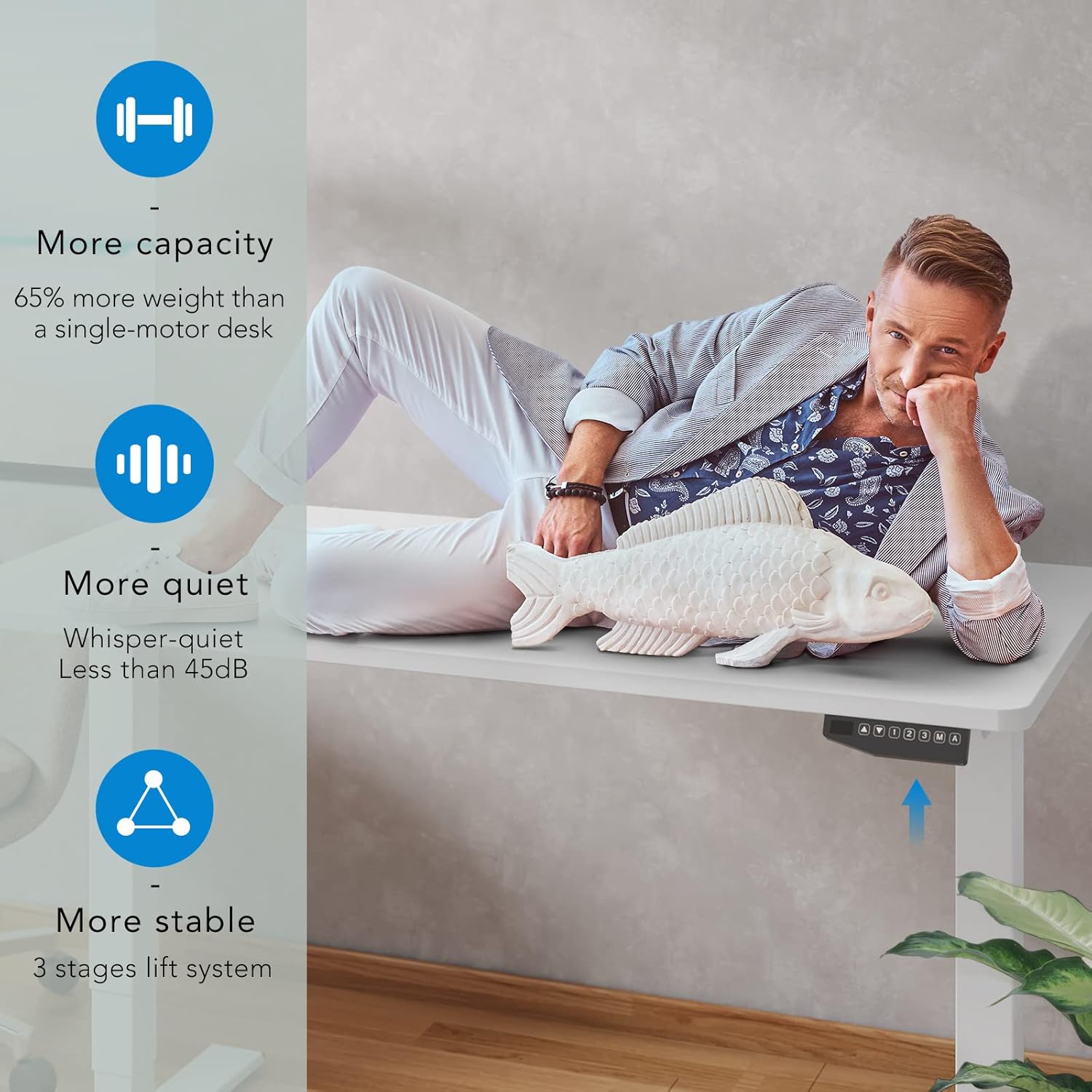
Figure 5: The dual motor system provides increased capacity, quiet operation, and superior stability.
Video 1: Demonstration of the FLEXISPOT Dual Motor Bamboo Standing Desk, highlighting its stability, quiet operation, and suitability for gaming setups. This video also shows the desk's ability to hold significant weight without instability.
Video 2: A home use version demonstration of the FLEXISPOT Dual Motor Bamboo Standing Desk, emphasizing its durability, ease of use with memory presets, and quiet operation for a productive home office environment.
Penyelenggaraan
Penyelenggaraan berkala memastikan ketahanan dan prestasi optimum meja berdiri FLEXISPOT anda.
- Pembersihan: Wipe the desktop and frame with a dry, soft cloth. For stubborn marks, a slightly damp kain boleh digunakan, diikuti dengan segera dengan kain kering. Elakkan bahan kimia yang keras atau pembersih yang kasar.
- Pemeriksaan Kabel: Periodically inspect all cables for any signs of wear, fraying, or damage. Ensure they are securely fastened and not interfering with the desk's movement.
- Keketatan skru: Over time, screws may loosen. Periodically check and tighten all assembly screws to maintain desk stability.
- Pengagihan Beban: Distribute weight evenly across the desktop to prevent undue stress on any single point or motor.
Video 3: A durability test video for the desktop, demonstrating its resistance to scratches, weight, and ease of cleaning. This highlights the robust nature of the bamboo desktop material.
Menyelesaikan masalah
If you encounter any issues with your FLEXISPOT standing desk, refer to the following common solutions:
| Masalah | Kemungkinan Punca | Penyelesaian |
|---|---|---|
| Meja tidak bergerak atau bertindak balas terhadap kawalan. | Power disconnected, loose cables, motor overload. | Check power cord connection to outlet and control box. Ensure all motor cables are securely plugged in. Reduce weight on the desk if overloaded. |
| Meja bergerak tidak sekata atau mengeluarkan bunyi yang luar biasa. | Uneven load, loose assembly, obstruction. | Ensure weight is evenly distributed. Check and tighten all assembly screws. Inspect for any obstructions under or around the desk. |
| Pratetap memori tidak berfungsi. | Pengaturcaraan yang salah. | Re-program the memory presets following the "Saving Memory Presets" instructions in the Operating section. |
| Meja berhenti pada pertengahan pergerakan. | Overheat protection, obstruction. | Allow the desk to cool down for 20 minutes if used continuously for an extended period. Check for obstructions. |
Jika masalah berterusan selepas mencuba penyelesaian ini, sila hubungi khidmat pelanggan FLEXISPOT untuk bantuan lanjut.
Spesifikasi
| Ciri | Perincian |
|---|---|
| Jenama | FLEXISPOT |
| Nombor Model | EC5 |
| Dimensi Produk (D x W x H) | 55.1"D x 27.5"W x 23.6"H (Minimum height) |
| Julat Ketinggian | 24.4" hingga 50" |
| Bahan Desktop | Whole-Piece Wood (Natural Desktop) |
| Bahan Asas | Metal (White Frame) |
| Jenis Motor | Motor Dwi |
| Tahap Kebisingan | Kurang daripada 45 dB |
| Kapasiti Berat | 287 paun |
| Panel Kawalan | One-Touch LED with 3 Memory Presets |
| Perhimpunan Diperlukan | Ya (2 orang disyorkan) |
| UPC | 810072796073 |
Waranti & Sokongan
FLEXISPOT stands behind the quality of its products. Your FLEXISPOT Pro 3 Stages Dual Motor Electric Standing Desk comes with the following warranty coverage:
- Perlindungan 5 Tahun: Applies to the desk frame and motors.
- Perlindungan 2 Tahun: Berkenaan dengan panel kawalan dan elektronik.
For any assistance, warranty claims, or technical support, please contact FLEXISPOT customer service. Please have your model number (EC5) and proof of purchase ready when contacting support.
You can visit the official FLEXISPOT weblaman web untuk maklumat lanjut dan butiran perhubungan: www.flexispot.com


