pengenalan
The Audizio RP310 is a high-quality belt-driven turntable designed for playing vinyl records. It features an integrated preamplifier, automatic return function, and a high-performance Audio Technica cartridge. This manual provides detailed instructions for setting up, operating, and maintaining your RP310 turntable to ensure optimal performance and longevity.
Arahan Keselamatan Penting
- Baca semua arahan dengan teliti sebelum mengendalikan peranti.
- Simpan manual ini untuk rujukan masa hadapan.
- Jangan dedahkan unit kepada hujan atau lembapan untuk mengelakkan kebakaran atau kejutan elektrik.
- Pastikan pengudaraan yang betul; jangan sekat sebarang bukaan pengudaraan.
- Letakkan unit pada permukaan yang stabil dan rata.
- Gunakan hanya lampiran/aksesori yang ditentukan oleh pengilang.
- Cabut palam unit semasa ribut petir atau apabila tidak digunakan untuk tempoh yang lama.
- Rujuk semua servis kepada kakitangan perkhidmatan yang berkelayakan.
Kandungan Pakej
Sahkan bahawa semua item yang disenaraikan di bawah terdapat di dalam pembungkusan:
- Audizio RP310 Turntable Unit
- Manual Arahan
- Tikar Meja Putar Getah
- RCA kabel
- Penyesuai Kuasa 12V
- Penutup Habuk
Produk Selesaiview
The Audizio RP310 turntable is designed for high-fidelity vinyl playback with user-friendly features.
- Automatic Return Function: The tonearm automatically returns to its rest position after playback.
- Audio Technica Cartridge: Equipped with a high-performance Audio Technica AT-3600L MM cartridge and diamond stylus for superior sound reproduction.
- Pembinaan Tahan Lama: Features a solid wooden housing with a high-gloss black finish for enhanced stability and aesthetics.
- Penutup Habuk Boleh Tanggal: Protects the turntable from dust and debris when not in use.
- Kesambungan USB: Allows for direct connection to a computer for converting vinyl records to MP3 digital files.
- Dual Speed Playback: Supports both 33 1/3 and 45 RPM records.
- Auto-Lift Tonearm: The tonearm features an auto-lift function for gentle record handling.
- Shock-Absorbing Feet: Minimizes vibrations for stable playback.
- Adjustable Tracking System: Allows for fine-tuning the tracking force between 1.5 and 3 grams for optimal stylus-to-groove contact.
- Pra terbina dalamamplebih hidup: Enables direct connection to any standard line-level input on an amppembesar atau pembesar suara berkuasa.
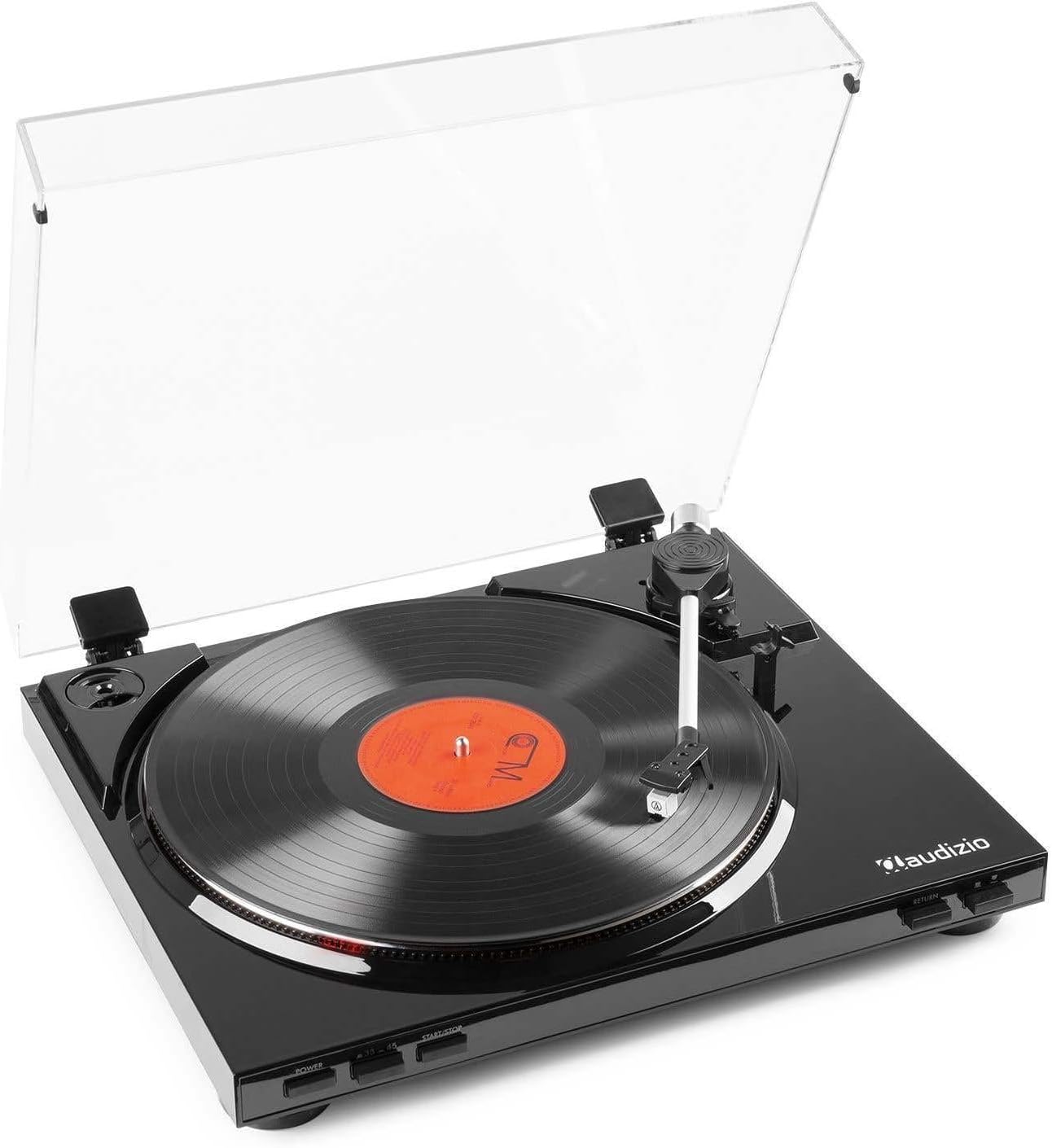
Rajah 1: The Audizio RP310 turntable with its dust cover open, showcasing a vinyl record on the platter and the tonearm in position.

Rajah 2: Atas view of the Audizio RP310 turntable with the protective dust cover closed, highlighting its sleek black finish.
Panduan Persediaan
- Membongkar: Carefully remove the turntable from its packaging. Retain all packaging materials for future transport or storage.
- penempatan: Letakkan meja putar di atas permukaan yang stabil dan rata, jauh daripada cahaya matahari langsung, sumber haba dan getaran berlebihan. Pastikan ruang yang mencukupi untuk penutup habuk terbuka sepenuhnya.
- Dust Cover Installation: Insert the hinges of the dust cover into the corresponding slots at the rear of the turntable unit.
- Platter and Mat: Place the platter onto the spindle. Then, place the rubber turntable mat on top of the platter.
- Imbangan Tonearm dan Daya Penjejakan:
- Tanggalkan pelindung stylus dengan perlahan.
- Carefully balance the tonearm by adjusting the counterweight until it floats horizontally.
- Once balanced, set the tracking force to the recommended range of 1.5 to 3 grams by rotating the counterweight. Refer to the cartridge manufacturer's specifications for the precise recommended force.

Rajah 3: Detail of the tonearm and counterweight, illustrating the adjustable tracking system.
- Sambungan Audio: Connect the supplied RCA cable from the "AUDIO OUT" ports on the rear of the turntable to a standard line-level input (e.g., "AUX," "CD," or "LINE IN") on your amppembesar atau pembesar suara berkuasa. Do not connect to a "PHONO" input, as the RP310 has a built-in preamplebih hidup.
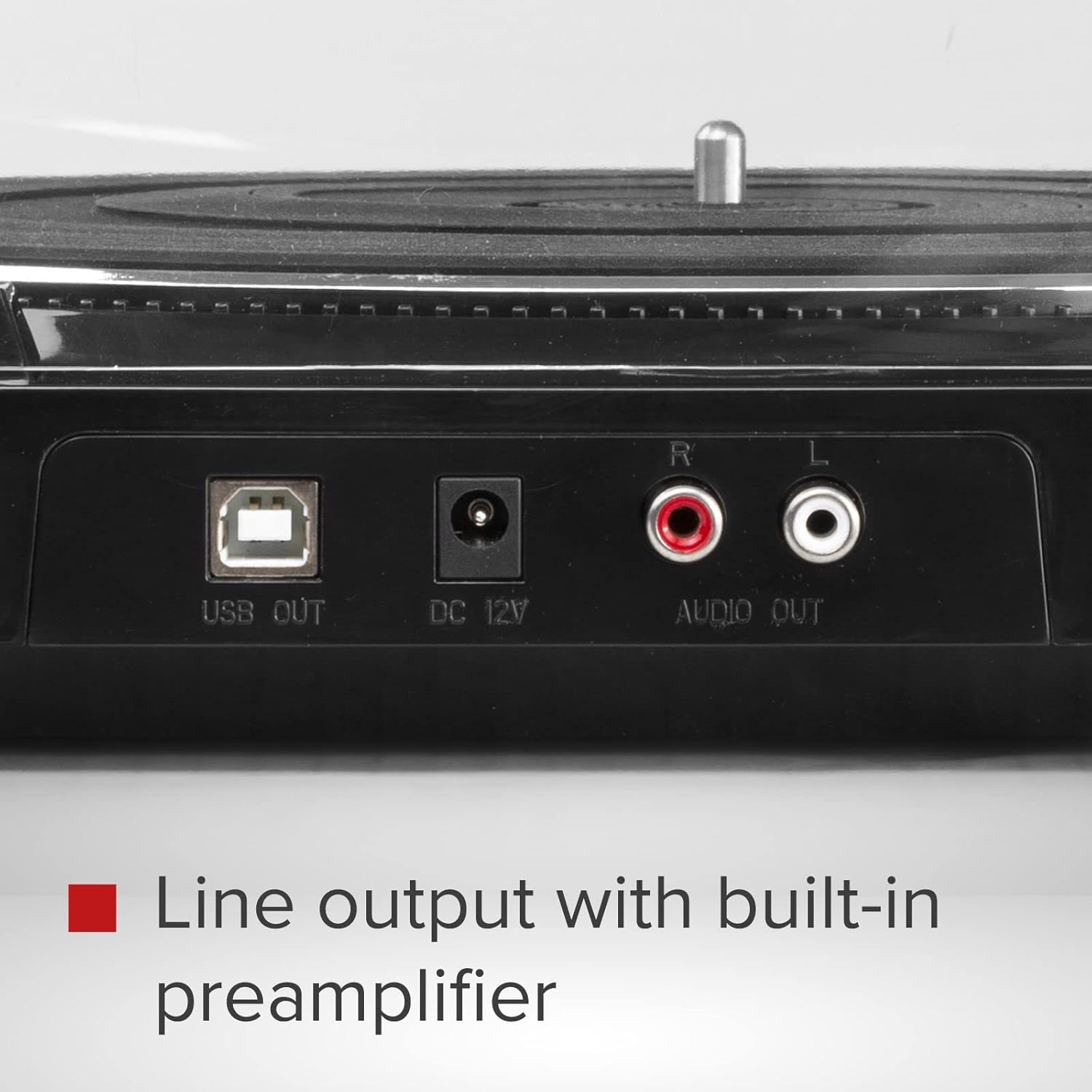
Rajah 4: Rear panel connections including USB Out, DC 12V power input, and RCA Audio Out ports.
- Sambungan Kuasa: Connect the 12V power adapter to the "DC 12V" input on the rear of the turntable, then plug the adapter into a suitable wall outlet.
Arahan Operasi
- Hidupkan kuasa: Tekan ke KUASA button located on the front panel to turn on the turntable.
- Pilih Kelajuan: Tekan ke 33/45 button to select the appropriate playback speed (33 1/3 RPM or 45 RPM) for your record. The selected speed will be indicated by an LED.
- Rekod Tempat: Carefully place a vinyl record on the turntable platter. If playing a 45 RPM single, use the included adapter if necessary.
- Mula Main Semula:
- Tekan ke MULA/BERHENTI button. The platter will begin to rotate.
- Manually lift the tonearm using the cueing lever and position it over the desired track on the record.
- Lower the cueing lever to gently place the stylus onto the record.
- Alternatively, for automatic start, simply move the tonearm over the record, and it will automatically lower.
- Pulangan Automatik: At the end of the record, the tonearm will automatically lift, return to its rest position, and the platter will stop rotating.
- Hentikan Main Balik: To stop playback manually at any time, lift the tonearm using the cueing lever, return it to its rest, and press the MULA/BERHENTI button to stop the platter.

Rajah 5: Front panel controls for power, speed selection, and start/stop functions.
USB Recording (Vinyl to MP3)
The Audizio RP310 allows you to convert your vinyl records into digital MP3 files using a computer. This feature is ideal for archiving your collection or listening to your records on portable devices.
- Sambung ke Komputer: Use a USB cable (not always included, but mentioned in feature bullets as "supplied cable") to connect the "USB OUT" port on the turntable to an available USB port on your PC or Mac computer.
- Pasang Perisian: Install the provided recording software on your computer. If no software CD is included, check the Audizio website for compatible software downloads. Audacity is a commonly used free audio recording software that is compatible with most USB turntables.
- Konfigurasikan Perisian: Open the recording software and select the Audizio RP310 as the audio input device. Adjust recording levels as needed to prevent clipping or distortion.
- Mulakan Rakaman: Begin playing your vinyl record on the turntable as described in the "Operating Instructions" section. Simultaneously, initiate recording within the software.
- Jimat Files: Once the record side is finished, stop the recording in the software and save the audio as an MP3 file. You may need to edit the track breaks and metadata within the software.
Penyelenggaraan
- Membersihkan Stylus: Bersihkan stylus secara berkala menggunakan berus lembut yang direka untuk membersihkan stylus, dan berus perlahan-lahan dari belakang ke hadapan. Stylus yang kotor boleh menjejaskan kualiti bunyi dan merosakkan rekod.
- Membersihkan Unit: Wipe the turntable's surface and dust cover with a soft, dry, or slightly damp kain. Elakkan menggunakan pembersih atau pelarut yang kasar.
- Penjagaan Rekod: Pastikan rekod anda bersih dan bebas daripada habuk. Simpannya secara menegak di dalam sarungnya untuk mengelakkan ia melengkung.
- Penggantian Stilus: The stylus has a limited lifespan (typically 300-1000 hours of playback). Replace it when you notice a decrease in sound quality or visible wear. Consult your dealer for a replacement Audio Technica AT-3600L stylus.
Menyelesaikan masalah
| Masalah | Kemungkinan Punca | Penyelesaian |
|---|---|---|
| Tiada kuasa | Penyesuai kuasa tidak disambungkan atau alur keluar rosak. | Ensure the power adapter is securely connected to the turntable and a working power outlet. Check the power button. |
| Tiada suara atau kelantangan rendah | Sambungan audio yang salah; amplifier input not selected; volume too low. | Verify RCA cables are correctly connected to a LINE IN input on your amplifier. Select the correct input source on your amplifier and increase volume. |
| Melangkau atau bunyi herot | Dirty record or stylus; incorrect tracking force; turntable not level. | Clean the record and stylus. Re-adjust the tracking force. Ensure the turntable is on a stable, level surface. |
| Kelajuan main balik yang salah | Wrong speed selected; belt issue. | Ensure the correct speed (33 or 45 RPM) is selected. Check if the drive belt is properly seated around the motor pulley and platter. |
| Tonearm does not return automatically | Halangan atau kerosakan mekanisme. | Ensure no obstructions are preventing the tonearm's movement. If the issue persists, contact customer support. |
Spesifikasi Teknikal
| Model | Audizio RP310 |
| Kelajuan | 33 1/3, 45 RPM |
| Jenis Drive | Pemacu Belt |
| Kartrij | Audio Technica AT-3600L MM |
| Julat Daya Penjejakan | 1.5 - 3 grams |
| Sambungan Keluaran | Talian RCA Keluar |
| Output USB | Yes (for MP3 conversion) |
| Bekalan Kuasa | 12V DC Adapter (230 VAC/50 Hz input) |
| Dimensi (L x W x H) | 40 x 36 x 9 cm |
| Berat badan | 2.7 kg |
Waranti dan Sokongan
For warranty information, technical support, or service inquiries, please refer to the warranty card included with your product or contact your retailer or the Audizio customer service department. Please have your model number (RP310) and purchase date available when contacting support.


