Produk Selesaiview
The Bluesound Node is a versatile wireless multi-room high-resolution music streamer designed to integrate seamlessly with your existing audio system. It allows you to access and stream high-fidelity audio from various sources, including internet radio, cloud music services, and your personal music library, throughout your home.

Image: The Bluesound Node, a compact black device with a touch-sensitive top panel, shown from a top-front perspective.
Key features include a powerful Quad-Core 1.8GHz ARM Cortex A53 processor, a 32-bit/384kHz premium DAC for superior sound quality, and comprehensive connectivity options. It supports dual-band Wi-Fi, Gigabit Ethernet, and 2-way Bluetooth aptX HD for robust and uninterrupted music playback.
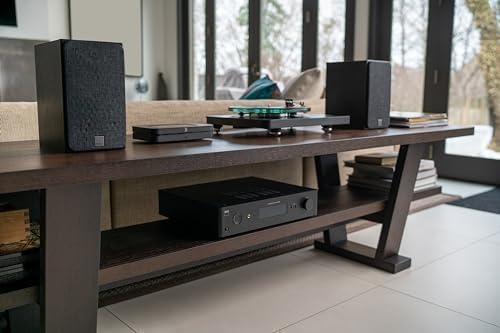
Image: The Bluesound Node positioned on a wooden console, part of a larger home audio setup with speakers and a turntable, demonstrating its integration capability.
Apa yang ada dalam Kotak
Verify that all the following items are included in your Bluesound Node package:
- Kabel Ethernet
- Kabel Kuasa AC 120V
- Stereo RCA ke RCA Cable
- OSLINK Optical to 3.5mm Mini Adaptor
Panduan Persediaan
Follow these steps to set up your Bluesound Node and begin streaming music:
- penempatan: Position the Bluesound Node near your existing stereo amplifier, AV receiver, or powered audio system. Ensure adequate ventilation around the device.
- Sambungan Kuasa: Connect the provided 120V AC Power Cord to the Node and then to a wall outlet.
- Sambungan Audio: Connect the Node to your audio system using one of the following methods:
- Analog: Use the Stereo RCA to RCA Cable to connect the Node's AUDIO OUT (R/L) to your ampinput analog lifier.
- Optik Digital: Use an optical cable (not included) to connect the Node's OPTICAL OUT to your amplifier's optical input. If your amplifier has a 3.5mm optical input, use the OSLINK Optical to 3.5mm Mini Adaptor.
- Koaksial Digital: Use a coaxial cable (not included) to connect the Node's COAX OUT to your amplifier's coaxial input.
- EARC HDMI: Connect an HDMI cable (not included) from the Node's HDMI eARC port to your TV's eARC/ARC HDMI input for TV audio integration.
- Sambungan Rangkaian: Connect the Node to your home network:
- Berwayar (Disyorkan): Connect the provided Ethernet Cable from the Node's LAN/USB port to your router or network switch.
- wayarles: The Node supports dual-band Wi-Fi. You will configure the wireless connection using the BluOS Controller app during the initial setup process.
- Pemasangan Apl: Download and install the BluOS Controller app on your smartphone, tablet, or computer. The app is available for iOS, Android, and desktop operating systems.
- Initial Setup via App: Open the BluOS Controller app and follow the on-screen instructions to connect your Node to your Wi-Fi network (if not using wired Ethernet) and configure your music services.

Image: The rear panel of the Bluesound Node, displaying various ports including RCA audio outputs, subwoofer output, coaxial and optical digital outputs, optical/analog inputs, IR input/output, LAN/USB, HDMI eARC, and power input.
Arahan Operasi
The Bluesound Node offers multiple ways to control your music playback and system settings:
Apl Pengawal BluOS
The primary method of control is through the intuitive BluOS Controller app. This app allows you to:
- Browse and select music from various streaming services (e.g., Amazon Music, Qobuz, TIDAL, Spotify), internet radio, and local music libraries.
- Cipta dan uruskan senarai main.
- Control playback (play, pause, skip, volume).
- Group multiple Bluesound players for a seamless multi-room audio experience.
- Access advanced settings and configurations for your Node.

Image: Multiple smartphone screens displaying the BluOS Controller app interface, showing options for player setup, music playback, and multi-room grouping.
Top Panel Touch Controls
The Node features a touch-sensitive glass top panel with built-in proximity sensing for basic controls:
- Main/Jeda: Ketik butang tengah.
- Kawalan Kelantangan: Use the left and right arrows to adjust volume.
- Track Skip: Swipe left or right on the touch bar.
- Pratetap: Configure up to five preset stations or playlists in the BluOS app for quick access directly from the top panel.
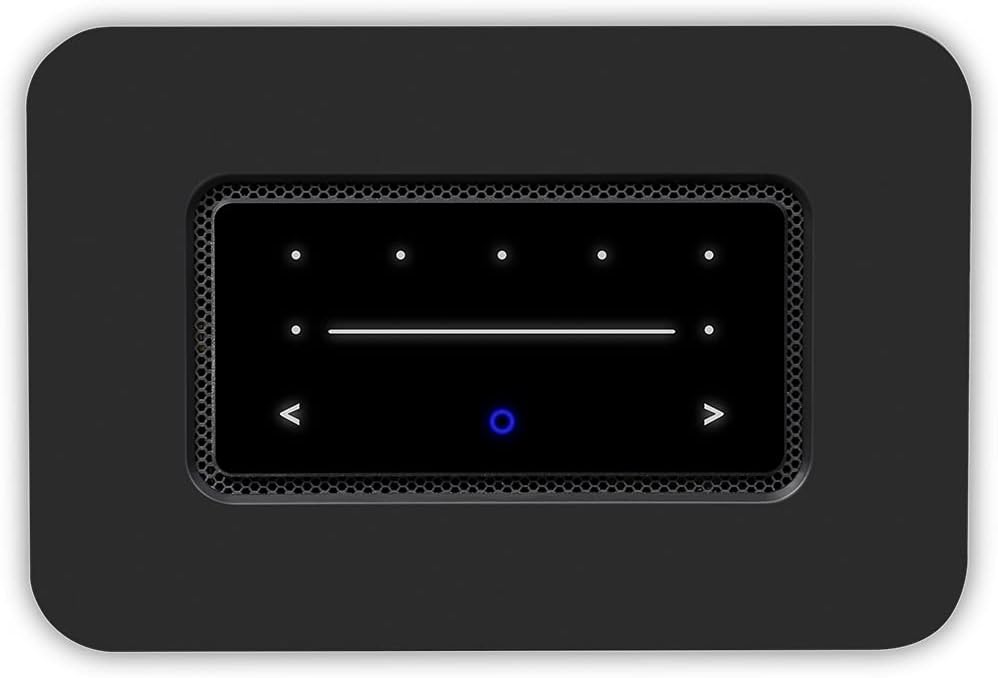
Imej: Bahagian atas yang terperinci view of the Bluesound Node, highlighting its black glass touch control panel with illuminated icons for playback, volume, and presets.
Kawalan Suara
Integrate your Node with Amazon Alexa for hands-free voice control. Enable the BluVoice skill in the Alexa app to control playback and select music on your Bluesound players.
AirPlay 2
Utilize AirPlay 2 to stream audio directly from your Apple devices to the Node, allowing for multi-room audio with other AirPlay 2 compatible devices.
Bluetooth aptX HD
The Node supports 2-way Bluetooth aptX HD, enabling high-quality wireless audio streaming from your Bluetooth devices to the Node, or from the Node to Bluetooth headphones or speakers.
Pembelajaran Jauh IR
The Node has IR input and remote learning capability, allowing you to program your existing IR remote control to operate basic functions of the Node, or use the optional Bluesound RC1 Remote Controller.
Video Produk Rasmi
Video: An official product video from Bluesound US showcasing the features and design of the Bluesound Node Wireless Multi-Room Hi-Res Music Streamer. This video highlights its capabilities and connectivity options.
Penyelenggaraan
To ensure the longevity and optimal performance of your Bluesound Node, follow these maintenance guidelines:
- Pembersihan: Use a soft, dry cloth to clean the exterior of the device. Avoid using abrasive cleaners, waxes, or solvents as they may damage the finish.
- Pengudaraan: Ensure that the ventilation openings are not blocked. Do not place the Node in an enclosed cabinet without proper airflow.
- Persekitaran: Operate the device in a clean, dry environment, away from direct sunlight, heat sources, and excessive moisture.
- Kemas kini Firmware: Regularly check for and install firmware updates via the BluOS Controller app. These updates often include performance improvements, new features, and bug fixes.
Menyelesaikan masalah
If you encounter issues with your Bluesound Node, refer to the following common troubleshooting steps:
| Masalah | Penyelesaian yang Mungkin |
|---|---|
| Tiada kuasa/Peranti tidak boleh dihidupkan | Ensure the power cord is securely connected to both the Node and a working electrical outlet. Try a different outlet. |
| Tiada keluaran bunyi | Check all audio cable connections between the Node and your amplifier/speakers. Verify the correct input is selected on your amplifier. Ensure volume is not muted or set too low on both the Node (via app/touch controls) and your audio system. |
| Cannot connect to Wi-Fi/Network issues | Ensure your Wi-Fi router is on and functioning. Restart your router and the Node. Re-run the network setup in the BluOS Controller app. Consider using a wired Ethernet connection if wireless issues persist. |
| BluOS app cannot find the Node | Ensure the Node is powered on and connected to the same network as your control device (smartphone/tablet). Restart the BluOS app. Restart the Node. |
| Intermittent audio dropouts | Check your network signal strength. Move the Node closer to your Wi-Fi router or use a wired Ethernet connection. Ensure no other devices are causing network interference. |
For more detailed troubleshooting or persistent issues, refer to the official Bluesound support webtapak atau hubungi sokongan pelanggan.
Spesifikasi
| Ciri | Perincian |
|---|---|
| Jenama | Bluesound |
| Nama Model | NODE |
| Nombor Model Item | N130BLKUNV |
| warna | Hitam |
| Dimensi Produk | 13.78 x 7.09 x 1.18 inci |
| Berat Barang | 4.8 paun |
| Pemproses | Quad-Core 1.8GHz ARM Cortex A53 |
| DAC Design | 32-bit/384kHz Premium DAC |
| Teknologi Ketersambungan | USB, Ethernet, Wi-Fi (Dual Band), Bluetooth aptX HD |
| Jenis Penyambung | Coaxial RCA, Optical, HDMI eARC, Analog RCA, Headphone, Subwoofer |
| Perkhidmatan Internet yang Disokong | Amazon Music, Qobuz, TIDAL, Spotify (and many others via BluOS app) |
| Jenis Pengawal | BluOS Controller App (iOS, Android, Desktop), Top Panel Touch Controls, Remote Control (optional) |
| Ciri Khas | Multi-Room Audio, Voice Control (Alexa), AirPlay 2, IR Learning |
Waranti dan Sokongan
The Bluesound Node comes with a manufacturer's warranty. For specific warranty terms and conditions, please refer to the documentation included with your product or visit the official Bluesound website. For technical support, product registration, and frequently asked questions, please visit the Bluesound support portal:
You can also find additional resources and community forums on the Bluesound webtapak.


