1. Pengenalan
This manual provides detailed instructions for the installation, operation, and maintenance of your Jennov PTZ Outdoor Wi-Fi Security Camera. Please read this manual thoroughly before using the product to ensure correct usage and optimal performance. This camera is designed for outdoor surveillance, offering 1080p HD video, pan/tilt/zoom capabilities, night vision, two-way audio, and motion detection.
2. Langkah-langkah Keselamatan
- This camera operates exclusively with Rangkaian Wi-Fi 2.4 GHz. It is not compatible with 5 GHz Wi-Fi.
- Ensure the camera is connected to a stable power source using the provided power cable. Wireless connectivity refers to data transmission, not power supply.
- Avoid using special characters in your Wi-Fi password, as this may cause connection issues.
- Jangan dedahkan kamera kepada suhu melampau di luar julat pengendaliannya (-40°C hingga 50°C).
- Handle the camera with care to prevent physical damage.
3. Kandungan Pakej
Sahkan bahawa semua item terdapat dalam pakej:
- 1 x Jennov 1080p HD Wi-Fi IP Camera
- 1 x Screw Pack for installation
- 1 x Manual Pengguna
- 1 x Cat5 Cable
- 1 x Penyesuai Kuasa
- 1 x Kad Mikro SD 32GB (prapasang)
4. Produk Lebihview
The Jennov PTZ Outdoor Wi-Fi Security Camera is a robust surveillance solution featuring 1080p resolution, pan/tilt/zoom functionality, and advanced night vision modes. It includes a pre-installed 32GB SD card for local storage and supports cloud storage options.

Rajah 4.1: Jennov PTZ Outdoor Wi-Fi Security Camera with included 32GB Micro SD card. This image displays the camera's main body, dual antennas, and the Micro SD card.
5. Persediaan
5.1 Sambungan Rangkaian
The camera supports both 2.4 GHz Wi-Fi and RJ45 wired connections.
- Sambungan Wi-Fi: Ensure your Wi-Fi network is 2.4 GHz. The camera does not support 5 GHz Wi-Fi.
- Sambungan Berwayar: Connect the camera to your router using the provided Cat5 cable for a stable network connection.
5.2 Pemasangan Aplikasi
Muat turun CamHipro application on your mobile device (iOS or Android) or use compatible software for Windows (e.g., Blue Iris, iSpy).
5.3 Initial Configuration (AP Mode)
The camera supports AP (Access Point) mode for initial setup without scanning a QR code:
- Hidupkan kamera.
- On your mobile phone, connect to the camera's Wi-Fi hotspot (usually named something like 'IPCAM-XXXXXX').
- Open the CamHipro app.
- Add the IP security camera via the "LAN search" function within the app.
- Follow the on-screen prompts to connect the camera to your home Wi-Fi network.
6. Arahan Operasi
6.1 Kawalan Sorot, Condong dan Zum (PTZ)
The camera offers a 355° horizontal pan and 90° vertical tilt, along with 4X digital zoom, allowing you to adjust the viewing angle remotely via the app.

Rajah 6.1: Illustration of the camera's 355° pan and 90° tilt capabilities, along with 4X digital zoom. The image shows a wide outdoor scene with children playing, demonstrating the camera's field of view and zoom function.
6.2 Mod Penglihatan Malam
The camera features 8 built-in white LEDs and 8 infrared LEDs, supporting three night vision modes:
- Mod Inframerah: Provides clear black and white images in low light.
- Mod Warna Penuh: Utilizes white LEDs to capture full-color images at night.
- Mod Pintar: Beralih secara automatik antara inframerah dan warna penuh berdasarkan gerakan yang dikesan.

Rajah 6.2: Comparison of FHD-Color Mode and FHD-Infrared Mode for night vision. The left side shows a clear, colored night view, while the right side shows a black and white infrared view.
6.3 Motion Detection & Humanoid Detection
The camera can automatically track and detect suspicious objects. It features a humanoid sensor to distinguish human movement from other objects, reducing false alarms.

Rajah 6.3: Demonstration of Humanoid Detection. The camera accurately identifies a person (left) while ignoring a pet (right), minimizing irrelevant alerts.
When motion is detected, the camera can trigger various alerts:
- Pemberitahuan Tolak: Receive instant alerts on your mobile device.
- Makluman E-mel: Configure email notifications with snapshots.
- FTP Upload: Automatically upload alarm videos to an FTP server.
- Penggera Akustik: Activate an audible alarm from the camera to deter intruders.
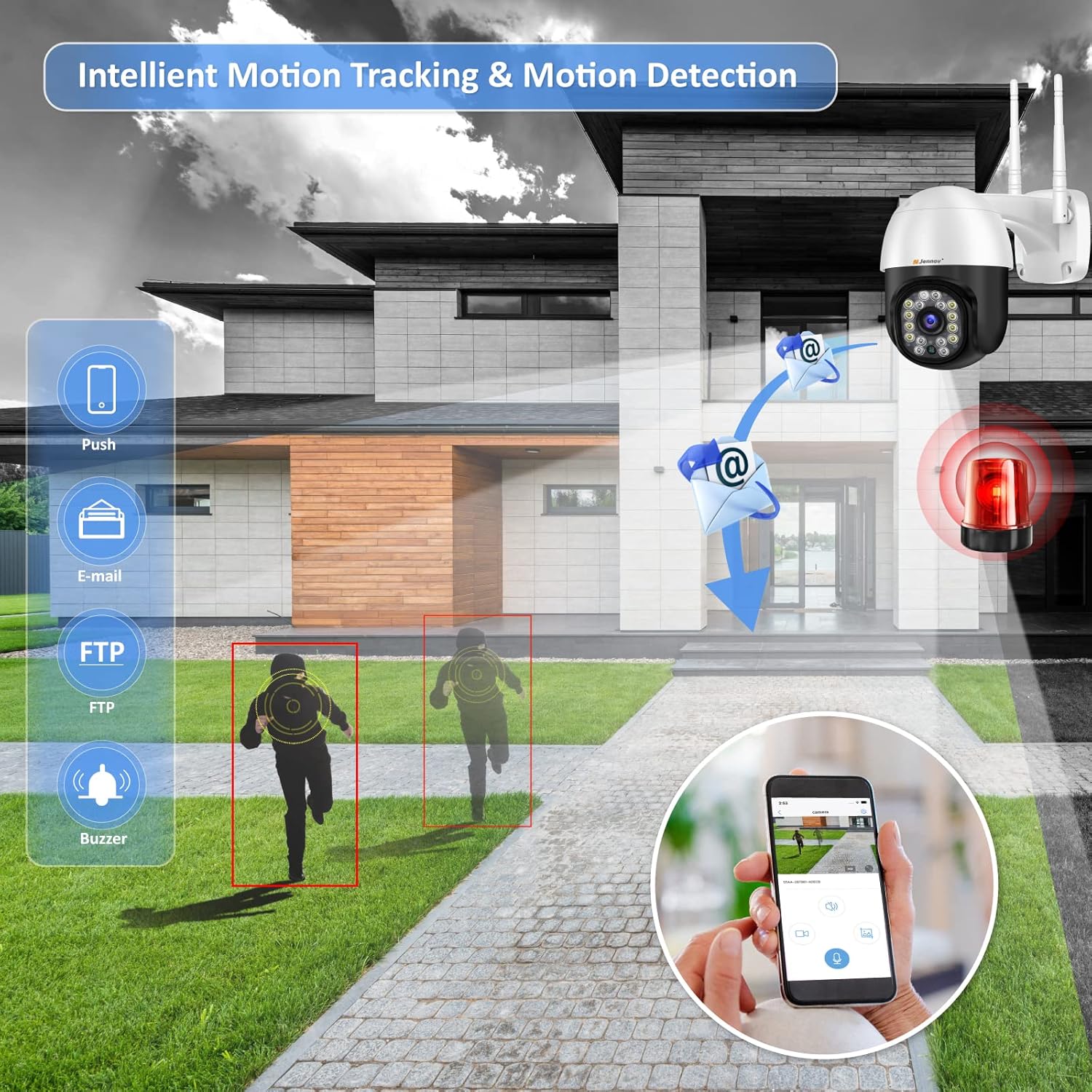
Rajah 6.4: Intelligent Motion Tracking and Detection features. The image shows the camera detecting movement and sending various alerts such as push notifications, email, FTP, and triggering a buzzer.
6.4 Audio Dua Hala
Equipped with high-quality speakers and noise-resistant microphones, the camera enables clear two-way communication through the app. You can speak to visitors or deter unwanted individuals.

Rajah 6.5: Multi-User Live View and Two-Way Audio functionality. The image depicts multiple users accessing the live feed and a scenario where a user communicates with a delivery person via the camera's two-way audio.
6.5 Rakaman & Penyimpanan
The camera comes with a pre-installed 32GB Micro SD card for continuous 24-hour recording. It supports up to a 64GB Micro SD card. Older videos are automatically overwritten when the storage is full. The camera uses H.264+ compression for efficient storage.

Rajah 6.6: Built-in 32GB SD Card and Cloud Storage support. The image shows the camera with icons representing local SD card storage and cloud storage options, along with a mobile app interface displaying recorded footage.
6.6 Akses Berbilang Pengguna
The Jennov camera supports simultaneous viewing and control by multiple users across various devices, including mobile phones, tablets, and computers.
7. Penyelenggaraan
- Bersihkan lensa kamera secara berkala dengan kain lembut dan kering untuk memastikan kualiti imej yang jelas.
- Pastikan sambungan kuasa selamat dan bebas daripada kerosakan.
- Check for firmware updates through the CamHipro app to ensure optimal performance and security.
- The camera is IP66 waterproof, dustproof, and resistant to heat and cold, making it suitable for various outdoor environments.

Rajah 7.1: IP66 Waterproof rating and suitability for diverse environments. The image shows the camera installed outdoors, highlighting its resistance to heat, dust, water, and cold, and its applicability in various settings like shops, parking lots, courtyards, and homes.
8. Penyelesaian masalah
- Tiada Kuasa: Periksa penyesuai kuasa dan sambungan kabel. Pastikan soket kuasa berfungsi.
- Isu Sambungan Wi-Fi: Verify your Wi-Fi network is 2.4 GHz. Ensure the Wi-Fi password does not contain special characters. Move the camera closer to the router if the signal is weak.
- Kualiti Imej Lemah: In the CamHipro app, click the "HD" symbol in the lower right corner of the real-time screen for higher image quality. Clean the camera lens.
- Kad SD Tidak Merakam: Ensure the SD card is properly inserted. Check if the card is full; older videos are overwritten automatically. Format the SD card via the app if issues persist.
- PTZ Control Malfunction: Ensure a stable network connection. If issues persist, restart the camera.
9. Spesifikasi
| Ciri | Spesifikasi |
|---|---|
| Resolusi | HD 1920 x 1080p |
| Format Video | H.264 + |
| Bidang View | Kuali 355°, Condongkan 90° |
| Zum Digital | 4X |
| Julat Penglihatan Malam | 20 meter |
| Sambungan Rangkaian | 2.4 GHz Wi-Fi, RJ45 Ethernet Port |
| Penyimpanan | Built-in 32GB Micro SD Card (supports up to 64GB), Cloud Storage |
| Suhu Operasi | -40°C ~ 50°C |
| Bekalan Kuasa | DC 12V, 2A |
| Dimensi | 20 x 18 x 12 cm |
| Berat badan | 710 g |
| Keserasian | Windows, iOS, Android (CamHipro app), Blue Iris, iSpy |
| Keselamatan | Penyulitan 128-bit AES |
| Rintangan Cuaca | IP66 Kalis Air |
10. Waranti dan Sokongan
Jennov offers a 12-month quality guarantee and customer support from the date of purchase. You may return or exchange the product within 30 days without stating reasons.
For technical assistance or warranty claims, please contact Jennov customer support through the official channels provided at the point of purchase or on the Jennov webtapak.


