1. Pengenalan
This instruction manual provides detailed information on the setup, operation, and maintenance of your DIHOOM Wireless Security Camera NVR. This NVR (Network Video Recorder) unit is designed to work with DIHOOM wireless surveillance cameras, supporting up to 8 cameras with 5-megapixel resolution. It features H.265+ compression for efficient storage and supports both local and remote monitoring via smartphone or PC.

Imej: Depan view of the DIHOOM Wireless Security Camera NVR unit, showing its compact design and two antennas.
2. Produk Lebihview dan Komponen
Familiarize yourself with the various ports and indicators on your NVR unit.

Image: Diagram illustrating the components and ports of the DIHOOM NVR. Key components include: (1) Power Lamp, (2) HDD Lamp, (3) RUN Lamp, (4) Antennas, (5) USB Port, (6) VGA Port, (7) Switch Button, (8) Power Port, (9) LAN Port, (10) HDMI Port.
- Kuasa Lamp: Menunjukkan status kuasa unit.
- HDD Lamp: Indicates the status of the hard disk drive.
- LARI Lamp: Menunjukkan status operasi NVR.
- Antena: For wireless communication with cameras.
- Port USB: For connecting a mouse or external storage.
- Port VGA: For connecting to a monitor via VGA cable.
- Butang Tukar: Suis hidup / mati.
- Pelabuhan Kuasa: Untuk menyambungkan penyesuai kuasa.
- Port LAN: For wired network connection to a router.
- Port HDMI: For connecting to a monitor via HDMI cable.
3. Panduan Persediaan
The DIHOOM NVR is designed for easy setup with minimal configuration required for wireless cameras.

Image: Visual guide for NVR setup. Steps include: 1. Powering on the camera and connecting the NVR to a router. 2. Downloading the mobile application. 3. Viewdalam rakaman.
3.1 Initial Wireless Connection
- Hidupkan Kamera: Ensure all DIHOOM wireless cameras are powered on and within range of the NVR.
- Hidupkan NVR: Connect the power adapter to the NVR's power port and plug it into an electrical outlet. The NVR will power on automatically.
- Sambung ke Paparan: Connect the NVR to a monitor or TV using either the HDMI or VGA port.
- Berpasangan automatik: The NVR will automatically detect and pair with powered-on DIHOOM wireless cameras. Live feeds should appear on the connected display.
3.2 Wired Connection (Optional)
For improved signal strength or specific network configurations, individual cameras can be connected to the NVR via an Ethernet cable.
- Connect one end of an Ethernet cable to the camera's LAN port.
- Connect the other end of the Ethernet cable to an available LAN port on the NVR.
- The NVR will automatically switch the camera's connection to wired mode.
3.3 Remote Monitoring Setup
Untuk mendayakan jarak jauh viewing via smartphone or PC, the NVR must be connected to your home network.
- Sambungkan NVR ke Penghala: Use an Ethernet cable to connect the NVR's LAN port to an available port on your internet router.
- Muat turun Aplikasi: Download the official DIHOOM monitoring application from your smartphone's app store (App Store for iOS, Google Play for Android).
- Daftar/Log Masuk: Follow the in-app instructions to register an account and add your NVR device using its unique ID or QR code.
- Klien PC: For PC monitoring, download the dedicated client software from the official DIHOOM webtapak.
4. Mengendalikan NVR
4.1 Langsung View and Playback (Local Operation)
When connected to a display, you can perform real-time viewing, playback, and system settings directly on the NVR using a USB mouse.
- Masa nyata Viewing: Displays live feeds from all connected cameras.
- Main balik: Akses foo yang dirakamtage stored on the installed HDD.
- tetapan: Configure various NVR parameters, including recording modes, network settings, and user management.
4.2 Mod Rakaman
The NVR supports three primary recording modes to suit different surveillance needs.
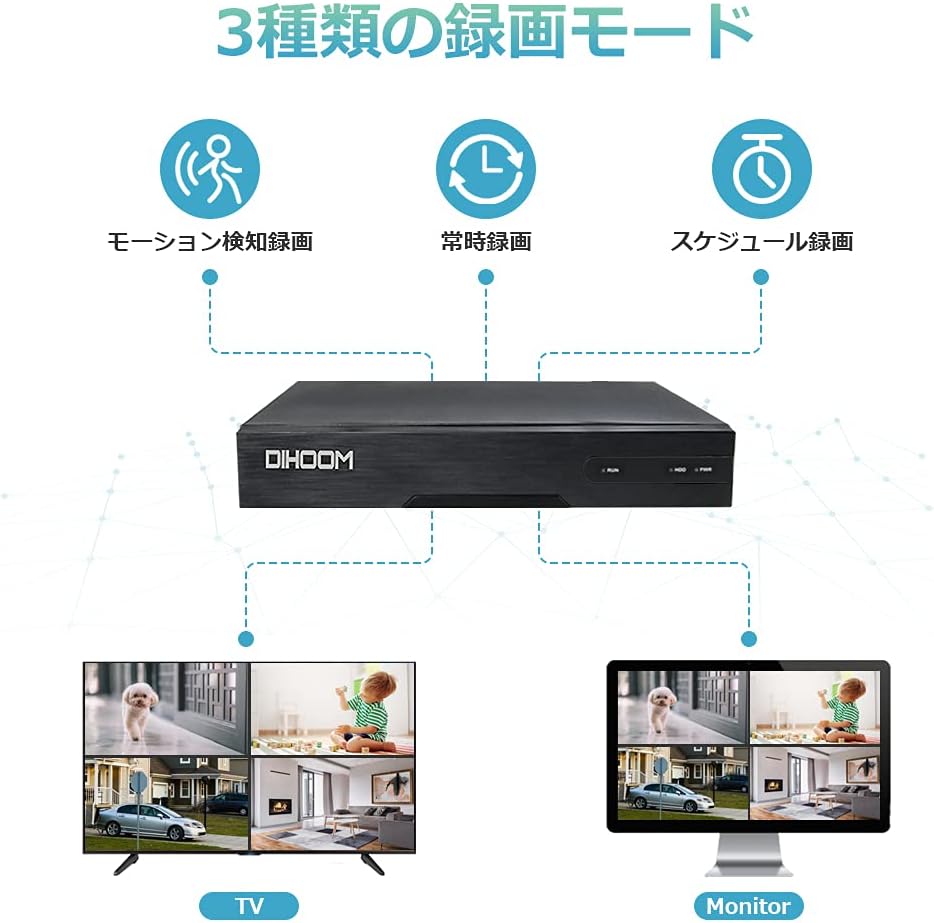
Image: Diagram illustrating the three recording modes: Motion Detection Recording, Continuous Recording, and Schedule Recording. Below are examples of multi-camera views on a TV and a monitor.
- Rakaman Berterusan: Merekod 24/7 tanpa gangguan.
- Jadual Rakaman: Allows you to set specific times for recording.
- Rakaman Pengesanan Gerak: Records only when motion is detected, saving storage space. When abnormal movement is detected, the NVR will trigger a buzzer alarm and send notifications to your smartphone.

Image: Illustration of the motion detection feature, showing a camera detecting human movement and the NVR unit emitting an alarm sound.
5. Ciri-ciri Utama
- 5 Megapixel Resolution Support: The NVR's default resolution is 5MP (2560x1920), providing clear and detailed images. It supports five different resolution settings for monitoring systems.
- H.265+ High Compression Technology: Adopting H.265+ compression technology, this NVR saves approximately half the HDD capacity compared to conventional H.264. This also reduces bandwidth usage, resulting in smoother video playback.

Image: Comparison of H.264, H.265, and H.265+ compression, showing H.265+ offers significantly longer recording times for the same storage capacity (e.g., 27 days vs. 9 days for 1TB HDD).
- Supports up to 8 Cameras: This NVR can be expanded to support up to 8 wireless security cameras, allowing for comprehensive surveillance coverage.
- Local and Remote Operation: The NVR supports local operation (real-time viewing, playback, settings) without an internet connection when connected to a display. For remote monitoring via smartphone or PC, a wired LAN connection to a router is required.
6. Penyelenggaraan
Proper maintenance ensures the longevity and optimal performance of your DIHOOM NVR.
- Pembersihan: Regularly wipe the NVR unit with a soft, dry cloth. Do not use liquid cleaners or aerosols.
- Pengudaraan: Ensure the NVR is placed in a well-ventilated area to prevent overheating. Do not block ventilation openings.
- Kemas kini Firmware: Periodically check the DIHOOM official website for firmware updates to ensure your system has the latest features and security patches.
- Kesihatan HDD: If an HDD is installed, monitor its health through the NVR's system settings to prevent data loss.
7. Penyelesaian masalah
This section addresses common issues you might encounter with your DIHOOM NVR.
| Masalah | Kemungkinan Punca | Penyelesaian |
|---|---|---|
| Tiada gambar yang dipamerkan. | Sambungan kabel longgar, sumber input tidak betul pada monitor, NVR tidak dihidupkan. | Check HDMI/VGA cable connection. Ensure monitor input is set correctly. Verify NVR power lamp sedang aktif. |
| Cameras not showing up. | Cameras not powered on, out of range, interference, or not paired. | Ensure cameras are powered. Reduce distance between NVR and cameras. Try wired connection for problematic cameras. Re-pair cameras if necessary (refer to NVR settings). |
| Jauh viewing not working. | NVR not connected to router, network issues, incorrect app settings. | Verify NVR is connected to router via LAN cable. Check router's internet connection. Ensure correct device ID/QR code is entered in the app. |
| Recording not happening. | No HDD installed, HDD full, incorrect recording schedule, motion detection not triggered. | Install a compatible HDD (up to 6TB). Check HDD status and free space. Verify recording schedule or motion detection settings. |
8. Spesifikasi
| Ciri | Perincian |
|---|---|
| Jenama | DIHOOM |
| Jenis Model | Wireless Security Camera NVR (Recorder Unit) |
| ASIN | B09362BY11 |
| UPC | 631851245137 |
| Teknologi Ketersambungan | Wi-Fi (Wireless), Ethernet (Wired) |
| Kiraan Saluran | 8 (Supports up to 8 cameras) |
| Resolusi Maks | 5 Megapixels (2560x1920) |
| Pemampatan Video | H.265 + |
| Sokongan HDD | Up to 6TB (HDD not included) |
| Dimensi Pakej | 50 x 46 x 39 cm |
| Berat Pakej | 13.6 kg |
9. Waranti dan Sokongan
DIHOOM is committed to providing high-quality products and excellent customer support.


Image: Left: DIHOOM customer support representatives ready to assist. Right: DIHOOM's quality control process, ensuring each product is inspected before shipment.
- Jaminan Kualiti: Products undergo rigorous inspection before shipment.
- Sokongan Teknikal: Professional technical support is available for assistance with product setup, operation, and troubleshooting.
- Maklumat Hubungan: For support inquiries, please refer to the contact details provided on the DIHOOM official webtapak atau dokumentasi pembelian anda.


