1. Maklumat Keselamatan Penting
Sila baca semua arahan dengan teliti sebelum pemasangan dan penggunaan. Simpan manual ini untuk rujukan masa hadapan.
- AMARAN: Always assemble the desk according to the provided instructions to ensure stability.
- Jangan melebihi kapasiti berat maksimum 177 lbs (80 kg).
- Be cautious when using the height adjustment feature to avoid injury from moving parts.
- Keep hands and fingers away from the moving parts during operation.
- Ensure the power cord is not pinched or damaged during assembly or operation.
- Produk ini bertujuan untuk kegunaan dalaman sahaja.
2. Produk Lebihview
The FLEXISPOT E1L is a dual-motor, L-shaped electric standing desk designed for home and office use. It features adjustable height, a quiet operation, and a customizable control panel.

Image 2.1: The FLEXISPOT E1L desk frame demonstrating its adjustable height capabilities.

Image 2.2: The FLEXISPOT E1L desk in a typical office setup, showcasing its L-shape and functionality.
3. Persediaan dan Pemasangan
Assembly of the FLEXISPOT E1L desk is designed to be straightforward, typically taking less than 30 minutes. All necessary tools are included.
3.1 Membongkar dan Semakan Komponen
Carefully unpack all components and verify against the packing list. Ensure all parts are present and undamaged before proceeding.
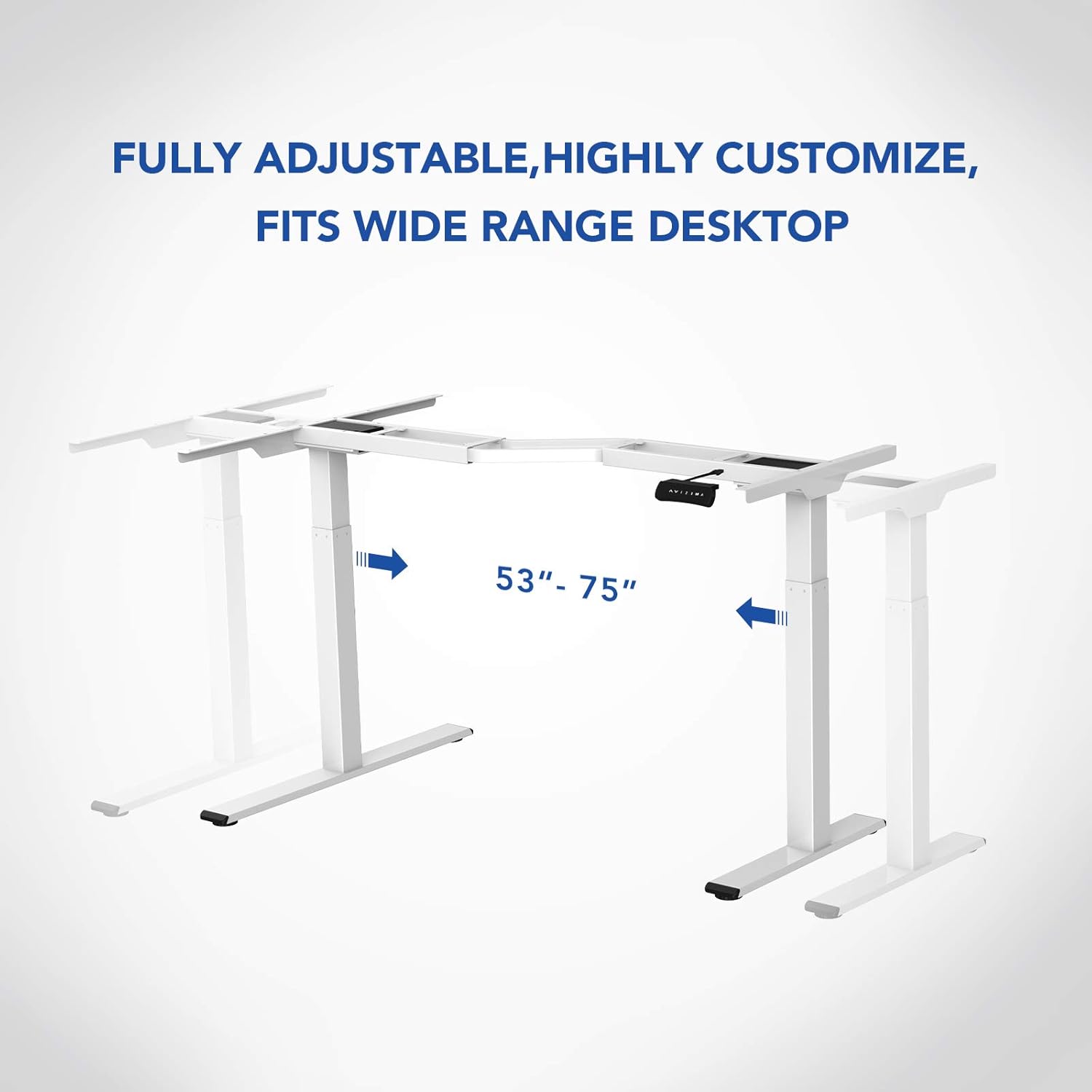
Imej 3.1: Selesaiview of the FLEXISPOT E1L desk frame components prior to assembly.
3.2 Langkah Perhimpunan
- Attach the lifting columns to the desktop frame.
- Pasangkan kaki ke bahagian bawah tiang pengangkat.
- Connect the control box and motor cables as per the detailed diagram in the included assembly guide.
- Mount the control panel to the desired location on the desk.
- Place the desktop surface onto the assembled frame and secure it.
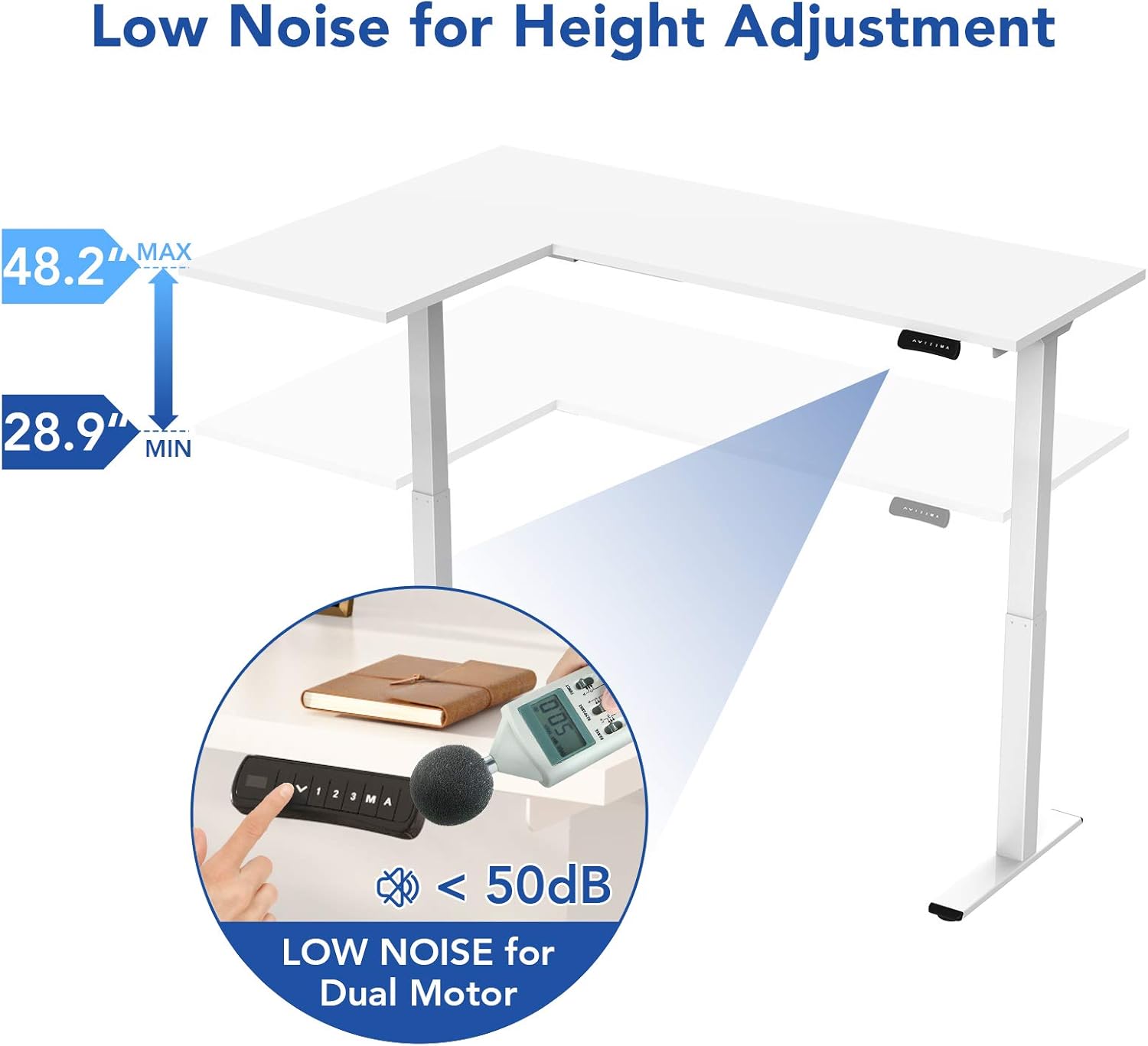
Image 3.2: An assembly step illustrating the connection of the L-shaped desk frame components.

Image 3.3: The desk frame nearing completion, with the control panel attached.
3.3 Reversible L-Shape Configuration
The L-shaped configuration of the desk is reversible, allowing you to set up the longer side on either the left or right, depending on your preference and workspace layout. This flexibility is determined during the assembly process.

Image 3.4: Visual representation of the desk's reversible L-shape, allowing for left or right-hand configurations.
4. Arahan Operasi
4.1 Pelarasan Ketinggian
The desk features a dual-motor lift mechanism for smooth and quiet height adjustments. The height can be adjusted from 27.9 inches (70.9 cm) to 47.2 inches (120 cm).
- Gunakan Up (▲) dan Bawah (▼) buttons on the control panel to manually adjust the desk height.
- The desk operates at a speed of 1 inch per second and maintains a noise level under 50 dB during movement.

Image 4.1: Illustration highlighting the low noise operation (under 50 dB) of the desk's dual motor system.
4.2 Fungsi Panel Kawalan
The built-in LED control panel allows for easy customization and programming of desk height settings.

Image 4.2: Close-up of the control panel, detailing its buttons and functions.
- Up/Down Buttons (▲, ▼): Manually adjust the desk height.
- Pratetap Memori (1, 2, 3): Store and recall up to three preferred height settings. To save a height, adjust the desk to the desired position, then press the 'M' button followed by the desired number (1, 2, or 3).
- Memory Button (M): Used to save height presets.
- Sit-Stand Reminder (A): Activate a programmable timer to remind you to switch between sitting and standing postures. Refer to the full assembly guide for detailed programming instructions.
4.3 Sistem Anti-Perlanggaran
The desk is equipped with a built-in anti-collision system. If the desk encounters an obstruction during height adjustment, it will automatically stop and reverse slightly to prevent damage or injury.

Image 4.3: Visual explanation of the anti-collision system, showing the desk reversing upon contact with an obstacle.
5. Penyelenggaraan
Regular maintenance ensures the longevity and optimal performance of your FLEXISPOT E1L desk.
- Pembersihan: Lap permukaan meja dan bingkai dengan lembut, damp kain. Elakkan pembersih atau pelarut yang kasar yang boleh merosakkan kemasan.
- Pengurusan Kabel: Periodically check all cables to ensure they are securely connected and not pinched or frayed. Use the included cable management tray to keep wires organized.
- Pengikat: Periksa semua skru dan bolt sekali-sekala untuk memastikan ia ketat. Ketatkan semula jika perlu.
- Pemeriksaan Motor: Listen for any unusual noises during operation. If you notice any, discontinue use and consult the troubleshooting section or contact customer support.
6. Penyelesaian masalah
Jika anda menghadapi masalah dengan meja anda, rujuk langkah penyelesaian masalah biasa berikut:
| Masalah | Kemungkinan Punca | Penyelesaian |
|---|---|---|
| Meja tidak bergerak. | Power cable disconnected; control box error; overload. | Check power connections. Unplug and replug the power cord. Reduce weight on the desk. |
| Meja bergerak tidak sekata. | Uneven load; motor synchronization issue. | Distribute weight evenly. Perform a reset (refer to the full manual for specific reset procedures). |
| Kod ralat dipaparkan. | Kesalahan sistem tertentu. | Refer to the detailed error code list in the complete user manual or contact customer support. Often, a power cycle (unplugging for 10 seconds and replugging) can resolve temporary errors. |
| Anti-collision system triggers too easily. | Sensitivity setting too high. | Adjust the anti-collision sensitivity setting via the control panel (refer to the full manual for instructions). |
If these steps do not resolve the issue, please contact FLEXISPOT customer support.
7. Spesifikasi
| Ciri | Spesifikasi |
|---|---|
| Jenama | FLEXISPOT |
| Nombor Model | E1L |
| Reka Bentuk Meja | Meja Komputer Bentuk L |
| Bahan Bingkai | Industrial-grade Steel |
| Mekanisme Mengangkat | Dual Electric Motor |
| Julat Pelarasan Tinggi | 27.9" hingga 47.2" (70.9 sm hingga 120 sm) |
| Kelajuan Angkat | 1"/second |
| Tahap Kebisingan | Di bawah 50 dB |
| Kapasiti Berat Maksimum | 177 paun (80 kg) |
| Panel Kawalan | LED with 3 Memory Presets & Sit-Stand Reminder |
| Ciri Khas | Anti-Collision System, Corded Operation, Reversible L-Shape |
| Perhimpunan Diperlukan | Ya (Termasuk semua alat pemasangan) |
| Orang yang Disyorkan untuk Perhimpunan | 1 |
8. Waranti dan Sokongan
8.1 Maklumat Waranti
The FLEXISPOT E1L desk comes with a Limited Warranty. Please refer to the warranty card included with your product or visit the official FLEXISPOT website for detailed terms and conditions regarding parts and labor coverage.
8.2 Sokongan Pelanggan
For technical assistance, warranty claims, or any questions regarding your FLEXISPOT E1L desk, please contact FLEXISPOT customer support through their official webtapak atau maklumat hubungan yang diberikan dalam pembungkusan produk anda.
Anda juga boleh melawat Kedai FLEXISPOT di Amazon untuk maklumat produk tambahan dan sumber sokongan.


