pengenalan
The HTC Vive Pro 2 Headset is engineered to enhance your virtual reality experiences with exceptional visual fidelity, ergonomic comfort, and precise sub-millimeter tracking. Featuring new dual LCD screens, 5K resolution, a 120-degree field of view, and a 120Hz refresh rate, it delivers a leading immersive experience suitable for high-end PC-VR gaming and demanding graphical applications. This manual provides essential information for setting up, operating, maintaining, and troubleshooting your Vive Pro 2 Headset.
Apa yang ada dalam Kotak
The HTC Vive Pro 2 Headset Only package includes the following components:
- VIVE Pro 2 Headset
- All-in-one cable
- Link Box
- 18W x1 AC adapter
- Penyesuai DP mini ke DP
- DisplayPort™ cable
- Kabel USB 3.0
Additional documentation and accessories are also included. Please note that base stations and controllers are required for full functionality and are sold separately.

Image: Components included with the HTC Vive Pro 2 Headset Only.
Persediaan
Follow these steps to set up your HTC Vive Pro 2 Headset:
- Sediakan PC Anda: Ensure your computer meets the minimum system requirements (refer to the Specifications section). Verify that your graphics card has a DisplayPort 1.2 or higher output.
- Connect the Link Box: Connect the Link Box to your PC using the provided DisplayPort cable and USB 3.0 cable. Power the Link Box with the AC adapter.
- Sambungkan Alat dengar: Plug the all-in-one cable from the Vive Pro 2 Headset into the Link Box.
- Pasang Perisian: Download and install the necessary Vive software and SteamVR from the official HTC Vive website or Steam. Follow the on-screen instructions for driver installation and initial setup.
- Set Up Tracking: If you have SteamVR 1.0 or 2.0 base stations (sold separately), position them according to their respective manuals to define your play area.
- Pair Controllers: Pair your Vive controllers or Valve Index controllers (sold separately) with the system as instructed by the software.
- Laraskan Padanan Alat Dengar: Place the headset on your head and adjust the head strap for a secure yet comfortable fit. Use the IPD adjustment dial to align the lenses with your eyes for optimal clarity.

Imej: Depan view of the HTC Vive Pro 2 Headset.
Beroperasi
The Vive Pro 2 Headset offers advanced features for an enhanced VR experience:
- High Visual Fidelity: Experience virtual worlds in 5K clarity with a combined resolution of 4896 x 2448 pixels. This high resolution brings out fine details in games and applications.
- Bidang Luas View (FOV): A 120-degree FOV expands your peripheral vision, making the virtual environment feel more natural and immersive.
- Kadar Penyegaran Tinggi: Enjoy smooth and seamless visuals with a 120Hz refresh rate, reducing motion sickness and improving overall comfort during graphics-intensive use.
- Reka bentuk ergonomik: The headset features a balanced construction and adjustable components, including eye relief and IPD (Interpupillary Distance) adjustment, to ensure a comfortable fit for various head sizes and vision types, including users wearing glasses.
- Hi-Res Certified Audio: Integrated headphones provide 3D spatial sound, delivering immersive audio experiences.

Image: Visual representation of the 5K clarity through the Vive Pro 2 lenses.
Video: Tamatview of the HTC VIVE Pro 2 Virtual Reality System, showcasing ciri dan komponennya.
Penyelenggaraan
Proper maintenance ensures the longevity and optimal performance of your Vive Pro 2 Headset:
- Kanta Pembersihan: Use a microfiber cloth specifically designed for optical lenses to gently wipe the headset lenses. Avoid abrasive materials or chemical cleaners, which can damage the lens coating.
- Membersihkan Luaran: Lap bahagian luar alat dengar dengan lembut, damp cloth. Do not use excessive moisture or allow liquids to enter the device.
- Storan: Store the headset in a cool, dry place away from direct sunlight. Protect the lenses from scratches by using the provided lens cover or storing it in a protective case.
- Pengurusan Kabel: Elakkan selekoh tajam atau lekukan pada kabel untuk mengelakkan kerosakan.
- Kebersihan: Regularly clean the foam face cushions and head straps, especially if multiple users share the headset. Replace worn-out cushions for comfort and hygiene.
Menyelesaikan masalah
If you encounter issues with your Vive Pro 2 Headset, consider the following troubleshooting steps:
- Tiada Paparan/Skrin Hitam:
- Ensure all cables (DisplayPort, USB, power) are securely connected to the headset, Link Box, and PC.
- Verify your PC meets the minimum graphics card requirements and that the DisplayPort cable is connected to a compatible port (not HDMI).
- Restart SteamVR and your computer.
- Isu Penjejakan:
- Check that your base stations are properly powered, positioned, and free from obstructions.
- Ensure there are no reflective surfaces in your play area that could interfere with tracking.
- Recalibrate your play area in SteamVR settings.
- Poor Visual Clarity/Blurriness:
- Adjust the IPD dial on the headset to match your interpupillary distance.
- Ensure the headset is positioned correctly on your head and the lenses are clean.
- Check your PC's graphics settings and ensure the resolution and refresh rate are configured correctly in SteamVR.
- Headset Overheating:
- Ensure adequate ventilation around the headset and your PC.
- Reduce graphics settings in demanding applications if overheating persists.
- Software Crashes (SteamVR):
- Update your graphics drivers and SteamVR software to the latest versions.
- Ensure no conflicting background applications are running.
- If issues persist, consider reinstalling SteamVR.
For further assistance, please refer to the official HTC Vive support webtapak.
Video: A detailed look at the HTC VIVE Pro 2, highlighting its sharp visuals and immersive VR experience.
Spesifikasi
Detailed technical specifications for the HTC Vive Pro 2 Headset:
| Ciri | Perincian |
|---|---|
| Skrin | Dual RGB low persistence LCD |
| Resolusi | 2448 x 2448 pixels per eye (4896 x 2448 combined) |
| Kadar Segar Semula | 90 / 120 Hz (Supports up to 90Hz via VIVE Wireless Adapter) |
| Bidang View | Sehingga 120 darjah |
| Audio | Hi-Res certified headphones (removable), High-impedance headphones support (via USB-C analog signal) |
| Input | Dual Integrated microphones |
| Sambungan | Bluetooth, USB-C port for peripherals |
| Penderia | G-sensor, gyroscope, proximity, IPD sensor, SteamVR Tracking V2.0 (compatible with SteamVR 1.0 and 2.0 base stations) |
| Ergonomik | Eye relief with lens distance adjustment, adjustable IPD, adjustable headphones, adjustable headstrap |
| Dimensi Produk | 13.2 x 13.1 x 7.3 inci |
| Berat Barang | 6.62 paun |
| Nombor Model Item | 99HASW001-00 |
Keperluan Minimum Komputer
| Komponen | Keperluan |
|---|---|
| Pemproses | Intel® Core™ i5-4590 or AMD Ryzen 1500 equivalent or greater |
| Grafik | NVIDIA® GeForce® GTX 1060 or AMD Radeon™ RX 480 equivalent or greater (GeForce® RTX 20 Series (Turing) or AMD Radeon™ 5000 (Navi) generations or newer required for Full Resolution mode) |
| Ingatan | 8 GB RAM atau lebih |
| Port USB | 1x USB 3.0 atau lebih baru |
| Sistem Operasi | Windows® 10 |
| Video Keluar | DisplayPort 1.2 or higher (DisplayPort 1.4 or higher with DSC required for Full Resolution mode) |
Refer to AMD or NVIDIA's VR Ready website for an extended list of VR Ready graphics cards.
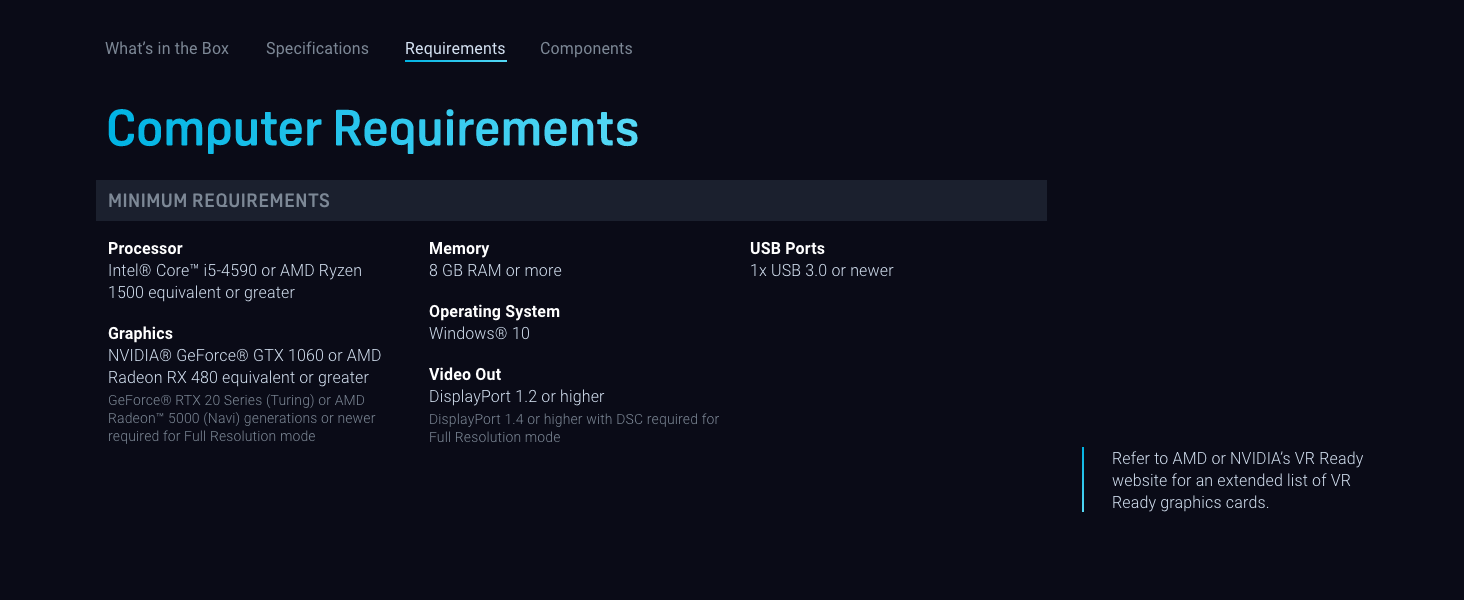
Image: Minimum computer requirements for the Vive Pro 2.
Waranti dan Sokongan
The HTC Vive Pro 2 Headset is covered by a manufacturer's warranty. Please refer to the warranty card included with your product or visit the official HTC Vive webtapak untuk terma dan syarat waranti terperinci khusus untuk wilayah anda.
For technical support, product registration, FAQs, and driver downloads, please visit the official HTC Vive support portal. You can find comprehensive resources and contact information for customer service there.
Official HTC Vive Support: www.vive.com/support/


