pengenalan
The FEELWORLD TP2 is a compact and portable teleprompter designed for video and program creators. It supports smartphones and tablets up to 8 inches for prompting, and is compatible with DSLR cameras for recording. This manual provides detailed instructions for setup, operation, and maintenance of your TP2 teleprompter.

Kandungan Pakej
Sila sahkan bahawa semua item yang disenaraikan di bawah disertakan dalam pakej anda:
- 1 × TP2 Teleprompter Unit
- 1 × Tablet/Smartphone Clamp
- 1 × Bluetooth Remote Controller
- 8 × Lens Adapter Rings (49/52/55/58/62/67/72/77mm)
- 1 × Drawstring Bag
- 1 × Microfiber Cloth
- 1 × Manual Pengguna

Arahan Persediaan
1. Attaching the Lens Adapter Ring
The TP2 teleprompter includes eight standard lens adapter rings (49/52/55/58/62/67/72/77mm). Select the ring that matches your camera lens thread size.
Penting: When installing the adapter ring, remove any UV filter or other filters from your camera lens first to prevent the adapter ring from becoming locked.

2. Mounting the Teleprompter
The teleprompter features a 1/4-inch standard mounting hole, allowing it to be connected to a tripod or light stand for stable positioning.

3. Installing Your Smartphone or Tablet
The TP2 supports smartphones and tablets up to 8 inches. Install your device into the clamp, ensuring it is securely positioned. Push the "PUSH" lock to the left to secure the clamp.


Arahan Operasi
Teleprompter APP and Bluetooth Remote Control
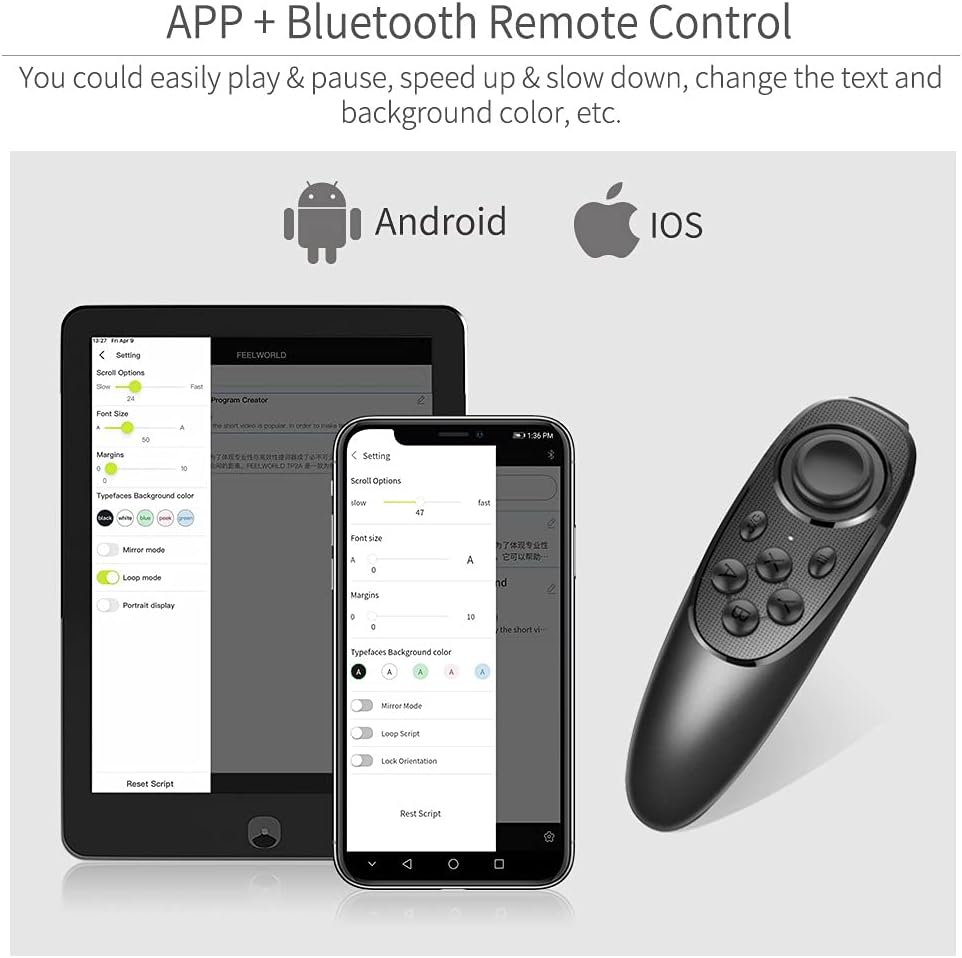
The FEELWORLD TP2 utilizes a dedicated app for smartphone/tablet prompting, compatible with both Android and iOS systems. The included Bluetooth remote control allows for easy script management.
- For iOS users, search "FEELWORLD" on the APP STORE to download the application.
- For Android users, search "FEELWORLD" in Google Play or scan the provided QR code to download the application.
- Nota: Pastikan yang dimuat turun file name is "FEELWORLD.apk" for Android. If not, delete any redundant characters.
Android APP Download Link: http://www.feelworld.cn/Common/ShowDownloadUrl.aspx?urlid=0&id=700

Fungsi Kawalan Jauh
The Bluetooth remote control provides the following functions:
- Main/Jeda: Start or stop script scrolling.
- Up-Speed up: Increase scrolling speed.
- Down-Slow down: Decrease scrolling speed.
- Left-Font zoom out: Decrease font size.
- Right-Font zoom in: Increase font size.
- Pilih file to enter the play/Exit/Turn ON/OFF: Navigasi files, exit, or power the remote on/off.
- Halaman sebelumnya: Go to the previous section of the script.
- Permainan gelung: Enable or disable continuous script looping.
- Menu: Access app menu settings.
- Horizontal/Vertical screen switch: Change screen orientation.
- Laman seterusnya: Go to the next section of the script.
- Cermin: Mirror the text display.
Notis: Due to variations across smartphone brands, some remote control functions may differ after connection.

Penyelenggaraan
Pembersihan
Use the provided microfiber cloth to gently clean the teleprompter glass and body. Avoid abrasive cleaners or solvents, as these can damage the surfaces.
Penyimpanan
When not in use, store the teleprompter in the included drawstring bag to protect it from dust, scratches, and minor impacts.

Menyelesaikan masalah
Isu Kawalan Jauh
If the remote control is unstable or unresponsive:
- Ensure the remote control batteries are charged or replaced.
- Re-pair the Bluetooth remote control with your smartphone/tablet.
- Check for app updates, as compatibility issues may be resolved with newer versions.
- Note that some functions may vary depending on your smartphone/tablet brand.
Vignetting with Wide-Angle Lenses
The TP2 is designed to support wide-angle lenses to minimize vignetting. If vignetting occurs:
- Ensure the teleprompter is correctly aligned with your camera lens.
- Verify that the correct lens adapter ring is used and properly installed.
- Adjust the camera's focal length or position if possible.
Adapter Ring Stuck
If a lens adapter ring becomes stuck to your camera lens:
- This can happen if a UV filter was not removed before installing the adapter ring.
- Gently try to unscrew the adapter ring. If it is severely stuck, seek professional assistance to avoid damaging your lens.
Spesifikasi
| Ciri | Perincian |
|---|---|
| Model | TP2 |
| Berat badan | Lebih kurang 300g (10.6 auns) |
| Supported Device Size | Smartphones/Tablets up to 8 inches |
| Lens Adapter Rings | 49/52/55/58/62/67/72/77mm |
| Melekap | 1/4" Standard Mounting Hole |
| Ketersambungan | Bluetooth (for remote control) |
| Dimensi | Refer to diagram for detailed measurements. |

Waranti dan Sokongan
For warranty information, technical support, and further assistance, please refer to the official FEELWORLD webtapak atau hubungi perkhidmatan pelanggan mereka secara langsung.
FEELWORLD Official Webtapak: https://www.feelworld.cn
Nota: Specific warranty terms are not provided in this manual. Please consult the manufacturer's official resources for detailed warranty policies.
Video Produk Rasmi
An official product video demonstrating the features and usage of the FEELWORLD TP2 portable teleprompter. This video showcases its compact design, ease of installation, and application in various video recording scenarios.


