pengenalan
This manual provides detailed instructions for the setup, operation, and maintenance of your SIMOLIO SM824D1 Digital Wireless TV Headphones. Please read this manual thoroughly before using the product to ensure proper functionality and to maximize your listening experience.
The SIMOLIO SM824D1 system includes a wireless headset and a transmitter. It is designed to provide clear audio from your TV or other audio sources directly to your ears, featuring balance and tone controls for personalized sound, and a long-range 2.4GHz wireless connection.
Kandungan Pakej
Sila sahkan bahawa semua item terdapat dalam pakej anda:
- SIMOLIO SM824D1 Wireless Headset
- SIMOLIO SM824D1 Transmitter
- Audio Cables (Optical, RCA, 3.5mm)
- Penyesuai Kuasa
- Kabel Pengecas USB
- Extra Soft Ear Tips
- Decompression Hanger Loops
- Manual Pengguna Bahasa Inggeris (dokumen ini)
- Spare Lithium-Ion Battery

Image: Contents of the SIMOLIO SM824D1 package, showing the headset, transmitter, audio cables, power adapter, USB cable, extra ear tips, and hanger loops.
Persediaan
1. Menghidupkan Pemancar
- Connect the power adapter to the transmitter's 'Power In' port.
- Palamkan penyesuai kuasa ke salur keluar dinding.
2. Connecting to Your TV/Audio Source
The SIMOLIO SM824D1 supports Digital Optical, RCA, and 3.5mm audio outputs. Choose the appropriate cable based on your TV or audio source's available ports.

Image: Compatibility chart for TV audio outputs (Digital Optical, 3.5mm, RCA) with SIMOLIO models.
- Sambungan Optik Digital: Use the optical cable. Connect one end to your TV's 'Digital Optical Audio Out' port and the other end to the 'OPTICAL IN' port on the transmitter. Penting: For optical connections, you MUST set your TV's audio output format to PCM. Refer to your TV's settings menu.
- Sambungan RCA: Use the RCA audio cable (red and white plugs). Connect the red plug to the TV's 'Audio Out R' and the white plug to 'Audio Out L'. Connect the other end to the 'AUDIO IN' port on the transmitter.
- Sambungan Audio 3.5mm: Use the 3.5mm audio cable. Connect one end to your TV's headphone jack or 'Audio Out' port and the other end to the 'AUDIO IN' port on the transmitter.
Only one audio cable connection is required. For TVs with only coaxial or HDMI ARC ports, an additional audio converter/extractor may be needed (not included).

Imej: Belakang view of the transmitter, highlighting the input ports and audio mode switches.
3. Mengecas Alat Dengar
The headset uses a rechargeable Lithium-Ion battery. A spare battery is also included and can be charged in the transmitter.
- Pastikan pemancar dihidupkan.
- To charge the headset, place it into the charging slots on the transmitter. Ensure the front of the headset faces the front of the transmitter.
- To charge the spare battery, open the charging compartment on the transmitter and insert the battery.
- Charging typically takes about 3 hours. The indicator light on the headset will show charging status.

Image: Instructions for charging the headset and spare battery using the transmitter.
Arahan Operasi
Kawalan Alat dengar
Imej: Selesaiview of the headset's controls and features.
- HIDUP/MATI Kuasa: Slide the switch to turn the headset on or off.
- Kawalan Kelantangan: Use the 'VOL' dial to adjust the listening volume.
- Kawalan Baki: Use the 'BAL' dial to adjust the volume balance between the left and right ears. This is useful for individuals with different hearing sensitivities in each ear.
- Bunyi Peribadi Amplifier Button: Press this button to activate the ambient sound listener function, allowing you to hear nearby conversations without removing the headset. The indicator light will turn red when active.
Kawalan Pemancar
- OFF/MONO/STEREO Switch: Select 'STEREO' for Hi-Fi sound quality or 'MONO' for clearer TV dialogue, especially beneficial for speech clarity.
- TONE Selector (TREBLE/NORMAL/BASS): Adjust the audio tone to your preference. 'TREBLE' enhances high frequencies, 'BASS' enhances low frequencies, and 'NORMAL' provides a balanced sound.
Memakai Alat dengar
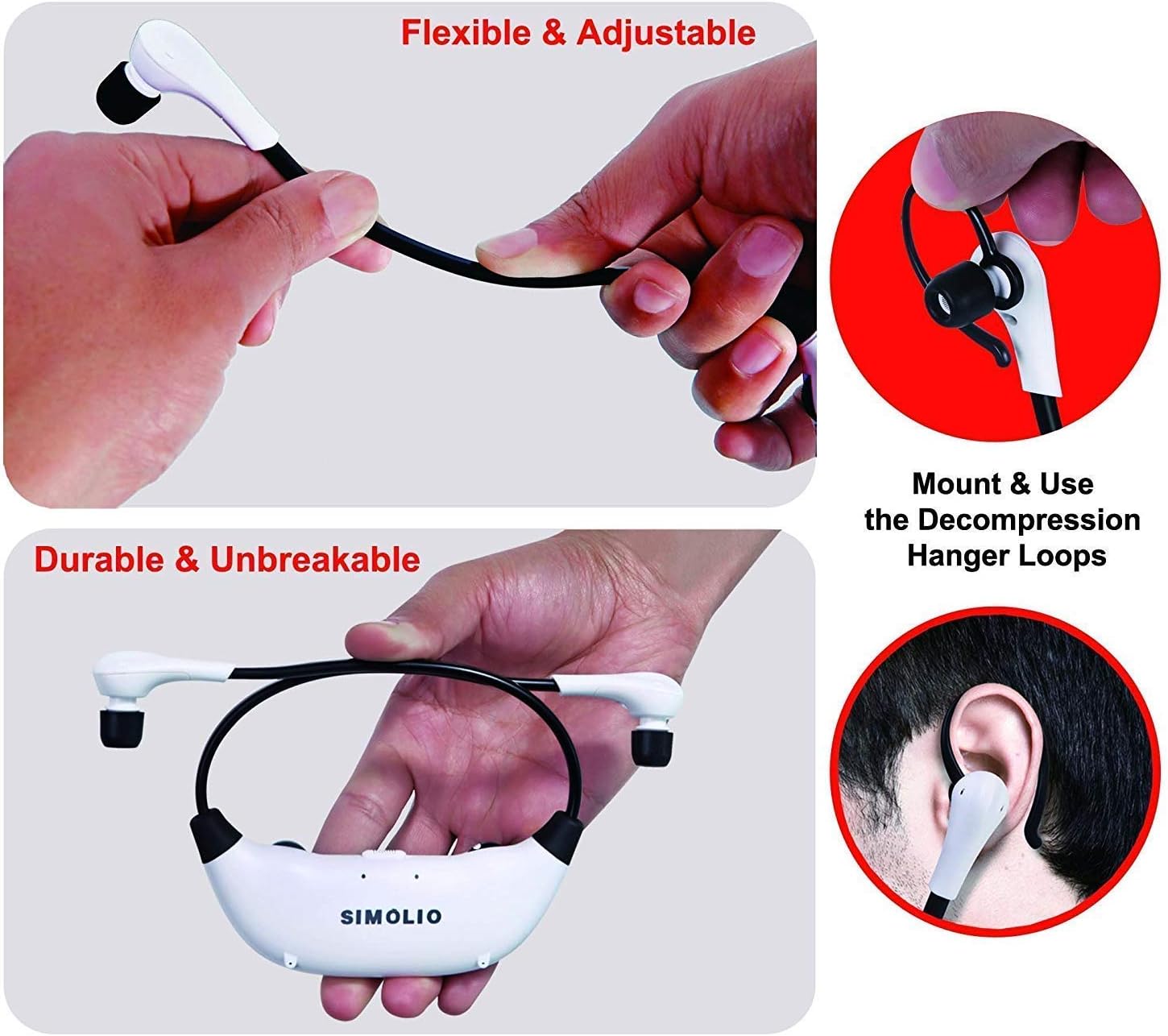
The headset features flexible and adjustable arms with memory stainless steel strips for a comfortable fit. Super-soft memory foam eartips and decompression hanger loops are included for enhanced comfort.

Image: Visual guide on adjusting the headset for comfort and using the hanger loops.
Penyelenggaraan
Penjagaan Bateri
- Sentiasa cas bateri sepenuhnya sebelum penggunaan pertama.
- When not in use, store the headset on the transmitter to keep it charged.
- The included spare battery can be swapped out for continuous use.
Pembersihan
- Wipe the headset and transmitter with a soft, dry cloth.
- The ear-tips feature an anti-dust mesh. Clean gently if dust accumulates.
- Elakkan menggunakan bahan kimia yang keras atau pembersih yang kasar.
Penyimpanan
- Simpan peranti di tempat yang sejuk dan kering jauh dari cahaya matahari langsung dan suhu yang melampau.
Menyelesaikan masalah
| Masalah | Kemungkinan Punca | Penyelesaian |
|---|---|---|
| Tiada suara atau kelantangan rendah |
|
|
| Herotan bunyi atau statik |
|
|
| Alat dengar tidak dicas |
|
|

Image: Recommended TV audio settings for optimal performance.

Image: Guidance on optimizing audio signal strength from TV and cable box.
Spesifikasi
- Nama Model: SM-824D1
- Teknologi Ketersambungan: Wayarles (RF)
- Teknologi Komunikasi Tanpa Wayar: RF (2.4GHz)
- Jack fon kepala: 3.5 mm Jack (for input to transmitter)
- Peranti Serasi: TVs with Digital Optical, RCA, or 3.5mm Audio Outputs
- Jenis Kawalan: Button Control, Push Button, Dial
- Masa Pengecasan: Lebih kurang 3 Jam
- Hayat Bateri: Up to 6 Hours (depending on usage)
- Berat Barang: 0.54 Kilograms (headset and transmitter)
- Bahan: plastik
- Noise Control Features: Pembatalan Bunyi
- Ciri Khas: Microphone Included (for ambient sound amplifikasi)
- Pengeluar: Simolio
Maklumat Keselamatan
Amaran:
- These RF products are not recommended for individuals with pacemakers. Please consult your physician before use if you have a pacemaker.
- Elakkan mendengar berpanjangan pada kelantangan tinggi untuk mengelakkan kerosakan pendengaran.
Waranti dan Sokongan
For warranty information or technical assistance, please refer to the warranty card included with your product or visit the official SIMOLIO website. You may also contact SIMOLIO customer support directly via the contact information provided on their webtapak atau dalam dokumentasi produk anda.
For connectivity questions, you can send a picture of your TV's jack panel to support@simolio.com for confirmation.


