pengenalan
This user manual provides detailed instructions for the Gen Game S3 Wireless Bluetooth Gamepad. It covers setup, operation, maintenance, and troubleshooting to ensure optimal performance and longevity of your device. This gamepad is designed for use with Android smartphones, tablet PCs, and personal computers, offering a versatile gaming experience.

Imej: Depan view of the Gen Game S3 Wireless Bluetooth Gamepad, showcasing its black body with red accents, dual analog sticks, D-pad, action buttons (A, B, X, Y), and central HOME button.
Kandungan Pakej
Selepas membuka pakej, sila sahkan bahawa semua item berikut disertakan:
- 1 x S3 Bluetooth Gamepad
- 1 x Kabel USB
- 1 x Manual Pengguna
Spesifikasi
| Ciri | Perincian |
|---|---|
| Model | S3 |
| Fungsi | Bluetooth |
| Versi Bluetooth | V3.0 |
| Keserasian | Smartphone, Tablet PC, PC (Android, iOS) |
| Jenis Sambungan | Bluetooth |
| bahan | ABS |
| Kapasiti Bateri | 420mAh |
| Masa Mengecas | 2 - 3 Jam |
| Masa Bekerja | Lebih kurang 1 Jam |
| Berat Barang | 400 g |
| warna | Hitam |
Persediaan dan Sambungan
The Gen Game S3 gamepad supports various connection modes for different devices. Ensure the gamepad is charged before initial use.
Mengecas Gamepad
- Connect the supplied USB cable to the gamepad's charging port.
- Sambungkan hujung kabel USB yang satu lagi ke sumber kuasa USB (cth, port USB komputer, penyesuai dinding USB).
- The indicator light will show charging status. Charging typically takes 2-3 hours.
Bluetooth Pairing (Android/iOS Smartphone/Tablet)
- Pastikan Bluetooth didayakan pada telefon pintar atau tablet anda.
- On the gamepad, press and hold the RUMAH button until the indicator light flashes rapidly, indicating pairing mode.
- On your device, search for Bluetooth devices. The gamepad should appear as "S3" or "Gen Game S3".
- Select the gamepad to pair. Once connected, the indicator light will become solid.

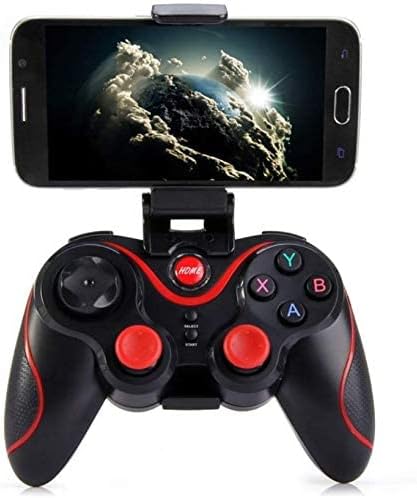
Image: The Gen Game S3 Wireless Bluetooth Gamepad with a smartphone securely mounted on its integrated holder, demonstrating its use with mobile devices.
Sambungan PC
For PC connection, you may use Bluetooth if your PC has it, or connect via USB cable for a wired connection.
- Bluetooth (PC): Follow similar steps as for smartphone pairing. Ensure your PC's Bluetooth is on and discoverable.
- Wired (PC): Connect the gamepad to your PC using the supplied USB cable. The PC should automatically detect and install necessary drivers.
Arahan Operasi
Once connected, the Gen Game S3 gamepad is ready for use with compatible games and applications.
Susun Atur dan Fungsi Butang
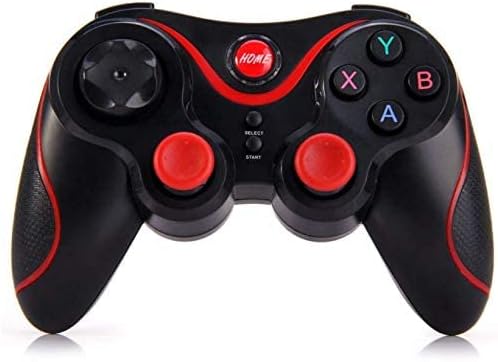
Imej: Atas ke bawah view of the Gen Game S3 Wireless Bluetooth Gamepad, highlighting the arrangement of its buttons, D-pad, and analog sticks.
- Kayu Analog: Used for directional movement and camera control in games.
- D-Pad: Digital directional input, often used for menu navigation or specific game actions.
- Butang Tindakan (A, B, X, Y): Primary interaction buttons for in-game actions.
- Butang rumah: Powers on/off the gamepad, enters pairing mode, or returns to the system home screen.
- Butang PILIH/MULAKAN: Used for various in-game functions, such as pausing or opening menus.
- Shoulder Buttons (L1, R1) and Triggers (L2, R2): Located on the top edge, used for additional in-game actions like shooting or aiming.

Imej: Sisi view of the Gen Game S3 Wireless Bluetooth Gamepad, clearly showing the L1, R1 shoulder buttons and L2, R2 triggers.
Pengurusan Kuasa
- Hidupkan kuasa: Tekan ke RUMAH butang.
- Matikan: Tekan dan tahan butang RUMAH button for approximately 5 seconds until the indicator light turns off. The gamepad will also automatically power off after a period of inactivity to conserve battery.
Penyelenggaraan dan Penjagaan
Proper care will extend the life of your Gen Game S3 gamepad.
- Pembersihan: Use a soft, dry cloth to wipe the surface of the gamepad. Do not use harsh chemicals or abrasive cleaners.
- Storan: Simpan gamepad di tempat yang sejuk dan kering, jauh daripada cahaya matahari langsung dan suhu yang melampau.
- Bateri: To maintain battery health, avoid fully discharging the battery frequently. Charge the gamepad regularly, even if not in use for extended periods.
- Elakkan Titisan: Protect the gamepad from physical shocks and drops, which can damage internal components.
Menyelesaikan masalah
If you encounter issues with your gamepad, refer to the following common problems and solutions:
- Gamepad does not power on:
Ensure the gamepad is fully charged. Connect it to a power source using the USB cable and allow it to charge for at least 30 minutes before attempting to power on again. - Gamepad does not connect via Bluetooth:
Verify Bluetooth is enabled on your device. Ensure the gamepad is in pairing mode (flashing indicator light). Try restarting both the gamepad and your device. Remove any previous pairings of the gamepad from your device's Bluetooth settings and attempt to pair again. - Buttons or analog sticks are unresponsive:
Check if the gamepad is properly connected. If connected via Bluetooth, ensure the connection is stable. If the issue persists, try resetting the gamepad (if a reset button is available, typically a small pinhole on the back, use a thin object to press it). - Hayat bateri pendek:
Ensure the gamepad is fully charged before use. Reduce the brightness of any indicator lights if possible (not applicable for this model, but general advice). The working time is approximately 1 hour, which is normal for this model.
Imej: Belakang view of the Gen Game S3 Wireless Bluetooth Gamepad, showing the battery compartment and regulatory information.
Waranti dan Sokongan
Gen Game products are designed for reliability and performance. For specific warranty information, please refer to the warranty card included in your product packaging or visit the official Gen Game website. If you require technical support or have questions not covered in this manual, please contact Gen Game customer service through their official channels.
For further assistance, you may also refer to the product's listing page on Amazon.eg: Gen Game S3 Product Page


