1. Pengenalan
Welcome to your JBL J777 Wireless In-Ear Headphones. This manual provides detailed instructions to help you get the most out of your device, ensuring proper setup, operation, and maintenance. Please read this manual thoroughly before using your headphones.
2. Produk Lebihview
The JBL J777 headphones are designed for wireless audio playback and hands-free calling, offering convenience and quality sound.
2.1 Komponen
- In-ear earbuds with silicone tips
- Flexible neckband cable
- Inline remote control with integrated microphone
- USB charging port (typically located on the remote)
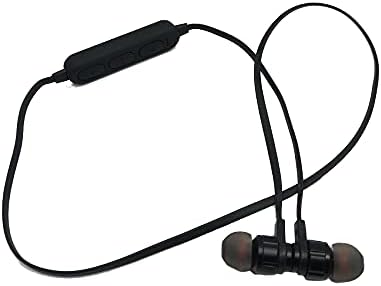
This image displays the complete JBL J777 wireless in-ear headphones. It features two black earbuds connected by a flexible cable, with an inline remote control positioned on the cable. The design is intended for comfortable wear around the neck.
2.2 Kawalan
The inline remote control provides easy access to various functions:
- Butang Kuasa/Pelbagai Fungsi: Used for powering on/off, play/pause music, and answering/ending calls.
- Butang Naik Kelantangan: Increases volume, also used for skipping to the next track.
- Butang Kurang Kelantangan: Decreases volume, also used for skipping to the previous track.

A terperinci view of the inline remote control for the JBL J777 headphones. It shows three distinct buttons for power/multi-function, volume up, and volume down, along with a small microphone opening for hands-free calls.
3. Persediaan
3.1 Mengecas Fon Kepala
- Connect the micro-USB charging cable to the charging port on the inline remote control.
- Sambungkan hujung kabel yang satu lagi ke sumber kuasa USB (cth, port USB komputer, penyesuai dinding USB).
- The LED indicator will typically show red during charging and turn off or blue when fully charged.
- The integrated 90mAh lithium battery provides wireless operation.
3.2 Berpasangan Bluetooth
To connect your JBL J777 headphones to a Bluetooth-enabled device:
- Pastikan fon kepala dimatikan.
- Tekan dan tahan butang Power/Multi-function button for approximately 5-7 seconds until the LED indicator flashes red and blue alternately. This indicates the headphones are in pairing mode.
- On your mobile phone or Bluetooth-enabled device, go to the Bluetooth settings and enable Bluetooth.
- Cari untuk available devices and select "JBL J777" from the list.
- Once paired, the LED indicator will typically flash blue slowly or remain solid blue.
- The headphones have an operation distance of up to 10 meters (33 feet) in an open environment.
4. Arahan Operasi
4.1 Hidupkan/Mati Kuasa
- Untuk Menghidupkan: Tekan dan tahan butang Power/Multi-function button for 3 seconds. The LED will flash blue.
- Untuk Mematikan: Tekan dan tahan butang Power/Multi-function button for 3 seconds. The LED will flash red and then turn off.
4.2 Main balik Muzik
- Main/Jeda: Tekan ke Power/Multi-function butang sekali.
- Lagu Seterusnya: Tekan dan tahan butang Kelantangan Naik butang.
- Trek Sebelumnya: Tekan dan tahan butang Kelantangan Kurang butang.
- Kelantangan: Tekan ke Kelantangan Naik butang secara ringkas.
- Perlahankan suara: Tekan ke Kelantangan Kurang butang secara ringkas.
4.3 Pengurusan Panggilan
- Jawab/Tamatkan Panggilan: Tekan ke Power/Multi-function butang sekali.
- Tolak Panggilan: Tekan dan tahan butang Power/Multi-function butang selama 2 saat.
- Dail Semula Nombor Terakhir: Tekan dua kali pada Power/Multi-function butang.
4.4 Pembatalan Bising Aktif
The JBL J777 headphones feature active noise cancellation to reduce ambient noise for a more immersive listening experience. This feature operates automatically or is controlled via the multi-function button, depending on the specific model variant.
5. Penyelenggaraan
Penjagaan yang betul memastikan jangka hayat dan prestasi optimum fon kepala anda.
- Pembersihan: Lap fon telinga dan kabel dengan kain lembut dan kering. Jangan gunakan bahan kimia yang keras atau bahan yang melelas.
- Storan: Store the headphones in a cool, dry place away from direct sunlight and extreme temperatures. Avoid tangling the cable.
- Penjagaan Bateri: To prolong battery life, avoid fully discharging the battery frequently. Charge the headphones regularly, even if not in use for extended periods.
6. Penyelesaian masalah
If you encounter any issues with your JBL J777 headphones, refer to the following common problems and solutions:
- Fon kepala tidak dihidupkan: Pastikan bateri dicas. Sambungkan ke sumber kuasa dan cuba lagi.
- Tidak boleh berpasangan dengan peranti:
- Ensure the headphones are in pairing mode (flashing red and blue).
- Pastikan Bluetooth didayakan pada peranti anda.
- Gerakkan fon kepala lebih dekat dengan peranti anda.
- Matikan dan hidupkan kedua-dua fon kepala dan peranti anda, kemudian cuba pasangkan sekali lagi.
- Tiada bunyi:
- Semak tahap kelantangan pada kedua-dua fon kepala dan peranti anda yang disambungkan.
- Pastikan fon kepala dipasangkan dan disambungkan dengan betul.
- Cuba mainkan audio daripada aplikasi atau sumber lain.
- Kualiti bunyi yang lemah atau sambungan terputus-putus:
- Pastikan tiada halangan antara fon kepala dan peranti anda.
- Move away from other wireless devices that may cause interference.
- Pasangkan semula fon kepala dengan peranti anda.
7. Spesifikasi
Detailed technical specifications for the JBL J777 Wireless In-Ear Headphones:
| Jenama | JBL |
| Nombor Model | J777 |
| taip | Fon Kepala Wayarles Dalam Telinga |
| Ketersambungan | Wayarles (Bluetooth 4.2) |
| Bluetooth Profiles | HFP, A2DP, AVCTP, AVDTP, AVRCP |
| Jarak Operasi | Sehingga 10 meter (33 kaki) |
| Menghantar Kuasa | Kelas 2 |
| Julat Kekerapan | 2.402 - 2.480 GHz |
| Diameter pembesar suara | Ø15mm |
| Impedans | 32Ω |
| Mikrofon | Bersepadu |
| Kawalan Bunyi | Pembatalan Bunyi Aktif |
| Bateri | Rechargeable Lithium, 90mAh |
| Serasi dengan | Telefon Bimbit |
| Sokongan Kad TF | 128MB - 32GB |
| Komponen yang Disertakan | Kusyen Telinga |

This image shows the rear side of the JBL J777 product packaging. It clearly lists technical specifications such as Bluetooth version, supported profiles, operation distance, transmitting power, frequency range, speaker size, impedance, and battery capacity. It also indicates TF card support.
8. Waranti dan Sokongan
For warranty information regarding your JBL J777 Wireless In-Ear Headphones, please refer to the documentation provided at the time of purchase. This information is typically included in the product packaging or available on the official JBL webtapak.
For further assistance, technical support, or to inquire about service, please visit the official JBL support page or contact their customer service department directly. Keep your proof of purchase handy for any warranty claims.


