1. Pengenalan
Thank you for choosing the Ferm WSM 1009 Electric Wall Chaser. This manual provides essential information for the safe and efficient operation, maintenance, and troubleshooting of your new tool. Please read this manual thoroughly before first use and keep it for future reference.
1.1. Tujuan Penggunaan
The Ferm WSM 1009 Electric Wall Chaser is designed for cutting grooves in concrete, brick, and similar masonry materials for electrical wiring, plumbing pipes, air conditioning cables, camera cables, and other installation purposes. It is suitable for both professional and DIY applications.
1.2. Arahan Keselamatan Am
Always observe general safety precautions when operating power tools. This includes wearing appropriate personal protective equipment (PPE) such as safety glasses, hearing protection, and dust masks. Ensure the work area is well-lit and free from obstructions. Disconnect the tool from the power supply before making any adjustments or changing accessories.
2. Produk Lebihview dan Komponen
Familiarize yourself with the main components of your Ferm WSM 1009 Electric Wall Chaser.
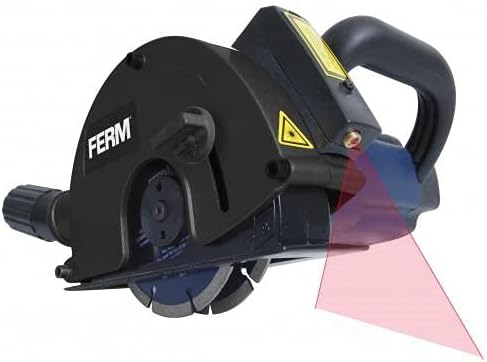
Rajah 2.1: Depan view of the Ferm WSM 1009 Electric Wall Chaser, showing the main body, handle, and the red laser guide lines projected forward for precise cutting.

Rajah 2.2: Sisi view of the wall chaser, highlighting the ergonomic handle and the dust extraction port at the rear. The laser guide is visible on top.
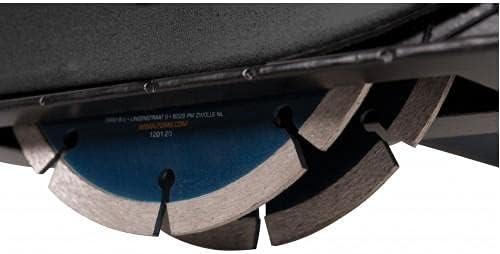
Rajah 2.3: Terperinci view of the dual diamond cutting blades, showing their robust construction and how they are mounted for creating parallel grooves.
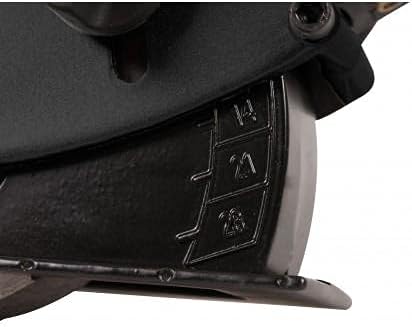
Figure 2.4: Close-up of the depth adjustment mechanism, clearly showing the numerical markings (14, 21, 28) for setting the desired cutting depth in millimeters.
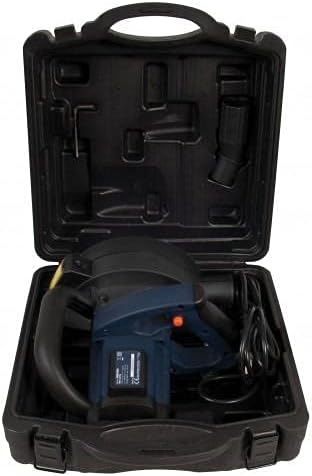
Figure 2.5: The Ferm WSM 1009 Electric Wall Chaser neatly packed inside its durable carrying case, along with accessories like the dust extraction adapter.
Komponen Utama:
- Badan Utama
- Ergonomic Handle with Soft Grip
- Suis Kuasa
- Tombol Pelarasan Kedalaman
- Cutting Blades (Diamond Discs)
- Laser Guide System
- Pelabuhan Pengekstrakan Habuk
- Plat asas
- Power Cable (3m length)
- Membawa Sarung
3. Spesifikasi Teknikal
| Spesifikasi | Nilai |
|---|---|
| Nombor Model | WSM 1009 |
| Input Kuasa | 1700 Watt |
| Kelajuan tanpa beban | 4000 rpm |
| Diameter Cakera | 5 inch (approx. 125 mm) |
| Maks. Kedalaman Memotong | 28 mm |
| Lebar Memotong | 14-29 mm |
| Sumber Kuasa | Elektrik Bertali |
| Panjang Kabel | 3 meter |
| Berat Produk | 7.73 Kilogram |
| Dimensi Pakej | 36.6 x 35.4 x 21.8 cm |
4. Persediaan dan Persediaan
4.1. Membongkar
Carefully remove the wall chaser and all accessories from the carrying case. Check for any damage that may have occurred during transit. Keep the packaging for future storage or transport.
4.2. Blade Installation/Adjustment
Ensure the tool is unplugged before handling the blades. The WSM 1009 uses two diamond cutting blades. Refer to the tool's markings for correct blade rotation direction. Adjust the spacing between the blades to achieve the desired cutting width (14-29 mm) using the provided spacers and wrench.
4.3. Setting Cutting Depth
The cutting depth can be adjusted up to 28 mm. Use the depth adjustment knob to set the desired depth. The scale on the tool indicates common depth settings (e.g., 14mm, 21mm, 28mm). Ensure the setting is securely locked before operation.
4.4. Dust Extraction Connection
For a healthy and safe working environment, connect a suitable dust extraction system to the dust extraction port of the wall chaser. This will significantly reduce airborne dust during operation.
4.5. Laser Guide Batteries
The laser guide requires batteries (included). Install them according to the polarity markings in the battery compartment. The laser guide assists in achieving ultimate precision during cutting.
5. Arahan Operasi
5.1. Sebelum Mula
- Always wear appropriate PPE (safety glasses, hearing protection, dust mask).
- Inspect the power cable for damage.
- Ensure the work surface is stable and the material to be cut is securely fixed.
- Mark the cutting line clearly on the material.
5.2. Memulakan Alat
Connect the power cable to a suitable power outlet. Hold the tool firmly with both hands using the ergonomic handle. Press the power switch to start the motor. Allow the blades to reach full speed before engaging with the material.
5.3. Membuat Potongan
Position the base plate of the wall chaser flat against the material. Align the laser guide with your marked cutting line. Slowly and steadily push the tool forward along the line. Do not apply excessive force; let the tool's speed and power do the work. Maintain a consistent feed rate for optimal results.
5.4. Menghentikan Alat
Release the power switch to stop the motor. Wait for the blades to come to a complete stop before setting the tool down or performing any adjustments.
6. Penyelenggaraan dan Penyimpanan
6.1. Pembersihan
After each use, disconnect the tool from the power supply. Use a brush or compressed air to remove dust and debris from the tool, especially around the motor vents and blade area. Do not use water or solvents.
6.2. Penggantian Bilah
Worn or damaged blades should be replaced immediately. Refer to the blade installation section for proper replacement procedures. Always use genuine Ferm replacement blades or equivalent quality diamond discs.
6.3. Penyimpanan
Store the wall chaser in its original carrying case in a dry, secure place, out of reach of children. Protect it from direct sunlight and extreme temperatures.
7. Penyelesaian masalah
| Masalah | Kemungkinan Punca | Penyelesaian |
|---|---|---|
| Alat tidak bermula | No power supply; Damaged power cable; Faulty switch | Check power connection; Inspect cable for damage; Contact service center |
| Getaran yang berlebihan | Loose blades; Damaged blades; Unbalanced blades | Tighten blade nuts; Replace damaged blades; Ensure blades are correctly installed |
| Prestasi pemotongan yang lemah | Worn blades; Incorrect cutting depth; Overloading the tool | Replace blades; Adjust cutting depth; Reduce feed rate |
| Panduan laser tidak berfungsi | Dead batteries; Misaligned laser | Replace batteries; Consult service manual for laser alignment (if applicable) |
8. Maklumat Waranti
Ferm products are manufactured to high quality standards and are guaranteed against defects in materials and workmanship for a period specified by your local retailer or distributor from the date of purchase. This warranty does not cover damage caused by misuse, abuse, normal wear and tear, or unauthorized repairs. Please retain your proof of purchase for warranty claims.
9. Sokongan Pelanggan
For technical assistance, spare parts, or warranty claims, please contact your local Ferm dealer or authorized service center. You can also visit the official Ferm webtapak untuk mendapatkan maklumat lanjut dan sumber sokongan.
Please note: Contact details may vary by region. Refer to your purchase documentation for specific local support information.


