pengenalan
This instruction manual provides comprehensive guidance for the SOAR NFL True Wireless Earbuds V.4. These earbuds feature Bluetooth 5.0 technology, a built-in microphone, and touch controls, offering 3-4 hours of playtime per charge. The included charging case ensures portability and extended use. Please read this manual thoroughly before using your earbuds to ensure proper operation and longevity.
Apa yang ada dalam Kotak
Upon opening your SOAR NFL True Wireless Earbuds V.4 package, you should find the following items:
- One (1) Pair of True Wireless Earbuds
- Satu (1) Bekas Pengecasan
- One (1) Micro-USB Charging Cable

The image above displays the SOAR NFL True Wireless Earbuds V.4 in their retail packaging. The package includes the earbuds, the charging case, and a micro-USB charging cable.
Produk Selesaiview
The SOAR NFL True Wireless Earbuds V.4 consist of two individual earbuds and a portable charging case. Each earbud features a touch-sensitive area for controls and an LED indicator. The charging case has a lid, charging ports for the earbuds, and LED indicators to show its battery status.

This image shows the earbuds outside their charging case, which is open and connected to a charging cable. The charging case has designated slots for each earbud (Left and Right) and LED indicators for charging status.
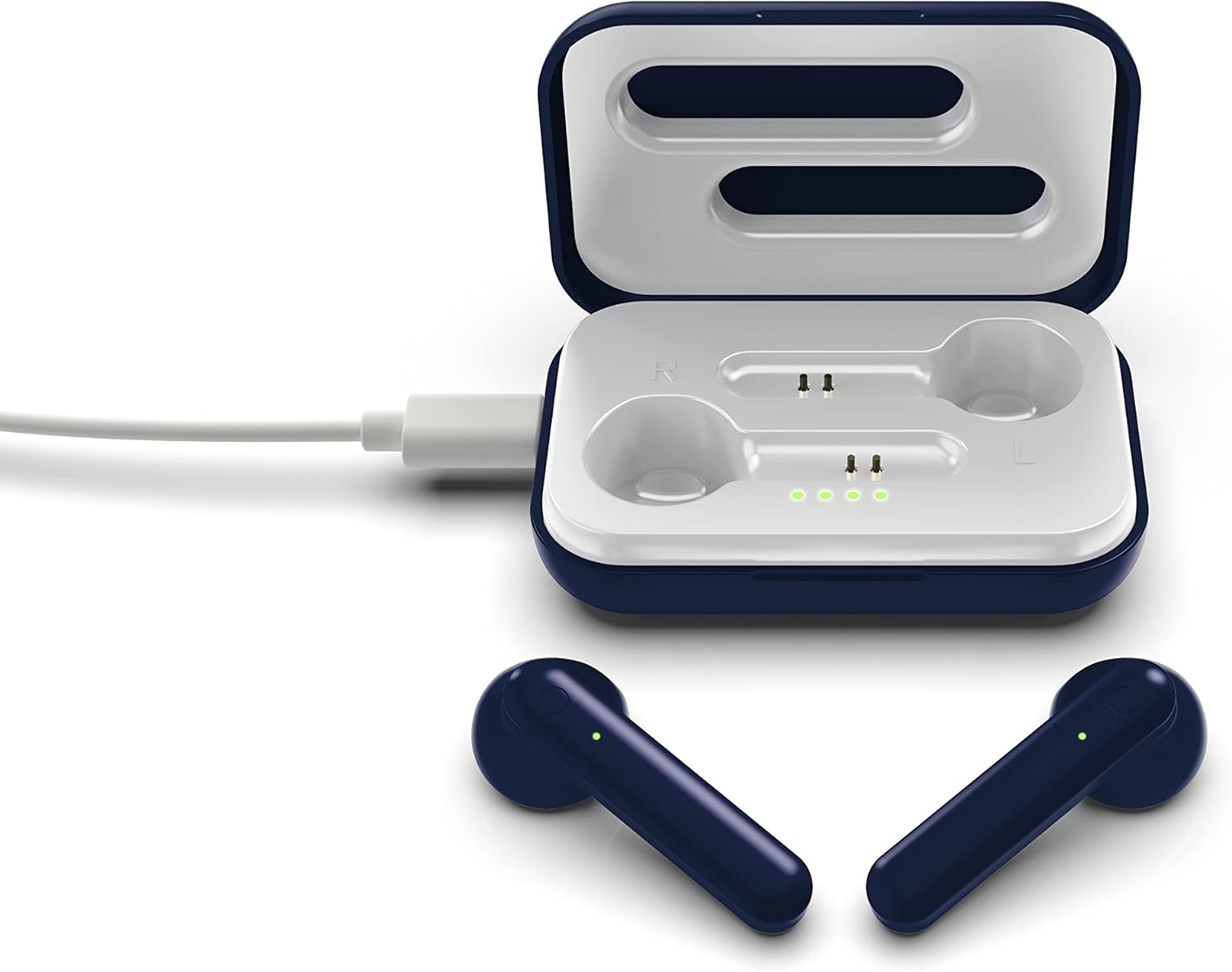
The image above illustrates the earbuds securely placed within their charging case. The illuminated LED lights on the case indicate the charging status of both the case and the earbuds.
Persediaan
1. Mengecas Fon Telinga dan Sarung
Sebelum penggunaan pertama, cas sepenuhnya kedua-dua fon telinga dan bekas pengecasan.
- Mengecas Kes: Connect the provided Micro-USB cable to the charging port on the case and the other end to a USB power source (e.g., computer, wall adapter). The LED indicators on the case will illuminate to show charging progress.
- Mengecas fon telinga: Place the earbuds into their respective slots in the charging case. Ensure they are correctly seated. The earbuds will begin charging automatically from the case's internal battery. The LED indicators on the earbuds will show their charging status.
- A full charge provides approximately 3-4 hours of playtime.
2. Berpasangan Bluetooth
Untuk menyambungkan fon telinga anda kepada peranti:
- Pastikan fon telinga dicas.
- Open the charging case. The earbuds will automatically power on and enter pairing mode. The LED indicator on one earbud will flash, indicating it is ready to pair.
- Pada peranti anda (telefon pintar, tablet, dll.), dayakan Bluetooth.
- Cari untuk available Bluetooth devices and select "SOAR TWS4" from the list.
- Once connected, the earbud LED indicator will stop flashing. You will hear an audible confirmation.
- Fon telinga akan menyambung semula secara automatik ke peranti gandingan terakhir apabila dialih keluar daripada sarung, jika Bluetooth didayakan pada peranti.
Arahan Operasi
The SOAR NFL True Wireless Earbuds V.4 feature touch controls for easy management of audio and calls.
Hidupkan/Mati Kuasa
- Hidupkan kuasa: Buka bekas pengecasan, atau tekan lama kawasan sentuh pada kedua-dua fon telinga selama 3 saat.
- Matikan: Letakkan fon telinga kembali ke dalam bekas pengecasan dan tutup penutup, atau tekan lama kawasan sentuh pada kedua-dua fon telinga selama 5 saat.
Main balik Muzik
- Main/Jeda: Ketik sekali pada salah satu fon telinga.
- Lagu Seterusnya: Ketik dua kali pada fon telinga kanan.
- Trek Sebelumnya: Ketik dua kali pada fon telinga kiri.
Pengurusan Panggilan
- Jawab/Tamatkan Panggilan: Ketik sekali pada sama ada fon telinga semasa panggilan masuk atau panggilan aktif.
- Tolak Panggilan: Tekan lama pada mana-mana fon telinga selama 2 saat semasa panggilan masuk.
Pembantu Suara
- Aktifkan Pembantu Suara: Ketik tiga kali pada salah satu fon telinga.
Penyelenggaraan
Penjagaan yang betul akan memanjangkan hayat fon telinga anda.
- Pembersihan: Gunakan kain lembut dan kering untuk membersihkan fon telinga dan bekas pengecas. Jangan gunakan bahan kimia yang keras atau bahan yang kasar.
- Storan: Apabila tidak digunakan, simpan fon telinga dalam bekas pengecasnya untuk melindunginya dan memastikan ia dicas.
- Tahan Air: Earbuds ini ialah tidak kalis air. Avoid exposure to liquids, moisture, and extreme temperatures.
- mengecas: Use only the provided Micro-USB cable or a certified equivalent for charging.
Menyelesaikan masalah
Jika anda menghadapi masalah dengan fon telinga anda, rujuk kepada penyelesaian biasa berikut:
| Masalah | Penyelesaian |
|---|---|
| One earbud is not connecting or producing sound. |
|
| Earbuds are not pairing with my device. |
|
| Fon telinga tidak dicas. |
|
Spesifikasi
| Ciri | Perincian |
|---|---|
| Nama Model | Earbud Wayarles Benar V.4 |
| Nombor Model Item | NFL-TWS4-SHKS |
| Teknologi Ketersambungan | Bluetooth, Wayarles |
| Teknologi Komunikasi Tanpa Wayar | Bluetooth 5.0 |
| Julat Bluetooth | Sehingga 30 kaki (9.14 meter) |
| Hayat Bateri (Masa Main) | 3-4 jam setiap caj |
| Jenis Kawalan | Sentuh, Kawalan Media |
| Ciri Khas | Mikrofon Termasuk |
| Penempatan Telinga | Di Telinga |
| Tahap Ketahanan Air | Bukan Tahan Air |
| bahan | plastik |
| Dimensi Produk | 1.25 x 4.5 x 6.5 inci |
| Berat Barang | 3.52 auns |
| Pengeluar | Prime Brands Group, Inc. |
| UPC | 192129070757 |
Video Produk Rasmi
Video ini menyediakan visual overview of the SOAR TWS4 True Wireless Earbuds V.4, highlighting key features such as the wireless charging case, touch controls, and Bluetooth 5.0 technology. It demonstrates the product's design and functionality.
Waranti dan Sokongan
Your SOAR NFL True Wireless Earbuds V.4 are covered by a Waranti Terhad 1 Tahun. This warranty covers manufacturing defects and issues arising from normal use. It does not cover damage caused by misuse, accidents, unauthorized modifications, or exposure to liquids.
For warranty claims, technical support, or further assistance, please contact the manufacturer, Prime Brands Group, Inc., or visit their official webtapak. Simpan bukti pembelian anda untuk pengesahan waranti.


