Pioneer DJ VM-50 5.25-inch Active Monitor Speaker Instruction Manual
Jenama: DJ perintis
model: VM-50
pengenalan
The Pioneer DJ VM-50 active monitor speaker is designed to produce clear audio with fast-attacking, punchy bass. This speaker can be precisely tuned to suit the acoustic characteristics of any room, making it ideal for recreating a club sound during DJ performances or providing a flat frequency response essential for music production in both home and professional studio environments.
Figure 1: Pioneer DJ VM-50 Active Monitor Speaker. This image shows the front view of the black VM-50 speaker, highlighting its compact and robust design.
Ciri-ciri Utama
Low/High EQ Controls: Allows for precise sound adjustments to match your listening environment or production needs.
Constant Directivity Horn: Delivers mid and high frequencies with power, creating a broad and uniform listening space. The horn and woofer edge are designed for a smooth frequency crossover, ensuring natural sound reproduction.
Rajah 2: Sisi view of the VM-50 speaker, illustrating the design of the constant directivity horn for optimal sound dispersion.
Kawalan DSP: Each VM speaker includes DSP settings with 16 configurations, enabling users to find the perfect sound for DJing or music production, regardless of room shape, size, or construction.
Rajah 3: Terperinci view of the DSP control panel on the rear of the VM-50, showing the Low and High EQ adjustment knobs and their corresponding frequency response curves.
4-mm Rigid Aluminum Front Baffle: The hexagonal aluminum front baffle not only provides a fresh aesthetic but also significantly improves sound quality and durability by reducing unwanted vibrations.
Figure 4: Close-up of the VM-50's hexagonal aluminum front baffle, showcasing its robust construction and brushed texture.
Aramid Fiber Woofer Cone: Ensures fast response for bass and low-mid frequencies, contributing to the speaker's clear and punchy sound.
Rajah 5: Terperinci view of the Aramid Fiber Woofer Cone, designed for precise and responsive low-frequency reproduction.
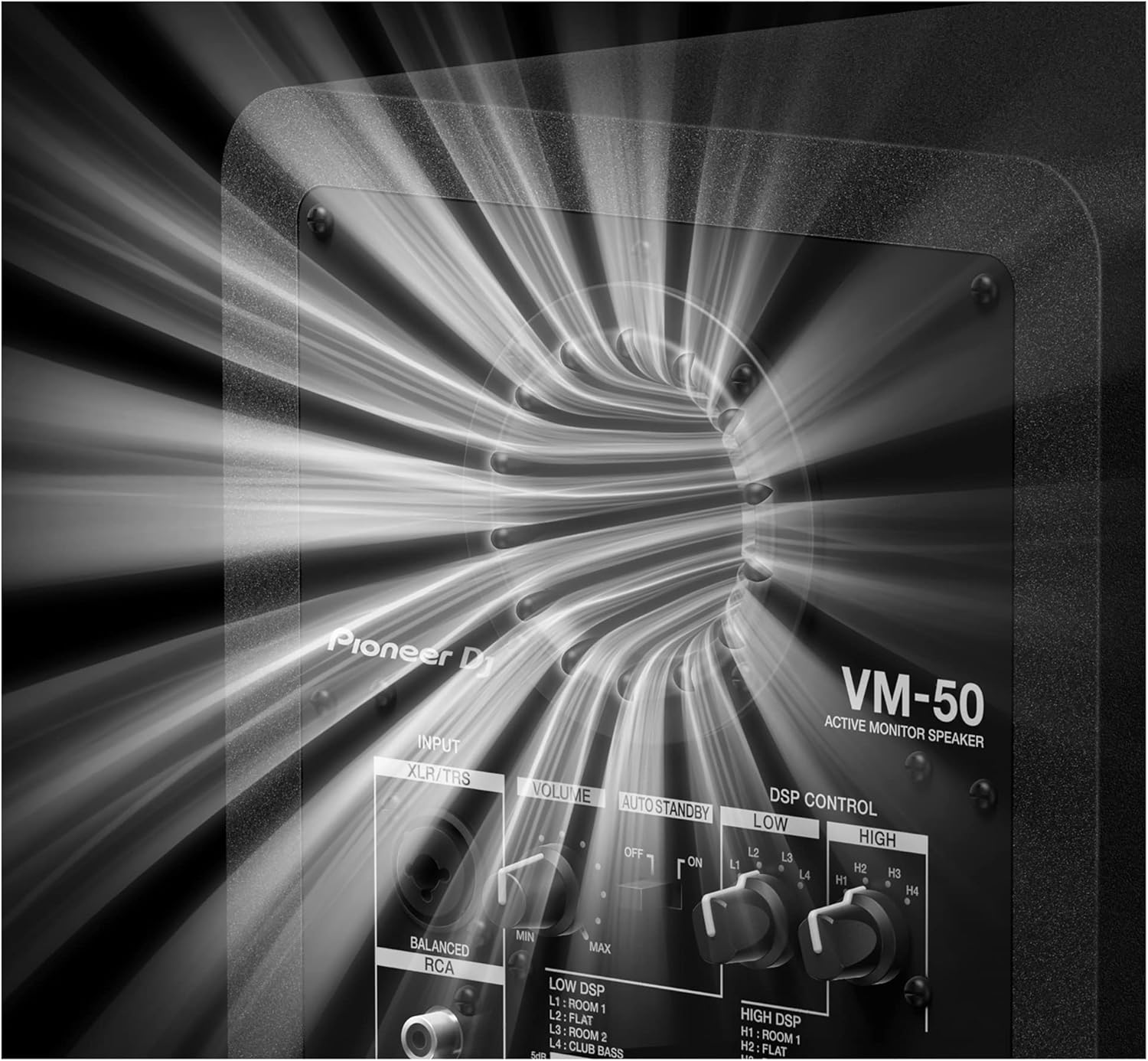
Vortex Bass Accelerator: Features a bass reflex port with grooves that reduce air friction, ensuring tight and punchy bass without unwanted vibrations, even at high volumes.
Figure 6: Close-up of the Vortex Bass Accelerator port on the rear of the VM-50, engineered for smooth airflow and distortion-free bass.
Video Produk Rasmi
Video 1: Pioneer DJ Official new VM series active monitor speakers. This video provides an overview of the VM series, highlighting key features such as clear bass, club-style sound recreation, rigid aluminum baffle, Class D amplifier, Aramid fiber woofer cone, Vortex Bass Accelerator, and DSP control.
Panduan Persediaan
1. Membongkar dan Meletakkan
Carefully remove the VM-50 speaker from its packaging. Place the speaker on a stable, flat surface, ideally at ear level in your listening position. Ensure there is adequate space around the speaker for proper ventilation and bass port function. For optimal stereo imaging, position the speakers equidistant from your listening position, forming an equilateral triangle.
2. Sambungan
The VM-50 offers versatile input options:
XLR/TRS Balanced Input: For professional audio equipment, use an XLR or 1/4-inch TRS cable to connect your audio interface, mixer, or controller to the speaker's balanced input.
RCA Unbalanced Input: For consumer-level audio devices, use an RCA cable to connect to the speaker's unbalanced input.
Connect the power cable to the AC IN port on the rear of the speaker, then plug it into a suitable power outlet. Ensure the power switch is in the OFF position before connecting to power.
Figure 7: Rear panel of the VM-50, showing the XLR/TRS and RCA input ports, volume control, auto standby switch, DSP controls, and power input.
Arahan Operasi
1. Hidupkan/Mati Kuasa
After all connections are made, flip the power switch on the rear panel to the ON position. The power indicator on the front of the speaker will illuminate.
2. Pelarasan Kelantangan
Gunakan JILID knob on the rear panel to adjust the output level of the speaker. Start with the volume at its minimum setting and gradually increase it to a comfortable listening level. Avoid setting the volume too high to prevent distortion and potential damage to the speaker or your hearing.
3. DSP Control (EQ Settings)
The VM-50 features a DSP control section on the rear panel, allowing you to tailor the sound to your room acoustics or personal preference. There are separate controls for EQ RENDAH dan EQ TINGGI, each offering four distinct settings:
LOW EQ Settings:
L1: Room 1 (Boosted low-end for smaller rooms)
L2: Flat (Neutral low-end response)
L3: Room 2 (Slightly attenuated low-end for larger rooms or bass-heavy environments)
L4: Club Bass (Enhanced low-end for a powerful, club-like sound)
HIGH EQ Settings:
H1: Room 1 (Slightly attenuated high-end for brighter rooms)
H2: Flat (Neutral high-end response)
H3: Room 2 (Slightly boosted high-end for duller rooms)
H4: Bright Treble (Enhanced high-end for a crisp, detailed sound)
Experiment with these settings to achieve the desired sound profile for your specific application, whether it's critical listening for production or dynamic playback for DJing.
4. Auto Standby
The STANDBY DIRI switch allows the speaker to automatically enter a low-power standby mode when no audio input is detected for a certain period. Flip the switch to ON to enable this feature, or DIMATIKAN to keep the speaker fully active at all times.
Penyelenggaraan
Pembersihan: Regularly wipe the speaker's exterior with a soft, dry cloth. For stubborn dirt, a slightly damp cloth can be used, followed by a dry one. Avoid using abrasive cleaners, solvents, or chemical sprays, as these can damage the finish.
Pengudaraan: Ensure the rear panel and bass port are free from obstructions to allow for proper airflow and prevent overheating.
Storan: If storing the speaker for an extended period, disconnect it from power and store it in a cool, dry place, away from direct sunlight and extreme temperatures.
Pengendalian: Always handle the speaker carefully. Avoid dropping it or subjecting it to strong impacts, which can damage internal components.
Menyelesaikan masalah
Masalah
Kemungkinan Punca
Penyelesaian
Tiada bunyi dari pembesar suara
Kabel kuasa tidak disambungkan atau suis kuasa dimatikan.
Tombol kelantangan ditetapkan kepada minimum.
Kabel audio disambungkan dengan salah atau rosak.
Input source not sending audio.
Pastikan kabel kuasa disambungkan dengan selamat dan suis kuasa HIDUP.
Increase the volume using the VOLUME knob.
Check audio cable connections and try different cables if necessary.
Verify that your audio source (mixer, interface, etc.) is powered on and sending audio.
Bunyi herot atau tidak jelas
Tetapan kelantangan terlalu tinggi (keratan).
Incorrect DSP (EQ) settings for the room.
Faulty audio cable or input source.
Reduce the volume on the speaker and/or the audio source.
Adjust the LOW EQ and HIGH EQ settings on the rear panel to better suit your room acoustics.
Try replacing audio cables or testing with a different audio source.
Speaker enters standby mode unexpectedly
Auto Standby feature is enabled.
No audio signal detected for an extended period.
If you do not wish for the speaker to enter standby, set the AUTO STANDBY switch to OFF.
Ensure a continuous audio signal is being sent to the speaker.
Spesifikasi
Atribut
Nilai
bahan
aluminium
Nama Model
VM-50
Jenis Pembesar Suara
Woofer
Ciri Khas
Bass Boost
Kegunaan Disyorkan Untuk Produk
Muzik
Peranti Serasi
Desktop, Komputer Riba, Telefon Pintar, Tablet, Televisyen
Diameter Subwoofer
5.25 Inci
Kiraan Unit
1.0 Kiraan
Jenis Pengawal
Bertali elektrik
warna
Hitam
Komponen yang Disertakan
fon telinga
Dimensi Produk
1"D x 1"W x 1"H
Berat Barang
15.5 paun
Adakah Kalis Air
palsu
Jenis Waranti
Terhad
Bilangan Item
4
Kaedah Kawalan
Sentuh
Saiz Pembesar Suara
5.25 Inci
Sumber Kuasa
Elektrik Bertali
Diameter Woofer
5.25 Inci
Teknologi Ketersambungan Subwufer
berwayar
Protokol Ketersambungan
Bluetooth
Termasuk pemain MP3?
Tidak
Bilangan Tahap Kuasa
1
Kegunaan Khusus Untuk Produk
Home Studios, Professional Studios, DJing
UPC
841300102021
Gaya
VM-50
Pengeluar
DJ perintis
ASIN
B0918FSSRZ
Nombor model item
VM-50
Tarikh Mula-mula Tersedia
30 Mac 2021
Jenama
DJ perintis
Kuasa Output Maksimum Pembesar Suara
60 Watt
Teknologi Ketersambungan
sepaksi
Mod Keluaran Audio
Stereo
Jenis Pemasangan
Pemasangan Atas Meja
Apa yang ada dalam Kotak
Earbuds (as per product data, though unusual for a monitor speaker)
Pembesar Suara Monitor Aktif DJ VM-50 Pioneer
Kabel Kuasa
Operating Instructions / Safety Information
Waranti dan Sokongan
The Pioneer DJ VM-50 Active Monitor Speaker comes with a Waranti Terhad. For detailed information regarding warranty terms, conditions, and duration, please refer to the warranty card included with your product or visit the official Pioneer DJ webtapak.
For technical support, troubleshooting assistance beyond this manual, or to inquire about service, please visit the Pioneer DJ Store on Amazon atau saluran sokongan rasmi mereka.
Manual Arahan Pembesar Suara Aktif dan Subwoofer Pioneer DJ XPRS2 Siri Dokumen ini menyediakan arahan komprehensif untuk pembesar suara aktif Siri Pioneer DJ XPRS2 (XPRS102, XPRS122) dan subwoofer aktif (XPRS1152S, XPRS1182S). Ia merangkumi ciri-ciri utama, kawalan panel belakang, tetapan DSP, prosedur pemasangan, gambar rajah sambungan dan spesifikasi terperinci.
Pioneer DJ XPRS2 Series: Active Loudspeakers and Subwoofers Manual Comprehensive guide for the Pioneer DJ XPRS2 Series, covering XPRS102, XPRS122 loudspeakers and XPRS1152S, XPRS1182S subwoofers. Includes features, specifications, installation, and connection details.
Manual Servis Pioneer DJ DDJ-RB - Panduan Teknikal untuk Pengawal DJ Manual servis rasmi untuk Pioneer DJ DDJ-RB DJ Controller. Menyediakan maklumat teknikal terperinci, prosedur diagnostik, penyelesaian masalah, panduan pembaikan dan senarai alat ganti untuk juruteknik yang berkelayakan.
Pioneer DJ DM-40D-BT/DM-40D-BT-W Active Monitor Speaker Instruction Manual This instruction manual provides comprehensive guidance for the Pioneer DJ DM-40D-BT and DM-40D-BT-W active monitor speakers, covering setup, connections, Bluetooth functionality, troubleshooting, and specifications for optimal audio performance.