pengenalan
This manual provides comprehensive instructions for the installation, operation, and maintenance of your AeroCool Miragebk ATX PC Case. The Miragebk features an ARGB LED strip on the front panel, a hinged tempered glass side panel, and a 12 cm ARGB fan, designed for optimal component visibility and cooling performance.
Kandungan Pakej
- AeroCool Miragebk ATX PC Case
- Kit aksesori (skru, pengikat, pengikat kabel)
- Manual Pengguna (dokumen ini)
Maklumat Keselamatan
Please read and understand all safety instructions before installing or operating this product. Failure to do so may result in injury or damage to the product.
- Sentiasa putuskan sambungan bekalan kuasa dari soket dinding sebelum melakukan sebarang pemasangan atau penyelenggaraan.
- Avoid placing the case in direct sunlight or near heat sources.
- Keep the case away from water and excessive humidity.
- Handle the tempered glass panel with care to prevent breakage.
- Pastikan pembumian yang betul untuk mengelakkan bahaya elektrik.
Persediaan dan Pemasangan
Follow these steps to set up your AeroCool Miragebk PC case and install components.
1. Menyediakan Kes
- Letakkan bekas di atas permukaan yang stabil dan rata.
- Carefully open the hinged tempered glass side panel. This panel provides full access to the interior.
- Remove any protective films from the glass and other surfaces.

Rajah 1: Depan view of the AeroCool Miragebk PC case, showcasing the ARGB LED strip and tempered glass panel.
2. Pemasangan Papan Induk
- Pasangkan pelindung I/O ke dalam bukaan belakang bekas.
- Align your ATX, Micro ATX, or Mini ITX motherboard with the standoffs inside the case.
- Selamatkan papan induk menggunakan skru yang disediakan.
3. Pemasangan Bekalan Kuasa
- Install the power supply unit (PSU) into the dedicated compartment at the bottom of the case.
- Selamatkan PSU dengan skru dari belakang kes itu.
4. Storage Drive Installation (HDDs/SSDs)
The case supports up to 7 HDDs and SSDs.
- Locate the drive bays or mounting points.
- Mount your 2.5" SSDs or 3.5" HDDs using the appropriate screws.
5. Pemasangan Kad Grafik (GPU).
Sarung ini menyokong kad grafik sehingga 356mm panjang.
- Tanggalkan penutup slot pengembangan yang diperlukan di bahagian belakang sarung.
- Insert your graphics card into the PCIe slot on the motherboard.
- Selamatkan kad grafik dengan skru.
6. Cooling System Installation (Fans/Liquid Cooling)
The case supports up to 8 fans and liquid cooling on the front, top, and rear.
- Install additional fans as needed for optimal airflow.
- For liquid cooling, mount radiators to the designated areas (front, top, or rear).
- The case includes one 12 cm ARGB fan.
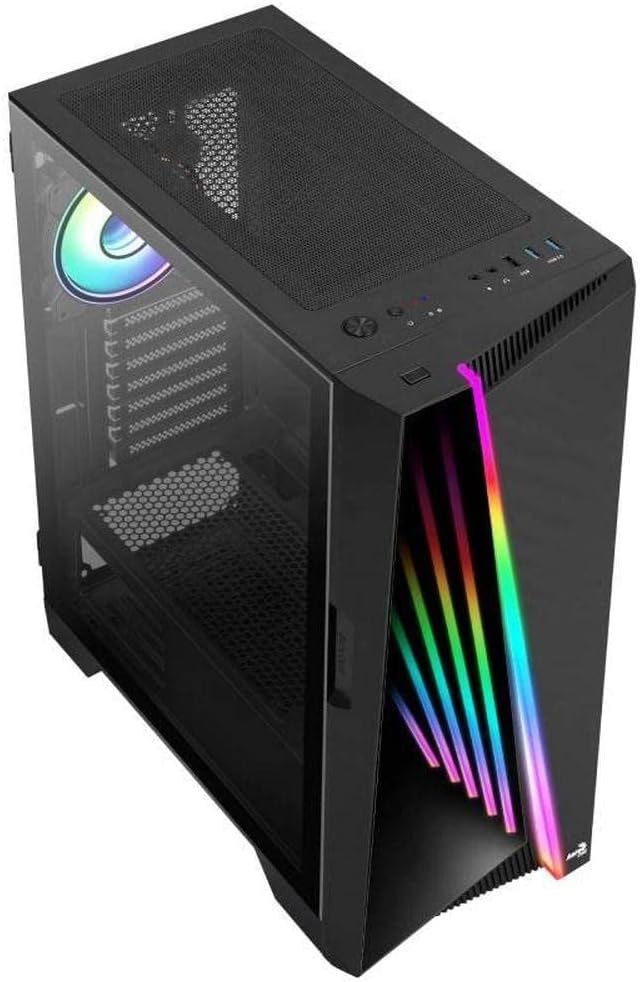
Rajah 2: Bersudut view of the AeroCool Miragebk PC case, highlighting the top mesh for ventilation and the front panel design.
7. Pengurusan Kabel
Gunakan potongan penghalaan kabel dan titik pengikat di belakang dulang papan induk untuk menguruskan kabel bagi aliran udara dan estetika yang lebih baik.
8. Menutup Kes
Once all components are installed and cables are managed, close the tempered glass side panel and secure it.
Arahan Operasi
Panel Depan I / O
The top panel of the AeroCool Miragebk provides convenient access to essential ports and controls:
- Butang Kuasa: Turns the PC on/off.
- Butang Tetapkan Semula: Restarts the PC.
- Butang Kawalan LED: Cycles through ARGB lighting modes or syncs with the motherboard.
- Port USB 3.0 (x2): Untuk pemindahan data berkelajuan tinggi.
- Port USB 2.0 (x1): Untuk peranti USB standard.
- HD Audio & Microphone Jacks: Untuk input dan output audio.
Kawalan Pencahayaan ARGB
The ARGB lighting on the front panel and included fan can be controlled in two ways:
- Butang Kawalan LED: Press the dedicated LED button on the top panel to cycle through various pre-set ARGB lighting effects.
- Penyegerakan Papan Induk: Connect the ARGB lighting to a compatible 3-pin +5V ARGB header on your motherboard. This allows software control of 16.8 million colors and synchronization with other ARGB components. The Mirage control hub supports up to 6 ARGB fans and 2 additional 3-pin ARGB accessories.
Penyelenggaraan
Penyelenggaraan tetap membantu memastikan prestasi optimum dan jangka hayat sarung PC anda.
- Penapis Habuk: Periodically remove and clean the dust filters (if present) to maintain good airflow and prevent dust buildup inside the case.
- Pembersihan Luaran: Lap permukaan luar dengan lembut, damp kain. Elakkan pembersih atau pelarut yang melelas.
- Pembersihan Dalaman: Use compressed air to remove dust from internal components and fans. Ensure the PC is powered off and unplugged before cleaning.
- Kaca Terbaja: Clean the tempered glass panel with a microfiber cloth and a glass cleaner designed for electronics.
Menyelesaikan masalah
If you encounter issues with your AeroCool Miragebk case, refer to the following common solutions:
- PC Not Powering On:
- Ensure the power supply is properly connected to the wall outlet and switched on.
- Verify all internal power cables (24-pin ATX, CPU, GPU) are securely connected.
- Check that the front panel power switch cable is correctly connected to the motherboard.
- Pencahayaan ARGB Tidak Berfungsi:
- Confirm the ARGB cables are correctly connected to the motherboard's 3-pin +5V ARGB header or the internal control hub.
- If using motherboard sync, ensure the motherboard's ARGB software is installed and configured correctly.
- Try pressing the LED control button on the top panel to see if pre-set modes function.
- Aliran Udara yang Buruk/Terlalu Panas:
- Check if all installed fans are spinning correctly.
- Bersihkan sebarang penapis habuk dan komponen dalaman.
- Ensure proper fan orientation (intake/exhaust) for optimal airflow.
Spesifikasi
| Ciri | Perincian |
|---|---|
| Jenama | AeroCool |
| Nama Model | MIRAGEBK |
| Jenis Kes | Tower (Semitower) |
| Keserasian Papan Induk | ATX, Mikro ATX, Mini ITX |
| bahan | Kaca Terbaja |
| warna | Hitam |
| Berat Barang | 12.98 paun |
| Dimensi Produk (LxWxH) | 19.65 x 8.5 x 16.46 inci |
| Bilangan USB 3.0 Port | 2 |
| Bilangan USB 2.0 Port | 1 |
| Jenis Pemasangan Bekalan Kuasa | Pelekap Bawah |
| Kaedah Penyejukan | Udara |
| Fan Size (Included) | 12 Centimeters (ARGB) |
| Ketinggian Penyejuk CPU Maks | 162mm |
| Panjang GPU Maks | 356mm |
| Drive Bays | 7 (HDDs and SSDs) |
Waranti dan Sokongan
For warranty information or technical support, please refer to the official AeroCool webtapak atau hubungi bahagian perkhidmatan pelanggan mereka. Simpan bukti pembelian anda untuk tuntutan waranti.


