1. Pengenalan
The Adastra A22 is a compact digital stereo PA amplifier designed for background music, announcements, or alerts. It features a built-in media player with USB/microSD, FM tuner, and Bluetooth connectivity, alongside multiple auxiliary inputs. This manual provides detailed instructions for the proper setup, operation, and maintenance of your A22 amplebih hidup.
2. Arahan Keselamatan
Please read and follow these safety instructions carefully to prevent damage and ensure safe operation.
- Bekalan Kuasa: Connect the unit only to a mains outlet with the specified voltage (230 VAC, 50 Hz). Ensure the power cord is not damaged or pinched.
- Kelembapan: Do not expose the unit to rain or moisture. Avoid placing liquids near the unit.
- Pengudaraan: Pastikan pengudaraan yang mencukupi. Jangan sekat bukaan pengudaraan.
- Servis: Do not attempt to service this product yourself. Refer all servicing to qualified personnel. Opening the casing boleh mendedahkan anda kepada voltages.
- penempatan: Letakkan unit di atas permukaan yang stabil dan rata. Elakkan suhu yang melampau, cahaya matahari langsung dan getaran yang kuat.
- Pembersihan: Putuskan sambungan daripada kuasa sebelum membersihkan. Gunakan kain lembut dan kering. Jangan gunakan pembersih cecair.
3. Kandungan Pakej
Sahkan bahawa pakej anda mengandungi item berikut:
- Adastra A22 Stereo PA Amplebih hidup
- Kawalan Jauh IR
- 4 x Pendakap Pemasangan
- Kabel Kuasa (IEC)
- Manual Pengguna
4. Kawalan dan Ciri
4.1 Panel Depan
The front panel provides access to the main controls and media player functions.
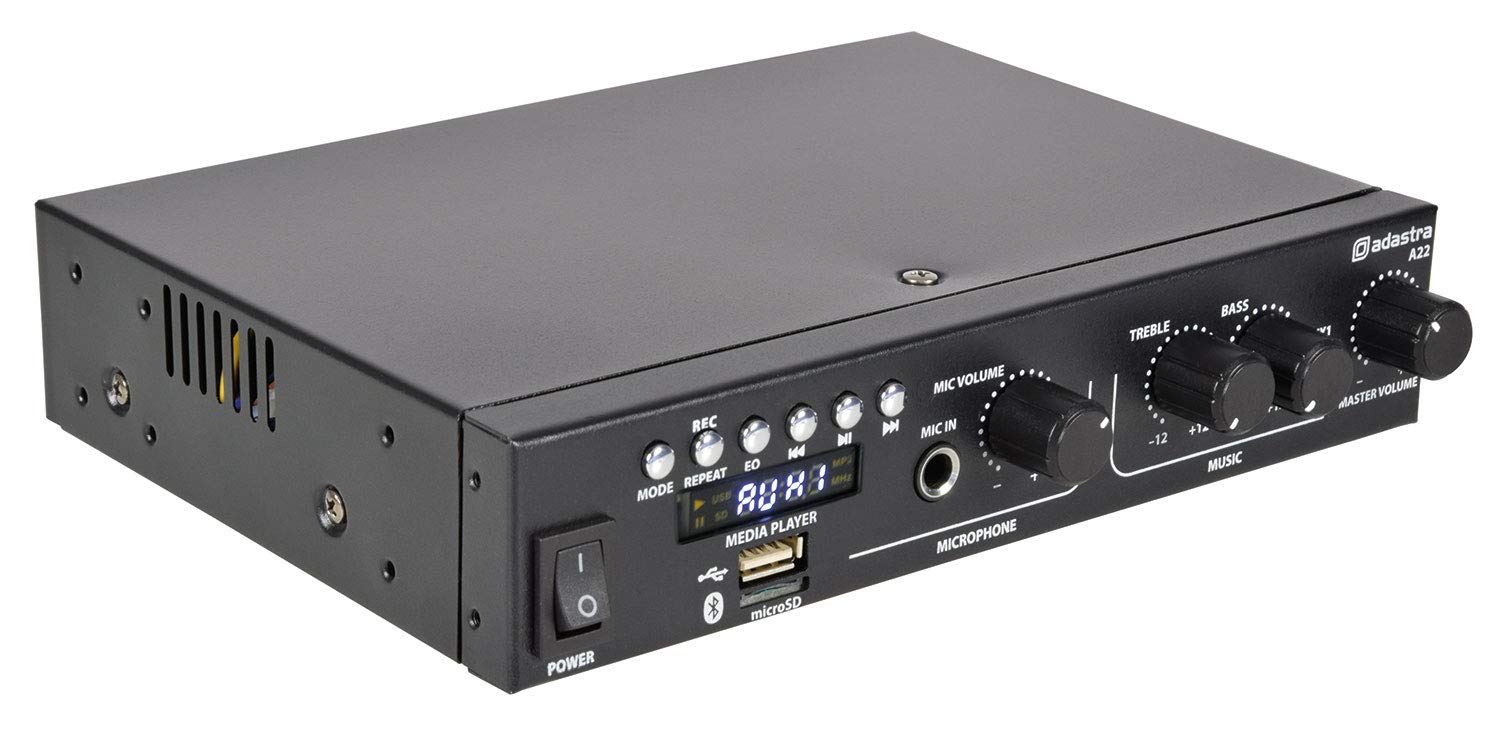
Image: Front panel of the Adastra A22 amplifier, showing the power switch, media player controls, microphone input and volume, treble, bass, auxiliary input, and master volume knobs.
- Suis kuasa: Togol amphidup atau mati.
- Kawalan Pemain Media: Buttons for REC, MODE, REPEAT, EQ, Previous Track, Play/Pause, Next Track.
- Port USB: Untuk menyambungkan pemacu kilat USB bagi main balik media.
- Slot Kad microSD: For inserting microSD cards for media playback.
- paparan: Menunjukkan mod semasa, maklumat trek dan frekuensi FM.
- VOLUME MIC: Adjusts the volume level of the microphone input.
- MIC IN (Bicu 6.3mm): Menyambungkan mikrofon.
- Treble: Adjusts the high-frequency response of the music.
- ASAS: Adjusts the low-frequency response of the music.
- AUX1 (3.5mm Jack): Input tambahan panel hadapan untuk peranti audio luaran.
- VOLUME MASTER: Mengawal volum keluaran keseluruhan amplebih hidup.
4.2 Panel Belakang
The rear panel houses all input and output connections.

Image: Rear panel of the Adastra A22 amplifier, showing RCA line outputs, RCA auxiliary inputs (AUX2, AUX3), FM antenna connector, speaker output terminals, and the IEC power inlet with fuse.
- LINE OUT (L+R RCA): Stereo RCA outputs for connecting to another ampalat penghidup atau rakaman.
- AUX2 INPUTS (L+R RCA): Input RCA stereo untuk sumber audio luaran.
- AUX3 INPUTS (L+R RCA): Input RCA stereo untuk sumber audio luaran.
- ANTENA FM: F-type connector for connecting an FM antenna.
- SPEAKER OUTPUT (CH1, CH2): Screw terminals for connecting passive speakers (4-8 Ohms).
- IEC Power Inlet with Fuse Holder: Connects the supplied power cable. Contains a replaceable fuse.
4.3 Alat Kawalan Jauh
The included IR remote control provides convenient access to media player functions and input selection.

Image: The remote control for the Adastra A22 amplifier, featuring power, mode, channel selection, EQ, playback controls, and a numeric keypad.
The remote control includes buttons for power, mode selection, channel/track navigation, equalizer presets, playback control (play/pause, skip), and a numeric keypad for direct track or station selection.
5. Persediaan
Follow these steps to set up your Adastra A22 amplebih hidup.
5.1 Mounting (Optional)
A22 amplifier can be mounted under a counter or against a wall using the four supplied mounting brackets for a discreet installation.

Image: Four black L-shaped mounting brackets, used for securing the Adastra A22 amplifier to a surface.

Image: The Adastra A22 amplifier mounted discreetly under a wooden desk, showing its front panel controls.

Imej: Bersudut view of the Adastra A22 amplifier mounted under a wooden desk, highlighting its compact size and integrated appearance.
Attach the brackets to the sides of the amplifier using appropriate screws, then secure the amplifier to your desired surface.
5.2 Pembesar Suara Penyambung
Connect your passive speakers to the SPEAKER OUTPUT terminals on the rear panel. Ensure correct polarity (+ to + and - to -) for each channel. The amplifier supports speakers with an impedance of 4 to 8 Ohms.
5.3 Menyambungkan Sumber Audio
- RCA Inputs (AUX2, AUX3): Use RCA cables to connect external audio devices like CD players, DVD players, or mixers to the AUX2 or AUX3 inputs.
- 3.5mm Input (AUX1): Use a 3.5mm stereo jack cable to connect portable devices like smartphones or tablets to the front panel AUX1 input.
- USB/microSD: Insert a USB flash drive or microSD card into the respective slot on the front panel for media playback.
- Antena FM: Connect an FM antenna to the F-type connector on the rear panel for radio reception.
5.4 Sambungan Kuasa
Connect the supplied IEC power cable to the IEC inlet on the rear panel of the amplifier, then plug the other end into a suitable mains power outlet.
6. Arahan Operasi
6.1 Menghidupkan/Mematikan
Tekan ke KUASA switch on the front panel to turn the amplifier on or off. The display will illuminate when the unit is powered on.
6.2 Pemilihan Input
Tekan ke MODE button on the front panel or remote control to cycle through the available input sources: USB/microSD, FM Tuner, Bluetooth, AUX1, AUX2, AUX3. The selected mode will be shown on the display.
6.3 Berpasangan Bluetooth
- Pilih mod Bluetooth menggunakan MODE button. The display will show "BLUE" and the Bluetooth indicator will flash.
- On your mobile device, search for Bluetooth devices and select "Adastra A22".
- Once paired, the Bluetooth indicator will stop flashing and remain solid. You can now play audio from your device through the amplebih hidup.
6.4 USB/microSD Playback
Insert a USB flash drive or microSD card containing MP3 audio files into the corresponding slot. The amplifier will automatically switch to USB/SD mode and begin playback. Use the media player controls (Previous, Play/Pause, Next) to manage playback. The ULIKAN button cycles through repeat modes (e.g., repeat one, repeat all).
6.5 Penala FM
In FM mode, the display will show the current frequency. Use the Previous/Next buttons to scan for stations. Press and hold these buttons to auto-scan. The EQ button can be used to cycle through equalizer presets.
6.6 Penggunaan Mikrofon
Sambungkan mikrofon ke MIC DALAM jack. Adjust the microphone volume using the VOLUME MIC knob. This allows for announcements or vocal performances over background music.
6.7 Tone and Master Volume Controls
- Treble: Rotate the TREBLE knob to increase or decrease the high frequencies of the music.
- ASAS: Rotate the BASS knob to increase or decrease the low frequencies of the music.
- VOLUME MASTER: Adjust the MASTER VOLUME knob to control the overall output level of all audio sources.
7. Penyelenggaraan
Penyelenggaraan yang betul memastikan ketahanan dan prestasi optimum peranti anda amplebih hidup.
- Pembersihan: Regularly wipe the unit with a soft, dry cloth. Do not use abrasive cleaners or solvents.
- Pengudaraan: Pastikan bukaan pengudaraan bersih daripada habuk dan serpihan untuk mengelakkan terlalu panas.
- Penggantian fius: If the unit does not power on, check the fuse located in the IEC power inlet on the rear panel. Replace it with a fuse of the same type and rating (F3.15A 250V). Always disconnect the power cable before replacing the fuse.
- Storan: Jika menyimpan unit untuk tempoh yang lama, putuskan sambungannya daripada kuasa dan simpan di tempat yang sejuk dan kering.
8. Penyelesaian masalah
If you encounter issues with your Adastra A22 amplifier, rujuk kepada masalah dan penyelesaian biasa berikut:
| Masalah | Kemungkinan Punca | Penyelesaian |
|---|---|---|
| Tiada kuasa | Power cable disconnected, power switch off, blown fuse | Check power cable connection, ensure power switch is on, replace fuse if necessary. |
| Tiada keluaran bunyi | Master volume too low, incorrect input selected, speaker connections loose, faulty audio source | Increase Master Volume, select correct input, check speaker wiring, test with a different audio source. |
| Bluetooth tidak bersambung | Not in Bluetooth mode, device too far, previously paired with another device | pastikan amplifier is in Bluetooth mode, bring device closer, unpair from other devices, try re-pairing. |
| USB/microSD not playing | tak betul file format, corrupted media, not in USB/SD mode | pastikan files are MP3 format, try a different USB/microSD, select USB/SD mode. |
| Penerimaan FM yang lemah | Antenna not connected, weak signal | Connect FM antenna, reposition antenna for better signal. |
Jika masalah berterusan selepas mencuba penyelesaian ini, sila hubungi kakitangan servis yang berkelayakan.
9. Spesifikasi
| Nombor Model | 953.422 |
| Bekalan Kuasa | 230 VAC, 50 Hz (IEC) |
| Impedans Keluaran | 4 to 8 Ohms (each channel) |
| Output Kuasa (8 Ohm) | 2 x 25 W RMS / 2 x 40 W max (@ 1 kHz 10% THD) |
| Output Kuasa (4 Ohm) | 2 x 35 W RMS / 2 x 55 W max (@ 1 kHz 10% THD) |
| Input | AUX1 (3.5mm), AUX2 (L+R RCA), AUX3 (L+R RCA), MIC (6.3mm jack), USB, microSD, FM Antenna |
| Keluaran | LINE OUT (L+R RCA), Speaker Output (screw terminals) |
| Sumber Audio | USB/microSD player, FM tuner, Bluetooth receiver |
| Dimensi (W x D x H) | 215 x 180 x 43 mm |
| Berat badan | 1.1 kg |
| Teknologi Ketersambungan | Tambahan, Bluetooth, USB |
| Teknologi Penalaan | FM |
10. Waranti dan Sokongan
Information regarding product warranty and customer support was not available in the provided data. Please refer to the manufacturer's official website or contact your retailer for details on warranty coverage and support services for your Adastra A22 amplebih hidup.


