pengenalan
This manual provides comprehensive instructions for the setup, operation, maintenance, and troubleshooting of your Cherry MX 3.0 S Wired Mechanical Gaming Keyboard. Designed for gamers and professionals, this keyboard combines robust construction with advanced features for an optimal typing and gaming experience. Please read this manual thoroughly to ensure proper use and longevity of your device.

Rajah 1: Atas-bawah view of the Cherry MX 3.0 S Wired Mechanical Gaming Keyboard, showcasing its full-size layout and RGB backlighting.
Ciri-ciri Produk
- CHERRY MX RED SILENT Switches: Patented damping minimizes actuation noise while maintaining the linear MX RED actuation feel. These switches are characterized by smooth operation and precise input transmission, ideal for quiet environments.
- Premium Aluminum Housing: Elegantly extruded aluminum housing integrates original CHERRY MX switches, ensuring high quality and stability. The screw-less design contributes to its timeless aesthetic.
- Full N-Key Rollover and Anti-Ghosting: Prevents unwanted inputs, double letters, or missing characters, ensuring accurate and reliable performance during intense gaming sessions or rapid typing.
- Pencahayaan latar RGB yang boleh disesuaikan: Features a full RGB color display with onboard memory for 5 dynamic layouts. Textured keycaps provide vibrant illumination options with over 16 million colors.
- Pembinaan Tahan Lama: Robust quality with an abrasion-resistant keycaps (double plastic-injected or lasered) and a detachable mini-USB B cable for superior longevity. Includes four rubberized feet for enhanced stability.
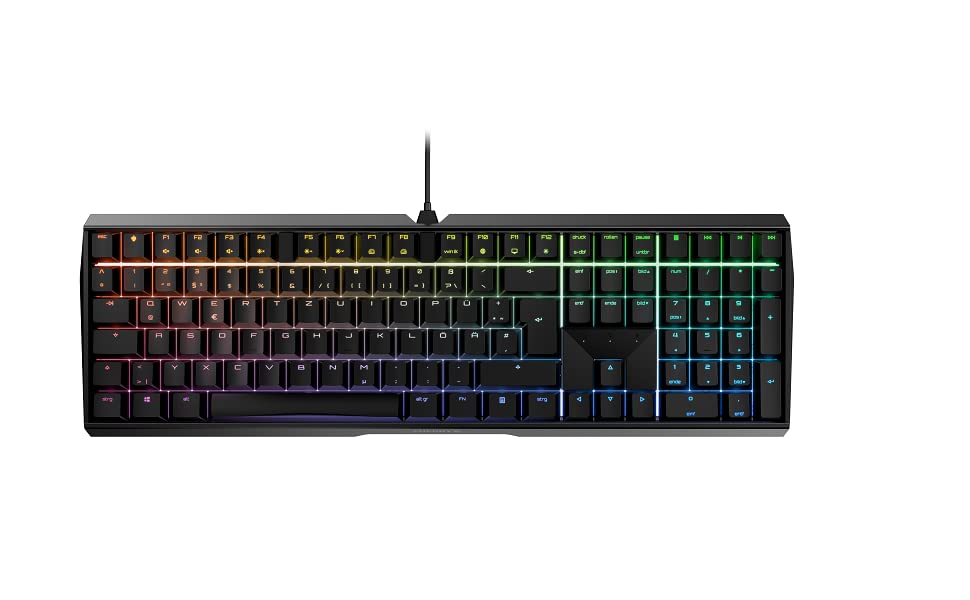
Figure 2: The Cherry MX 3.0 S keyboard displaying its customizable RGB backlighting.
Kandungan Pakej
Sila sahkan bahawa semua item terdapat dalam pakej:
- Cherry MX 3.0 S Wired Mechanical Gaming Keyboard
- USB Cable (detachable)
- Manual Pengguna (dokumen ini)
Persediaan
1. Menyambung Papan Kekunci
- Locate the detachable USB cable provided with your keyboard.
- Connect the mini-USB B end of the cable to the port on the back of the Cherry MX 3.0 S keyboard.
- Connect the USB-A end of the cable to an available USB port on your computer or gaming console.
- The keyboard should be automatically recognized by your operating system. No additional drivers are typically required for basic functionality.

Rajah 3: Belakang view of the keyboard, highlighting the detachable USB cable connection point.
2. Pemasangan Perisian (Pilihan)
For advanced customization of RGB lighting and other features, Cherry may provide optional software. Please visit the official Cherry website for the latest software downloads and installation instructions. This software allows for personalized RGB settings and pattern options beyond the onboard memory.
Operasi
Fungsi Papan Kekunci Asas
The Cherry MX 3.0 S functions as a standard full-size keyboard. All keys operate as labeled. The MX Red Silent switches provide a linear feel with minimal noise, suitable for both typing and gaming.
Penyesuaian Pencahayaan RGB
The keyboard features onboard memory for up to 5 dynamic RGB lighting layouts. Specific key combinations (often involving the 'Fn' key) can be used to cycle through pre-programmed effects or adjust brightness. Refer to the quick start guide or the official Cherry software for detailed instructions on customizing lighting profiles.
Ciri Khas
- N-Key Rollover (NKRO) and Anti-Ghosting: This keyboard supports full N-Key Rollover, meaning every key press is registered independently, even when multiple keys are pressed simultaneously. Anti-ghosting ensures that no unintended key presses occur.
- WIN Key Lockout: For gaming, the Windows key can be disabled to prevent accidental interruptions during gameplay. This function is typically activated via a specific key combination (e.g., Fn + Windows key). The indicator light for the Windows key may change color (e.g., red) when disabled.

Figure 4: A user's hand demonstrating typing on the keyboard, highlighting the keycap design.
Penyelenggaraan
Pembersihan
Untuk mengekalkan prestasi dan penampilan papan kekunci anda:
- Putuskan sambungan papan kekunci daripada komputer anda sebelum membersihkan.
- Gunakan kain lembut dan tidak berbulu sedikit dampened with water or a mild cleaning solution to wipe down the keycaps and housing. Avoid harsh chemicals or abrasive materials.
- Untuk habuk dan serpihan di antara kunci, gunakan udara termampat atau berus kecil.
Penjagaan Am
Avoid exposing the keyboard to excessive moisture, extreme temperatures, or direct sunlight. Do not attempt to disassemble the keyboard, as this may void your warranty.
Menyelesaikan masalah
If you encounter issues with your Cherry MX 3.0 S keyboard, please refer to the following common solutions:
| Masalah | Penyelesaian yang Mungkin |
|---|---|
| Papan kekunci tidak bertindak balas | Pastikan kabel USB disambungkan dengan selamat pada papan kekunci dan komputer. Cuba port USB lain atau komputer lain untuk mengenal pasti masalah tersebut. |
| Pencahayaan RGB tidak berfungsi atau tidak betul | Check the keyboard's onboard lighting controls (Fn key combinations). If using software, ensure it is installed correctly and updated. Restart the software and/or computer. |
| Kekunci tidak mendaftar atau menaip dua kali | Ensure the keyboard is clean and free of debris. If the issue persists, it may indicate a hardware problem. |
| Spacebar squeaks | This can sometimes be resolved by carefully removing the spacebar and applying a very small amount of lubricant (e.g., lightweight valve oil, not WD-40) to the stabilizers. Exercise caution to avoid damaging components. |
Untuk bantuan lanjut, sila lawati sokongan rasmi Cherry webtapak atau hubungi perkhidmatan pelanggan mereka.
Spesifikasi
| Ciri | Perincian |
|---|---|
| Dimensi Produk | 16.93 x 5.51 x 1.42 inci |
| Berat Barang | 2.25 paun |
| Pengeluar | CHERRY |
| Nombor Model Item | G80-3874HWAUS-0 |
| Teknologi Ketersambungan | USB-A |
| Penerangan Papan Kekunci | Papan Kekunci Permainan Mekanikal |
| Penggunaan yang Disyorkan | Gaming, Home Office, Office, Programming |
| Ciri Khas | Backlit, Customizable Display Keys, Lighting, MX Red Silent Switches |
| warna | White (as per current model) |
| Bilangan Kunci | 109 |
| Backlighting papan kekunci | RGB |
| Gaya | Klasik |

Figure 5: The Cherry MX 3.0 S keyboard, highlighting its German engineering and design.
Waranti dan Sokongan
Cherry products are manufactured to high-quality standards and come with a manufacturer's warranty. For detailed information regarding warranty terms, technical support, and service, please visit the official Cherry weblaman web atau hubungi khidmat pelanggan mereka secara langsung. Simpan resit pembelian anda sebagai bukti pembelian untuk tuntutan jaminan.
Ceri Rasmi Webtapak: www.cherry.de


