1. Pengenalan
The APC Network Management Card 3 (NMC3) is a UPS management adapter designed to provide essential and secure remote monitoring and management capabilities for your Uninterruptible Power Supply (UPS). This card enhances visibility into your UPS operations, ensuring mission-critical systems remain protected and operational. It supports environmental monitoring and Modbus communication, offering comprehensive control and data collection.
2. Ciri-ciri Utama
- Secure Remote Monitoring and Management: Enables essential and secure remote monitoring and management of a UPS.
- Pemantauan Alam Sekitar: Included Universal I/O (UIO) ports support environmental monitoring.
- Modbus RTU Support: Serial RS-485 port supports Modbus RTU for industrial control systems.
- Pemproses Berkelajuan Tinggi: Provides a fast and powerful experience with Gigabit Ethernet connectivity.
- Multiple User Logins: Supports simultaneous multiple user logins to the easy-to-use web user interface or Command Line Interface (CLI).
- Advanced Security Compliance: Features best-in-class security compliance, with firmware independently certified to IEC 62443-4-2 standard.
- Integrasi Perisian: Integrates with EcoStruxure IT for efficient equipment management, PowerChute Network Shutdown for graceful shutdown and VM migration, and other SNMP-enabled systems.
3. Produk Lebihview
Network Management Card 3 (AP9643)
The APC Network Management Card 3 is a compact circuit board designed to fit into a SmartSlot on compatible UPS devices. It features various ports for network connectivity, environmental sensors, and console access.
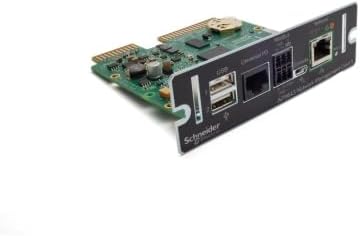
Rajah 1: Depan view of the APC Network Management Card 3, showing the Ethernet port, USB ports, and console port.

Rajah 2: Atas view of the APC Network Management Card 3, highlighting the circuit board and internal components.
4. Persediaan dan Pemasangan
4.1. Installing the Network Management Card 3
Follow these steps to install the NMC3 into a compatible UPS:
- Power Down UPS: Ensure the UPS is powered off and disconnected from the main power source to prevent electrical hazards.
- Locate SmartSlot: Identify the SmartSlot on your compatible APC UPS. This is typically a rectangular slot on the rear panel.
- Insert NMC3: Carefully slide the NMC3 into the SmartSlot until it is fully seated. Ensure the card is oriented correctly.
- Kad Selamat: Use any provided screws or retention clips to secure the NMC3 in place.
- Sambungkan Kabel Rangkaian: Connect a standard Ethernet cable from your network to the Ethernet port on the NMC3.
- Connect Environmental Sensors (Optional): If using environmental monitoring, connect the Universal I/O (UIO) sensors to the appropriate ports on the NMC3.
- UPS Hidupkan Kuasa: Reconnect the UPS to the main power source and power it on. The NMC3 will initialize automatically.
4.2. Konfigurasi Awal
After installation, the NMC3 requires initial network configuration:
- Akses Web UI: Buka a web browser and enter the default IP address of the NMC3 (refer to your UPS documentation for the default IP, often DHCP assigned or a fallback IP).
- log masuk: Enter the default username and password (typically 'apc' for both). You will be prompted to change these for security.
- Tetapan Rangkaian: Configure static IP address, subnet mask, gateway, and DNS settings as required by your network environment.
- Tarikh dan Masa: Set the correct date and time, preferably using an NTP server.
5. Arahan Operasi
5.1. Monitoring and Management
The NMC3 allows for comprehensive monitoring and management of your UPS:
- Web Antaramuka pengguna (Web UI): Provides a graphical interface to view UPS status, battery health, load levels, and configure settings.
- Antara Muka Baris Perintah (CLI): Accessible via Telnet or SSH for advanced configuration and scripting.
- Protokol yang disokong: The NMC3 supports Telnet, SSH, HTTPS, and SSL for secure communication.
5.2. Pemantauan Alam Sekitar
With connected environmental sensors, the NMC3 can monitor:
- Suhu
- Kelembapan
- Door contact status
- Other custom sensor inputs via Universal I/O ports.
Modbus RTU support via the RS-485 port allows integration with building management systems for centralized environmental data collection.
5.3. Integrasi Perisian
The NMC3 integrates with various software solutions:
- EcoStruxure IT: For cloud-based monitoring and management of your IT infrastructure.
- PowerChute Network Shutdown: Enables graceful shutdown of connected servers during extended power outages and supports VM migration.
- SNMP-enabled Systems: Allows integration with existing network management systems using SNMP protocol.
6. Penyelenggaraan
6.1. Kemas Kini Perisian Tegar
Regularly check for and apply firmware updates to ensure optimal performance, security, and compatibility. Firmware updates are typically available through the APC support website and can be applied via the NMC3's web UI atau CLI.
6.2. Pengurusan Bateri
The NMC3 monitors the battery status of the connected UPS. For information on UPS battery replacement and maintenance, refer to the specific user manual for your APC UPS model.
7. Penyelesaian masalah
7.1. Isu Biasa
- Tiada Kesambungan Rangkaian: Check Ethernet cable connection, network settings (IP address, subnet, gateway), and network switch status.
- Tidak Boleh Akses Web UI: Verify IP address, ensure network connectivity, and try clearing browser cache.
- NMC3 Not Detected by UPS: Ensure the card is fully seated in the SmartSlot and the UPS is powered on.
- Environmental Sensor Errors: Check sensor connections and ensure they are compatible with the UIO ports.
For more detailed troubleshooting, consult the comprehensive documentation available on the APC support webtapak.
8. Spesifikasi
| Atribut | Nilai |
|---|---|
| Dimensi Produk | 4.25 x 4.76 x 1.5 inci |
| Berat Barang | 4.9 auns (140 Gram) |
| Nombor Model Item | AP9643 |
| Proprietary Slot Type | Slot Pintar |
| Pengurusan | UPS Monitoring |
| Protokol | Telnet, SSH, HTTPS, SSL |
| Antara Muka Perkakasan | USB |
| Peranti Serasi | UPS |
| Protokol Pautan Data | USB |
| Pengeluar | APC |
| UPC | 731304403319 |
9. Video Produk Rasmi
APC for your Business
Video ini memberikan penamatview of APC solutions for businesses, highlighting the importance of reliable power protection.
10. Waranti dan Sokongan
10.1. Maklumat Waranti
The APC Network Management Card 3 includes a 1-year Secure NMC Subscription, which provides access to the latest firmware and security updates. For detailed warranty terms and conditions, please refer to the official APC warranty statement provided with your product or visit the APC webtapak.
10.2. Sokongan Teknikal
For technical assistance, troubleshooting, or product inquiries, please visit the official APC by Schneider Electric support website or contact their customer service. Support resources include FAQs, knowledge bases, and contact information for regional support teams.


