1. Pengenalan
This manual provides instructions for the Sharp Digital Alarm Clock, Model SPC547AJAMZ. This device features an easy-to-read LED display, a high-speed USB charging port, and essential alarm functions. Please read this manual thoroughly before use to ensure proper operation and to maximize the product's lifespan.

Figure 1: Sharp Digital Alarm Clock (Model SPC547AJAMZ) front view.
2. Ciri-ciri Produk
The Sharp Digital Alarm Clock offers the following key features:
- Paparan Mudah Dibaca: Large, clear green LED digits for visibility from a distance.
- High-Speed USB Charging Port: A 2 AMP USB port for rapid charging of compatible devices such as smartphones and tablets.
- Kelantangan Penggera Boleh Laras: Select between high and low alarm volume settings.
- Operasi Mudah: Intuitive button controls for setting time and alarm.
- Bateri tambahan: Mengekalkan tetapan masa dan penggera semasa kuasa dimatikantages (requires 2 AAA batteries, not included). The display will be blank during battery backup mode, but the internal clock will continue to run, and the alarm will sound at the set time.

Figure 2: Alarm clock with a smartphone connected to the USB charging port.
3. Kandungan Pakej
Sahkan bahawa semua item terdapat dalam pakej:
- Sharp Digital Alarm Clock (Model SPC547AJAMZ)
- Penyesuai Kuasa AC
- Manual Pengguna (dokumen ini)
Nota: 2 bateri AAA untuk sandaran tidak disertakan dan mesti dibeli secara berasingan.
4. Maklumat Keselamatan
Sila patuhi langkah berjaga-jaga keselamatan berikut:
- Jangan dedahkan unit kepada air atau kelembapan berlebihan.
- Elakkan meletakkan unit berhampiran sumber haba atau di bawah cahaya matahari langsung.
- Use only the provided AC power adapter.
- Jangan cuba membuka atau mengubah suai unit.
- Jauhkan daripada kanak-kanak.
- Pastikan pengudaraan yang betul di sekeliling unit.
5. Persediaan
5.1 Sambungan Kuasa
- Plug the AC power adapter into the DC IN jack located on the back of the alarm clock.
- Pasangkan hujung penyesuai kuasa AC yang satu lagi ke soket dinding standard (120V AC, 60Hz).
- The display will illuminate, and the clock will be ready for time setting.
5.2 Pemasangan Sandaran Bateri
Untuk memastikan tetapan masa dan penggera dikekalkan semasa kuasa terputustage:
- Cari petak bateri di bahagian bawah unit.
- Buka penutup petak bateri.
- Insert two (2) new AAA batteries, observing the correct polarity (+ and -) as indicated inside the compartment.
- Tutup penutup petak bateri dengan selamat.
Note: Batteries are for backup only. The clock display will not be lit during a power outage when operating on battery backup, but the internal clock will continue to run, and the alarm will sound at the set time.
6. Arahan Operasi
Familiarize yourself with the control buttons located on the top of the unit:
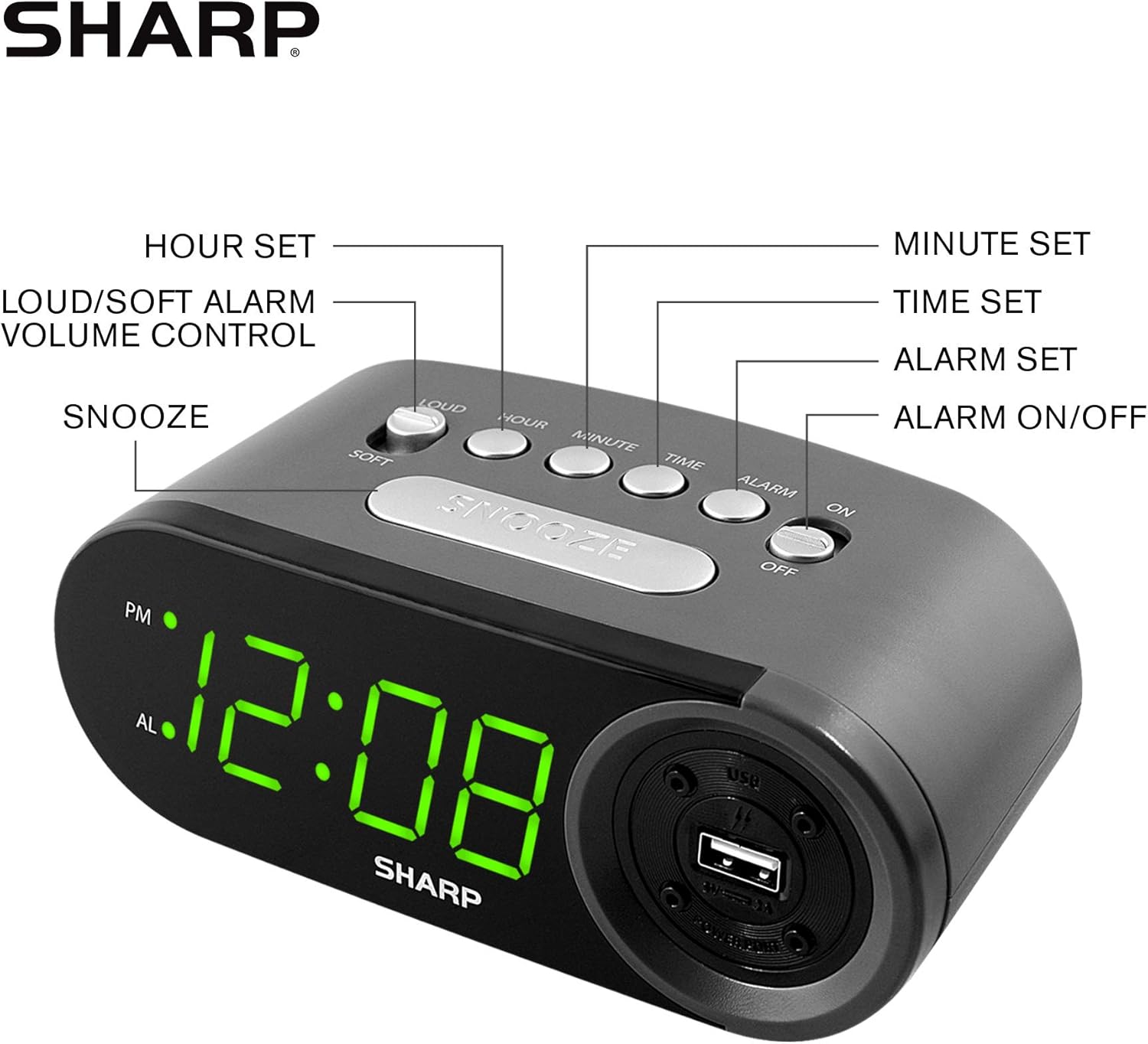
Figure 3: Top panel controls and their functions.
6.1 Menetapkan Masa Semasa
- Tekan dan tahan butang MASA button until the display begins to flash.
- Tekan ke JAM button repeatedly to set the hour. Observe the PM indicator for afternoon hours.
- Tekan ke MINIT button repeatedly to set the minutes.
- Setelah masa yang dikehendaki ditetapkan, tekan butang MASA butang sekali lagi untuk mengesahkan dan keluar dari mod tetapan masa.
6.2 Menetapkan Masa Penggera
- Tekan dan tahan butang PENGGERA button until the alarm time display begins to flash. The "AL" indicator will also flash.
- Tekan ke JAM button repeatedly to set the alarm hour. Observe the PM indicator.
- Tekan ke MINIT butang berulang kali untuk menetapkan minit penggera.
- Once the desired alarm time is set, press the PENGGERA butang sekali lagi untuk mengesahkan dan keluar dari mod tetapan penggera.
6.3 Mengaktifkan/Menyahaktifkan Penggera
- Untuk menghidupkan penggera ON, luncurkan ALARM ON / OFF switch to the "ON" position. The "AL" indicator will appear on the display.
- Untuk menghidupkan penggera DIMATIKAN, luncurkan ALARM ON / OFF switch to the "OFF" position. The "AL" indicator will disappear.
6.4 Fungsi Tunda
Apabila penggera berbunyi, tekan besar MENGEJUTKAN button. The alarm will temporarily stop and sound again after approximately 9 minutes.
6.5 Menghentikan Penggera
To stop the alarm completely after it sounds (without using snooze), slide the ALARM ON / OFF switch to the "OFF" position. The alarm will reset for the next day if the switch is moved back to "ON".
6.6 Melaraskan Kelantangan Penggera
Tekan ke LOUD/SOFT button to toggle between high and low alarm volume settings.
6.7 Menggunakan Port Pengecasan USB
2 AMP USB charging port is located on the right side of the unit.
- Connect your device's USB charging cable (not included) to the USB port on the alarm clock.
- Connect the other end of the cable to your smartphone, tablet, or other compatible USB-powered device.
- Ensure the alarm clock is connected to AC power for the USB port to function.
Note: Charging speed may vary depending on your device and cable.
7. Penyelenggaraan
To keep your alarm clock in optimal condition:
- Pembersihan: Lap unit dengan kain lembut dan kering. Jangan gunakan pembersih atau pelarut yang melelas.
- Penggantian Bateri: Replace AAA backup batteries annually or when the battery low indicator (if present) appears, to ensure reliable backup functionality.
- Storan: Jika menyimpan unit ini untuk tempoh yang lama, tanggalkan bateri sandaran untuk mengelakkan kebocoran.
8. Penyelesaian masalah
| Masalah | Kemungkinan Punca | Penyelesaian |
|---|---|---|
| Paparan jam kosong. | Tiada kuasa AC; kuasa keluartage; unit unplugged. | Ensure AC adapter is securely plugged into the unit and a working wall outlet. Check for power outages. |
| Penggera tidak berbunyi. | Alarm is not activated; alarm time is incorrect; volume is too low. | Slide ALARM ON/OFF switch to "ON". Verify alarm time is set correctly. Adjust alarm volume using the LOUD/SOFT button. |
| Port pengecasan USB tidak berfungsi. | Clock not connected to AC power; device not compatible; faulty cable. | Ensure the clock is plugged into AC power. Try a different USB cable or device to confirm compatibility. |
| Tetapan masa/penggera hilang selepas kuasa dimatikantage. | Bateri sandaran mati atau tidak dipasang. | Install two fresh AAA batteries in the battery compartment, ensuring correct polarity. |
9. Spesifikasi
- Jenama: tajam
- model: SPC547AJAMZ
- Jenis Paparan: LED Digital (Hijau)
- Sumber Kuasa: Elektrik Berwayar (AC 120V, 60Hz)
- Bateri tambahan: 2 x bateri AAA (tidak termasuk)
- Port Pengecasan USB: 2 AMP (5V)
- Dimensi Produk: Approximately 6.2" W x 2.3" H x 3.25" D
- Berat Barang: Kira-kira 9.6 auns
- Bahan: plastik
- UPC: 049353006000

Rajah 4: Dimensi produk.
10. Waranti & Sokongan
10.1 Maklumat Waranti
This Sharp product is covered by a limited manufacturer's warranty. For specific warranty terms and conditions, please refer to the warranty card included with your purchase or visit the official Sharp webtapak. Simpan resit pembelian anda sebagai bukti pembelian.
10.2 Sokongan Pelanggan
If you have any questions, require assistance, or need to report an issue with your Sharp Digital Alarm Clock, please contact Sharp customer support. Contact details can typically be found on the official Sharp webtapak atau pada pembungkusan produk.
Untuk maklumat lanjut, lawati Kedai Sharp di Amazon.