pengenalan
This manual provides detailed instructions for the safe and efficient use of your XO B26 Bluetooth 4.2 Wireless Earbud. Please read this manual thoroughly before using the product and retain it for future reference.
Produk Selesaiview
The XO B26 is a single Bluetooth 4.2 wireless earbud designed for mobile phones, offering ease of use and portability. It is crafted from high-quality materials to ensure durability and a secure fit.
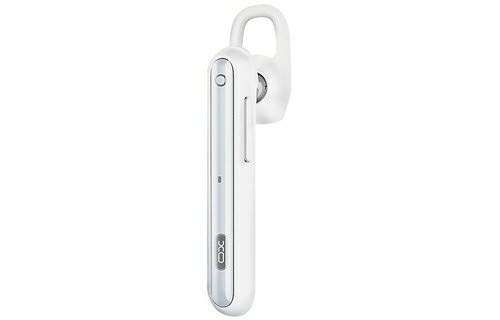
Image: The XO B26 Bluetooth Wireless Earbud, shown in white with a silver accent, featuring its ergonomic design and ear hook.
Ciri-ciri Utama:
- Bluetooth 4.2 connectivity for stable wireless connection.
- Reka bentuk padat dan ringan untuk mudah dibawa.
- Ergonomically designed for a secure and comfortable fit.
- Touch control method for intuitive operation.
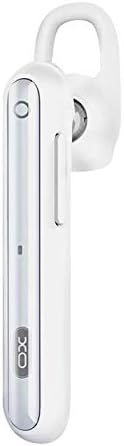
Imej: Dari dekat view of the XO B26 earbud, highlighting the control button and sleek design.
Persediaan
1. Charging the Earbud
- Connect the charging cable (not included) to the earbud's charging port.
- Palamkan hujung kabel yang satu lagi ke sumber kuasa USB yang serasi.
- Lampu penunjuk akan menunjukkan status pengecasan. Pengecasan penuh mengambil masa kira-kira 2 jam.
- Once fully charged, disconnect the earbud from the power source.
2. Berpasangan dengan Peranti
- Ensure the earbud is fully charged and turned off.
- Press and hold the multi-function button on the earbud until the indicator light flashes red and blue alternately, indicating it is in pairing mode.
- On your mobile phone or compatible device, enable Bluetooth and search for available devices.
- Select "XO B26" from the list of found devices.
- Once paired, the indicator light will flash blue slowly, and you may hear a confirmation tone.
- Jika digesa untuk kata laluan, masukkan "0000".
Arahan Operasi
Hidupkan/Mati Kuasa
- Hidupkan kuasa: Press and hold the multi-function button for approximately 3 seconds until the blue indicator light flashes.
- Matikan: Press and hold the multi-function button for approximately 5 seconds until the red indicator light flashes and then turns off.
Making and Receiving Calls (Touch Control)
- Jawab Panggilan: Briefly tap the multi-function button when an incoming call rings.
- Tamatkan Panggilan: Briefly tap the multi-function button during a call.
- Tolak Panggilan: Tekan dan tahan butang berbilang fungsi selama lebih kurang 2 saat semasa panggilan masuk.
- Dail Semula Nombor Terakhir: Double-tap the multi-function button when not on a call.
Main Semula Muzik (Kawalan Sentuh)
- Main/Jeda: Briefly tap the multi-function button to play or pause music.
- Lagu Seterusnya: Press and hold the multi-function button for approximately 2 seconds to skip to the next track.
- Kawalan Kelantangan: Volume is typically controlled via the connected device.
Penyelenggaraan
Pembersihan
- Wipe the earbud with a soft, dry, lint-free cloth.
- Jangan gunakan pembersih, pelarut atau pembersih semburan yang kasar.
- Pastikan port pengecasan bebas daripada habuk dan serpihan.
Penyimpanan
- Store the earbud in a cool, dry place away from direct sunlight and extreme temperatures.
- Elakkan menyimpan berhampiran medan magnet.
Penjagaan Bateri
- Charge the earbud regularly, even if not in use, to maintain battery health.
- Elakkan menyahcas sepenuhnya bateri dengan kerap.
Menyelesaikan masalah
| Masalah | Penyelesaian yang Mungkin |
|---|---|
| Fon telinga tidak boleh dihidupkan. | Ensure the earbud is fully charged. Press and hold the multi-function button for a longer duration. |
| Tidak boleh berpasangan dengan peranti. | Make sure the earbud is in pairing mode (flashing red and blue). Turn off and on Bluetooth on your device. Move the earbud closer to your device. |
| No sound during music or calls. | Check the volume level on both the earbud and your connected device. Ensure the earbud is properly paired and connected. |
| Kualiti bunyi yang buruk. | Ensure there are no obstructions between the earbud and your device. Move closer to your device. Check for interference from other wireless devices. |
| Earbud not charging. | Verify the charging cable is securely connected. Try a different USB power source or cable. Ensure the charging port is clean. |
Spesifikasi
| Ciri | Perincian |
|---|---|
| Jenama | XO |
| Nama Model | B26 |
| warna | putih |
| Versi Bluetooth | 4.2 |
| Teknologi Komunikasi Tanpa Wayar | Tanpa wayar |
| Peranti Serasi | Multiple (Mobile Phones) |
| Kaedah Kawalan | Sentuh |
| Masa Berbual | Lebih kurang 3 jam |
| Masa Muzik | Lebih kurang 3 jam |
| Masa Mengecas | Lebih kurang 2 jam |
| Komponen yang Disertakan | Kusyen Telinga |
| Berat Barang | 106 gram |
| Dimensi Penghantaran | 17.8 x 3.4 x 0.8 cm |
| ASIN | B08WT1RK59 |
Maklumat Keselamatan
Sila patuhi garis panduan keselamatan berikut untuk mengelakkan kerosakan pada produk atau kecederaan kepada diri anda:
- Do not disassemble, repair, or modify the earbud.
- Keep the earbud away from water, moisture, and extreme temperatures.
- Elakkan pendedahan berpanjangan kepada paras volum tinggi untuk mengelakkan kerosakan pendengaran.
- Jauhkan daripada kanak-kanak dan haiwan peliharaan.
- Use only compatible charging accessories.
Waranti dan Sokongan
Untuk maklumat jaminan atau sokongan teknikal, sila rujuk dokumentasi yang disediakan semasa pembelian atau hubungi peruncit anda. Simpan bukti pembelian anda untuk sebarang tuntutan jaminan.